AI Agent Status Dashboards: Keep Back-Office Automation Visible
AI agent status dashboards help service businesses automate inbox, scheduling, CRM, and follow-up work without losing visibility.
AI agents are starting to handle longer business tasks, not just answer questions. That creates a new operating problem for founders and service-business teams: if AI is checking an inbox, drafting follow-up, updating a CRM, or routing a customer issue, someone needs to see what is running, what is waiting, what failed, and what needs human review.
Quick take: An AI agent status dashboard is a simple operating view that shows active automations, pending approvals, exceptions, source records, and recent changes. As Microsoft, Google, and Salesforce add more agentic workflows, service businesses should build visibility into the workflow from day one instead of discovering problems after a customer chases an update.
| If you only read one section | Read this |
|---|---|
| You are testing AI for inbox or CRM work | Why status visibility matters now |
| You want a practical dashboard layout | What an AI agent status dashboard should show |
| You need a safe first workflow | A first dashboard for service-business follow-up |
| You worry about errors or privacy | Risks to manage before launch |
| You want implementation help | Where Zenovae helps |
Why status visibility matters now
AI work is moving from one-off chat into live business workflows.
Microsoft's July 1, 2026 Microsoft 365 Copilot release notes include status icons and progress indicators for long-running agent tasks in the Windows taskbar. Microsoft says this helps users monitor agentic workflows without opening the full app and supports faster issue detection and resolution (Microsoft Learn).
Google Workspace Studio, announced December 3, 2025 and updated on March 19, 2026, lets teams create, manage, and share AI agents to automate work in Workspace without coding. Google describes agents that can handle prioritization, support issue triage, smart approvals, content generation, sentiment analysis, and third-party integrations such as Asana, Jira, Mailchimp, and Salesforce (Google Workspace Updates).
Salesforce is pushing the same direction in customer operations and back-office work. In April 2026, Salesforce introduced Agentforce Operations for manual back-office processes across disconnected systems. In its Agentforce 360 material, Salesforce also highlights observability as a way to monitor, analyze, and optimize agent performance in near real time (Salesforce Agentforce Operations, Salesforce Agentforce 360).
Salesforce also says Agentforce Help Agent and Agentforce Customer Service Portal are generally available in July 2026, with pay-per-resolution pricing available the same month. That reinforces the buyer need to track which customer issues were resolved, which were not, and which need a person before the business treats an AI outcome as successful (Salesforce Help Agent).
Plain-English version: more tools can now start, continue, and finish tasks in the background. That is useful only if operators can track the work.
What this means for your business
Most service businesses already have invisible work. It sits in shared inboxes, callback lists, unassigned CRM tasks, job notes, calendars, spreadsheets, and text threads.
When AI enters that environment, it should not become another invisible worker. It should make the work easier to see.
| Current operating pain | What happens without visibility | What a status dashboard changes |
|---|---|---|
| Lead follow-up is spread across phone notes and CRM | Staff assume someone else replied | Shows open leads, AI-drafted replies, owner, and due date |
| Appointment changes arrive by email | Calendar and CRM fall out of sync | Shows pending schedule updates and exceptions |
| Customers ask for status updates | Staff search several tools manually | Shows source records and a reviewed draft response |
| Managers ask "what is stuck?" | Team checks inboxes and spreadsheets | Shows stale work, failed automations, and missing approvals |
| AI drafts or updates records | Nobody knows what changed | Shows action log, source links, and reviewer |
This is not just a technical feature. It is an operating control. A founder, practice manager, dispatcher, office manager, or sales lead should be able to answer:
- Which AI workflows are running today?
- Which customer items are waiting for review?
- Which automations failed or paused?
- Which records did AI suggest changing?
- Which work needs a human because it is sensitive, urgent, or unclear?
What an AI agent status dashboard should show
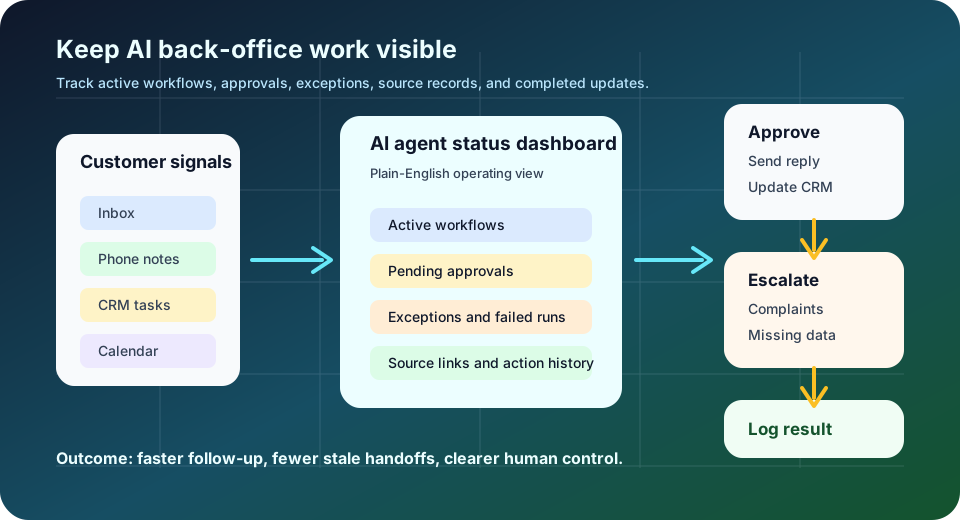
An AI agent status dashboard does not need to be complicated. For a small service business, the best version is often a clean internal page that pulls together the work that matters.
| Dashboard section | What it shows | Why the operator cares |
|---|---|---|
| Active workflows | Follow-up, scheduling, CRM cleanup, inbox triage, reporting | Confirms what AI is currently helping with |
| Pending approvals | Draft replies, CRM notes, task assignments, appointment changes | Keeps humans in control before customer-facing action |
| Exceptions | Angry customers, missing data, urgent requests, high-value leads | Prevents risky issues from being treated as routine |
| Source links | Email thread, call note, CRM record, appointment, form submission | Lets staff verify context quickly |
| Action history | What was drafted, approved, skipped, changed, or retried | Creates an audit trail for training and quality review |
| Metrics | Open items, stale work, approval time, correction rate | Shows whether automation is improving operations |
The goal is not to watch every AI step forever. The goal is to see enough to trust the workflow, catch exceptions, and improve it over time.
A first dashboard for service-business follow-up
If you are unsure where to start, build visibility around follow-up. It is common, revenue-sensitive, and easy to review.
Good candidates include:
- Missed-call follow-up after business hours.
- Estimate follow-up for HVAC, plumbing, med spa, or dental inquiries.
- Tenant or customer status updates.
- Appointment confirmation and rescheduling.
- Open CRM tasks with no next step.
- Old leads that still have no owner.
| Step | What AI can do | What the dashboard should show |
|---|---|---|
| 1. Collect signals | Read approved inbox labels, call notes, forms, and CRM tasks | New items, source, customer, and category |
| 2. Classify work | Identify lead, scheduling, billing, complaint, status request, or admin update | Category and confidence level in plain English |
| 3. Draft next step | Prepare a reply, task, note, or scheduling action | Draft text, suggested owner, and due date |
| 4. Route exceptions | Pause sensitive or unclear items | Reason for pause and recommended human owner |
| 5. Approve action | Let staff send, edit, skip, or assign | Approval decision and reviewer |
| 6. Log result | Save the final action and source reference | History for the customer record and manager review |
This gives the business speed without losing judgment. Staff do not start from a blank inbox, but customers still get reviewed, context-aware follow-up.
Build vs. buy: what should the dashboard connect to?
Some businesses can use built-in platform dashboards. Others need a custom internal view because their work spans multiple systems.
| Option | Best fit | Watchout |
|---|---|---|
| Built-in Microsoft, Google, Salesforce, or CRM views | Teams already standardized on one platform | May not show phone, field-service, or niche software data clearly |
| Automation platform history | Simple workflows with a few app connections | Often too technical for front-office staff |
| Custom internal dashboard | Service businesses with CRM, phone, calendar, inbox, forms, and niche tools | Needs careful scope so it solves a real workflow, not every problem |
| Spreadsheet tracker | Very early proof of concept | Easy to outgrow and hard to trust at scale |
The buyer question is simple: where does the manager need to look at 8:30 a.m. to know what AI handled overnight, what needs approval, and what could affect revenue or customer experience today?
Risks to manage before launch
NIST's AI Risk Management Framework says AI risk work should improve trustworthiness across design, development, use, and evaluation of AI systems (NIST). For service-business operators, that means the dashboard should help people govern and improve the workflow, not just admire automation activity.
| Risk | Business impact | Practical guardrail |
|---|---|---|
| AI acts on stale information | Wrong customer update or missed handoff | Show source timestamp and require review for customer-facing actions |
| Approval queues pile up | Automation becomes another backlog | Assign owners and set review-time targets |
| Staff cannot understand AI status | People stop trusting the workflow | Use plain statuses: drafted, needs review, sent, paused, failed |
| Too much data is exposed | Privacy and role-access problems | Match dashboard access to existing staff permissions |
| No exception rules | Sensitive issues slip through | Route complaints, refunds, health details, legal concerns, and high-value accounts to humans |
| No feedback loop | The same mistake repeats | Track corrections and review samples weekly |
The safest launch pattern is draft, review, log, then expand. Let AI suggest work first. Give it more action only after the team can see and measure what is happening.
A 30-day implementation plan
| Timeframe | Action | Output |
|---|---|---|
| Days 1-3 | Pick one workflow, such as missed-call follow-up or open estimate follow-up | Narrow scope and named business owner |
| Days 4-7 | Map source systems, decisions, owners, and exceptions | Workflow map and risk checklist |
| Days 8-12 | Define dashboard statuses and approval rules | Simple operating model for staff |
| Days 13-18 | Build a draft-only AI workflow connected to approved tools | AI-assisted queue with source links |
| Days 19-24 | Add review actions, exception routing, and action history | Manager-ready status dashboard |
| Days 25-30 | Run a pilot and review corrections | Launch notes, quality baseline, and next workflow candidate |
Useful measures include approval time, number of stale items, missed follow-ups caught, edits required before sending, failed automations, and exception accuracy. Do not invent an ROI number before the workflow has data. Measure the first month honestly.
Where Zenovae helps
Zenovae helps founders and service-business operators turn scattered back-office work into practical AI integrations, workflow automation, and custom internal software.
For an AI agent status dashboard, that can include:
- Mapping the current inbox, CRM, calendar, phone, scheduling, and reporting workflow.
- Choosing the first automation with real time or revenue impact.
- Connecting AI to existing tools instead of replacing the whole stack.
- Building a review screen for drafts, approvals, exceptions, and action history.
- Creating custom software when built-in dashboards do not match how the team works.
- Monitoring quality, cost, and workflow performance after launch.
Want to remove a manual workflow? Zenovae can map the task, connect the right tools, and show what an AI integration or custom software build would look like.
FAQ
What is an AI agent status dashboard?
An AI agent status dashboard is an internal view that shows what AI workflows are doing, what needs approval, what failed, what was changed, and which customer items need human attention.
Do small service businesses need this?
Yes, if AI is touching customer follow-up, scheduling, CRM records, inbox triage, or reporting. The dashboard can be simple, but the business still needs visibility into pending work and exceptions.
Should AI send customer replies automatically?
Not at first. Start with draft-only replies, source links, and human approval. After the workflow is accurate and trusted, consider limited automation for low-risk confirmations or internal updates.
What should be human-reviewed every time?
Complaints, refunds, legal concerns, health details, angry customers, high-value accounts, unclear requests, and anything that changes price, scope, access, or customer commitments should stay human-reviewed.
Sources
- Microsoft Learn: Microsoft 365 Copilot release notes
- Google Workspace Updates: Create AI agents to automate work with Google Workspace Studio
- Salesforce: Agentforce Operations announcement
- Salesforce: Agentforce 360 announcements
- Salesforce: Agentforce Help Agent announcement
- NIST: AI Risk Management Framework
Need Help with Your AI Project?
At Zenovae, we build production-ready AI systems that scale. From OpenClaw setup to custom integrations, Mission Control workflows, and full-stack delivery, we can help you ship faster and avoid costly mistakes.
Let's Talk