AI Agents in Business Workflows: What Service Businesses Should Fix First
AI agents in business workflows are moving into email, voice, CRM, agreements, and admin tools. Here is what service businesses should fix first.
AI agents in business workflows are software assistants that can use company context, connected apps, permissions, and review rules to help complete repeatable work. For service businesses, the practical question is not "Which AI agent is newest?" It is "Which customer workflow is still leaking revenue because calls, emails, forms, schedules, documents, and CRM notes do not stay connected?"
Quick take: The week of May 19, 2026 showed the same pattern across customer service, office productivity, and agreement software: AI agents are moving from isolated chat windows into the tools where work already happens. Service businesses should fix their intake, knowledge, permissions, and handoff rules before giving agents access to customer records, calendars, dispatch boards, or agreements.
| If you only read one section | Read this |
|---|---|
| You are deciding what this AI agent news means | What changed this week |
| You own calls, booking, follow-up, or dispatch | What this means for service businesses |
| You need a practical rollout path | A 30-day workflow readiness plan |
| You are comparing vendors or custom builds | Buyer questions to ask before connecting agents |
What Changed This Week
Several current announcements point in the same direction: AI agents are becoming part of operating systems for work, not just another chatbot on a website.
Zendesk announced its "Autonomous Service Workforce" at Relate on May 19, 2026, describing AI agents that operate across messaging, email, voice, ChatGPT, and Gemini while maintaining shared context. Zendesk also said its platform brings together data, intelligence, knowledge, workflows, and governance, and that its new workflow connectors include 40 prebuilt connectors with more planned. Source: Zendesk Relate 2026 announcement
OpenAI's ChatGPT Business release notes show a similar operational shift. On April 22, 2026, OpenAI said Workspace Agents could connect to apps such as Google Drive, Google Calendar, Slack, and SharePoint, run on a schedule, and be managed with admin controls. On May 6, OpenAI added an Agents area to the global admin console where admins can review connected apps, memory files, schedules, activity, and analytics. Source: OpenAI ChatGPT Business release notes
Google announced new Workspace updates on May 19, 2026, including conversational voice features in Gmail, Docs, and Keep, AI Inbox actions, and Gemini Spark, a personal AI agent that can take action under the user's direction and integrate with Workspace apps. Google said Spark will be available soon in preview for Workspace business customers. Source: Google Workspace updates
Docusign announced new AI assistant, agent, and Agent Studio capabilities on May 21, 2026, focused on agreement work. The company said the Docusign AI assistant, agents, and Agent Studio are available in U.S. early access and will roll out in the U.S. starting in July. Source: Docusign AI agents announcement
For small and mid-sized businesses, the OECD's 2026 D4SME survey is a useful reality check. OECD says AI adoption among SMEs is increasing, but strategic and secure integration remains uneven, with time constraints, maintenance costs, and skills gaps still blocking implementation. Source: OECD, Empowering SMEs in the age of AI
Why This Matters More Than Another Chatbot
Most service businesses do not lose money because they lack a chatbot. They lose money when the customer journey breaks between channels.
| Broken workflow | What the customer experiences | What the business loses |
|---|---|---|
| Call goes to voicemail | "Nobody answered, so I called someone else" | Lead value, emergency jobs, and trust |
| Web form creates no fast follow-up | "I submitted the form but never heard back" | Speed-to-lead and booked appointments |
| Email has details but CRM is blank | "Why are you asking again?" | Staff time and customer confidence |
| Agreement is signed but onboarding is manual | "What happens next?" | Delays, mistakes, and stalled revenue |
| AI answers but cannot take action | "Thanks, but I still need a person" | Low automation value and staff cleanup |
The business opportunity is to connect the front door to the work system. A useful agent should not only respond. It should know what it is allowed to check, what it can change, when it must ask for approval, and how to hand off cleanly.
What This Means for Service Businesses
Service businesses should use the current AI agent wave to fix one customer workflow at a time. Start where speed, consistency, and system updates matter most.
| Business type | First workflow to fix | Why it is a good starting point |
|---|---|---|
| Property management | After-hours maintenance triage | Requests have urgency rules, tenant details, status updates, and clear escalation paths |
| Dental practice | New-patient calls and appointment requests | Calls, calendars, forms, reminders, and handoffs are tightly connected |
| Med spa | Consultation booking and follow-up | Leads often arrive from forms, social, SMS, and missed calls |
| HVAC company | Emergency intake and dispatch routing | Speed and service-area rules matter, especially after hours |
| Plumbing business | Urgent job qualification | The AI can gather job type, address, timing, and on-call routing details |
Do not start by asking an AI agent to "handle customer service." Start with a measurable outcome such as "book qualified consultations," "route urgent maintenance," "create clean CRM notes," or "confirm next steps after an agreement is signed."
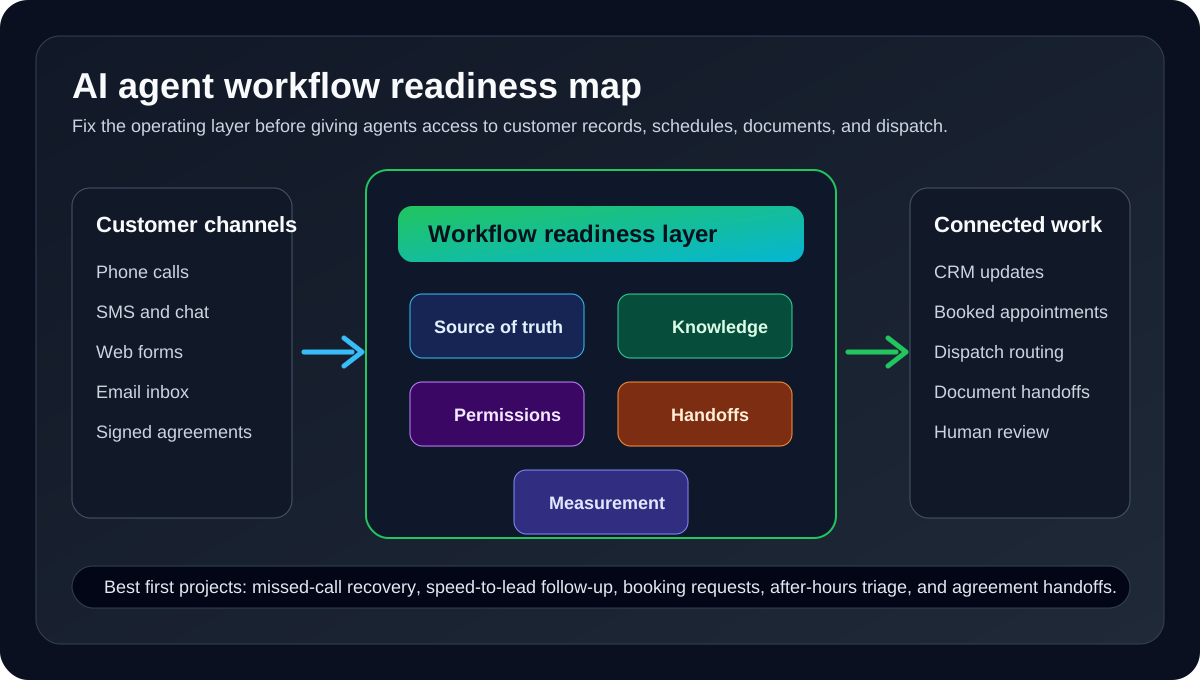
The Readiness Map
Before connecting AI agents to live customer workflows, check the five foundations below.
| Foundation | Buyer question | Minimum standard |
|---|---|---|
| Source of truth | Where does the correct customer record live? | CRM, practice system, property system, dispatch board, or help desk is named clearly |
| Knowledge | What should the agent rely on when answering? | Current FAQs, service areas, policies, pricing boundaries, and escalation rules |
| Permissions | What can the agent do without approval? | Read, draft, create, update, schedule, or escalate permissions are explicit |
| Handoffs | When does a person take over? | Urgent, sensitive, uncertain, expensive, or complaint-driven cases have clear rules |
| Measurement | What counts as success? | Booked job, qualified lead, routed issue, completed form, signed agreement, or resolved request |
If these five pieces are vague, the AI agent will magnify the mess. If they are clear, the agent can become a reliable layer between customer demand and staff action.
A 30-Day Workflow Readiness Plan
Use the first month to prepare and launch one practical AI agent workflow.
| Timeline | Goal | What to do |
|---|---|---|
| Days 1-3 | Pick one workflow | Choose a revenue leak such as missed calls, slow follow-up, after-hours intake, or agreement handoff |
| Days 4-7 | Define the outcome | Write down what counts as booked, qualified, routed, completed, escalated, or reviewed |
| Days 8-12 | Clean business knowledge | Gather FAQs, policies, service areas, appointment rules, emergency criteria, and follow-up scripts |
| Days 13-17 | Set permissions | Decide what the agent can read, draft, create, update, and send without approval |
| Days 18-22 | Connect minimum systems | Integrate only what the first workflow needs: phone, SMS, CRM, calendar, forms, dispatch, or documents |
| Days 23-27 | Test edge cases | Try duplicate customers, missing details, angry calls, schedule conflicts, urgent requests, and unclear intent |
| Days 28-30 | Launch with review | Review transcripts, actions, corrections, escalations, and outcomes every day |
The goal is not a perfect AI program in 30 days. The goal is one workflow that proves the business can safely connect customer demand to operational action.
Buyer Questions to Ask Before Connecting Agents
Use these questions when comparing packaged platforms, AI receptionist vendors, and custom AI automation builds.
| Question | Strong answer | Weak answer |
|---|---|---|
| Which customer workflow will this agent complete first? | A specific workflow with a named outcome | "It can help with anything" |
| Which systems does it need? | Only the systems required for the first workflow | Every app is connected on day one |
| How are permissions controlled? | Clear read, write, approval, and escalation rules | The model decides when to act |
| How is business knowledge updated? | Named owner, source documents, review cadence, and test questions | One-time upload with no maintenance plan |
| How does human handoff work? | Transcript, summary, urgency, customer record, and recommended next step | Staff just receives a notification |
| How are results measured? | Operational outcomes and correction rate | Message volume or AI response count |
The right answer is usually narrower than a vendor demo. A small, well-governed workflow beats a broad agent that creates cleanup work for staff.
Where Zenovae Helps
Zenovae helps service businesses turn AI agent ideas into practical customer operations: answering calls, recovering missed leads, booking appointments, routing urgent work, updating CRMs, and giving owners visibility into what happened.
| Need | How Zenovae supports it |
|---|---|
| Find the right first workflow | Map missed calls, slow follow-up, scheduling friction, and admin handoffs |
| Build an AI receptionist | Qualify callers, answer common questions, book appointments, and route urgent requests |
| Connect existing tools | Use AI integrations for CRM, calendars, phone systems, forms, dispatch, and business software |
| Build governed agent workflows | Create AI agent workflows with permissions, escalation rules, and human review |
| Improve visibility | Build custom dashboards and internal tools for outcomes, corrections, and workflow performance |
If your team is relying on voicemail, manual callbacks, scattered notes, or staff memory to move customers forward, Zenovae can map the workflow and show what to automate first. Book a free AI audit to identify the highest-value starting point.
FAQ
What are AI agents in business workflows?
AI agents in business workflows are AI systems that can use business context, connected tools, permissions, and review rules to help complete repeatable work such as intake, scheduling, follow-up, routing, record updates, and document handoffs.
Should a service business buy an AI agent platform now?
Buy or build only after choosing one specific workflow and defining the source of truth, permissions, handoffs, and success metrics. Without those basics, a platform can add more complexity instead of reducing work.
What should service businesses automate first?
Start with high-volume, repeatable workflows that have clear business value: missed-call recovery, speed-to-lead follow-up, appointment booking, after-hours triage, customer status updates, and agreement handoffs.
How should AI agent performance be measured?
Measure operational outcomes such as booked appointments, qualified leads, routed emergencies, completed forms, clean CRM updates, signed agreements, escalation quality, and staff correction rate. Avoid judging success by message volume alone.
Sources
Need Help with Your AI Project?
At Zenovae, we build production-ready AI systems that scale. From OpenClaw setup to custom integrations, Mission Control workflows, and full-stack delivery, we can help you ship faster and avoid costly mistakes.
Let's Talk