AI App Actions for Service Businesses: Automate Handoffs Without Losing Control
AI app actions can move work across Slack, email, calendars, and CRM. Learn how service businesses should automate safe handoffs first.
AI is no longer limited to answering questions in a chat window. The current shift is toward AI that can take approved actions inside the tools your team already uses: Slack, Outlook, Gmail, calendars, spreadsheets, CRM, support desks, and internal systems.
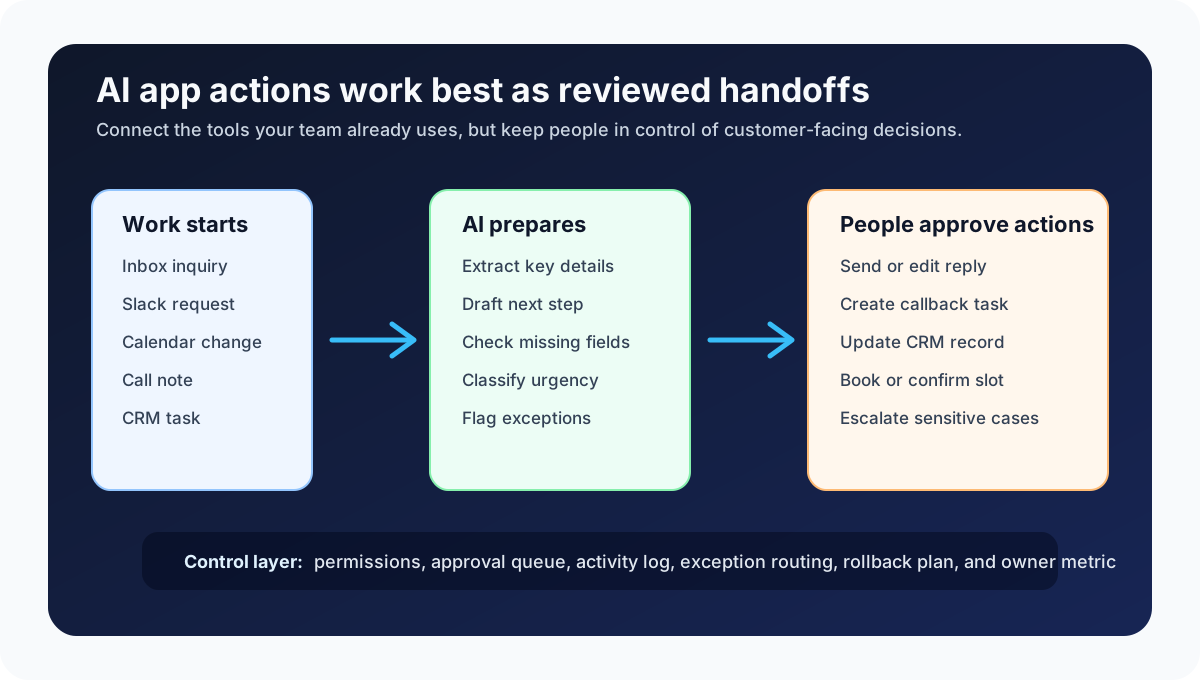
For a service business, that does not mean handing the whole company to an AI agent. The practical opportunity is smaller and more valuable: automate the handoff between tools so leads, appointments, customer requests, and open tasks do not sit untouched.
Quick take: Recent updates from OpenAI, Microsoft, Google, and Salesforce show AI moving from "summarize this" to "help take action in my business apps." Service businesses should start with low-risk, human-reviewed handoffs: create a callback task from a Slack message, draft a lead reply from an inbox request, prepare a CRM update after a call, or route an exception to the right person.
| If you only read one section | Read this |
|---|---|
| You use Slack, email, calendar, and CRM every day | What changed |
| Leads fall through tool-to-tool handoffs | What this means for your business |
| You want a safe first automation | The best first handoffs to automate |
| You are worried about AI making changes | The control checklist before launch |
| You need a rollout plan | A practical 30-day implementation plan |
What changed
The important news is not one product launch. It is the direction of travel across major business platforms: AI systems are being connected to apps, permissions, actions, workflows, and admin controls.
OpenAI's ChatGPT Business release notes show that direction clearly. On June 19, 2026, OpenAI said Business workspaces can use Slack connector actions when the Slack app is connected and actions are enabled, including supported actions such as joining a channel, creating a reminder, uploading a file, or updating a Slack profile. The same release notes also describe admin controls for action approval and OAuth scopes, which matters because business AI is moving into permissioned work rather than plain conversation (OpenAI Help Center).
Microsoft is taking a similar path inside Copilot Studio. Microsoft Learn describes agent flows as automations that can be triggered manually, by events, by agents, or on a schedule. The same documentation lists human-in-the-loop approval requests, connectors, looping, branching, and AI-driven actions as part of the workflow toolkit (Microsoft Learn).
In May 2026, Microsoft also described Copilot Studio updates that combine structured workflows with adaptive AI steps. Its blog explains that agent nodes can help when a workflow needs reasoning, tool orchestration, or knowledge retrieval, while workflows can still keep structured steps where predictability matters (Microsoft Copilot Blog).
Google Workspace Studio is aimed at the same everyday-work problem. Google announced general availability of Workspace Studio in December 2025 as a way to design, manage, and share AI agents in Google Workspace, with agents built to automate repetitive tasks like email triage, calendar logistics, follow-up, prioritization, and notifications (Google Workspace Blog).
Salesforce's Summer '26 release announcement adds the CRM view of the trend. Salesforce described a shift from experimentation to scaled impact through multi-agent orchestration, Slack-first workflows, real-time data activation, and AI-powered customer engagement (Salesforce).
Plain English version: the AI tool is becoming less like a search box and more like a staff assistant that can prepare, route, and sometimes complete work across business apps.
What this means for your business
Most service businesses already have the raw material for automation: missed call notes, contact forms, estimate requests, Slack messages, email threads, calendar changes, CRM records, invoices, and weekly reports.
The breakdown usually happens between systems. A lead comes in by email, but the CRM is not updated. A customer asks a scheduling question in Slack, but nobody creates the callback task. A technician notes a follow-up during a call, but the office never sees it. A property maintenance request gets discussed in chat, but the vendor handoff is delayed.
AI app actions can help by turning those handoffs into reviewed workflow steps.
| Manual handoff today | AI-assisted handoff | Business outcome to watch |
|---|---|---|
| Staff copy details from email into CRM | AI extracts key fields and prepares a reviewed CRM update | Fewer incomplete records and less retyping |
| A Slack message says "call this lead tomorrow" | AI creates a reminder or task for the assigned owner | Fewer forgotten callbacks |
| Appointment requests sit in a shared inbox | AI drafts a scheduling reply and flags missing information | Faster response without rushed staff work |
| Call notes stay inside the phone system | AI prepares a summary, follow-up task, and CRM note | Cleaner customer history |
| Weekly reporting depends on manual screenshots | AI gathers open items into a manager-ready status summary | Better visibility with less admin time |
The goal is not to make AI "own" customer relationships. The goal is to stop losing work in the cracks between tools.
The best first handoffs to automate
Start where the task is repeated often, the rules are clear, and a person can review the result before anything customer-facing happens.
| Good first workflow | Why it works | Keep human control over |
|---|---|---|
| Inbox inquiry to CRM draft | The source and destination are clear | Final customer response and lead qualification exceptions |
| Slack request to callback task | The action is simple and visible | Urgent or high-value customer prioritization |
| Call note to follow-up queue | Staff already know what should happen next | Promises, refunds, medical details, or legal-sensitive wording |
| Appointment email to scheduling draft | The AI can collect dates, times, and missing fields | Confirming availability and changing the calendar |
| Open estimate to next-touch reminder | The workflow can use age, status, and owner | Discounting, negotiation, and deal strategy |
| Daily task list to owner report | The output is internal and easy to check | Personnel issues or sensitive customer escalations |
For a dental office, a safe first handoff might be turning a new patient email into a scheduling task and draft response. For an HVAC company, it might be converting a missed-call note into a callback reminder and CRM note. For a property manager, it might be triaging maintenance requests into "emergency," "vendor needed," and "needs tenant details" queues.
Key terms in plain English
AI app actions are approved steps an AI system can take inside another app, such as creating a reminder, drafting an email, updating a record, or uploading a file.
Connector means the bridge between the AI tool and a business app. A connector may give the AI permission to read data, take actions, or both.
Human-in-the-loop automation means a person reviews or approves important steps before they affect a customer, calendar, invoice, CRM record, or account status.
Agent flow means a repeatable workflow where an AI agent, software rules, connectors, and approval steps work together to move a task forward.
OAuth scope means a permission boundary for an app connection. In plain English, it defines what the connected app is allowed to read or change.
The control checklist before launch
When AI can take actions, permissions and review steps matter more than prompt wording. The safer question is not "Can AI do this?" It is "What is it allowed to do, when, and who checks the result?"
| Control | Why it matters | Practical test |
|---|---|---|
| Read vs. write permissions | Prevents the AI from changing systems before the team is ready | "Can this workflow only draft, or can it update records?" |
| Approved source of truth | Reduces mistakes from stale or duplicate data | "Which CRM view, inbox, calendar, or sheet should it trust?" |
| Human approval point | Protects customer relationships and revenue decisions | "Who reviews before a message is sent or a record is changed?" |
| Exception routing | Keeps unusual cases out of the automatic path | "Where does it send missing details, angry customers, or high-value leads?" |
| Activity log | Lets managers audit what happened | "Can we see what the AI read, drafted, changed, skipped, or flagged?" |
| Rollback plan | Makes mistakes easier to correct | "How do we undo a bad update or stop the workflow quickly?" |
| Owner and metric | Keeps the workflow tied to business value | "Who owns stale leads, callback time, no-show risk, or completion rate?" |
The NIST AI Risk Management Framework is written for broad AI risk management, but the practical lesson fits small service businesses too: map the use case, measure outcomes and risks, govern who can change it, and manage the system after launch.
A practical 30-day implementation plan
You do not need to automate the entire back office to get value. A focused first project is usually better.
| Timeframe | Action | Output |
|---|---|---|
| Days 1-3 | Pick one handoff that currently creates delay or missed revenue | A named workflow, such as "inbox lead to CRM draft" |
| Days 4-7 | Map the trigger, tools, fields, owner, and approval point | A before-and-after workflow map |
| Days 8-14 | Build a draft-only version that reads the source and prepares the next step | Draft CRM notes, task cards, reminders, or replies |
| Days 15-21 | Add human review, exception labels, and logging | Staff can approve, edit, reject, or escalate |
| Days 22-30 | Run with a small live scope and measure results | Response time, stale-item count, completion rate, and error notes |
The first version should feel almost boring. It should make the next action obvious, reduce retyping, and give staff a clean review queue. Autonomy can increase later, once the workflow has real evidence behind it.
Where Zenovae helps
Zenovae helps founders and service-business operators turn manual back-office handoffs into practical AI integrations, workflow automation, and custom software.
That can mean connecting your inbox to a CRM, turning Slack requests into reviewed tasks, routing call notes into a follow-up queue, building a dashboard for stale leads, or creating custom software when your business process does not fit cleanly inside a single SaaS product.
The important part is support after launch. AI app actions need monitoring, permissions, staff feedback, prompt adjustments, exception handling, and occasional changes when the business process changes. Zenovae can map the workflow, connect the right tools, keep humans in control, and improve the automation over time.
Relevant service pages:
- AI Integration Services for connecting AI to CRM, calendar, inbox, phone systems, forms, and internal tools
- AI Agent Development for tool-using agents that prepare follow-up, route exceptions, and update systems with review
- Custom Software Development for dashboards, portals, internal tools, and workflow systems built around your process
- Free AI Audit for identifying the highest-value manual workflow to remove first
Want to remove a manual workflow? Zenovae can map the task, connect the right tools, and show what an AI integration or custom software build would look like.
FAQ
What are AI app actions?
AI app actions are approved actions an AI system can take inside another business app. Examples include creating a task, drafting a reply, preparing a CRM update, adding a reminder, or routing a file for review.
Should a service business let AI update CRM automatically?
Start with draft-only updates. Let AI prepare the CRM note, owner assignment, or missing-field flag, then have staff approve it. Automatic updates are safer later for low-risk, well-tested fields.
What is the safest first AI handoff to automate?
A good first handoff is internal, repeated often, and easy to review. Examples include email inquiry to CRM draft, Slack request to callback task, call note to follow-up queue, or open estimate to next-touch reminder.
How is this different from basic Zapier-style automation?
Basic automation usually follows a fixed trigger-and-action rule. AI app actions can read messy context, summarize details, classify urgency, draft language, and route exceptions. The best setup often combines both: predictable rules for structure, AI for interpretation, and human review for risk.
What should stay human-led?
Keep humans in control of pricing exceptions, refunds, medical or legal-sensitive wording, angry customers, unusual scheduling conflicts, high-value sales conversations, and any action that could damage trust if handled badly.
Sources
Need Help with Your AI Project?
At Zenovae, we build production-ready AI systems that scale. From OpenClaw setup to custom integrations, Mission Control workflows, and full-stack delivery, we can help you ship faster and avoid costly mistakes.
Let's Talk