AI Back-Office Blueprints: Turn Messy Admin Work Into Reviewed Workflows
AI back-office blueprints help service businesses turn inbox, document, approval, and CRM handoffs into reviewed workflows without losing control.
Most service businesses do not need another AI demo. They need a cleaner way to move real work through inboxes, documents, approvals, calendars, CRMs, accounting tools, and staff handoffs.
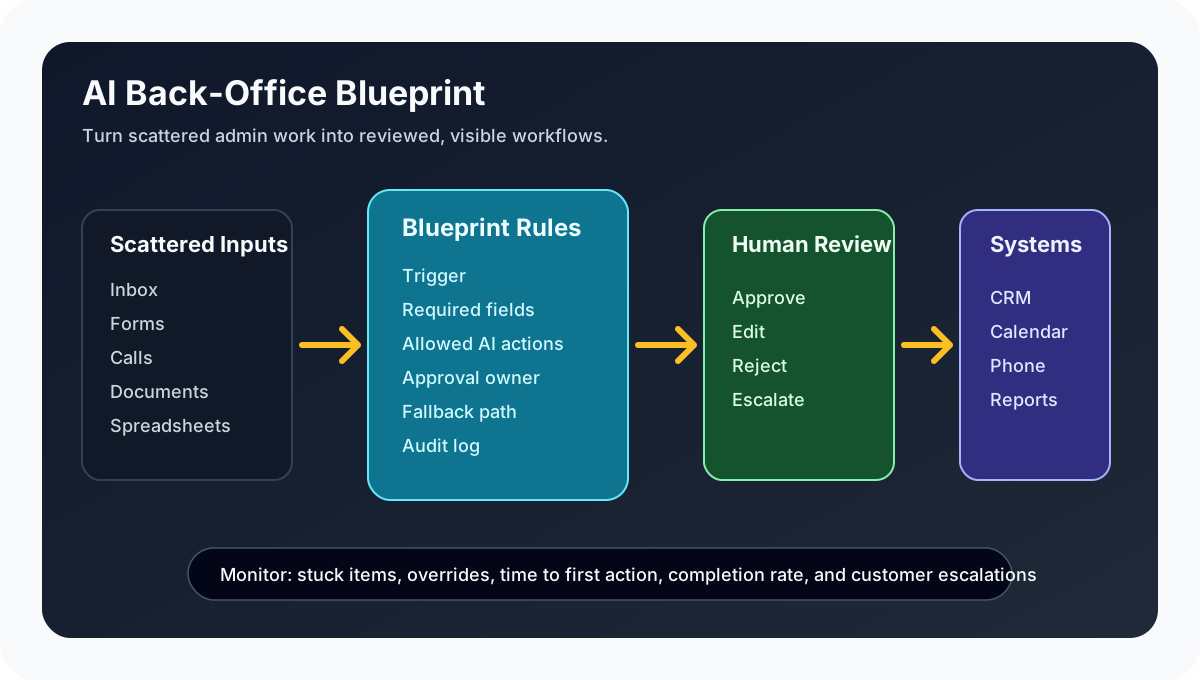
That is why the idea of an AI back-office blueprint matters. A blueprint is a plain-English map of a repeatable workflow: what starts the task, what information is required, who reviews it, what system gets updated, and what happens when the AI is unsure.
Quick take: AI back-office blueprints help owners and operators turn scattered admin work into visible, reviewed workflows. The best first use is not fully autonomous decision-making. It is a narrow process where AI reads, drafts, routes, updates, and escalates while a human stays in control of expensive, sensitive, or customer-facing decisions.
| If you only read one section | Read this |
|---|---|
| Your admin work lives in email and spreadsheets | What changed in the market |
| You want a practical first workflow | Where service businesses should start |
| You worry AI will make silent mistakes | The risk checklist before launch |
| You need a rollout path | A 30-day implementation plan |
| You want help mapping the process | Where Zenovae helps |
What changed in the market
AI is moving from chat windows into the actual back-office process.
On July 13, 2026, Salesforce published an admin-focused guide to Agentforce Operations, describing how it uses blueprints and workflows to coordinate back-office work across email, documents, external participants, human reviewers, and AI agents (Salesforce Admins). Salesforce says common examples include invoice auditing, supplier onboarding, purchase order management, contract review, and internal approval workflows.
Salesforce's April 29, 2026 Agentforce Operations announcement framed the same shift as a move from task routing to process execution across disconnected systems such as email and ERP tools, with audit trails and human handoffs built into the workflow (Salesforce News).
Microsoft is pointing in a similar direction. Its May 2026 Copilot Studio update says computer-using agents are generally available, which means organizations can build agents that interact with websites and desktop applications through the user interface when an older system does not have a clean API (Microsoft Copilot Blog).
OpenAI has also pushed workplace agents toward connected workflows. OpenAI describes ChatGPT Work as an agent that can act across apps and files and turn a goal into finished work (OpenAI). OpenAI's AgentKit update also notes that Agent Builder and Evals products are being wound down from November 30, 2026 onward, with recommendations to use the Agents SDK for code-based workflows or Workspace Agents in ChatGPT for natural-language prompting (OpenAI AgentKit).
Plain-English version: AI tools are changing quickly, but the stable business need is the same. You need a clear workflow that can survive tool changes, vendor updates, staff turnover, and exceptions.
What is an AI back-office blueprint?
An AI back-office blueprint is a structured plan for how a repeatable admin task should run.
It does not have to be technical. A good blueprint answers:
| Blueprint question | Plain-English meaning | Service-business example |
|---|---|---|
| What starts the workflow? | The trigger that tells the system work has arrived | A new web form, missed call, invoice email, maintenance request, or signed estimate |
| What information is required? | The fields the AI or staff must collect | Customer name, job type, property, urgency, due date, vendor, amount, or appointment window |
| What can AI prepare? | The draft work AI is allowed to do | Summarize the request, draft a reply, update a CRM field, prepare a callback task |
| Who approves? | The person who must review before the task becomes final | Owner, office manager, dispatcher, clinician, property manager, or accountant |
| What happens when AI is unsure? | The fallback path | Route to a queue, ask for missing details, or assign to a human |
| What should be logged? | The proof trail | Source message, draft, reviewer, change history, final action, and timestamp |
Think of the blueprint as the operating manual for the AI integration. The tool can change, but the workflow rules should stay understandable to the business.
Why this matters for service businesses
Service businesses often lose time and revenue in the gaps between systems.
A plumbing company may answer calls in one tool, schedule jobs in another, invoice in accounting software, and track follow-up in a spreadsheet. A dental office may collect new patient forms, insurance details, appointment requests, and treatment-plan follow-up across several inboxes. A property manager may receive maintenance requests by email, portal, text, and phone, then chase vendors in separate threads.
Those workflows are not "small admin tasks." They affect response time, booked revenue, customer trust, and staff capacity.
| Current workflow | What breaks | Blueprint-based automation |
|---|---|---|
| Staff manually triage every inbox message | Urgent leads and requests wait behind low-value messages | AI classifies messages, drafts next steps, and escalates urgent items |
| Follow-up depends on memory | Leads go cold after the first response | AI creates reviewed follow-up tasks and reminders |
| Managers approve in text threads | Nobody can see what is waiting or why | Approval queue shows owner, status, age, and source |
| CRM updates happen after the fact | Reports are stale and staff repeat questions | AI drafts CRM updates after calls, forms, or emails |
| Exceptions live in someone's head | Work stalls when one person is unavailable | Blueprint defines fallback rules and human ownership |
The goal is not to replace staff judgment. The goal is to stop wasting staff judgment on copying, chasing, sorting, and status-checking.
Where service businesses should start
Start with a workflow that is frequent, measurable, and annoying, but not catastrophic if handled with human review.
| Workflow candidate | Why it is a good first project | What AI should do | What a human should control |
|---|---|---|---|
| Lead follow-up after missed calls | Revenue impact is direct and easy to see | Summarize call notes, draft SMS/email, create CRM task | Approve unusual messages and pricing promises |
| Appointment rescheduling | Repetitive, time-sensitive, and rules-based | Offer approved time windows, update calendar draft | Confirm high-value or complex bookings |
| Maintenance request triage | Requests arrive from many channels | Classify urgency, collect missing details, route vendor task | Approve emergency dispatch and expensive repairs |
| Vendor onboarding | Documents and approvals are predictable | Request missing forms, extract details, track status | Approve vendor eligibility and contract terms |
| Weekly operations reporting | Data sits across systems | Pull status, summarize blockers, draft owner report | Review commentary and decisions |
Avoid starting with workflows where a bad answer could create a legal, medical, financial, or safety problem. For those, start with a draft-and-review assistant, not an autonomous agent.
The risk checklist before launch
NIST's AI Risk Management Framework is designed to help organizations manage AI risks and improve trustworthiness in AI systems (NIST). For a service business, that does not need to become a giant compliance project. It can start with a simple checklist.
| Risk | Why it matters | Practical control |
|---|---|---|
| Silent wrong updates | A bad CRM, calendar, or invoice update can create downstream confusion | Require review for first 30 days and log every change |
| Over-permissioned tools | AI should not access more systems than the workflow needs | Give the narrowest permissions possible |
| Customer promises | AI may draft a response that sounds final | Use approved templates for pricing, timing, refunds, and policies |
| Missing context | AI may not know local rules, staff availability, or exceptions | Connect the right knowledge base and route uncertainty to staff |
| No fallback owner | Work can stall when the AI cannot continue | Assign a human queue and response-time rule |
| No performance review | Bad automation slowly becomes normal | Review exceptions, overrides, completion time, and customer complaints weekly |
The most important rule: decide what the AI is allowed to draft, what it is allowed to send, and what it is allowed to change before launch.
A 30-day implementation plan
You do not need to automate the whole back office at once. One well-scoped workflow is enough to prove value.
| Timeline | What to do | Output |
|---|---|---|
| Days 1-3 | Pick one workflow and list every current step | Current-state map |
| Days 4-7 | Define the blueprint: trigger, required fields, approval rules, fallback owner, system updates | Reviewed workflow spec |
| Days 8-14 | Connect the tools: inbox, CRM, calendar, phone system, forms, spreadsheet, or internal dashboard | Working AI integration draft |
| Days 15-21 | Run with human review on every action | Exception list and corrected prompts/rules |
| Days 22-30 | Measure cycle time, completion rate, overrides, missed items, and staff feedback | Launch decision and improvement backlog |
This is where custom software can matter. If the workflow spans several tools, a simple internal dashboard may be more useful than forcing staff to watch five different apps. The dashboard can show pending approvals, stuck items, exception reasons, owner, age, and the original source message.
What to measure
The right metrics depend on the workflow, but the first dashboard should be simple.
| Metric | Why it matters |
|---|---|
| Time to first action | Shows whether leads, requests, or approvals are moving faster |
| Items completed without rework | Shows whether the workflow is accurate enough |
| Human overrides | Shows where rules, prompts, or knowledge are incomplete |
| Stuck items by reason | Shows bottlenecks before customers complain |
| Customer or staff escalations | Shows where automation is creating friction |
| Manual minutes saved | Helps estimate whether the workflow is worth expanding |
Do not measure only "AI actions completed." A workflow can look busy while still creating cleanup work. Measure the business outcome: faster follow-up, cleaner records, fewer missed tasks, clearer approvals, or shorter cycle time.
Where Zenovae helps
Zenovae helps founders and service-business operators turn messy admin work into practical AI integrations, workflow automation, and custom software.
For a blueprint-style project, that usually means:
| Need | How Zenovae supports it |
|---|---|
| Workflow mapping | Identify the manual steps, decision points, exceptions, and systems involved |
| AI integration | Connect AI to inboxes, forms, phone systems, calendars, CRMs, spreadsheets, and internal tools |
| Human review | Build approval queues, fallback routing, and clear ownership rules |
| Custom software | Create dashboards or portals when off-the-shelf tools do not fit the workflow |
| Monitoring and support | Track failures, overrides, cost, response time, and improvement opportunities after launch |
The best automation partner does not just turn on an agent. They help decide what the agent should never do without a person.
FAQ
What is the difference between a workflow and an AI agent?
A workflow is the step-by-step process. An AI agent is a tool that can complete parts of that process, such as reading a document, drafting a response, summarizing a call, or updating a record. In a service business, the workflow should come first so the agent has clear boundaries.
Do I need to replace my CRM or accounting software?
Usually no. Most practical AI automation starts by connecting the tools you already use. Replacement only makes sense when the current system cannot support the workflow, reporting, permissions, or customer experience you need.
Should AI update customer records automatically?
Not at first. Let AI draft updates, then review them until accuracy and exception handling are proven. After that, you can decide which low-risk fields are safe to update automatically.
What is a good first back-office workflow to automate?
Choose a workflow with clear rules, frequent volume, measurable delay, and low downside when reviewed by a human. Missed-call follow-up, appointment rescheduling, maintenance triage, vendor onboarding, and weekly reporting are common starting points.
Start with one manual workflow
The strongest AI automation projects start with a business problem, not a tool demo.
Pick one workflow your team repeats every week. Write down how it starts, who touches it, where information gets copied, what customers are waiting for, and where mistakes happen. That becomes the blueprint.
Want to remove a manual workflow? Zenovae can map the task, connect the right tools, and show what an AI integration or custom software build would look like.
Sources
- Salesforce Admins: Automate Your Back Office with Agentforce Operations
- Salesforce News: Salesforce Launches Agentforce Operations
- Microsoft Copilot Blog: What's new in Copilot Studio, May 2026
- OpenAI: ChatGPT is now a partner for your most ambitious work
- OpenAI: Introducing AgentKit
- NIST AI Risk Management Framework
Need Help with Your AI Project?
At Zenovae, we build production-ready AI systems that scale. From OpenClaw setup to custom integrations, Mission Control workflows, and full-stack delivery, we can help you ship faster and avoid costly mistakes.
Let's Talk