AI Call Management for Service Businesses: What Changed in 2026
AI call management is moving into phone, CRM, and service tools. Learn what service businesses should automate first and what to keep human-led.
AI call management is becoming a practical front-desk layer for service businesses because phone systems, workspace tools, and service platforms are adding AI agents, call summaries, routing, analytics, and app integrations directly into daily operations.
For business buyers, the important question is not "Should we buy AI?" It is "Which calls, follow-ups, and handoffs should be automated first, and where should staff stay in control?"
Quick take: AI call management is useful when it answers routine calls, captures structured details, updates the right system, and escalates sensitive cases to a human. The best early projects are missed-call recovery, appointment booking, lead qualification, after-hours intake, and customer-status updates. Avoid treating AI as a full staff replacement before your call rules, escalation paths, and integrations are clear.
| If you only read one section | Read this |
|---|---|
| You miss calls after hours | Start with missed-call recovery |
| You already use a CRM, calendar, or job board | Connect AI to systems of record |
| You worry about bad answers | Keep humans in control |
| You need a practical rollout | Use a 30/60/90-day plan |
What changed in 2026
The 2026 shift is that AI service tools are moving closer to the systems where work already happens.
Ooma's AI suite now includes AI Transcriptions, AI Answering Service, AI Receptionist beta, and AI Insights beta for business communications. Its product page describes AI Answering Service as an intelligent voice agent that answers missed calls, gives company information, responds to inquiries, and captures details for follow-up; it describes AI Receptionist as a 24/7 virtual front desk that can route callers, schedule appointments, and handle complex inquiries (Ooma AI).
OpenAI's ChatGPT Business release notes show the same movement inside workspaces. In April 2026, OpenAI began rolling out Workspace Agents for Business workspaces, with connected apps, scheduled runs, Slack usage, version history, and analytics. In May 2026, OpenAI also added admin-console areas for analytics and agents, including visibility into connected apps, schedules, recent activity, and agent runs (OpenAI Help Center).
Freshworks announced AI Agent Studio in Freshservice on May 14, 2026, positioning it around no-code AI agents, service workflows, MCP Gateway connections to third-party tools, and AI Insights for service leaders (Freshworks).
Gartner's February 2026 customer service survey adds the leadership context: 91% of customer service and support leaders surveyed said they were under executive pressure to implement AI, and many are prioritizing customer satisfaction, operational efficiency, and self-service success (Gartner).
The buyer takeaway: AI is no longer just a chatbot on a website. It is becoming part of call handling, service operations, workspace automation, reporting, and integrations.
What AI call management actually means
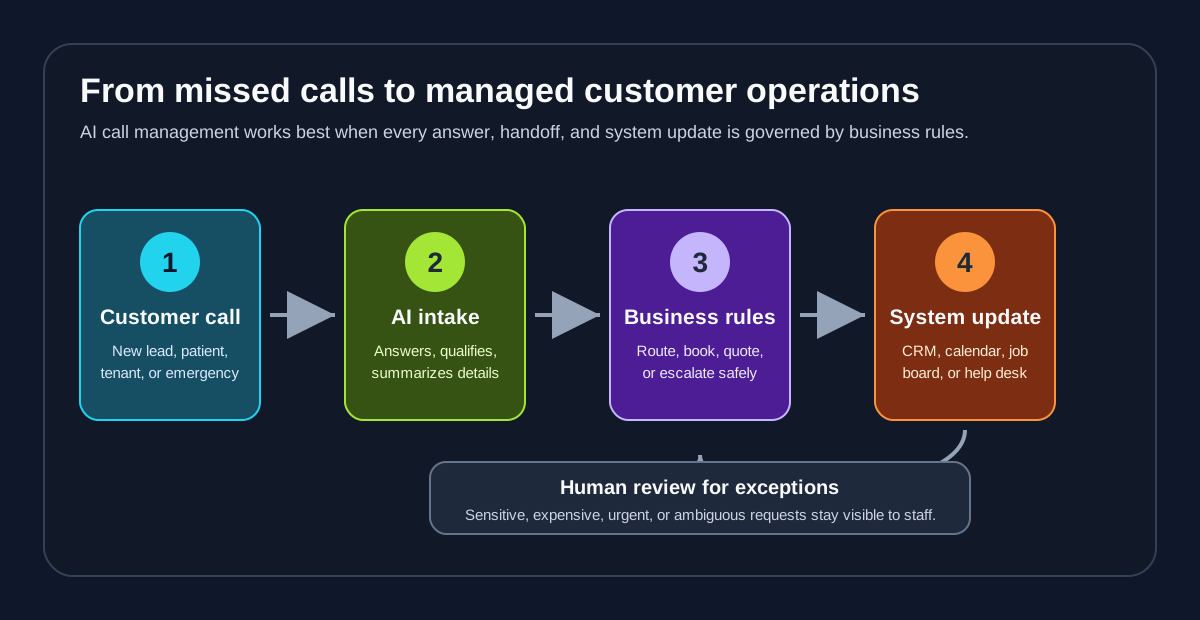
AI call management is the use of AI to answer, triage, summarize, route, and follow up on customer calls using business-specific rules and connected systems.
For a service business, that can mean:
| Call moment | What AI can do | What staff should still own |
|---|---|---|
| Missed call | Answer, collect reason for calling, capture contact details, send a callback task | Decide priority when the request is high-value or ambiguous |
| New lead | Ask qualifying questions, check service area, offer appointment windows | Approve exceptions, discounts, and complex job estimates |
| Existing customer | Identify the account, summarize the issue, route to the right person | Resolve disputes, billing issues, and sensitive complaints |
| After-hours emergency | Gather symptoms, location, urgency, and contact details | Dispatch decisions when safety, liability, or high cost is involved |
| Post-call admin | Produce summaries, next steps, tags, and follow-up reminders | Audit quality and improve scripts, policies, and escalation rules |
That is why the implementation matters more than the tool label. A simple AI receptionist can create value if it captures details cleanly and routes them to the right place. A more advanced AI agent can create risk if it is allowed to act without clear limits.
Why this matters for service businesses
Service businesses lose revenue when customers cannot reach them, when staff return calls too slowly, or when call details never make it into the CRM, calendar, dispatch board, or patient-management system.
AI call management helps in three practical ways:
- It expands coverage without asking staff to monitor every channel all day.
- It turns unstructured calls into structured notes, tasks, and follow-up steps.
- It gives owners better visibility into why customers call and where the operation is leaking time.
Google Cloud's 2026 AI Agent Trends Report frames this as a broader shift from scripted chatbots to agentic workflows. The report says businesses are beginning to connect agents around end-to-end processes and points to "concierge-style" service as a growing customer-experience pattern (Google Cloud).
For a dental office, that might mean every missed new-patient call receives an immediate response and booking path. For a plumbing company, it might mean after-hours emergencies are captured with enough detail for dispatch. For property management, it might mean tenant calls are classified as emergency, maintenance, leasing, renewal, or billing before a human opens the queue.
Start with missed-call recovery, not a full contact center
The fastest AI call management project is usually missed-call recovery.
Do not begin by trying to automate every conversation. Begin with calls your team already fails to answer or follow up on consistently.
| First workflow | Why it is a good starting point | What to measure |
|---|---|---|
| Missed-call answering | Clear problem, low ambiguity, immediate customer impact | Calls captured, callbacks completed, booked appointments |
| After-hours intake | Customers expect quick acknowledgment even when staff are offline | After-hours leads captured, urgent escalations, next-day follow-up |
| Appointment confirmation | Repetitive, rule-based, and easy to audit | Confirmed visits, reschedules, no-show trend |
| Lead qualification | Helps staff focus on good-fit opportunities | Qualified leads, speed to response, booking rate |
| Call summaries | Saves admin time without letting AI make decisions | Notes created, staff edits, CRM completion rate |
This staged approach gives the business a clean test: did more calls become usable opportunities, did staff spend less time chasing details, and did customers get faster responses?
Connect AI to systems of record
The difference between a demo and a useful operation is whether the AI can update the systems your team trusts.
OpenAI's Workspace Agents notes emphasize connected apps, schedules, Slack usage, analytics, and admin controls. Freshworks' announcement emphasizes service workflows, third-party context through MCP Gateway, and service-performance insights. Ooma's AI suite emphasizes phone-side answering, call summaries, AI receptionist capabilities, and insights.
For buyers, this points to a simple rule: do not evaluate AI call management as a voice feature alone. Evaluate the handoff.
| System | Why it matters | Example AI handoff |
|---|---|---|
| CRM | Prevents leads from living only in voicemail or staff memory | Create lead, tag source, add call summary, assign owner |
| Calendar | Turns customer intent into a real appointment | Offer approved slots, book, send confirmation |
| Job board or dispatch tool | Keeps operations from losing urgent work | Create service request with urgency and location |
| Phone system | Captures missed calls, transcriptions, routing, and call metadata | Summarize call and trigger follow-up task |
| Knowledge base | Keeps AI answers consistent with business policy | Answer hours, pricing rules, service area, intake steps |
| Reporting dashboard | Shows whether automation is helping | Track call reasons, response time, bookings, escalations |
Zenovae often starts by mapping this handoff before choosing tooling. The phone experience matters, but the business outcome usually depends on what happens after the call ends.
Keep humans in control
Gartner's survey points to a practical operating model: AI and human expertise working together. Gartner reported that nearly 80% of organizations planned to transition at least some agents into new roles, and 84% planned to add new skills to the agent role as routine tasks become automated (Gartner).
For service businesses, that means staff should not disappear from the workflow. They should spend less time collecting basic details and more time handling exceptions, judgment calls, and customer relationships.
| Let AI handle | Require human review |
|---|---|
| Office hours, service area, intake questions, call summaries | Complaints, refunds, medical or legal sensitivity, high-dollar quotes |
| Appointment reminders and routine rescheduling | Overbooked calendars, VIP customers, unusual availability |
| Basic maintenance triage questions | Safety issues, habitability concerns, emergency dispatch |
| Lead follow-up and status nudges | Angry customers, cancellations, ambiguous intent |
| CRM note creation and task setup | Final approval of policies, pricing, and sensitive communications |
The right design is not "AI answers everything." It is "AI handles the repetitive front line and makes the right human handoff obvious."
A practical 30/60/90-day rollout plan
| Timeline | Focus | Business output |
|---|---|---|
| First 30 days | Audit calls, missed-call logs, voicemail, CRM gaps, booking rules, and escalation paths | A ranked list of workflows to automate first |
| Days 31-60 | Launch one controlled workflow, usually missed-call recovery or after-hours intake | AI answers defined call types and creates staff-visible follow-up |
| Days 61-90 | Add integrations, analytics, and second workflow such as appointment confirmation or lead qualification | Better reporting, fewer manual handoffs, clearer ROI signal |
This plan works because it treats AI call management as an operations project, not a software purchase. The goal is not to add another tool. The goal is to make sure every valuable customer contact becomes a trackable next step.
What to ask vendors before buying
| Question | Why it matters |
|---|---|
| Can the AI capture structured fields, not just produce a transcript? | Staff need usable details, not another long record to read. |
| Which CRM, calendar, phone, service, and ticketing tools does it connect to? | Integrations determine whether the workflow actually changes. |
| Can we define escalation rules by urgency, customer type, job value, and topic? | Human review should be built in, not improvised later. |
| What analytics show call reasons, outcomes, response time, and handoffs? | Owners need evidence that automation improved operations. |
| Can staff review and improve scripts, knowledge, and call outcomes? | AI quality depends on ongoing operational feedback. |
| What permissions, data retention, and admin controls are available? | Customer information and business data need clear governance. |
If a vendor cannot answer these questions clearly, slow down. A polished AI voice is less important than reliable routing, clean records, safe permissions, and measurable outcomes.
Where Zenovae helps
Zenovae helps service businesses turn AI call management into a working customer-operations system.
That usually includes:
| Zenovae service | How it supports AI call management |
|---|---|
| AI receptionist and call handling | Answer missed and after-hours calls, collect details, qualify leads, and route urgent requests |
| AI integrations | Connect phone systems, CRMs, calendars, forms, dispatch tools, and internal dashboards |
| AI agent development | Build rule-based agents for repeatable workflows with human approval where needed |
| Custom software development | Create dashboards, portals, reporting views, and workflow tools around AI operations |
| Industry automation | Adapt workflows for property management, dental, HVAC, plumbing, and med spa teams |
If your team still relies on voicemail, manual callbacks, scattered notes, or spreadsheet follow-up, start with a workflow audit. Zenovae can map the highest-leak call paths, show what to automate first, and design the human handoffs that keep the system practical.
Book a free AI audit to identify where AI call management would recover the most time or revenue in your business.
FAQ
What is AI call management?
AI call management uses AI to answer calls, capture details, summarize conversations, route requests, trigger follow-up, and update business systems such as CRMs, calendars, phone systems, and service tools.
Is an AI receptionist the same as AI call management?
An AI receptionist is one part of AI call management. Full call management also includes call summaries, routing rules, CRM updates, appointment workflows, analytics, and human review for exceptions.
What should a service business automate first?
Most service businesses should start with missed-call recovery, after-hours intake, appointment confirmation, call summaries, or lead qualification because those workflows are repetitive, measurable, and easier to supervise.
What should stay human-led?
Complaints, emergencies, refunds, high-dollar estimates, medical or legal sensitivity, and ambiguous requests should stay human-led or require human approval before action.
Sources
Need Help with Your AI Project?
At Zenovae, we build production-ready AI systems that scale. From OpenClaw setup to custom integrations, Mission Control workflows, and full-stack delivery, we can help you ship faster and avoid costly mistakes.
Let's Talk