AI Call Notes for Service Businesses: Turn Conversations Into Follow-Up
AI call notes are moving into business phone systems. Learn how service businesses can turn calls into tasks, CRM updates, and follow-up.
AI call notes are becoming more than a convenience feature. For service businesses, they are a practical way to stop losing action items after phone calls, quote conversations, appointment changes, maintenance requests, and customer complaints.
The buyer problem is simple: your team may answer the call, but the follow-up still depends on memory, manual typing, and someone remembering to update the CRM. That is where revenue leaks happen.
Quick take: On June 16, 2026, Google announced AI note-taking for Google Voice phone calls, including recording, transcription, summaries, and action items. The bigger trend is clear: phone conversations are becoming structured business data. Service businesses should use AI call notes to create tasks, update records, and trigger follow-up, while keeping consent, review, and sensitive decisions under human control.
| If you only read one section | Read this |
|---|---|
| You want the buyer takeaway | Answer first: what changed |
| You manage inbound calls | Why call notes matter for service businesses |
| You need a first project | What to automate first |
| You are worried about compliance | Risks and guardrails |
| You want an action plan | A practical 30/60/90-day rollout |
Answer first: what changed
Google announced on June 16, 2026 that "Take notes for me" is available in Google Voice for phone calls. Google says the feature records and transcribes calls, summarizes key points, and organizes action items that are sent by Gmail and stored in the Voice app (Google Workspace Updates).
Google also described important controls. Existing Google Voice customers must have the feature enabled by an admin, end users need Workspace Smart Feature Consent, and an audio disclosure tells call participants that the call is being recorded and captured by AI. Google says the feature is available in English and for Workspace customers with eligible Voice plans (Google Workspace Updates).
This is part of a wider shift. Microsoft announced Work IQ APIs in June 2026 so agents can work with business context from email, calendar, meetings, chats, files, people, and line-of-business systems instead of raw data alone (Microsoft). OpenAI's ChatGPT business pricing page lists business connectors for Microsoft 365, Google Drive, Slack, GitHub, Linear, Figma, and more, along with company knowledge and record mode for Business and Enterprise plans (OpenAI).
Small businesses are already using multiple AI tools rather than one all-purpose system. SBE Council reported from its March 2026 data that 82% of small business employers have invested in AI tools, and the typical small business uses a median of five AI tools (SBE Council).
For business buyers, the takeaway is not "buy every AI feature." It is this: call content is becoming usable operations data. The winners will connect that data to follow-up workflows, not leave it sitting as a transcript.
Why call notes matter for service businesses
Service businesses run on conversations. A property manager hears about a leaking ceiling. A dental office discusses insurance, availability, and patient concerns. A med spa answers pricing and pre-treatment questions. An HVAC or plumbing company handles urgency, address details, and dispatch needs.
Those calls usually create downstream work. Someone must summarize the call, update the customer record, assign the next step, send a reminder, schedule a visit, or escalate a problem. When that handoff is manual, tasks slip.
| Business situation | What the call contains | What AI call notes can produce |
|---|---|---|
| New lead asks about service | Contact details, service need, urgency, location, budget signal | Lead summary, CRM fields, follow-up task, booking prompt |
| Customer changes appointment | Requested time, reason, availability constraints | Reschedule task, confirmation draft, calendar note |
| Tenant reports maintenance issue | Unit, symptom, access notes, urgency, safety clues | Maintenance ticket draft, vendor routing, resident update |
| Dental patient asks about treatment | Symptoms, insurance question, desired appointment | Staff callback task, approved FAQ answer draft, scheduling note |
| Med spa prospect asks about pricing | Treatment interest, objection, preferred date | Consultation follow-up, nurture tag, quote discussion note |
| After-hours emergency call | Address, issue, risk details, callback number | Escalation alert, dispatch note, review queue |
The goal is not just prettier notes. The goal is fewer dropped commitments after a call ends.
What to automate first
Start with call-to-task workflows. They are easier to verify than fully automated customer decisions, and they create value immediately.
| Automate first | Why it works | Human checkpoint |
|---|---|---|
| Call summaries | Staff can review quickly and correct mistakes | Team confirms the summary before relying on it |
| Follow-up task creation | Prevents lead and customer requests from disappearing | Manager reviews stale or high-value tasks |
| CRM field suggestions | Captures contact reason, urgency, source, and next step | Staff approves updates before important records change |
| Appointment confirmation drafts | Saves typing without making sensitive decisions | Staff approves edge cases and exceptions |
| Maintenance or service ticket drafts | Turns phone details into structured work orders | Human reviews priority, cost, and safety |
| End-of-day missed-action report | Surfaces calls with no owner or no next step | Manager assigns accountability |
Do not start by letting AI approve refunds, give clinical advice, interpret lease terms, price exceptions, or dispatch emergency work without review. Those workflows need stronger rules, better source data, and a history of reviewed outputs.
The real value is the integration
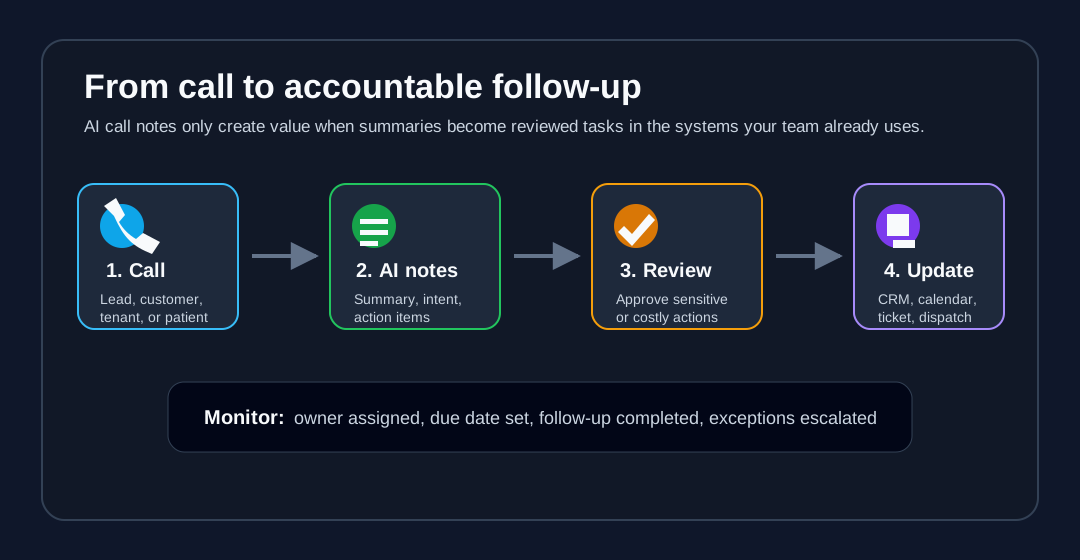
A transcript that sits in a phone app is useful for recall. A transcript that creates the next step in the right system is useful for operations.
For most service businesses, the call-note workflow should connect four layers:
| Layer | What it does | Example systems |
|---|---|---|
| Capture | Records, transcribes, and summarizes the conversation with consent | Google Voice, call center platform, AI receptionist |
| Understand | Extracts intent, urgency, customer details, next step, and risk | AI summary, approved knowledge base, workflow rules |
| Route | Sends the right work to the right place | CRM, calendar, dispatch board, property management software, ticketing tool |
| Monitor | Shows whether the follow-up happened | Dashboard, task queue, alerts, weekly operations report |
This is why business buyers should avoid evaluating AI call notes as a standalone feature. The question is not only "Can it summarize a call?" The better question is "What happens after the summary is created?"
What this means for service businesses
For a small service team, AI call notes can become a lightweight operating layer between phone calls and customer operations.
| Customer type | Best first use case | Business outcome to measure |
|---|---|---|
| Property management | Turn maintenance calls into ticket drafts and resident updates | Fewer unassigned maintenance requests |
| Dental practices | Capture new patient call details and staff callback tasks | Faster patient follow-up and fewer missed bookings |
| Med spas | Summarize consultation inquiries and trigger nurture follow-up | More consultations booked from phone inquiries |
| HVAC companies | Capture after-hours job details and escalation notes | Faster dispatch handoffs |
| Plumbing companies | Route emergency calls with structured notes | Fewer missed urgent jobs |
| Multi-location service businesses | Standardize notes across locations and managers | More consistent customer records |
If your team already answers calls well, this improves the handoff. If your team misses calls or lets voicemail pile up, call notes should be paired with an AI receptionist or answering workflow so every inquiry is captured in the first place.
Risks and guardrails
AI call notes touch customer conversations, so controls matter. The guardrails should be designed before rollout, not after a mistake.
| Risk | Why it matters | Practical guardrail |
|---|---|---|
| Consent problems | Call recording laws and customer expectations vary by location and context | Use clear disclosures, admin controls, and legal review for recording practices |
| Over-trusting summaries | AI may miss nuance, urgency, or a customer objection | Require review for high-value, urgent, or sensitive calls |
| Bad CRM updates | Incorrect fields can damage future follow-up | Start with suggested updates before automatic writes |
| Sensitive data exposure | Calls may include health, payment, tenant, or employee information | Limit access, define retention, and keep sensitive workflows human-led |
| No owner for action items | Notes without accountability still fail | Route every action item to a queue, owner, and due date |
| Tool sprawl | Notes across multiple apps can create more admin work | Choose one source of truth for follow-up |
Verint's 2026 contact center research is a useful reminder that the automation opportunity is often the work around the call. Verint reported that, in its survey of 1,000 contact center agents, 54% of calls require after-call work and 57% require agents to gather interaction context upon escalation (Verint). Even small service teams feel the same pattern: the call ends, but the work is not done.
A practical 30/60/90-day rollout
| Timeline | What to do | Output |
|---|---|---|
| First 30 days | Audit call types, consent requirements, CRM fields, and common missed follow-ups | Call workflow map and risk list |
| Days 31-60 | Pilot AI summaries and task drafts for one call type, such as new leads or maintenance calls | Reviewed pilot with accuracy notes and staff feedback |
| Days 61-90 | Connect reviewed summaries to CRM, calendar, ticketing, or dispatch workflows | Production workflow with owner, due date, and monitoring |
Keep the first rollout narrow. One reliable call-to-task workflow is more valuable than five half-connected AI features that staff do not trust.
Where Zenovae helps
Zenovae helps service businesses turn call automation into working operations. That usually starts with mapping the missed-call, call-note, follow-up, CRM, calendar, and dispatch workflow before choosing tools.
For a property manager, Zenovae can connect call notes to maintenance triage, vendor routing, and resident updates. For dental practices and med spas, we can connect inquiry summaries to appointment workflows, patient callback queues, and approved FAQ responses. For HVAC and plumbing teams, we can pair AI call notes with AI receptionists, after-hours routing, and CRM follow-up.
Zenovae builds AI receptionists, AI follow-up automation, CRM-connected AI agents, RAG knowledge systems, dashboards, and monitoring around the tools you already use. The goal is to make every important call create a visible next step.
Want to know where AI would recover the most revenue in your business? Book a free AI audit, or see how Zenovae approaches AI integrations, AI agent development, and AI receptionist workflows.
FAQ
What are AI call notes?
AI call notes use speech recognition and AI summarization to turn phone conversations into transcripts, summaries, action items, and follow-up records. For service businesses, the best use is not just note storage. It is creating accountable next steps after calls.
Should AI call notes update my CRM automatically?
Start with suggested CRM updates, not automatic writes. Once staff have reviewed enough summaries and field suggestions, low-risk updates such as contact reason, follow-up owner, or appointment interest can be automated with rules and audit logs.
Are AI call notes enough to fix missed follow-up?
Not by themselves. AI call notes help capture what happened. You still need routing, ownership, due dates, reminders, and escalation rules. The operational workflow matters more than the transcript.
Sources
Need Help with Your AI Project?
At Zenovae, we build production-ready AI systems that scale. From OpenClaw setup to custom integrations, Mission Control workflows, and full-stack delivery, we can help you ship faster and avoid costly mistakes.
Let's Talk