AI Chatbot Disclosure: Keep Customer Trust When Automation Answers First
AI chatbot disclosure helps service businesses use AI replies safely, set customer expectations, and keep high-risk requests human-reviewed.
AI is becoming the first reply in more customer conversations: website chat, missed-call texts, WhatsApp, Messenger, Instagram DMs, email, and help widgets. That can be good for a service business. Customers get faster answers, staff stop repeating the same intake questions, and more leads make it into the calendar or CRM.
The trust problem starts when customers cannot tell what is happening. If an AI assistant sounds like a person, promises too much, or handles a sensitive request without a clean handoff, the business may save a few minutes and lose confidence at the exact moment the customer is deciding whether to book.
Quick take: AI chatbot disclosure is not just a legal checkbox. For service businesses, it is an operating rule: tell customers when automation is helping, define what the AI can and cannot do, route sensitive requests to people, and log the handoff in the CRM. The business wins when customers get fast help without feeling misled.
| If you only read one section | Read this |
|---|---|
| You want the practical answer | Answer first: what should service businesses do? |
| You need a simple workflow | The disclosure workflow to build |
| You worry about customers losing trust | Where AI replies can go wrong |
| You want a rollout plan | A 30-day implementation plan |
| You want help connecting tools | Where Zenovae helps |
Answer first: what should service businesses do?
If an AI assistant is talking directly with a customer, the safest practical rule is to disclose it clearly at the start, keep the wording plain, and make human help easy to reach.
That does not mean adding a scary warning to every message. A simple note such as "I am Zenovae's automated assistant. I can help with intake and scheduling, and a team member can step in when needed" is usually clearer than hiding automation behind a fake human name.
The workflow also needs guardrails behind the message:
| Customer-facing promise | Back-office rule behind it |
|---|---|
| "I can help gather details." | AI captures name, contact info, request type, urgency, and preferred next step. |
| "A team member can review this." | Sensitive or expensive decisions move to a human approval queue. |
| "I can check appointment options." | The system reads live calendar rules or sends a request instead of inventing availability. |
| "I can summarize your request." | The summary is saved to the CRM, inbox, ticket, or scheduling tool. |
| "You can ask for a person." | Human handoff is available by keyword, button, phone, or staff escalation rule. |
Plain-English definition: AI chatbot disclosure means telling a customer when an automated AI system is interacting with them or helping prepare the response. It is different from a privacy policy buried in a footer. It should be visible during the conversation.
What changed in August 2026
On July 20, 2026, the European Commission published guidelines for AI Act transparency obligations. The Commission says these obligations apply from August 2, 2026 and cover certain AI systems, including interactive systems and AI-generated content (European Commission).
Article 50 of the EU AI Act says providers must ensure people are informed when they are interacting directly with an AI system, unless that is obvious in the circumstances. It also says the information should be clear, distinguishable, accessible, and provided no later than the first interaction (AI Act Service Desk).
Many Zenovae clients and prospects are US-based, so this article is not legal advice and does not claim every local business is covered by EU rules. The practical signal still matters: regulators are moving toward clearer AI transparency, and customers are getting used to knowing when automation is involved.
The same trust theme appears in US enforcement. In May 2026, the Federal Trade Commission announced settlements over allegedly deceptive claims about an AI-powered marketing service. The FTC's message was straightforward: businesses need to be honest about what AI tools do and what customers have opted into (FTC). In March 2026, the FTC also announced a settlement involving Air AI after alleging deceptive business-growth and refund claims tied to conversational AI services sold to small businesses (FTC).
The business takeaway is not "avoid AI." It is "do not make AI feel sneaky." Clear disclosure, review rules, and accurate claims make automation easier to trust.
Why this matters for service businesses
Service businesses often win or lose customers in the first few minutes after an inquiry. A homeowner with a plumbing leak, a new patient looking for an appointment, a tenant reporting a maintenance problem, or a med spa prospect asking about availability is not evaluating your technology stack. They are evaluating whether your business is responsive, clear, and reliable.
AI can improve that first impression when it handles intake quickly and moves work into the right system. It can damage the impression when it pretends to be a person, misses urgency, gives an answer without context, or fails to escalate.
| Service-business situation | Why disclosure helps | What should happen next |
|---|---|---|
| New lead asks for availability after hours | Sets expectation that the first response is automated | AI captures details and creates a booking or callback task. |
| Customer describes an urgent issue | Avoids false confidence from a generic answer | AI flags urgency and routes to staff or dispatch. |
| Patient asks about clinical suitability | Makes limits clear | AI gathers context, then routes to a trained team member. |
| Tenant asks about lease terms or fees | Keeps policy interpretation controlled | AI links approved policy or sends to property staff. |
| Customer is angry about service | Prevents a tone-deaf automated loop | AI summarizes and escalates to a manager. |
Disclosure is not only about compliance. It is a customer-experience tool. It tells the customer what the system is good at and where a person will step in.
The disclosure workflow to build
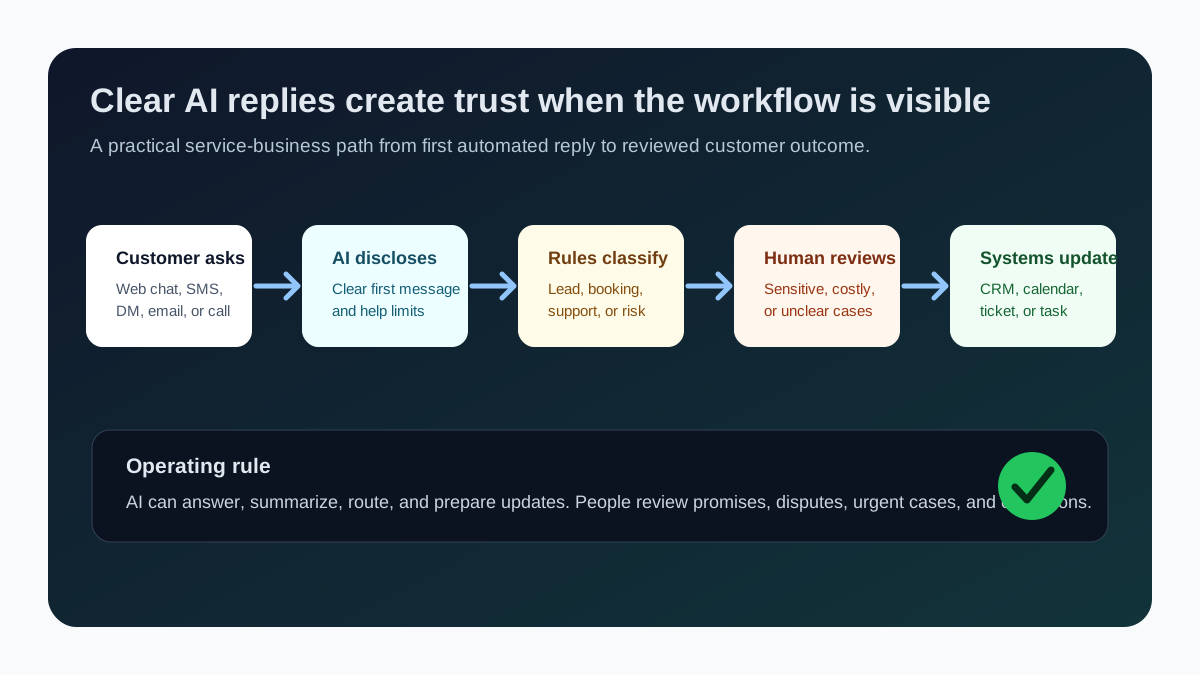
A useful disclosure workflow has five parts.
1. Start with a plain first message
The first message should identify the assistant as automated and state the job it can help with. Keep it short.
| Channel | Plain disclosure |
|---|---|
| Website chat | "I am the automated assistant for this team. I can help with intake, scheduling requests, and routing." |
| Missed-call SMS | "This automated assistant can gather a few details so the team can call back faster." |
| WhatsApp or Messenger | "I am an AI assistant helping this business respond quickly. A team member can step in when needed." |
| Email triage | "This reply was prepared with automation and reviewed by our team." |
Avoid wording that makes the AI sound like a staff member if it is not one. Customers do not need a lecture about artificial intelligence. They need to know who is handling the conversation and how to reach a person.
2. Define low-risk and high-risk requests
AI should not treat every message the same. A routine scheduling question is different from a refund demand, an emergency dispatch request, a medical concern, a legal dispute, or a customer threatening to leave.
| Automate first | Keep human-reviewed |
|---|---|
| Business hours, location, service area, basic FAQs | Refunds, billing disputes, discounts, chargebacks |
| Lead intake and callback requests | Medical, legal, insurance, lease, or safety-sensitive questions |
| Appointment request drafts | Final confirmation when calendar or staff capacity is uncertain |
| CRM notes and task creation | Angry customers, cancellations, negative reviews |
| Reminder messages with approved wording | Any claim about guaranteed results or eligibility |
This is where human-in-the-loop automation matters. In plain English, it means AI can prepare or route the work, but a person reviews decisions that carry revenue, safety, reputation, or compliance risk.
3. Connect the AI to the systems that decide the answer
Many bad AI replies happen because the assistant is isolated from the business systems that hold the truth.
| System | Why the AI needs it |
|---|---|
| CRM | To know whether the person is a new lead, open deal, existing customer, or churn risk. |
| Calendar or scheduling tool | To avoid offering times that are not actually available. |
| Phone system or call transcripts | To connect missed calls, voicemails, and texts to the same customer record. |
| Property management, dispatch, or practice software | To respect real service status, technician capacity, patient rules, or tenant workflows. |
| Knowledge base or SOPs | To answer from approved policies instead of guessing. |
| Reporting dashboard | To see volume, handoffs, response time, and exceptions. |
This is the difference between a chatbot and a useful AI integration. A chatbot answers. An integration moves the work to the right place with the right controls.
4. Log what happened
If staff cannot see what the AI did, they cannot trust it. Every AI-handled conversation should leave a trail that is easy to review.
| Field | Why it matters |
|---|---|
| Customer name and contact | Lets staff follow up without searching the inbox. |
| Source channel | Shows whether the request came from web chat, SMS, email, WhatsApp, or another channel. |
| Intent | Labels the request as lead, booking, support, billing, emergency, cancellation, or review. |
| AI action | Records whether the AI answered, drafted, routed, scheduled, or escalated. |
| Human owner | Makes the next step accountable. |
| Review status | Shows whether the conversation is pending, approved, sent, closed, or reopened. |
This record can live in a CRM, shared inbox, ticketing tool, or custom dashboard. The exact tool matters less than the visibility.
5. Monitor the first month closely
The NIST AI Risk Management Framework describes AI risk management around govern, map, measure, and manage functions, and emphasizes ongoing monitoring across the AI system lifecycle (NIST). For a service business, that means do not launch an AI assistant and forget it.
| Signal | What to look for |
|---|---|
| Handoff rate | Are too many conversations getting stuck with AI or too many going to staff? |
| Response accuracy | Are answers matching approved policies and real availability? |
| Customer confusion | Are customers asking whether they are speaking with a person? |
| Missed urgency | Did any emergency, cancellation, refund, or complaint stay automated too long? |
| CRM completion | Are notes, tasks, owners, and next steps actually being created? |
The first month is where you tune the rules. Keep the scope narrow, review transcripts, and expand only after staff trust the workflow.
Where AI replies can go wrong
Most AI customer-service problems are ordinary workflow failures.
| Failure | What the customer feels | Prevention |
|---|---|---|
| Hidden automation | "Why did this sound human but fail to understand me?" | Disclose the automated assistant at the first interaction. |
| No live system context | "You offered a time that was not available." | Connect calendar, CRM, and scheduling rules before confirming. |
| Overconfident answer | "You promised something your team will not honor." | Restrict claims and use approved knowledge sources. |
| Weak escalation | "I asked for help and got stuck in a loop." | Add human handoff by button, keyword, urgency, and sentiment. |
| No audit trail | "Nobody knows what happened with my request." | Save summaries, owners, statuses, and timestamps. |
The practical fix is not to make the AI sound more human. It is to make the workflow more honest, visible, and connected.
A 30-day implementation plan
| Week | Focus | Output |
|---|---|---|
| 1 | Map customer conversations | List top channels, message types, staff owners, and risky requests. |
| 2 | Draft disclosure and handoff rules | Write first-message copy, human-review triggers, and escalation paths. |
| 3 | Connect systems | Link CRM, calendar, inbox, phone, forms, or ticketing tools needed for the first workflow. |
| 4 | Launch with monitoring | Review transcripts, measure handoffs, fix confusing copy, and tighten routing. |
Start with one channel and one workflow. For example: missed-call SMS intake for HVAC leads, web-chat appointment requests for a dental office, Instagram DM qualification for a med spa, or maintenance-request triage for a property manager.
FAQ: AI chatbot disclosure for service businesses
Do customers care if the first reply is automated?
Customers usually care less about automation itself and more about whether the business is clear, fast, and helpful. Disclosure helps because it sets the right expectation and makes human escalation feel normal instead of like a failure.
Does every AI reply need a long disclaimer?
No. In most customer workflows, a short first-message disclosure is clearer than a long legal paragraph. Keep it visible, plain, and close to the conversation. For legal obligations, ask qualified counsel.
Should AI assistants use human names?
Avoid using a human name if customers may think the AI is a real staff member. A role-based label such as "automated assistant" or "AI scheduling assistant" is usually more transparent.
What should never be fully automated?
High-risk, high-emotion, or high-value decisions should stay human-reviewed. That includes refunds, disputes, medical or legal advice, emergency prioritization, final pricing promises, cancellations, and complaints.
What is the best first workflow?
Start with intake, routing, and CRM logging. Those tasks save time, improve follow-up, and give staff visibility without letting AI make final decisions too early.
Where Zenovae helps
Zenovae helps founders and service-business operators build AI automation that fits the way the business actually runs. That includes AI receptionists, missed-call follow-up, chat and inbox triage, CRM updates, scheduling workflows, reporting dashboards, and custom internal software.
For AI chatbot disclosure specifically, the work is part strategy and part implementation. Zenovae can map the customer journey, write plain escalation rules, connect the AI assistant to existing tools, add human approval queues, and monitor the workflow after launch.
Want to remove a manual workflow? Zenovae can map the task, connect the right tools, and show what an AI integration or custom software build would look like.
Sources
- European Commission: Guidelines on transparency obligations for providers and deployers of AI systems
- AI Act Service Desk: Article 50 transparency obligations
- Federal Trade Commission: settlements over allegedly deceptive AI-powered marketing claims
- Federal Trade Commission: Air AI settlement announcement
- NIST: AI Risk Management Framework
Need Help with Your AI Project?
At Zenovae, we build production-ready AI systems that scale. From OpenClaw setup to custom integrations, Mission Control workflows, and full-stack delivery, we can help you ship faster and avoid costly mistakes.
Let's Talk