AI Customer Agents Need a Runbook Before They Handle Real Requests
AI customer agents can answer, route, and update records, but service businesses need policies, approvals, and monitoring before launch.
AI customer agents are moving from simple chat answers into real work: answering calls, checking account details, applying business rules, updating records, and escalating to people when needed.
That is useful, but it changes the buying question. A service business should not ask only, "Which AI tool should we buy?" The better question is, "Which customer requests are ready for AI, what is the agent allowed to do, and when does a human take over?"
Quick take: OpenAI announced OpenAI Presence on July 22, 2026, positioning it as an enterprise product for trusted voice and chat agents that use policies, approved actions, simulations, evaluations, guardrails, escalations, and post-launch improvement. For smaller service businesses, the lesson is practical: before AI handles billing questions, scheduling, lead follow-up, or service requests, build a customer-agent runbook that defines scope, permissions, review rules, and monitoring.
| If you only read one section | Read this |
|---|---|
| You want the business takeaway | What changed with AI customer agents |
| You need plain-English definitions | The plain-English terms owners should know |
| You are choosing what to automate | Where an AI customer agent fits first |
| You worry about risk | The customer-agent runbook checklist |
| You want a rollout plan | A 30-day implementation plan |
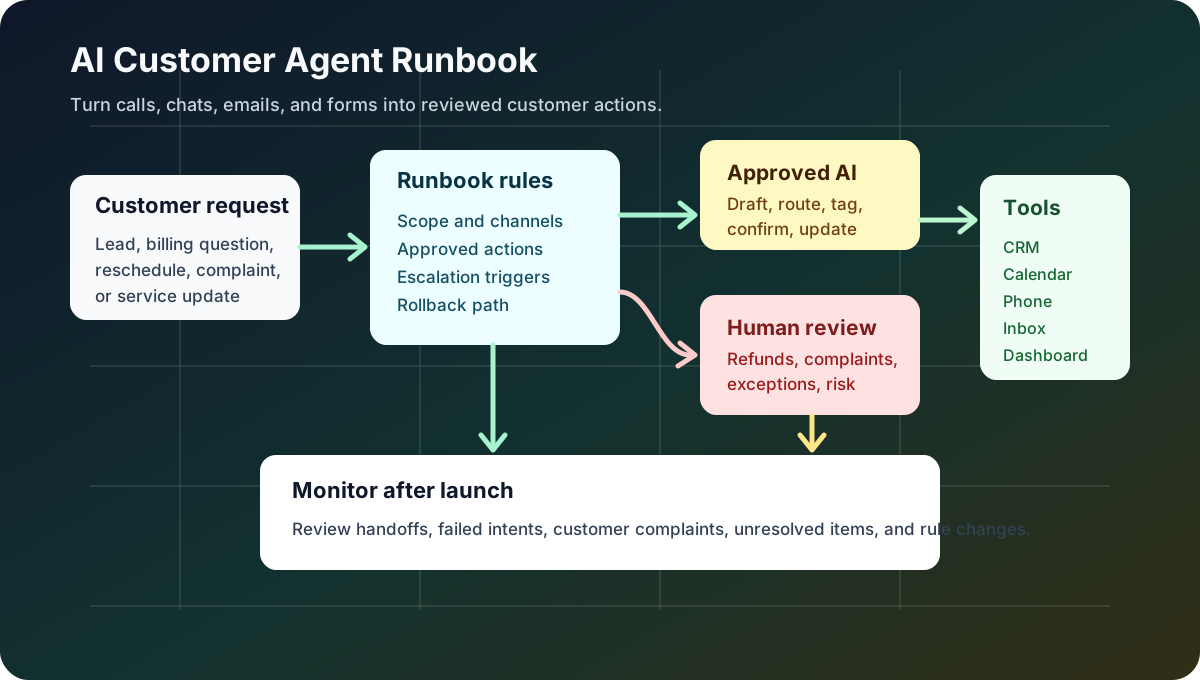
What changed with AI customer agents
OpenAI introduced OpenAI Presence on July 22, 2026 as a deployed product for voice and chat agents across customer and internal workflows. OpenAI describes Presence as a system that can answer questions, resolve issues, use company systems, take approved actions, and escalate to people when needed.
The important part for service-business buyers is not the brand name. Presence is not a self-serve small-business product today; OpenAI says it is available to eligible enterprise customers through a limited general availability program. The important part is the operating model: real customer agents need policies, standard operating procedures, approved actions, simulations, evaluation tools, guardrails, escalation rules, and ongoing monitoring.
OpenAI's July 20, 2026 safety note on long-horizon models makes the same point from a risk angle. OpenAI wrote that pre-deployment evaluations need to be paired with monitored deployment and the ability to intervene, pause, or roll back when problems appear.
For owners and operators, that means AI customer agents should be treated like a new front-office role with a documented playbook, not like a switch you turn on.
Why this matters for service businesses
Service businesses already run on repeatable customer workflows:
| Business moment | Common manual work | What can go wrong |
|---|---|---|
| New lead asks for availability | Staff checks calendar, asks qualifying questions, logs CRM notes | Slow replies, missed booking windows, duplicate follow-up |
| Customer asks about a bill | Staff verifies identity, checks invoice, explains policy | Wrong account details, inconsistent explanations, delayed resolution |
| Tenant reports a maintenance issue | Staff gathers details, classifies urgency, routes to vendor | Urgent issues buried behind routine messages |
| Patient or client wants to reschedule | Staff checks rules, finds slots, updates reminders | No-shows, calendar conflicts, missing confirmations |
| Estimate follow-up goes quiet | Staff tracks the open opportunity and sends reminders | Leads age out because nobody owns the next step |
An AI customer agent can help with these patterns because the work is repetitive and easy to define. But the agent needs access to business systems and customer context. That is where mistakes become expensive.
The service-business opportunity is not "replace the team." It is to remove the handoffs that slow the team down: reading every message, copying notes into the CRM, checking calendars, drafting routine replies, tagging urgency, and remembering who needs follow-up.
The plain-English terms owners should know
You do not need to speak like a software engineer to buy this well.
| Term | Plain-English meaning | Why it matters |
|---|---|---|
| AI agent | Software that can understand a request, choose steps, and use tools to complete a task | It may do more than answer; it may update records or trigger workflows |
| Guardrail | A rule that blocks, limits, or redirects the agent | Prevents the agent from handling requests outside its lane |
| Approved action | A task the agent is allowed to complete, such as sending a reminder or updating a CRM field | Keeps automation useful without giving it unlimited authority |
| Escalation | A handoff to a person | Protects sensitive, unclear, angry, high-value, or risky situations |
| Simulation | A test conversation before launch | Shows whether the agent follows your rules before customers depend on it |
| Evaluation | A score or review of whether the agent did the right thing | Helps you improve the workflow with evidence |
| Human-in-the-loop | A person reviews or approves certain actions | Keeps humans in control for judgment calls |
Where an AI customer agent fits first
Start where the work is frequent, rules are clear, and a human can review exceptions.
| Priority | Workflow | Good first version | Keep human approval for |
|---|---|---|---|
| 1 | Lead follow-up | Draft replies, ask qualifying questions, offer appointment windows, create CRM tasks | Discounts, custom quotes, large jobs |
| 2 | Scheduling and rescheduling | Suggest slots, send reminders, confirm details, update calendar notes | Double-booking exceptions, cancellation fees |
| 3 | Inbox and missed-call triage | Classify urgency, summarize request, assign owner, prepare callback notes | Upset customers, legal or medical details |
| 4 | Billing questions | Explain approved policy, gather missing information, route disputed items | Refunds, credits, payment-plan changes |
| 5 | Service status updates | Pull status, draft update, notify customer when rules are met | Delays, complaints, promises about completion |
This is also where AI integrations matter. A useful customer agent usually needs to connect to the phone system, shared inbox, CRM, calendar, booking system, forms, help desk, or property-management software. If it cannot see the right context or write to the right place, staff still ends up doing the back-office work manually.
The customer-agent runbook checklist
Before an AI customer agent handles real requests, write down the rules a trained employee would follow.
| Runbook item | Question to answer | Example |
|---|---|---|
| Scope | What job is the agent responsible for? | "Handle new HVAC lead intake and appointment requests." |
| Channels | Where can it interact with customers? | Phone, SMS, website chat, email, WhatsApp, portal messages |
| Knowledge | Which policies, FAQs, prices, service areas, and documents can it use? | Approved service FAQ, booking rules, refund policy |
| System access | Which tools can it read or update? | CRM read/write, calendar read/write, phone notes, ticket status |
| Approved actions | What can it do without asking a person? | Send appointment reminders, create CRM tasks, tag urgency |
| Approval gates | Which actions require review? | Refunds, credits, promises, unusual pricing, complaint replies |
| Escalation rules | When should it hand off? | Angry customer, low confidence, emergency, sensitive data |
| Monitoring | What will you review after launch? | Handoffs, failed intents, customer complaints, unresolved requests |
| Rollback | How do you pause or narrow the agent quickly? | Disable outbound actions, switch to draft-only mode, route to staff |
NIST's AI Risk Management Framework is written for a broad audience, but the practical idea applies here: organizations should manage AI risk across design, deployment, use, and evaluation. For a small service business, that can be as simple as clear permissions, visible logs, owner review, and a monthly improvement meeting.
Before and after: a safer customer-agent workflow
| Step | Manual workflow today | Reviewed AI customer-agent workflow |
|---|---|---|
| Customer asks for help | Message lands in inbox, voicemail, chat, or form | Agent captures request and identifies intent |
| Staff gathers context | Staff searches CRM, calendar, invoice, or ticket history | Agent pulls approved context from connected tools |
| Next step is decided | Staff applies policy from memory | Agent follows the runbook and flags unclear cases |
| Customer gets response | Staff writes reply when available | Agent drafts or sends approved replies by channel |
| Record is updated | Staff copies notes later | Agent creates notes, tasks, owner, and status |
| Exceptions are handled | Manager finds issue after delay | Agent escalates with summary and recommended action |
| Workflow improves | Problems repeat quietly | Reviews identify gaps, and rules are updated |
The win is operational clarity. Every customer request has a source, owner, status, next action, and audit trail.
What this means for your business
If you run a dental office, med spa, property-management company, HVAC company, plumbing business, or another local service operation, the practical path is to automate one customer workflow at a time.
Do not start with the most sensitive request. Start with a high-volume workflow where the business rule is obvious:
- "If a new lead asks for availability, collect service type, location, timing, and contact details."
- "If a customer asks to reschedule, offer available slots that match the cancellation policy."
- "If a maintenance request includes water, heat, access, or safety language, mark it urgent and route it to the right person."
- "If an invoice question is a dispute, prepare context but require manager approval."
That is how AI moves from novelty to useful back-office automation. The agent handles the repeatable pieces; people keep control over judgment, exceptions, and relationship moments.
A 30-day implementation plan
| Week | Focus | Output |
|---|---|---|
| 1 | Pick one workflow | A short description of the customer request, channels, systems, and desired outcome |
| 2 | Build the runbook | Approved answers, escalation rules, CRM fields, calendar rules, and human-review points |
| 3 | Connect and test | AI integration with the right tools, simulated customer requests, and staff review |
| 4 | Launch with limits | Draft-only or low-risk actions first, daily monitoring, and a list of fixes |
The first launch should be narrow. A narrow agent that reliably handles one workflow is more valuable than a broad agent that creates cleanup work for staff.
Where Zenovae helps
Zenovae helps founders and service-business operators turn manual customer operations into practical AI workflows.
That can include:
- Mapping the customer request from first contact to CRM update, booking, task, or escalation.
- Connecting AI to existing tools such as CRMs, calendars, phone systems, inboxes, forms, and internal dashboards.
- Building a custom workflow or internal tool when off-the-shelf software does not match the business.
- Adding human-in-the-loop approvals for billing, scheduling exceptions, urgent service requests, complaints, and high-value leads.
- Monitoring the workflow after launch so the system improves instead of drifting away from how the business actually works.
Want to remove a manual workflow? Zenovae can map the task, connect the right tools, and show what an AI integration or custom software build would look like.
FAQ
What is an AI customer agent?
An AI customer agent is software that can understand a customer request, use approved business information, take allowed actions, and hand off to a person when the request is risky or unclear.
Should a small service business use an enterprise AI agent product?
Not always. Many small businesses need the same operating principles, not the same enterprise product. Start with one workflow, clear policies, connected tools, approval rules, and monitoring.
What should an AI customer agent not do automatically?
It should not automatically approve refunds, change pricing, make legal or medical judgments, promise unusual service outcomes, or handle angry and sensitive situations without a human review path.
What is the safest first customer-agent workflow?
Lead follow-up, scheduling reminders, missed-call triage, and routine status updates are usually safer starting points because the rules can be documented and exceptions can be routed to staff.
Sources
Need Help with Your AI Project?
At Zenovae, we build production-ready AI systems that scale. From OpenClaw setup to custom integrations, Mission Control workflows, and full-stack delivery, we can help you ship faster and avoid costly mistakes.
Let's Talk