AI Front Office for Service Businesses: What to Connect Before You Buy
AI front office tools now connect phones, texts, booking, CRM, and analytics. Learn what service businesses should automate first.
An AI front office is no longer just a voice bot that answers after-hours calls. In 2026, the useful version connects phone calls, SMS, web chat, scheduling, CRM records, call summaries, analytics, and human handoffs into one customer operations workflow.
That matters for service businesses because the front desk is where revenue leaks usually start. A caller asks for availability. A lead texts after hours. A customer needs a reschedule. A technician needs context. If those interactions stay trapped in voicemail, call notes, inboxes, and disconnected calendars, AI will only make the mess faster.
Quick take: The best AI front office projects start with one measurable workflow: answer, qualify, book, route, and record the interaction. Recent announcements from RingCentral, Ooma, GoTo, Microsoft, OpenAI, and Freshworks show the same direction: AI is being embedded into communications, scheduling, service operations, admin controls, and analytics. Buyers should evaluate integrations and handoffs before voice quality demos.
| If you only read one section | Read this |
|---|---|
| You are choosing an AI receptionist | What changed in May 2026 |
| Your phone system already has AI add-ons | The front-office connection map |
| You manage a dental, HVAC, plumbing, med spa, or property team | What this means for service businesses |
| You want a rollout plan | A practical 30-day implementation plan |
What Changed in May 2026
The AI front office market is moving toward connected customer operations. Several recent product updates point in the same direction.
RingCentral announced expanded AI Receptionist capabilities on May 7, 2026, including shared SMS inbox support, call queue handling, Shopify, Calendly, and WhatsApp integrations. RingCentral also said AIR was used by more than 11,800 businesses and listed standalone pricing starting at $49 per month with 100 minutes. Those are vendor claims, but they show the product category is moving beyond phone answering into booking, messaging, and workflow connection.
Ooma introduced Ooma AI on May 12, 2026, with AI Transcriptions, AI Answering Service, AI Receptionist in beta, AI Insights in beta, and an OpenAI integration for Ooma Office. The important buyer signal is not the feature list by itself. It is the combination: capture the call, summarize it, respond to it, and analyze what happened.
GoTo launched GoTo Connect CX Complete on May 19, 2026, positioning it as a unified customer experience platform for SMBs across phone, text, web chat, WhatsApp, and webinar interactions. GoTo says its AI-powered analytics evaluates 100% of interactions, which is useful if managers need coaching, sentiment, trend, and service visibility instead of random call sampling.
Enterprise service platforms are moving the same way. Microsoft's Dynamics 365 Customer Service 2026 release wave 1 emphasizes AI-first service, unified routing, supervisor tooling, Copilot integration, and four AI agents for case management, customer intent, quality evaluation, and customer knowledge management. OpenAI's ChatGPT Business release notes show workspace agents rolling out with schedules, connected apps, Slack use, admin controls, analytics, and version history. Freshworks announced Freddy AI Agent Studio in Freshservice on May 14, 2026, highlighting governed service agents, third-party context through MCP Gateway, and AI insights.
The pattern is clear: AI customer operations is becoming less about one chatbot and more about connected work.
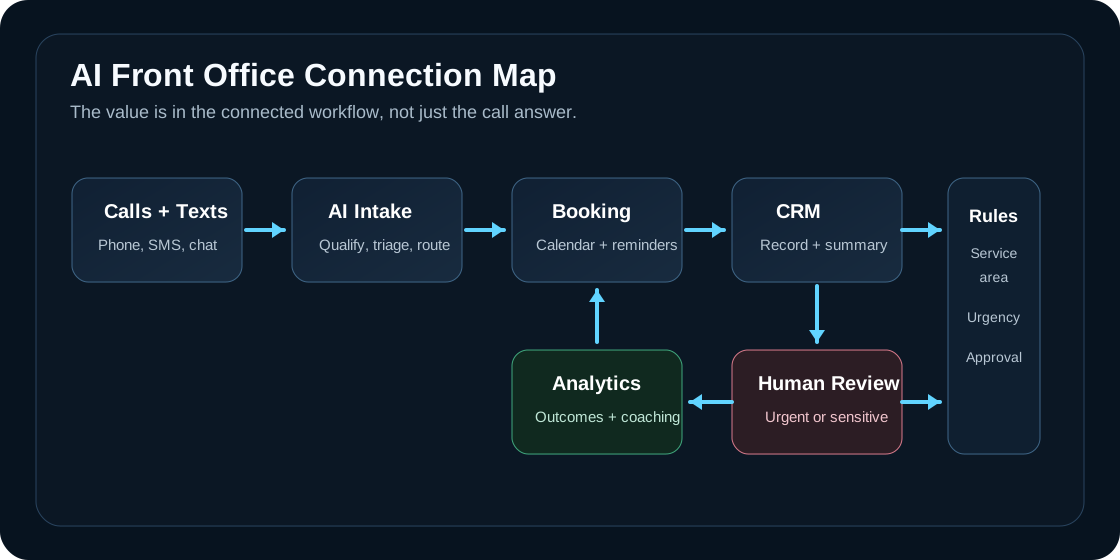
The Front-Office Connection Map
An AI front office should be judged by what it can safely complete, not by how impressive one demo call sounds.
| Front-office layer | Buyer question | Why it matters |
|---|---|---|
| Phone and SMS | Can AI answer, text back, handle queues, and capture context? | Many service leads still start with a call or text, especially urgent requests. |
| Scheduling | Can it book, reschedule, or request staff approval from the real calendar? | A qualified lead is weaker than a booked appointment. |
| CRM or job system | Does every interaction create or update the right record? | Staff should not retype call notes or guess what happened. |
| Knowledge base | Is it grounded in current pricing rules, service areas, FAQs, and policies? | Generic answers create customer trust problems. |
| Escalation rules | Does it know when to route to a human, technician, manager, or emergency line? | Sensitive, expensive, or unusual cases need human control. |
| Analytics | Can managers review missed calls, outcomes, sentiment, response time, and handoff quality? | AI needs operating metrics, not just setup completion. |
For a service business, the simplest version is often enough: caller comes in, AI asks the right intake questions, checks the business rules, books or routes the request, writes the summary to the CRM, and alerts the right person when the case is risky.
What This Means for Service Businesses
The practical opportunity is different by vertical, but the front-office pattern is similar.
| Business type | Automate first | Keep human-led |
|---|---|---|
| HVAC and plumbing | Emergency triage, service-area checks, after-hours intake, appointment requests, technician notifications | Pricing exceptions, safety-sensitive dispatch decisions, angry customer recovery |
| Dental practices | New patient intake, recall reminders, appointment confirmations, insurance pre-screening questions | Clinical advice, treatment decisions, complex billing disputes |
| Med spas | Treatment inquiries, consultation booking, reminder flows, post-visit check-ins | Medical suitability, adverse reactions, high-value package discussions |
| Property management | Leasing inquiries, maintenance triage, showing coordination, tenant status updates | Legal notices, eviction-sensitive issues, owner escalation |
| Local professional services | Lead qualification, consult scheduling, FAQ responses, follow-up reminders | Conflict checks, legal or financial advice, custom proposal decisions |
The mistake is buying a generic AI receptionist and expecting it to understand your workflow. A plumbing company needs to separate water is actively leaking from quote for next month. A dental office needs to distinguish emergency pain, new patient booking, hygiene recall, and billing. A property manager needs to triage maintenance without accidentally promising unavailable repairs.
What to Ask Vendors Before You Buy
Use these questions before signing for any AI receptionist, phone AI, or AI customer service add-on.
| Evaluation question | Good answer | Red flag |
|---|---|---|
| What systems does it update after the call? | CRM, calendar, phone log, job record, and internal notification are mapped. | You can export transcripts. |
| How are human handoffs handled? | Rules define urgency, confidence thresholds, escalation contacts, and summaries. | Every hard case goes to voicemail or a generic inbox. |
| Can managers review outcomes? | Dashboard shows resolved calls, booked appointments, escalations, missed handoffs, and trends. | Only raw transcripts are available. |
| Who controls actions? | Admins can enable, disable, or approve write actions and integrations. | The AI has broad access with little review. |
| How is the knowledge base maintained? | There is an owner, update process, and review cadence. | The AI learns from stale docs with no accountability. |
| What happens when it is wrong? | There is a rollback path, notification workflow, and human correction loop. | The model is very accurate. |
This is where many buyers should slow down. A voice demo is easy. A durable operating workflow requires permissions, records, prompts, routing rules, reporting, and training for staff.
A Practical 30-Day Implementation Plan
You do not need to automate the whole front office at once. Start with the highest-volume, lowest-risk workflow and prove it before expanding.
| Timeline | Work to complete | Output |
|---|---|---|
| Days 1-5 | Pull call reasons, missed-call patterns, common text questions, booking rules, service areas, and escalation contacts. | A ranked list of front-office workflows. |
| Days 6-10 | Choose one workflow, such as after-hours intake or new appointment requests. Define human handoff rules. | A controlled pilot scope. |
| Days 11-18 | Connect phone, SMS, calendar, CRM, and knowledge source. Test edge cases with real business scenarios. | Working AI front office pilot. |
| Days 19-24 | Train staff on reviews, corrections, and escalation handling. Confirm customer-facing language. | Human-in-the-loop operating process. |
| Days 25-30 | Review outcomes, missed handoffs, booking quality, and staff feedback. Decide whether to expand. | Go, adjust, or pause decision. |
For AI search and buyer evaluation, this is also the clearest way to describe the project: not "we installed AI," but "we automated after-hours intake and appointment requests while keeping urgent and sensitive calls under human review."
Risks and Watchouts
AI front office projects fail when the automation is disconnected from the actual business process.
| Risk | Why it matters | Mitigation |
|---|---|---|
| Generic answers | Customers notice when AI does not know your service area, pricing policy, or schedule. | Ground the agent in approved FAQs, policies, and current offers. |
| Bad handoffs | Staff lose trust if escalations arrive without context. | Include transcript, summary, reason, urgency, and recommended next step. |
| Over-automation | Sensitive cases can damage customer trust if AI pushes too far. | Keep medical, legal, safety, refund, and complaint decisions human-led. |
| Unclear ownership | No one updates scripts, knowledge, and routing rules after launch. | Assign an owner and monthly review cadence. |
| Weak measurement | The project looks busy but no one knows if it improved outcomes. | Track booked calls, escalations, missed-call recovery, response time, and staff time saved. |
The goal is not to remove people from the customer experience. The goal is to remove avoidable delay, repetition, and dropped context while keeping humans available for judgment.
Where Zenovae Helps
Zenovae builds AI front office workflows for service businesses that need the phone, calendar, CRM, and staff process to work together.
That can include an AI receptionist, AI integrations, AI agent development, custom dashboards, workflow rules, follow-up automation, reporting, and ongoing support. For vertical teams, Zenovae can map industry-specific flows for property management, dental practices, HVAC companies, plumbing companies, and med spas.
The useful first step is a workflow audit. Which calls are missed? Which texts wait too long? Which appointments require manual back-and-forth? Which records are incomplete? Which handoffs are risky? Once that map is clear, the AI implementation becomes smaller, safer, and easier to measure.
Want to know where AI would recover the most revenue in your business? Book a free AI audit, and Zenovae can map your missed-call, follow-up, and scheduling workflow before you buy another disconnected tool.
FAQ
What is an AI front office?
An AI front office is a connected customer operations workflow where AI answers calls or messages, qualifies the request, books or routes the next step, updates business systems, and gives managers visibility into what happened.
Is an AI front office the same as an AI receptionist?
No. An AI receptionist is usually one part of the front office. The broader AI front office includes phone, SMS, scheduling, CRM updates, knowledge systems, analytics, and human escalation rules.
What should a service business automate first?
Start with high-volume, low-risk work: after-hours intake, missed-call callbacks, appointment requests, confirmations, reminders, FAQ responses, and lead qualification. Keep sensitive decisions human-led until the workflow is proven.
How should buyers measure success?
Measure business outcomes, not demo quality. Useful metrics include answered interactions, booked appointments, qualified leads, escalations, response time, staff review time, incomplete records, and customer complaints.
Sources
- RingCentral: RingCentral Brings Always-On AI to the Front Lines of Customer Engagement
- Ooma: Ooma Introduces Ooma AI to Streamline Business Call Management and Transform Customer Experiences
- GoTo: GoTo Launches GoTo Connect CX Complete
- Microsoft Learn: Dynamics 365 Customer Service 2026 release wave 1
- OpenAI Help Center: ChatGPT Business release notes
- Freshworks: Freshworks Unveils AI Agent Studio in Freshservice
Need Help with Your AI Project?
At Zenovae, we build production-ready AI systems that scale. From OpenClaw setup to custom integrations, Mission Control workflows, and full-stack delivery, we can help you ship faster and avoid costly mistakes.
Let's Talk