AI Inbox Triage for Service Businesses: Turn Messages Into Booked Work
AI inbox triage helps service businesses turn emails, forms, and messages into reviewed follow-up, scheduling, CRM updates, and clearer admin queues.
Most service businesses do not have one inbox. They have email, website forms, missed-call notes, voicemail transcripts, texts, calendar requests, CRM tasks, portal messages, and staff side channels.
That is where follow-up gets lost. A new patient asks about availability. A tenant sends a maintenance request with photos. A homeowner replies to an estimate. A vendor sends an invoice. None of these messages are hard by themselves, but the business loses time when every message needs a person to read, classify, assign, reply, update the CRM, and remember the next step.
Quick take: AI inbox triage is a practical first automation for service businesses because it turns scattered messages into reviewed work: urgent lead, booking request, customer issue, vendor bill, routine question, or manager approval. The safest version does not let AI silently run the business. It lets AI sort, summarize, draft, route, and prepare updates while humans approve high-value or sensitive actions.
| If you only read one section | Read this |
|---|---|
| You miss leads because messages pile up | What changed in AI work tools |
| You need a practical first workflow | The inbox triage workflow to automate first |
| You worry AI will send the wrong reply | What should stay human-reviewed |
| You want a rollout plan | A 30-day implementation plan |
| You want help mapping it | Where Zenovae helps |
What changed in AI work tools
AI is moving into the work apps where admin tasks already happen.
OpenAI announced ChatGPT Work on July 9, 2026, describing it as an agent that can take action across apps and files, stay with projects for hours, and turn goals into finished work (OpenAI). OpenAI also says connected plugins can bring context from systems such as Slack, Teams, Google Drive, SharePoint, email, calendars, CRMs, and project trackers into ChatGPT Work.
Earlier, OpenAI introduced workspace agents in ChatGPT for teams on April 22, 2026. The examples include lead outreach agents that qualify inbound leads, draft follow-up emails, and update the CRM, plus reporting agents that pull data and deliver weekly updates (OpenAI).
Google made a similar move with Google Workspace Studio, announced on December 3, 2025. Google described it as a way to design, manage, and share AI agents in Workspace, including agents that can automate email sorting, calendar logistics, reminders, status reports, and follow-up tasks without coding (Google Workspace).
Microsoft's May 2026 Copilot Studio update also points in the same direction. Microsoft says computer-using agents are generally available and can interact with websites and desktop applications through the user interface when older systems do not have clean APIs. Microsoft also highlighted workflows that combine API actions, approvals, business logic, and adaptive UI interactions (Microsoft Copilot Blog).
Plain-English version: the tools are getting better at crossing app boundaries. The business question is no longer "Can AI read a message?" It is "Which messages should become booked work, CRM updates, follow-up tasks, or human review queues?"
What AI inbox triage means in plain English
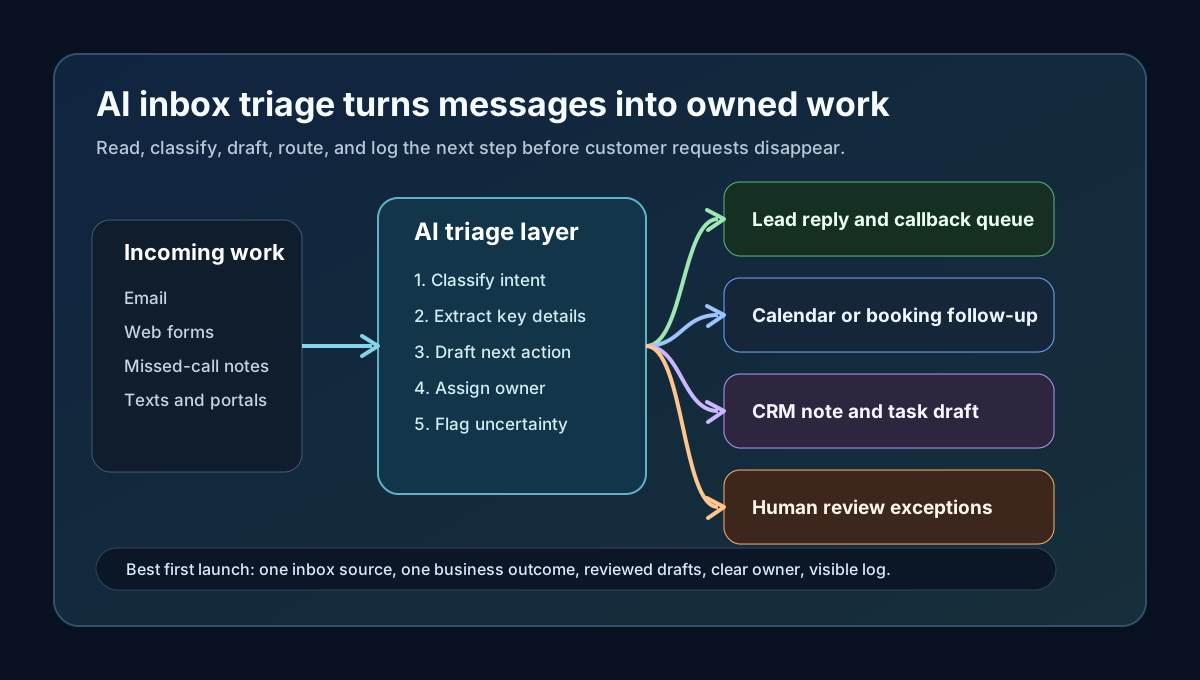
AI inbox triage is the use of AI to read incoming messages, understand what they are about, decide the next business step, and prepare the handoff.
It is not just an autoresponder. A useful inbox triage system can:
| Message type | What AI can prepare | Human role |
|---|---|---|
| New lead asks for pricing or availability | Classify lead type, draft reply, suggest appointment slots, create CRM task | Approve reply rules and review edge cases |
| Existing customer reports an issue | Summarize problem, detect urgency, route to owner or dispatcher | Decide on refunds, priority changes, or sensitive replies |
| Missed-call transcript arrives | Extract name, phone, job type, urgency, and callback reason | Call back or approve automated SMS follow-up |
| Vendor invoice email arrives | Identify vendor, amount, due date, and missing details | Approve payment or send to accounting |
| Routine question arrives | Draft answer from approved FAQs or policies | Review when confidence is low |
The goal is simple: every message should have an owner, a status, and a next step.
Why this matters for service businesses
Service businesses often lose revenue in the quiet gap between "message received" and "someone handled it."
For a dental practice, that gap can mean a new patient books elsewhere. For a med spa, it can mean an inquiry sits until the customer loses interest. For an HVAC or plumbing company, it can mean an urgent job waits behind low-value email. For a property manager, it can mean tenants send repeat messages because nobody can see who owns the request.
AI inbox triage helps because the workflow is repetitive, high-volume, and easy to review. It also connects naturally to the systems service businesses already use: phone systems, website forms, calendars, CRMs, property management software, scheduling tools, and shared inboxes.
| Before triage automation | After reviewed AI triage |
|---|---|
| Staff open the inbox several times a day and scan everything manually | Messages are classified into lead, booking, support, billing, vendor, or review queues |
| Follow-up depends on whoever saw the message first | Each item gets an owner, due time, and suggested next action |
| CRM updates happen late or not at all | AI prepares CRM notes and task drafts from messages, calls, or forms |
| Urgent requests compete with newsletters and routine admin | Priority rules surface urgent customer and revenue-impacting messages |
| Managers ask "what happened with this lead?" in chat threads | Status, source, owner, and next step are visible in one place |
This is why inbox triage is a good starting point for back-office automation. It is close to revenue, visible to staff, and easy to improve after launch.
The inbox triage workflow to automate first
Start with one message source and one business outcome. Do not try to automate every inbox on day one.
For many service businesses, the first workflow should be: new inquiry received -> classify -> draft response -> create task -> update CRM or schedule follow-up -> route exceptions to a human.
| Step | What happens | Practical rule |
|---|---|---|
| Capture | Pull in new messages from email, web forms, call notes, or texts | Start with the source that creates the most missed revenue |
| Classify | Label the message by intent and urgency | Use business labels staff already understand |
| Extract | Pull out name, contact info, service type, location, preferred time, and issue | Mark missing fields clearly instead of guessing |
| Draft | Prepare a reply, callback note, appointment prompt, or CRM update | Keep customer-facing drafts reviewed at first |
| Route | Assign to the right person or queue | Escalate high-value, angry, legal, medical, or billing-sensitive messages |
| Log | Save source message, draft, reviewer, decision, and final action | Make the trail easy to audit later |
Technical term, translated: an AI integration means connecting AI to the tools you already use so it can read allowed information, prepare work, and hand it back to the right system. It does not mean replacing your CRM, calendar, phone system, or inbox.
What should stay human-reviewed
AI inbox triage should make the team faster, not invisible.
The NIST AI Risk Management Framework describes AI risk work as a continuous process of governing, mapping, measuring, and managing risks across the system lifecycle (NIST AI Resource Center). For a service business, that translates into practical controls: write the rules down, test with real examples, monitor mistakes, and adjust the workflow as customer behavior changes.
Keep a human in the loop when the message involves:
| Message or action | Why it needs review | Safer automation pattern |
|---|---|---|
| Refunds, cancellations, discounts, or payment disputes | The business impact can be material | AI drafts options; manager approves |
| Medical, dental, legal, insurance, or compliance-sensitive details | The answer may require licensed or policy-specific judgment | AI routes and summarizes; qualified staff responds |
| Angry customers or reputation risk | Tone and context matter | AI flags urgency and drafts a calm response; owner reviews |
| High-value leads or complex estimates | A generic reply can reduce close rate | AI creates a briefing and next-step task |
| Unclear messages or low-confidence matches | Guessing creates bad data | AI asks for missing information or sends to review queue |
The safe rule is not "AI never acts." The safe rule is "AI acts only where the business has clear rules, a visible record, and a defined fallback."
The priority scorecard
Use a simple scorecard before building. The best first workflow is usually the one with high volume, clear rules, measurable value, and low downside if a human reviews the final step.
| Workflow candidate | Revenue impact | Rule clarity | Review ease | Start now? |
|---|---|---|---|---|
| New lead inbox triage | High | High | High | Yes |
| Missed-call transcript follow-up | High | High | High | Yes |
| Appointment rescheduling requests | Medium | High | High | Yes |
| Vendor invoice intake | Medium | Medium | High | Good second workflow |
| Complaints and refunds | Medium | Medium | Medium | Review-only first |
| Complex estimates or diagnoses | High | Low | Medium | Human-led with AI notes |
If two workflows look similar, choose the one your team already complains about every week. Staff frustration is often a useful signal: the task is repetitive enough to automate and visible enough to measure.
A 30-day implementation plan
You do not need a six-month transformation project to test inbox triage. You need a narrow workflow, a clean handoff, and a short feedback loop.
| Timeline | Business goal | What to build |
|---|---|---|
| Days 1-5 | Pick the workflow and define success | Choose one inbox source, list message categories, define what "handled" means |
| Days 6-10 | Map the handoff | Decide who reviews, what gets drafted, where CRM or calendar updates go, and what must be logged |
| Days 11-18 | Build the first AI integration | Connect inbox/form/call-note source, classification, draft response, task creation, and review queue |
| Days 19-24 | Test with real examples | Run recent messages through the workflow, compare AI output to staff decisions, tune rules |
| Days 25-30 | Launch with monitoring | Track response time, open items, review changes, missed categories, and staff feedback |
The first month should prove whether the workflow reduces waiting, copying, and chasing. It should not aim to automate every judgment call.
What this means for your business
If your business is still relying on manual inbox scanning, AI inbox triage can create operational clarity quickly.
You should expect better visibility into:
- Which leads are waiting for a reply.
- Which customer issues are urgent.
- Which messages need a human decision.
- Which CRM records are missing notes.
- Which staff member owns the next step.
- Which repeat questions could become approved templates or knowledge base answers.
The strongest operational benefit is not only speed. It is fewer dropped handoffs. When every message is classified, assigned, and logged, managers can see where work stalls before customers chase the business.
Where Zenovae helps
Zenovae helps founders and service-business operators turn messy admin work into practical AI integrations and custom software.
For AI inbox triage, that can include:
- Mapping the current inbox, phone, form, calendar, and CRM handoff.
- Defining message categories, approval rules, and exception paths.
- Connecting AI to the tools you already use instead of forcing a full system replacement.
- Building review queues, dashboards, or internal portals when off-the-shelf tools do not fit.
- Monitoring the workflow after launch so mistakes, edge cases, and cost issues are visible.
This is especially useful for property managers, dental practices, med spas, HVAC companies, plumbing companies, and other service businesses where fast response, clear scheduling, and clean follow-up directly affect revenue.
Want to remove a manual workflow? Zenovae can map the task, connect the right tools, and show what an AI integration or custom software build would look like.
FAQ: AI inbox triage for service businesses
What is AI inbox triage?
AI inbox triage is a workflow where AI reads incoming messages, classifies the request, extracts key details, prepares a response or task, and routes the item to the right person or system. For service businesses, it is useful for leads, missed-call notes, appointment requests, customer issues, vendor messages, and CRM follow-up.
Is AI inbox triage the same as an autoresponder?
No. An autoresponder sends a simple preset message. AI inbox triage can understand message intent, summarize details, prepare CRM notes, suggest next steps, and route exceptions for human review.
Should AI reply to customers automatically?
Sometimes, but not for every message. Start with AI-drafted replies that staff review. After the workflow proves reliable, routine low-risk replies can be automated with clear limits, logging, and fallback rules.
What tools does inbox triage need to connect with?
Most service businesses need connections to email or shared inboxes, website forms, phone or voicemail transcripts, calendars, CRM records, task tools, and sometimes property management, scheduling, or accounting software.
What should be measured after launch?
Measure response time, number of unassigned messages, reviewed draft changes, missed categories, stale leads, appointment conversion, and staff time spent on manual sorting. These metrics show whether the automation is improving the workflow instead of just adding another tool.
Sources
Need Help with Your AI Project?
At Zenovae, we build production-ready AI systems that scale. From OpenClaw setup to custom integrations, Mission Control workflows, and full-stack delivery, we can help you ship faster and avoid costly mistakes.
Let's Talk