AI Invoice Approval Workflows: Stop Losing Vendor Bills in the Inbox
AI invoice approval workflows help service businesses capture vendor bills, review drafts, and keep accounting work moving without losing control.
Vendor invoices are one of the easiest back-office workflows to underestimate. A bill arrives by email, someone downloads the PDF, checks the vendor, guesses the right category, asks a manager for approval, updates the accounting system, and follows up later when the payment status is unclear.
That work is not glamorous, but it affects vendor trust, cash visibility, owner focus, and month-end cleanup. For service businesses with technicians, offices, contractors, software subscriptions, utilities, rent, supplies, and marketing vendors, the invoice inbox can quietly become an operations bottleneck.
Quick take: AI invoice approval workflows are becoming a practical entry point for back-office automation because they connect inboxes, documents, accounting records, approval rules, and human review. The safest first version does not pay bills automatically. It captures vendor invoices, prepares a draft, flags uncertainty, and lets a human approve before anything becomes final.
| If you only read one section | Read this |
|---|---|
| You lose bills in email | Start with the invoice inbox |
| You use QuickBooks, Business Central, or another accounting tool | What changed in the market |
| You worry about accounting mistakes | Keep humans in control of money movement |
| You need an implementation path | A 30-day rollout plan |
| You want help mapping the workflow | Where Zenovae helps |
What changed in the market
AI is moving into routine finance administration, not just customer chat.
Microsoft's Payables Agent for Dynamics 365 Business Central is a clear example. Microsoft describes it as an autonomous AI-powered agent that monitors a designated email inbox for PDF invoice attachments, extracts invoice data, matches vendors, suggests account classifications, and creates draft purchase documents for review (Microsoft Learn, last updated May 3, 2026).
The important word is draft. Microsoft says the Payables Agent creates drafts only and does not automatically post invoices or make permanent financial changes without explicit human approval (Microsoft Learn).
Microsoft's release-plan details also show why this matters for ordinary operating expenses. The Payables Agent focuses on overhead expenses such as rent, utilities, leasing, food, phone bills, and software subscriptions, which often arrive as email attachments or through other channels (Microsoft Learn, last updated November 18, 2025).
Intuit is moving in a similar direction for small-business operations. Its Intuit AI page emphasizes control and oversight, including review and editing of AI-drafted messages, estimates, reminders, or bills, and says accountants remain part of the workflow (Intuit QuickBooks).
The broader automation pattern is also becoming clearer. Microsoft says agents and workflows work best together: workflows provide defined steps, branching logic, handoffs, and audit trails, while agents handle tasks that need judgment, such as interpreting a document or routing an exception (Microsoft Copilot Blog, April 15, 2026).
Plain-English version: the new opportunity is not "let AI run finance." It is "let AI prepare the repetitive parts, then keep people in charge of approvals, exceptions, and payments."
What an AI invoice approval workflow means
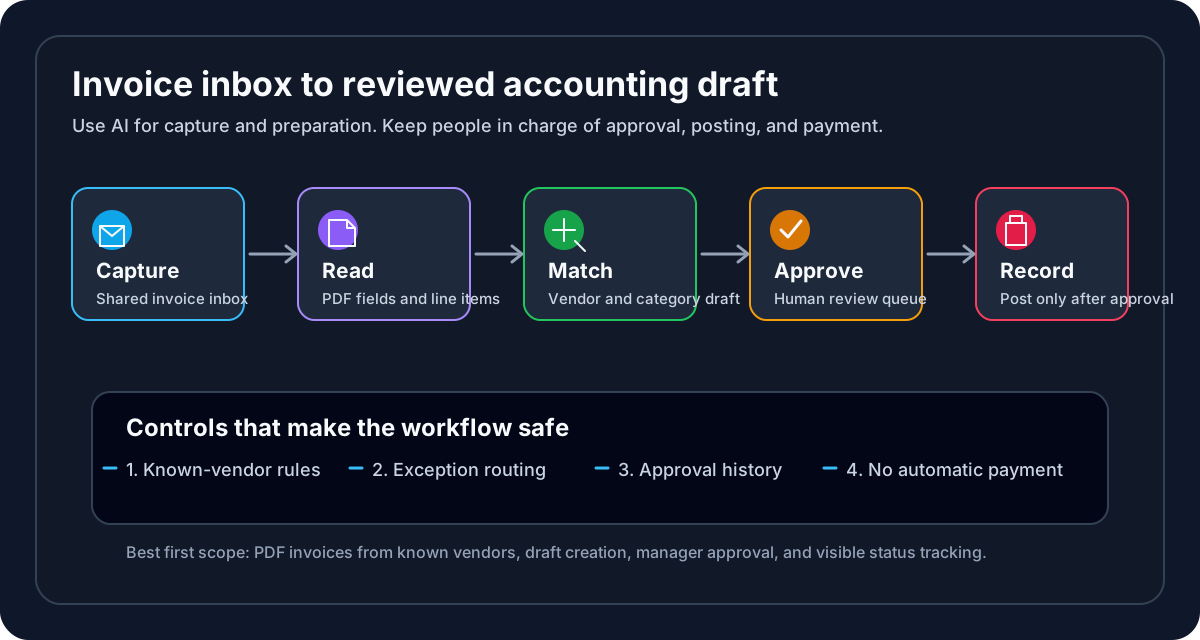
An AI invoice approval workflow is a connected process that helps a business move vendor bills from inbox to reviewed accounting draft.
For non-technical operators, the workflow usually has five parts:
| Workflow step | Plain-English meaning | Human control point |
|---|---|---|
| Capture | Collect invoice emails and PDF attachments in one place | Staff can decide which inbox is trusted |
| Read | Extract vendor, date, amount, line items, and due date | Staff can check the document against the draft |
| Match | Compare the invoice to known vendors and past accounting records | Staff reviews uncertain vendor matches |
| Route | Send the draft to the right owner for approval | Managers approve, reject, or ask questions |
| Record | Update the accounting or operations system after approval | Final posting and payment stay controlled |
This is not the same as a simple email rule. A basic rule can move messages into a folder. An AI-assisted workflow can read a vendor bill, prepare a structured draft, and flag what does not look clear.
It is also not the same as giving AI permission to spend money. For most service businesses, the correct first step is invoice preparation and approval routing, not automated payment.
Start with the invoice inbox
The best first move is boring and valuable: create a clean, monitored invoice intake path.
Many service businesses have invoices scattered across owner inboxes, office-manager emails, technician texts, vendor portals, and forwarded PDFs. AI works better when the work enters through a predictable front door.
| Current invoice habit | Operational problem | Better first automation |
|---|---|---|
| Vendors email different staff members | Bills get missed when someone is busy or out | A shared invoice inbox with clear ownership |
| Staff download PDFs manually | Files sit on desktops or in email threads | Automatic attachment capture and draft creation |
| Vendor names are typed inconsistently | Duplicate vendor records and coding mistakes | Vendor matching against the accounting system |
| Managers approve in text threads | No clear approval history | Approval queue with source links |
| Owners ask "what do we owe?" | Cash visibility depends on manual updates | Reviewed draft list by vendor, due date, and amount |
For a dental practice, this might include lab bills, dental supplies, rent, software, payroll services, and marketing invoices.
For an HVAC or plumbing company, it might include parts suppliers, fleet costs, fuel cards, subcontractors, insurance, dispatch tools, and seasonal advertising.
For a property manager, it might include repair vendors, utilities, cleaning, landscaping, maintenance contractors, leasing tools, and owner reimbursements.
The first win is not a perfect finance system. The first win is that every vendor bill has a place to land, a status, and an owner.
Keep humans in control of money movement
Invoice automation touches financial records, so the approval design matters more than the AI model.
Microsoft's Payables Agent documentation is useful here because it clearly separates preparation from final action. The agent can create drafts, identify vendors, suggest classifications, and request assistance when uncertain, but drafts require human review and approval before posting (Microsoft Learn).
That is the right pattern for most service businesses:
| Automate first | Keep human-led |
|---|---|
| Collect invoice emails and attachments | Approve new vendors |
| Extract invoice fields from PDFs | Approve unusual or high-dollar invoices |
| Suggest vendor and category matches | Decide whether a disputed bill should be paid |
| Prepare draft records | Post invoices and release payments |
| Route exceptions to the right person | Change finance policies or approval limits |
In plain English, human-in-the-loop automation means the system can prepare work, but a person reviews sensitive steps before they become final.
That review step protects the business from common issues:
| Risk | Why it matters | Practical control |
|---|---|---|
| Fake or altered invoices | Fraud can look like routine vendor email | Use a trusted intake inbox and vendor verification |
| Wrong vendor match | Duplicate or incorrect records create payment errors | Require approval when confidence is low |
| Wrong accounting category | Reports become misleading | Let AI suggest, but have finance review early |
| Duplicate invoices | The same bill may be forwarded more than once | Match invoice number, vendor, date, and amount |
| Missing context | A bill may need job, property, or patient context | Route exceptions to the operational owner |
| Automatic payment too soon | Money movement is high-risk | Keep posting and payment behind approval |
NIST's AI Risk Management Framework is not a finance playbook, but its core point applies: organizations should manage AI risks to individuals, organizations, and society and build trustworthiness into AI systems (NIST AI RMF). For invoice workflows, that means clear roles, review steps, audit trails, and the ability to stop or correct the system.
What this means for your business
AI invoice approval is not just an accounting upgrade. It can improve how the business operates day to day.
| Business pain | Workflow impact | What improves |
|---|---|---|
| Owner handles vendor bills after hours | Finance work steals focus from sales and service quality | Owners review exceptions instead of every attachment |
| Staff chase approvals manually | Vendors wait and office work piles up | Approval queue shows who needs to act |
| Bills are coded differently each month | Reports are harder to trust | Repeated vendors get more consistent treatment |
| Month-end cleanup is painful | Missing invoices surface late | Invoices enter the process when they arrive |
| Managers lack cash visibility | Decisions are made from stale numbers | Drafts and approvals show what is pending |
The biggest benefit is operational clarity. A founder or operator should be able to answer:
- Which bills came in this week?
- Which invoices are waiting for approval?
- Which vendor records need review?
- Which invoices are unusual or incomplete?
- Which approved bills still need posting or payment?
When those answers are visible, the business can move faster without making finance feel like a black box.
Choose the right first workflow
Not every invoice should be automated on day one. Pick the workflow with enough repetition to matter and enough structure to review safely.
| Candidate workflow | Good first fit? | Reason |
|---|---|---|
| Recurring software invoices | Yes | Similar format, known vendor, predictable category |
| Utility bills | Yes | Repetitive, operationally important, easy to route |
| Parts supplier invoices | Often | Useful if vendor and job/project matching are clear |
| Subcontractor bills | Sometimes | May require job validation and manager review |
| New vendor invoices | Later | Higher fraud and setup risk |
| Disputed or unusual invoices | Human-led | Requires business judgment |
For most service businesses, the first automation should prepare clean drafts for known vendors and push exceptions to a person. That is enough to save time while keeping risk contained.
A 30-day rollout plan
You do not need a six-month transformation project to start. You need one workflow, one owner, one intake path, and a clear review rule.
| Week | What to do | Output |
|---|---|---|
| 1 | Map how invoices arrive today across email, portals, staff, and vendors | Current-state workflow and pain points |
| 2 | Choose one invoice category, such as utilities, software, or known suppliers | First automation scope |
| 3 | Connect the intake inbox, accounting tool, approval owner, and exception rules | Working draft workflow |
| 4 | Review drafts with staff, measure corrections, and tighten rules | Launch-ready process with monitoring |
Keep the first build focused. A good pilot might process only PDF invoices from known vendors, send uncertain items to an office manager, and avoid any automatic posting or payment.
Where Zenovae helps
Zenovae helps founders and service-business operators turn messy back-office work into practical AI integrations and custom software.
For invoice approval workflows, that can include:
- Mapping how vendor bills arrive today.
- Creating a shared intake workflow for invoice emails and attachments.
- Connecting AI document review to QuickBooks, Microsoft Business Central, CRM records, calendars, spreadsheets, or internal tools.
- Building an approval queue with source links, status, and exception flags.
- Keeping humans in control for new vendors, unusual amounts, disputed invoices, posting, and payment.
- Monitoring the workflow after launch so it improves instead of becoming another hidden system.
This is the same practical pattern Zenovae uses for lead follow-up, scheduling, CRM updates, inbox triage, and reporting: automate the repetitive steps, connect the tools you already use, and keep people in charge of judgment-heavy work.
Want to remove a manual workflow? Zenovae can map the task, connect the right tools, and show what an AI integration or custom software build would look like.
FAQ
Should AI pay vendor bills automatically?
Usually no, at least not at the start. A safer first workflow lets AI capture the invoice, prepare a draft, and route it for review. Posting and payment should stay behind human approval until the process is proven and controls are clear.
What does OCR mean?
OCR means optical character recognition. In plain English, it is the technology that reads text from a scanned document or PDF so software can turn an invoice into structured fields like vendor, amount, date, and line items.
What does "agent" mean in invoice automation?
An AI agent is software that can work through a task, use tools, and ask for help when needed. In an invoice workflow, an agent might monitor an inbox, read a PDF, match a vendor, prepare a draft, and pause when a person needs to review something.
What is the best first invoice workflow to automate?
Start with known vendors and repetitive invoices. Software subscriptions, utilities, recurring office costs, and common suppliers are usually better first candidates than new vendors, disputed bills, or high-dollar exceptions.
Sources
- Microsoft Learn: FAQ for Payables Agent
- Microsoft Learn: Payables Agent overview
- Microsoft Learn: Automate payables processes with the Payables Agent
- Microsoft Copilot Blog: Automate business processes with agents plus workflows
- Intuit QuickBooks: AI-powered business tools
- NIST: AI Risk Management Framework
Need Help with Your AI Project?
At Zenovae, we build production-ready AI systems that scale. From OpenClaw setup to custom integrations, Mission Control workflows, and full-stack delivery, we can help you ship faster and avoid costly mistakes.
Let's Talk