AI Lead Nurturing Approval Queues: Follow Up Faster Without Losing Control
AI lead nurturing approval queues help service businesses speed up follow-up while keeping owners, opt-outs, and risky replies reviewed.
Most service businesses do not lose leads because the team does not care. They lose them because follow-up work is scattered across form submissions, missed calls, inboxes, CRM records, calendars, quote notes, and staff memory.
AI lead nurturing can help, but the practical question is not whether an AI tool can write a follow-up email. The buyer question is whether your business can let AI draft, queue, route, and update follow-up work without sending the wrong message, ignoring an opt-out, or hiding important customer context from the owner.
Quick take: Salesforce's July 2026 Agentforce Sales release notes include more control over manual review of lead nurturing emails, and Salesforce's Lead Nurturing Agent documentation describes approval queues, owner rules, opt-out handling, meeting handoffs, and email limits. For service businesses, the useful lesson is simple: automate the follow-up queue before you automate every send. Use AI to draft, prioritize, and prepare the next step, then require human approval where the message could affect trust, price, scheduling, or compliance.
| If you only read one section | Read this |
|---|---|
| You want the business takeaway | What changed with AI lead nurturing approval queues |
| You need workflow examples | What this means for service-business follow-up |
| You worry about mistakes | The risk checklist before AI sends anything |
| You want a rollout plan | A practical 30-day implementation plan |
| You want Zenovae's fit | Where Zenovae helps |
What changed with AI lead nurturing approval queues
Salesforce's Summer 2026 Sales release notes list July 2026 updates for Agentforce Engagement, including greater control over manual review of lead nurturing emails. Salesforce's Lead Nurturing Agent process documentation explains that a lead nurturing agent can draft outreach, send nudges, answer questions from a data library, include meeting links, hand interested prospects to owners, and mark email opt-out when a prospect asks not to be emailed.
The important part for business owners is the control layer. Salesforce says that when manual approval is required, generated emails go to a queue for approval by the prospect owner or manager. If "send as seller" is enabled, only the record owner can approve emails sent on their behalf.
Salesforce's Lead Nurturing considerations also show why this is not a set-and-forget workflow. It includes limits and operating details such as connected email requirements, daily provider limits, a 14-calendar-day approval window, and the fact that replies and nudges depend on configured engagement rules.
Plain-English version: AI follow-up is moving from "write a nice email" toward "manage a queue of next steps." That queue needs owners, rules, review gates, and visibility.
Why this matters now
AI use is rising, but many businesses are still early in turning experiments into real operations. The U.S. Census Bureau's May 2026 analysis of its Business Trends and Outlook Survey found overall business AI use hovered between 17% and 20% from December 2025 to May 2026, with 20% to 23% of businesses expecting to use AI in the next six months.
Small-business workers are already using AI heavily for everyday work. The U.S. Chamber of Commerce Foundation's June 2026 Main Street AI Monitor reported that half of small-business workers use AI at work, but only 6% of AI users said they use it to automate workflows with minimal human involvement. The same report found privacy or security concerns, unclear business application, and skills gaps were common barriers.
That gap matters for service businesses. A dental office, HVAC company, med spa, plumbing business, or property management firm may already have staff using AI to draft messages. But without a shared follow-up system, the business still has the same problem: no one can reliably see which leads are waiting, which replies need judgment, which customer should not be contacted, and which records are missing context.
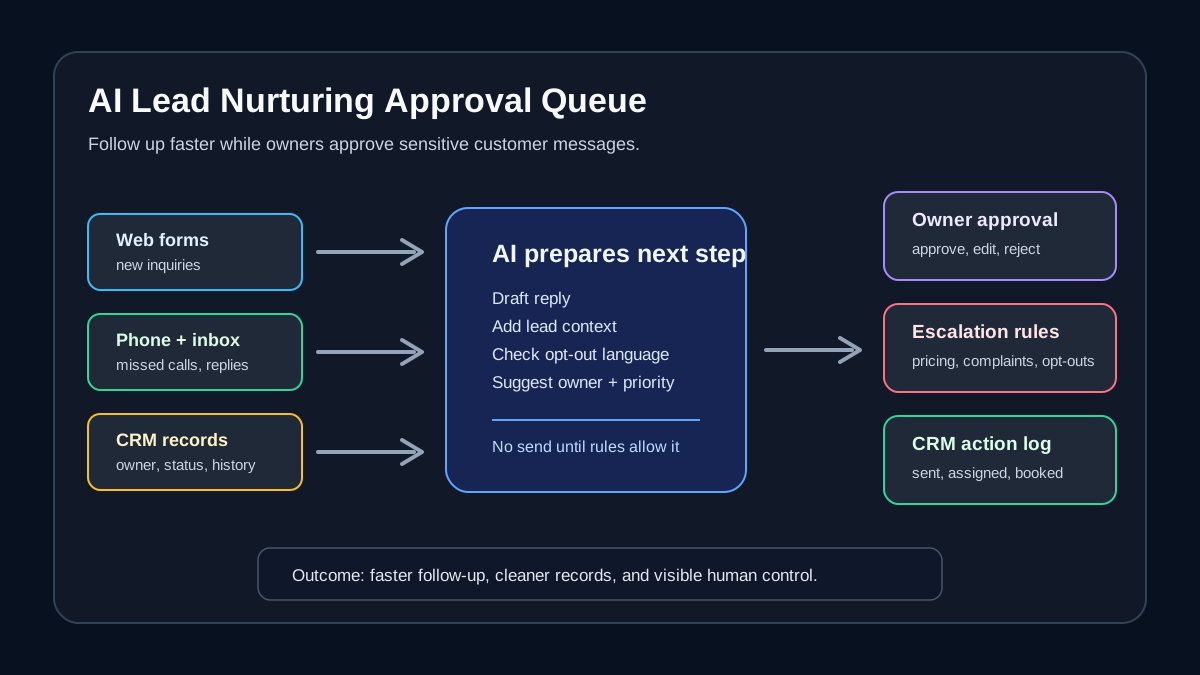
An approval queue solves the middle step. AI prepares the work. People stay in control of sensitive messages. The CRM stays cleaner because the decision, owner, and outcome are recorded.
What this means for service-business follow-up
An AI lead nurturing approval queue is a reviewed workflow where AI drafts or recommends follow-up, then routes the item to the right person before customer-facing action happens.
Think of it like a dispatch board for sales and admin follow-up. Instead of technicians or front-desk staff checking five systems, the queue shows what needs attention, why it matters, and what the next step could be.
| Lead situation | Manual workflow today | AI-assisted approval queue |
|---|---|---|
| New website inquiry | Someone notices a form email and writes a reply from scratch | AI drafts a response, attaches lead context, and routes it to the owner |
| Missed call after hours | Staff listen to voicemail in the morning and decide who calls back | AI summarizes the call, suggests priority, and queues callback or text approval |
| Stale quote | Manager remembers to check old estimates when time allows | AI finds quotes with no response and drafts a polite check-in |
| Booking request | Staff compare calendars manually | AI prepares available slots and asks the owner to approve the reply |
| Prospect asks a pricing question | Staff search policies or ask a manager | AI drafts from approved FAQs and routes for human review |
| Opt-out or complaint | Message may get buried in inbox | AI flags it as stop-contact or manager-review before any more nurturing |
This is useful because service businesses often need fast responses without careless automation. A lead who asks about emergency plumbing service, a dental treatment plan, a med spa package, or a tenant maintenance issue should not receive a generic drip email that ignores the situation.
The right workflow separates low-risk follow-up from high-risk judgment.
| Automate first | Keep human-reviewed |
|---|---|
| Drafting first replies from approved templates | Discounts, refunds, legal, medical, or lease-related language |
| Pulling CRM context into the queue | Messages from unhappy customers |
| Reminding owners about stale leads | Pricing exceptions or custom commitments |
| Preparing scheduling options | Any reply that may affect safety, compliance, or trust |
| Logging approved outcomes | Opt-outs, complaints, and unusual requests |
Plain-English terms owners should know
Lead nurturing means staying in touch with prospects until they are ready for the next step, such as booking an appointment, approving an estimate, scheduling a tour, or speaking with a manager.
Approval queue means a list of AI-prepared items waiting for a person to approve, edit, assign, or reject. The queue is the control point between AI drafting and customer-facing action.
Human-in-the-loop automation means AI can do repetitive parts of the work, but a person reviews decisions that carry business risk. It is especially useful for customer messages, pricing, scheduling exceptions, complaints, and regulated workflows.
CRM automation means updating systems such as Salesforce, HubSpot, Zoho, ServiceTitan, Housecall Pro, or a custom internal dashboard so lead status, owner, next step, and notes stay current.
Data library means the approved business information the AI is allowed to use, such as service descriptions, pricing guidelines, FAQs, hours, booking rules, property policies, warranty language, and escalation instructions.
Where approval queues fit by business type
The best first workflow is usually not the flashiest one. It is the place where slow follow-up already costs time, creates confusion, or makes customers wait.
| Business type | High-value approval queue |
|---|---|
| Property management | Leasing inquiries, maintenance follow-up, renewal reminders, vendor updates |
| Dental practice | New-patient inquiries, unscheduled treatment plans, cancellation openings, insurance document follow-up |
| Med spa | Consultation requests, package follow-up, pre-visit questions, no-show recovery |
| HVAC company | Estimate follow-up, urgent callback triage, maintenance-plan renewal, seasonal campaign replies |
| Plumbing business | Missed-call recovery, quote follow-up, dispatch clarification, post-job review requests |
| Professional services firm | Discovery-call follow-up, proposal reminders, document requests, CRM cleanup |
This does not require replacing the tools your team already uses. In many cases, the better route is to connect the existing CRM, inbox, form, phone, calendar, and task tools into one narrow workflow.
The risk checklist before AI sends anything
NIST's AI Risk Management Framework is built around managing AI risks in practical, flexible ways across organizations. For a service business, that translates into a simple operating question: what should AI be allowed to do, what should a person approve, and how will the business know when something went wrong?
Use this checklist before moving from draft-only automation to approved sending.
| Risk | Why it matters | Practical control |
|---|---|---|
| Wrong owner | A lead may receive a reply from the wrong person or team | Require owner assignment before approval |
| Bad CRM data | AI drafts from stale status, missing notes, or duplicate records | Add a missing-field check before draft generation |
| Over-contacting | Prospects may receive too many nudges | Set cadence limits and stop rules |
| Opt-out mishandling | Continuing contact after opt-out damages trust and can create compliance risk | Treat opt-out language as a stop-contact event |
| Sensitive topics | Pricing, health, lease, finance, or warranty issues need judgment | Route sensitive categories to manager review |
| Hidden failures | Staff may assume AI followed up when it did not | Keep an action log and daily exception report |
| Calendar mismatch | AI may offer times that do not match real availability | Connect approved calendars and require final review for exceptions |
| Generic tone | A bland email can feel careless after a personal request | Use approved templates plus owner editing |
The goal is not to slow down every message. The goal is to approve the messages where the cost of being wrong is higher than the value of instant sending.
A practical 30-day implementation plan
Start with one follow-up path. Do not try to automate every lead source at once.
| Week | Work to do | Output |
|---|---|---|
| Week 1 | Map the current lead sources, owners, response rules, and follow-up delays | A simple lead-follow-up map |
| Week 2 | Build approved templates, FAQs, opt-out rules, and escalation categories | Drafting rules the AI can follow |
| Week 3 | Connect CRM, inbox, forms, phone summaries, and calendar where needed | A working approval queue |
| Week 4 | Run with human approval, review outcomes, and tune the rules | A measured workflow ready for broader rollout |
For the first month, measure operational signals rather than pretending there is a universal benchmark. Track how many leads entered the queue, how many drafts were approved, how many needed edits, how many were escalated, and how many records were missing required context.
Those numbers tell you where the workflow is strong enough to automate further and where the business process needs cleanup.
What to connect before you buy another tool
Many service businesses already have enough software. The bottleneck is that the systems do not share context cleanly.
Before buying a new AI lead tool, write down the systems that already hold the truth.
| System | What the AI needs from it | What should be written back |
|---|---|---|
| CRM | Lead status, owner, source, last activity, notes | Follow-up outcome, next step, updated status |
| Inbox | New inquiries, replies, opt-outs, attachments | Approved replies and thread notes |
| Phone system | Missed calls, voicemail summaries, call outcomes | Callback task or lead activity |
| Calendar | Available times, staff schedules, appointment rules | Confirmed meeting or booking task |
| Forms | Service request details, property or job type, urgency | Created or updated lead record |
| Internal documents | FAQs, policies, service descriptions, pricing rules | Usually read-only, with version control |
If these systems cannot be connected cleanly, the AI will either miss context or make staff copy information manually. That is why integration design matters as much as the AI model.
When to move from approval to automation
Approval queues are not meant to be permanent bottlenecks. They are a safe way to learn which parts of follow-up are repeatable.
Move a step toward automation when three things are true:
- The input is predictable.
- The approved draft rarely needs meaningful edits.
- The downside of a mistake is low and recoverable.
For example, a simple "we received your request and will call shortly" message may be safe to automate earlier than a pricing answer. A reminder to approve an estimate may be safer than a message that changes the appointment type. A CRM cleanup task may be safer than a customer-facing promise.
Keep manager review for high-value leads, special pricing, urgent service issues, customer complaints, regulated language, and any situation where the AI lacks enough context.
Where Zenovae helps
Zenovae helps founders and service-business operators turn lead follow-up into a practical AI workflow without asking the team to become technical operators.
That can include:
- Mapping the current lead intake, missed-call, CRM, calendar, and inbox workflow.
- Designing the approval queue, owner rules, escalation categories, and stop-contact rules.
- Connecting AI to existing tools such as CRM, forms, email, phone systems, calendars, and internal documents.
- Building custom software when off-the-shelf tools cannot match the business workflow.
- Adding monitoring, action logs, and support after launch so the system improves instead of drifting.
For many teams, the first useful build is not a fully autonomous AI seller. It is a reviewed follow-up queue that helps staff respond faster, keep better records, and stop losing track of qualified prospects.
Want to remove a manual workflow? Zenovae can map the task, connect the right tools, and show what an AI integration or custom software build would look like.
FAQ
What is an AI lead nurturing approval queue?
An AI lead nurturing approval queue is a workflow where AI drafts or recommends follow-up for prospects, then routes the item to a person for approval before it is sent or logged.
Should a service business let AI send lead emails automatically?
Sometimes, but not at the start. Begin with human approval for customer-facing messages, then automate only the narrow steps that are predictable, low-risk, and consistently approved without major edits.
What should AI never handle without review?
Keep review on pricing exceptions, refunds, complaints, opt-outs, urgent service issues, regulated language, and any message where the customer expects a human judgment call.
Can this work without Salesforce?
Yes. Salesforce is the news hook, but the operating pattern applies to HubSpot, Zoho, ServiceTitan, Housecall Pro, Google Workspace, Outlook, Airtable, custom dashboards, and other systems if the workflow can connect lead data, owner rules, approved templates, and review steps.
Sources
- Salesforce Help: Sales release notes
- Salesforce Help: How a Lead Nurturing Agent Processes Prospects
- Salesforce Help: Considerations for Using Agentforce Lead Nurturing
- U.S. Census Bureau: Large Firms With at Least 20 Employees Biggest AI Users
- U.S. Chamber of Commerce Foundation: Half of Small Business Workers Use AI
- NIST: Artificial Intelligence Risk Management Framework 1.0
Need Help with Your AI Project?
At Zenovae, we build production-ready AI systems that scale. From OpenClaw setup to custom integrations, Mission Control workflows, and full-stack delivery, we can help you ship faster and avoid costly mistakes.
Let's Talk