AI Reporting Agents: Turn Weekly Updates Into a Back-Office Workflow
AI reporting agents can turn CRM, inbox, calendar, and task data into reviewed weekly updates for service-business operators.
Most service businesses do not lose visibility because nobody cares. They lose visibility because the update lives in five places at once: missed-call notes, CRM stages, calendar changes, job statuses, inbox threads, spreadsheets, and staff memory.
That makes weekly reporting painful. A manager spends Friday chasing screenshots, asking who called which lead, checking which estimates are stale, and trying to understand whether the team is actually improving. By the time the report is finished, the useful follow-up window may already be gone.
AI reporting agents are becoming a practical answer to that problem. Not because they make better charts, but because they can gather the right signals, draft a plain-English operating summary, flag missing data, and hand the final report to a human for review.
Quick take: Recent AI announcements point to a clear shift: agents are moving from one-off chat answers into repeatable workflows that can pull data, draft reports, route approvals, and run inside existing business tools. Service businesses should use that shift to automate internal reporting first: weekly lead follow-up, scheduling gaps, open jobs, unresolved customer requests, and stale CRM records.
| If you only read one section | Read this |
|---|---|
| You spend Fridays building reports manually | What changed |
| Your CRM is never fully up to date | Why reporting breaks in service businesses |
| You want a safe first workflow | A practical reporting agent workflow |
| You worry about wrong numbers | The review checklist before launch |
| You need an implementation path | A 30-day rollout plan |
What changed
The news is not just that AI tools are getting smarter. The more useful change is that AI systems are being designed to work across tools, permissions, schedules, and team processes.
OpenAI introduced workspace agents in ChatGPT on April 22, 2026, describing shared agents that can handle complex and long-running workflows inside organizational permissions. OpenAI's examples include a weekly metrics reporting agent that pulls Friday data, creates charts, drafts the narrative, and shares a business report, plus a lead outreach agent that qualifies inbound leads, drafts follow-up, and updates CRM records (OpenAI).
On June 28, 2026, HP announced a strategic partnership with OpenAI Frontier. HP said the work will include customer-facing experiences, internal operations, customer telemetry insights and reporting, employee productivity, and software development (HP). OpenAI's own write-up says HP is using Frontier as a unified way to understand what is running, what context each system can use, how actions are governed, and how outcomes are evaluated (OpenAI).
Microsoft's 2026 Work Trend Index makes the operating point even clearer: the constraint is not only individual AI skill, but whether work is structured so AI and people can produce better outcomes together. The report says effective AI users decide what should be delegated, what needs collaboration, and where humans stay responsible for judgment and quality control (Microsoft WorkLab).
ServiceNow and OpenAI are also pushing in the same direction. Their 2026 partnership announcement describes AI that can use enterprise data, respect governance and permissions, and move work through approvals and updates until it is done (OpenAI).
Plain English version: AI reporting is moving from "ask a chatbot for a summary" to "run a controlled workflow that gathers data, drafts the report, asks for review, and logs what happened."
Why reporting breaks in service businesses
Weekly reporting fails when the report depends on heroic manual cleanup. The owner wants a clear answer, but the data is scattered.
For a property manager, the update might involve vacancies, maintenance requests, tenant messages, showings, vendor delays, and renewal conversations. For a dental office, it might involve new patient calls, no-show risk, treatment-plan follow-up, insurance questions, and open scheduling gaps. For an HVAC or plumbing company, it might involve emergency calls, unscheduled estimates, technician notes, parts delays, and callbacks.
The common problem is not the industry. It is the handoff.
| Reporting problem | What usually causes it | Business impact |
|---|---|---|
| Stale lead counts | CRM records are not updated after calls or emails | Owners cannot see where revenue is stuck |
| Missed follow-up | Call notes, inbox replies, and task lists are separate | Good leads cool off before anyone acts |
| Slow scheduling visibility | Calendar changes are not tied to the customer record | Staff overbook, underbook, or miss openings |
| Weak customer experience signals | Complaints sit in inboxes or chat threads | Patterns show up late, after trust is damaged |
| Manual manager reports | Staff copy data into spreadsheets every week | Reporting becomes expensive and inconsistent |
An AI reporting agent helps when it can read the right systems, assemble a draft, flag gaps, and send the report to a person who knows the business.
What an AI reporting agent is
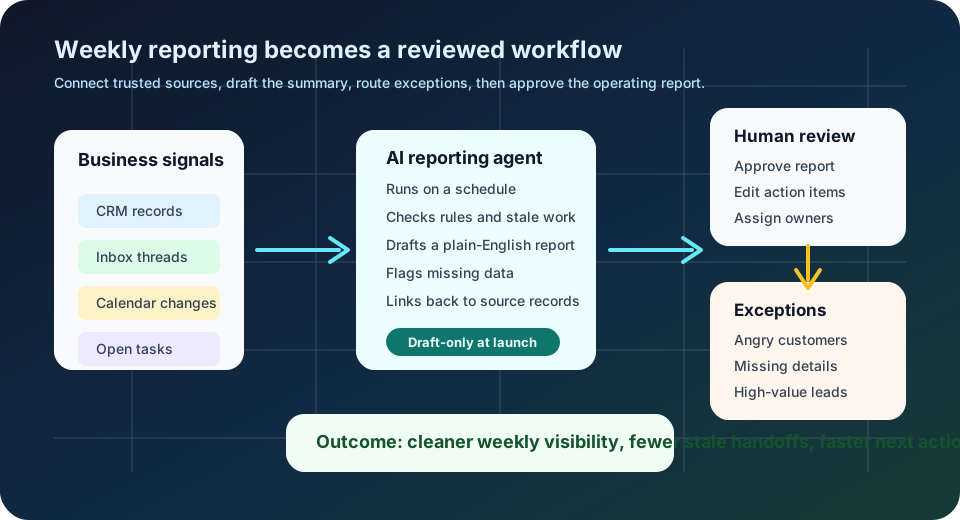
An AI reporting agent is a workflow that uses AI to collect information from business tools, summarize what changed, identify exceptions, and prepare a report for review.
It is different from a dashboard. A dashboard shows data that already exists in clean fields. A reporting agent can also look at messy work: email threads, call summaries, task notes, calendar changes, intake forms, and CRM comments.
It is also different from a chatbot. A chatbot waits for a question. A reporting agent can run on a schedule, follow a checklist, and produce the same operating update every Monday morning or Friday afternoon.
For service businesses, the best reporting agents usually cover one narrow business question:
| Business question | Data sources to connect | Useful report output |
|---|---|---|
| Which leads need attention? | CRM, inbox, phone notes, web forms | Stale leads, owner, last touch, recommended next step |
| Which appointments are at risk? | Calendar, CRM, reminders, inbox | Unconfirmed appointments, reschedule risk, missing details |
| Which jobs are stuck? | Job board, technician notes, vendor emails | Open blockers, owner, due date, escalation path |
| Which customers need a human callback? | Calls, chat, inbox, support tickets | Angry, confused, high-value, or sensitive cases |
| What changed this week? | CRM, calendar, tasks, reports | Executive summary, wins, risks, next actions |
A practical reporting agent workflow
A useful first workflow should feel like a better manager's assistant, not a mysterious AI brain. It should gather facts, make the next action visible, and keep a person in charge.
| Step | What happens | Human control point |
|---|---|---|
| 1. Trigger | The workflow runs every Friday at 3 p.m. or Monday at 8 a.m. | Manager chooses the schedule |
| 2. Collect | The agent reads selected CRM views, inbox labels, calendar events, and task queues | Only approved sources are connected |
| 3. Compare | It checks current status against simple rules: stale lead, unconfirmed appointment, overdue task, missing owner | Rules are written in plain English |
| 4. Draft | It creates a short report with sections for wins, risks, stuck work, and next actions | Draft stays internal until approved |
| 5. Escalate | It flags exceptions that need human judgment | Sensitive items go to a named owner |
| 6. Log | It records sources used, missing data, and edits made by the reviewer | Manager can audit what changed |
Here is what the before-and-after can look like:
| Manual reporting today | AI-assisted reporting workflow |
|---|---|
| Manager asks staff for updates in chat | Agent gathers standard signals on a schedule |
| Staff paste screenshots and partial notes | Agent drafts a structured report with source links |
| CRM gaps are discovered after the meeting | Agent flags missing owner, missing next step, or stale status |
| Follow-up decisions depend on memory | Agent creates a reviewed action list |
| The same report is rebuilt every week | The workflow improves as rules and exceptions are refined |
What this means for your business
The first value is not a prettier report. The first value is operational clarity.
If you run a service business, an AI reporting agent can help answer questions that otherwise require a lot of manual checking:
- Which new leads have not received a meaningful follow-up?
- Which appointments are not confirmed?
- Which customers have waited too long for a response?
- Which estimates are open with no next step?
- Which jobs are blocked by missing parts, vendor replies, or customer information?
- Which staff handoffs are repeatedly breaking?
That clarity affects revenue and customer experience. A stale estimate can become a lost job. An unconfirmed appointment can become an empty slot. A missed maintenance escalation can become a reputation problem. A reporting agent helps managers spot these issues while they are still fixable.
The review checklist before launch
Reporting automation is safer than fully autonomous customer messaging, but it still needs controls. Bad data can create bad decisions.
NIST's AI Risk Management Framework is useful here because it frames AI risk work around govern, map, measure, and manage. NIST also emphasizes that AI risk management should be continuous across the AI system lifecycle, not a one-time setup step (NIST AI Resource Center).
Use that idea in practical terms:
| Control | Plain-English question | Why it matters |
|---|---|---|
| Source list | Which systems is the agent allowed to read? | Prevents reports from mixing trusted and outdated data |
| Read/write boundary | Can the agent only draft, or can it update records? | Keeps the first version low-risk |
| Exception rules | What should never be auto-summarized as routine? | Protects angry customers, medical details, refunds, legal issues, and high-value accounts |
| Human reviewer | Who approves the report before decisions are made? | Keeps judgment with a person who knows the business |
| Audit trail | Can we see what the agent used and what it skipped? | Makes errors easier to diagnose |
| Quality checks | How do we measure accuracy, missing fields, and usefulness? | Turns reporting from a demo into an operating system |
| Stop switch | How do we pause or roll back the workflow? | Gives the team confidence to launch safely |
Start with draft-only reporting. Let the system produce the summary and action list, but keep record updates, customer messages, and sensitive decisions under human approval until the workflow proves itself.
A 30-day rollout plan
You do not need a company-wide AI program to start. Pick one report that already consumes manager time every week.
| Timeframe | Action | Output |
|---|---|---|
| Days 1-3 | Choose one recurring report: leads, appointments, jobs, or customer issues | A named reporting workflow with a business owner |
| Days 4-7 | Map sources, fields, rules, and exceptions | A simple before-and-after workflow map |
| Days 8-14 | Build a draft-only agent that reads selected systems | First internal report draft |
| Days 15-21 | Add review, source links, missing-data flags, and exception routing | Manager-ready report with action list |
| Days 22-30 | Run live with a small scope and measure quality | Accuracy notes, time saved, stale-work reduction, next improvements |
The key is to avoid starting with every report. A dental office might begin with new patient follow-up. A property manager might begin with open maintenance requests. An HVAC company might begin with estimates older than three days. A med spa might begin with consultation follow-up and unbooked leads.
Where Zenovae helps
Zenovae helps founders and service-business operators turn this kind of manual back-office work into practical AI integrations and custom software.
That can mean connecting an AI workflow to your CRM, calendar, phone system, inbox, forms, spreadsheets, or internal tools. It can also mean building a lightweight dashboard where managers review AI-drafted reports, approve next actions, and monitor whether follow-up is improving.
For many businesses, the right answer is not a giant platform replacement. It is a focused workflow that connects the tools you already use and removes one recurring manual burden.
Zenovae can help with:
- Mapping the reporting workflow and identifying the highest-value first report.
- Connecting the right systems with clear permissions.
- Building draft-only summaries, exception flags, and approval steps.
- Creating custom internal software when off-the-shelf tools do not fit.
- Monitoring the workflow after launch so the reports get more useful over time.
Want to remove a manual workflow? Zenovae can map the task, connect the right tools, and show what an AI integration or custom software build would look like.
FAQ
Should an AI reporting agent replace my dashboard?
No. A dashboard is useful when the data is clean and already structured. An AI reporting agent is useful when the work is scattered across CRM notes, emails, calls, calendars, and task lists. Many businesses need both: dashboards for metrics and reporting agents for weekly operating context.
What should a service business automate first?
Start with a recurring internal report that is painful but low-risk. Good first candidates include stale lead reports, unconfirmed appointment reports, open estimate reports, customer issue summaries, and weekly manager updates.
Can an AI reporting agent update my CRM automatically?
It can, but the first version usually should not. Start with draft-only reporting and human review. Once the workflow is accurate and trusted, you can consider approved CRM updates for simple fields such as owner, next-step date, or status notes.
What tools does this need to connect to?
Most reporting workflows need access to some mix of CRM, email, calendar, phone or call notes, task management, forms, spreadsheets, and job management software. The right integration plan depends on where your team actually records work today.
Sources
- OpenAI: Introducing workspace agents in ChatGPT
- HP: HP Inc. launches Frontier strategic partnership with OpenAI
- OpenAI: HP Inc. launches Frontier strategic partnership with OpenAI
- Microsoft WorkLab: 2026 Work Trend Index
- OpenAI: ServiceNow powers actionable enterprise AI with OpenAI
- NIST AI Resource Center: AI RMF Core
Need Help with Your AI Project?
At Zenovae, we build production-ready AI systems that scale. From OpenClaw setup to custom integrations, Mission Control workflows, and full-stack delivery, we can help you ship faster and avoid costly mistakes.
Let's Talk