AI Scheduled Task Monitors: Catch Back-Office Work Before It Slips
AI scheduled task monitors help service businesses catch missed follow-up, stale CRM records, and admin bottlenecks before customers feel them.
Most back-office problems do not start as big failures. They start as a lead that sat unanswered, a customer email no one owned, a CRM record that never got updated, an invoice waiting for approval, or a cancellation that never reached the waitlist.
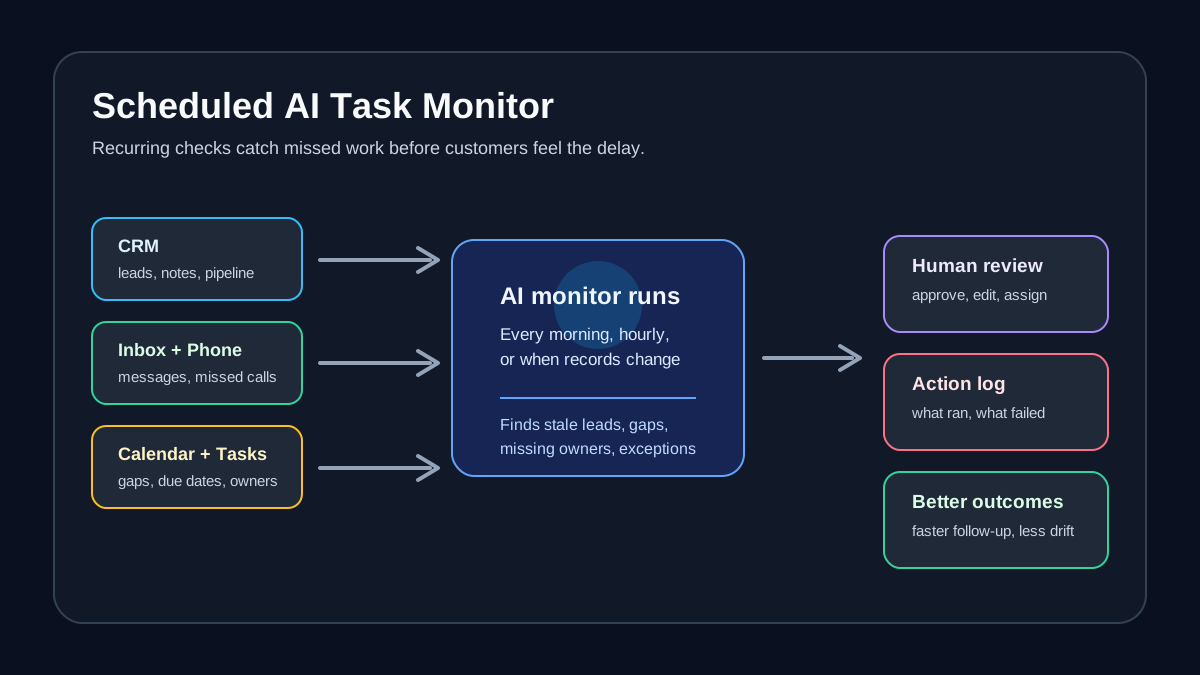
AI scheduled task monitors give service businesses a practical way to check for those problems on a routine cadence. Instead of asking staff to remember every follow-up, report, and exception, an AI-assisted workflow can review connected systems, find the items that need attention, and send a short queue to the right person for review.
Quick take: OpenAI's July 2026 ChatGPT Business release notes describe ChatGPT Work as an agent for longer tasks that can work across connected apps and files, support approvals, and keep projects moving through Scheduled Tasks that run once, repeat on a schedule, or monitor for changes. For service businesses, the useful move is not "set AI loose." It is to create narrow, recurring monitors for missed follow-up, scheduling gaps, inbox exceptions, CRM hygiene, and reporting, with clear human review before customer-facing or financial actions happen.
| If you only read one section | Read this |
|---|---|
| You want the business takeaway | What changed with scheduled AI task monitors |
| You need examples | Where scheduled monitors fit in a service business |
| You worry about mistakes | The risks to control before launch |
| You want a rollout plan | A practical 30-day implementation plan |
| You want Zenovae's fit | Where Zenovae helps |
What changed with scheduled AI task monitors
OpenAI's ChatGPT Business release notes say ChatGPT Work can handle longer tasks, work across connected apps and files, create finished outputs, and let users follow progress, answer questions, change direction, and approve important actions. The same July 9, 2026 note says Work can use Scheduled Tasks that run once, repeat on a schedule or trigger, or monitor for changes.
Microsoft is moving in the same direction inside everyday office tools. Its Workflows in Microsoft 365 Copilot documentation says users can describe a workflow in natural language, automate work across Outlook, Teams, SharePoint, Planner, and Approvals, trigger actions on a schedule or in response to events, and review run history.
Salesforce is also positioning AI agents around back-office bottlenecks. In its Agentforce Operations announcement, Salesforce describes agents that coordinate work across disconnected systems, approvals, compliance checks, and operational processes instead of only answering front-office questions.
Plain-English version: AI tools are shifting from "write me a response" to "keep watching this workflow and tell me when work is stuck." That is especially relevant for service businesses because customer experience depends on many small handoffs happening on time.
What this means for your business
A scheduled AI task monitor is a recurring check that looks for work that should not be missed. It might run every morning, every afternoon, after business hours, or when something changes in a system.
For a property manager, that could mean a daily monitor for unanswered leasing leads, maintenance tickets without an owner, or renewal tasks due this week. For a dental office, it could mean a morning check for cancellations, unscheduled treatment plans, or new-patient inquiries that were not followed up. For HVAC and plumbing companies, it could mean reviewing urgent calls, open estimates, technician notes, and jobs missing customer updates.
The business value is operational clarity. Staff still make judgment calls, but they stop spending so much time hunting across inboxes, calendars, CRMs, spreadsheets, and task boards.
| Back-office problem | Manual pattern today | Scheduled AI monitor |
|---|---|---|
| Leads go cold | Someone checks the CRM when they remember | Every morning, AI finds new leads without follow-up and queues owners |
| Customers chase updates | Staff scan inboxes and texts manually | AI flags customer messages with no reply after a set time |
| CRM records get messy | Notes are updated days later | AI reviews missing fields and drafts cleanup tasks |
| Reports take too long | Manager builds weekly summaries by hand | AI drafts a report from approved systems for manager review |
| Approvals stall | Invoices, discounts, refunds, or schedule changes wait in email | AI lists pending approvals with context and deadline |
The plain-English terms owners should know
You do not need to buy this like a technical platform. You need to define what the monitor checks, what it is allowed to do, and who reviews exceptions.
| Term | Plain-English meaning | Why it matters |
|---|---|---|
| Scheduled task | A workflow that runs at a set time, such as every weekday morning | Good for lead queues, daily summaries, and overdue work |
| Trigger | An event that starts a workflow, such as a new email or CRM update | Good for urgent customer requests or new bookings |
| Monitor | A recurring or event-based check for changes, missing work, or exceptions | Helps catch problems before they reach customers |
| AI integration | A connection between AI and your tools, such as CRM, calendar, inbox, phone system, or task board | Without integrations, staff still copy and paste the results |
| Approval gate | A review step before AI sends, updates, cancels, refunds, or assigns something sensitive | Keeps people in control |
| Run history | A record of what the workflow checked, what it found, and whether each step succeeded | Helps managers troubleshoot and improve the workflow |
Where scheduled monitors fit in a service business
The best first monitors are narrow, frequent, and easy to verify. They should reduce missed work without creating a pile of false alarms.
| Monitor | What it checks | Who reviews it | Good first outcome |
|---|---|---|---|
| Missed lead monitor | New calls, forms, chats, or emails without follow-up | Sales owner, office manager, dispatcher | Faster callback queue |
| Appointment gap monitor | Cancellations, unfilled slots, no-show risks, waitlist opportunities | Front desk or scheduling lead | More filled calendar slots |
| Customer issue monitor | Unanswered messages, urgent words, overdue ticket status | Operations manager | Fewer customers chasing updates |
| CRM hygiene monitor | Missing next steps, stale opportunities, incomplete contact fields | Admin or owner | Cleaner pipeline and reporting |
| Invoice and approval monitor | Vendor bills, refund requests, discounts, or job changes awaiting approval | Owner, finance lead, manager | Fewer stuck approvals |
| Weekly operations monitor | Leads, bookings, open issues, delayed tasks, and team workload | Owner or leadership team | Shorter weekly reporting process |
The monitor does not need to solve every step on day one. A useful first version can simply say: "Here are the 14 items that need attention, grouped by owner, with a recommended next step."
The risks to control before launch
Scheduled monitors are powerful because they run without someone asking. That also means the guardrails matter.
NIST's AI Risk Management Framework Core describes AI risk work through govern, map, measure, and manage functions, and emphasizes continuous risk management across the AI system lifecycle. For a small service business, that translates into a practical rule: decide upfront which AI actions are only suggestions, which actions can be drafted, and which actions may happen automatically.
| Workflow action | Safe automation level | Why |
|---|---|---|
| Summarize overdue leads | Automate summary | Low risk if source links are included |
| Draft follow-up texts or emails | Draft for review | Customer tone and promises still matter |
| Add internal CRM notes | Draft or update with clear rules | Needs clean source attribution and correction path |
| Send appointment reminders | Automate after testing | Usually repeatable if opt-in and timing rules are clear |
| Offer discounts, refunds, or credits | Human approval required | Financial and customer-trust risk |
| Cancel bookings or dispatch urgent jobs | Human approval required | Mistakes can create real operational damage |
| Change medical, legal, lease, or compliance records | Human approval required | Sensitive and regulated information needs stricter review |
Microsoft's Workflows documentation also warns users to review and test AI-generated workflows before using them in production, and notes limitations such as limited connectors and possible ambiguity when natural language names a site or channel. That warning is relevant outside Microsoft too: if your CRM has similar-sounding pipelines or your team has multiple inboxes, the monitor needs exact rules.
A practical 30-day implementation plan
Start with one workflow where the pain is obvious and the data is already available. Do not begin with the most complex back-office process in the business.
| Week | Action | Output |
|---|---|---|
| Week 1 | Pick one recurring problem: missed leads, stale CRM records, appointment gaps, or overdue approvals | A written monitor definition with owner, schedule, source tools, and success criteria |
| Week 2 | Connect the required systems and define review rules | AI can read the right records and produce a reviewed queue |
| Week 3 | Run in shadow mode without taking actions | Team compares AI findings against manual review and fixes gaps |
| Week 4 | Turn on limited actions or daily summaries | Staff receive a reliable queue, drafts, or report at the right time |
Use simple success measures: fewer stale leads, faster response ownership, fewer manual report hours, fewer overdue approvals, or cleaner CRM records. Avoid vague goals like "use AI more." The monitor should have a job.
How to choose the first monitor
If several workflows look useful, score them before building.
| Question | Score 1 if yes | Why it matters |
|---|---|---|
| Does this problem happen weekly or daily? | Recurring pain is worth monitoring | |
| Is the source data already in a system? | Connected tools reduce manual cleanup | |
| Is the next step easy to verify? | Review queues work best when staff can approve quickly | |
| Does a missed item cost revenue, time, or customer trust? | The monitor should protect something measurable | |
| Can a person review exceptions in under 10 minutes? | Human-in-the-loop automation should not become another job |
Start with the workflow that scores highest. For many service businesses, that is missed lead follow-up, appointment gaps, or overdue customer issues.
Where Zenovae helps
Zenovae builds AI integrations and custom back-office workflows for founders and service-business operators who want practical automation without replacing their existing tools.
For scheduled AI task monitors, that usually means:
- Mapping the workflow in plain English: what gets checked, when it runs, what counts as an exception, and who owns the result.
- Connecting the right systems: CRM, inbox, calendar, phone system, forms, spreadsheets, property management software, or internal dashboards.
- Building human review into the workflow so AI can draft, summarize, route, and monitor without making risky decisions alone.
- Creating a custom dashboard or internal tool when a basic automation tool cannot show the status clearly enough.
- Monitoring the workflow after launch, tightening the rules, and improving the results as the team uses it.
This fits Zenovae's broader service story: fast AI integrations, custom software where off-the-shelf tools stop short, and hands-on support after launch.
Want to remove a manual workflow? Zenovae can map the task, connect the right tools, and show what an AI integration or custom software build would look like.
FAQ
What is an AI scheduled task monitor?
An AI scheduled task monitor is a recurring workflow that checks business systems for missing work, changes, or exceptions. For example, it can review a CRM every morning for new leads without follow-up, then send a short queue to the person responsible.
Is this different from a normal automation?
Yes. A normal automation often follows a fixed "when this happens, do that" rule. An AI scheduled task monitor can review messy information, summarize context, group work by priority, and ask for human approval when the next step is uncertain.
What should a service business automate first?
Start with recurring checks that protect revenue or customer experience: missed lead follow-up, appointment gaps, unanswered customer messages, overdue approvals, or weekly operations reporting.
Should AI send messages automatically?
Only after the workflow has been tested and the rules are narrow. For early rollouts, AI should usually draft messages, group tasks, and prepare summaries while a person approves customer-facing actions.
Sources
Need Help with Your AI Project?
At Zenovae, we build production-ready AI systems that scale. From OpenClaw setup to custom integrations, Mission Control workflows, and full-stack delivery, we can help you ship faster and avoid costly mistakes.
Let's Talk