AI Service Workforce: What Service Businesses Should Automate First
AI service workforce tools are replacing simple chatbots. Here is what service businesses should automate first and how to avoid customer trust issues.
AI service workforce is the new phrase business owners will hear from customer-service platforms in 2026. The practical meaning is simple: AI is moving from "answer a question" chatbots to connected service agents that can remember context, route work, book appointments, update systems, and hand off to people when the situation gets sensitive.
For service businesses, this matters because customer operations are still full of expensive gaps: missed calls, repeated customer explanations, slow callbacks, manual scheduling, scattered notes, and staff stuck copying information between tools. The opportunity is real, but the wrong first project can frustrate customers and create more cleanup work than it saves.
Quick take: Service businesses should not start by trying to automate every customer conversation. Start with one frequent, structured workflow such as missed-call recovery, after-hours intake, appointment confirmation, or basic routing. Then connect the AI to approved knowledge, calendar or CRM data, escalation rules, and a reporting loop before expanding.
| If you only read one section | Read this |
|---|---|
| You are deciding what to automate first | The best first workflows |
| You worry customers will dislike AI | What to keep human-led |
| You already use phone, SMS, CRM, and forms | The operating layer matters more than the bot |
| You want a rollout plan | A practical 30-day launch plan |
What Changed in May 2026
On May 19, 2026, Zendesk announced its Autonomous Service Workforce, positioning the market away from deflection-based chatbots and toward specialized AI agents that work across channels. Zendesk described new tools such as Agent Builder, expanded AI agents for messaging, email, voice, and external AI platforms, a Context Graph, workflow connectors, and Model Context Protocol support for governed connections to service data.
The same pattern showed up in several other customer-operations announcements this month:
| Source | What changed | Business implication |
|---|---|---|
| Zendesk, May 19 | Specialized service agents, no-code agent building, context, workflow connectors, and outcome-based pricing | Customer support AI is being judged by resolved work, not just ticket deflection |
| Twilio, May 6 | Conversation Memory, Conversation Orchestrator, Conversation Intelligence, and Agent Connect | Phone, SMS, email, chat, humans, and AI need shared context |
| Ooma, May 12 | AI Transcriptions, AI Answering Service, AI Receptionist beta, AI Insights beta, and OpenAI integration for Ooma Office | AI call handling is moving into small-business phone systems, not just enterprise contact centers |
| Freshworks, May 14 | Freddy AI Agent Studio, MCP Gateway, AI Insights, and service operations data | Internal service workflows are becoming agent-driven too |
| OpenAI and Parloa, May 7 | Voice agents built with simulation, evaluation, RAG, tools, and production testing | Reliable AI phone workflows need testing and evaluation before callers depend on them |
The signal is consistent: the market is no longer just asking whether AI can answer. It is asking whether AI can safely complete customer work inside the business.
What AI Service Workforce Means
An AI service workforce is a set of AI agents and human handoff rules that operate together across customer service, front desk, sales intake, scheduling, and internal support.
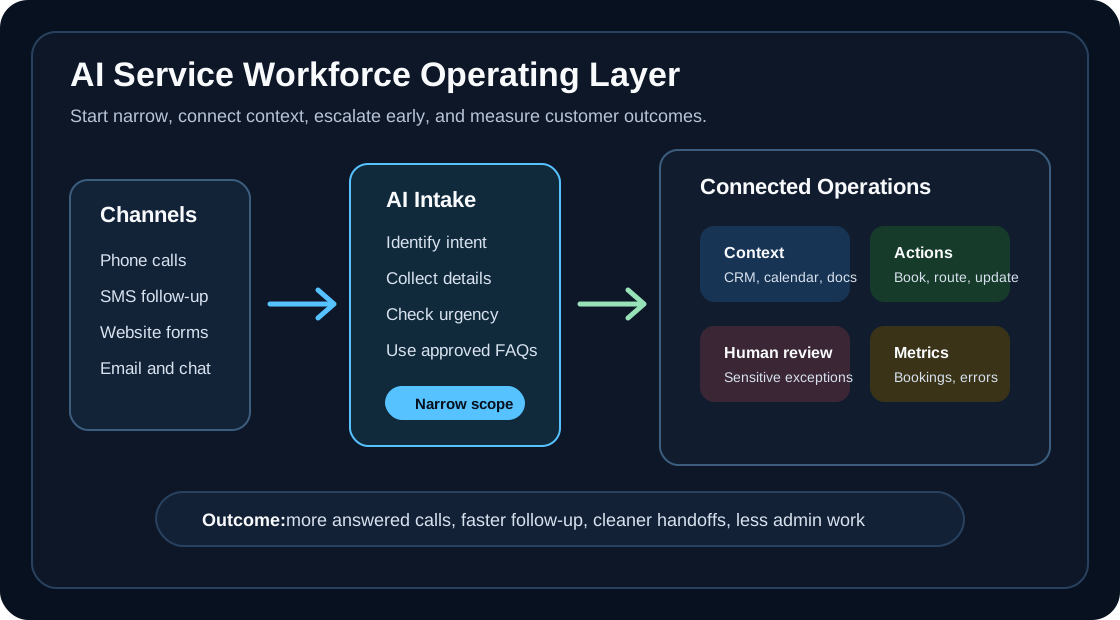
For a local service business, that does not need to mean a large enterprise platform. It can mean a practical operating layer with five parts:
| Layer | Plain-English meaning | Example for a service business |
|---|---|---|
| Customer channels | Where people contact you | Phone, SMS, website form, chat, email |
| Business context | What the AI knows | Services, hours, service area, pricing rules, policies, customer notes |
| Workflow actions | What the AI can do | Book a slot, create a lead, update CRM, send a reminder, route an urgent call |
| Human control | When people step in | Emergencies, angry customers, refunds, medical questions, unusual promises |
| Measurement | How you know it worked | Calls answered, bookings created, escalations, complaints, bad handoffs |
This is why simple chatbot demos can be misleading. The hard part is not making AI sound friendly. The hard part is making sure it knows the business, follows rules, completes the next step, and stops when a person should take over.
Why This Matters for Service Businesses
Service businesses often lose revenue before a sales conversation even starts. A caller reaches voicemail, a web lead waits until tomorrow, a tenant repeats the same maintenance issue three times, or a new patient never gets a callback.
The new AI service workforce trend matters because it pushes automation closer to the real workflow:
| Old chatbot pattern | AI service workforce pattern |
|---|---|
| Answers FAQs on a website | Handles calls, texts, forms, and follow-up together |
| Deflects tickets | Resolves defined requests or routes them with context |
| Lives outside core systems | Connects to CRM, calendar, phone system, knowledge base, and internal tools |
| Measures containment | Measures booked jobs, resolved requests, escalations, and service quality |
| Leaves staff to clean up notes | Writes structured summaries and next steps into the right system |
That shift is especially useful for businesses where speed and trust matter: dental offices, med spas, HVAC companies, plumbing teams, property managers, and appointment-based local services.
The Best First Workflows
The best first automation is frequent, rules-based, easy to supervise, and expensive to miss. Do not start with edge cases. Start where customers already expect fast response and the business already knows the correct next step.
| Automate first | Why it works | Keep the launch narrow by defining |
|---|---|---|
| Missed-call text-back | The customer just tried to reach you and still has intent | Message timing, lead fields, callback owner, opt-out language |
| After-hours intake | Staff are unavailable but customers still need acknowledgment | Urgency rules, next-business-day workflow, emergency escalation |
| Appointment confirmation | The task is repetitive and measurable | Confirmation window, reschedule path, no-show policy |
| New lead qualification | The same questions are asked repeatedly | Service type, location, urgency, budget range, calendar handoff |
| Maintenance request triage | Property managers need structured issue details | Emergency categories, tenant instructions, vendor routing |
| Post-call summaries | Staff waste time reconstructing what happened | Summary format, CRM fields, owner review rules |
If the workflow cannot be described in a short checklist, it is probably not the first workflow to automate.
What to Keep Human-Led
AI should not be the first or only decision-maker for sensitive moments. Recent research reinforces that point. A May 14, 2026 arXiv paper on Alibaba customer-service operations found that human intervention helped preserve service quality in technical escalations, but was less effective when customers were already emotionally frustrated. The practical lesson is that timing and escalation design matter.
| Keep human-led or human-approved | Why |
|---|---|
| Angry or distressed customers | The cost of a poor handoff is trust, not just time |
| Medical, legal, safety, or insurance questions | The AI may collect information, but should not give risky advice |
| Refunds, discounts, and pricing exceptions | These affect margin and customer expectations |
| High-value commercial accounts | A relationship owner should stay visible |
| Emergencies | Routing must be immediate, conservative, and auditable |
| Unusual promises | Staff should approve anything outside standard policy |
The goal is not to hide humans. The goal is to use AI for the repetitive intake, routing, reminders, and summaries so humans can focus on judgment, exceptions, and relationship repair.
The Operating Layer Matters More Than the Bot
The latest platform announcements all point to the same requirement: AI needs context and orchestration. Twilio framed its new platform around persistent memory and real-time context across humans and AI. Zendesk emphasized unified data, knowledge, workflows, governance, and MCP connections. Freshworks highlighted domain-specific AI grounded in enterprise context. OpenAI's Parloa case study described simulation, evaluation, RAG, tools, and deterministic controls before production.
For service businesses, the operating layer should answer these questions before launch:
| Question | Why it matters |
|---|---|
| What sources is the AI allowed to use? | Prevents outdated policy, pricing, or service-area answers |
| What systems can it update? | Keeps CRM, calendar, phone notes, and tickets from diverging |
| What is it forbidden to do? | Reduces risky promises, wrong advice, or unauthorized changes |
| What does escalation look like? | Prevents customers from getting trapped in an AI loop |
| How will staff review performance? | Turns launch into an improvement cycle instead of a one-time setup |
This is also where many off-the-shelf tools fall short. A generic AI receptionist may answer the phone, but a useful customer-operations system also knows which jobs are urgent, which service areas are covered, which calendar rules matter, and where the next step belongs.
A Practical 30-Day Launch Plan
| Timeline | What to do | Output |
|---|---|---|
| Days 1-3 | Pick one workflow and define the business goal | Example: recover missed calls and book qualified estimates |
| Days 4-7 | Gather approved knowledge and write the rules | Services, hours, FAQs, escalation rules, disallowed answers |
| Days 8-14 | Connect the minimum systems needed | Phone, SMS, CRM, calendar, form, or ticketing tool |
| Days 15-20 | Test with real scenarios before customers rely on it | Happy paths, interruptions, angry callers, emergencies, wrong-location calls |
| Days 21-25 | Launch with staff review | Human review of summaries, escalations, and booked appointments |
| Days 26-30 | Measure and adjust | Calls recovered, booking rate, bad handoffs, manual cleanup time |
The first month should prove two things: customers get a faster response, and staff spend less time on repetitive admin without losing control of sensitive situations.
What This Means by Industry
| Business type | Best first AI service workforce use case | Watchout |
|---|---|---|
| Property management | Maintenance intake, after-hours triage, tenant status updates | Escalate safety, habitability, lease, and legal issues |
| Dental practices | New patient calls, confirmations, recall follow-up | Do not provide clinical advice or override office policy |
| Med spas | Consultation requests, lead follow-up, review requests | Escalate treatment suitability and medical questions |
| HVAC companies | Emergency call capture, dispatch routing, seasonal campaign follow-up | Route safety and no-heat/no-cooling emergencies conservatively |
| Plumbing companies | Leak intake, job qualification, after-hours routing | Escalate active leaks, sewage issues, and commercial accounts |
| Multi-location services | Cross-location routing and centralized intake | Keep location hours, staff, and availability accurate |
Where Zenovae Helps
Zenovae helps service businesses turn AI from a demo into an operating workflow.
That usually includes:
| Need | Zenovae service fit |
|---|---|
| You miss calls or rely on voicemail | AI receptionist and call handling |
| Leads go cold before staff respond | AI follow-up automation and missed-call recovery |
| Your AI needs CRM, calendar, phone, or form access | AI integrations |
| Staff need accurate answers from company documents | RAG and business knowledge systems |
| You need a custom dashboard or workflow around AI | Custom software development |
| You want to launch without losing control | Deployment, monitoring, reporting, and ongoing improvement |
The right first step is usually not "buy an AI agent." It is mapping where revenue or time leaks today, choosing one workflow, and building the smallest reliable system around it.
FAQ
What is an AI service workforce?
An AI service workforce is a coordinated system of AI agents, human handoffs, business rules, and connected tools that help resolve customer or employee service requests across channels.
Is an AI service workforce the same as an AI receptionist?
No. An AI receptionist is usually one part of the system. An AI service workforce also includes context, workflow actions, measurement, escalation rules, and integration with business systems.
What should a service business automate first?
Start with missed-call recovery, after-hours intake, appointment confirmation, lead qualification, maintenance request triage, or post-call summaries. These workflows are common, measurable, and easier to supervise than sensitive exceptions.
How should a business avoid bad AI customer experiences?
Limit the first workflow, use approved business knowledge, define forbidden actions, test realistic edge cases, measure outcomes, and make it easy for the AI to hand off to a person with context.
Sources
- Zendesk: Autonomous Service Workforce announcement, May 19, 2026
- Twilio: Next-generation platform for the agentic era, May 6, 2026
- Ooma: Ooma AI for business call management, May 12, 2026
- Freshworks: Freddy AI Agent Studio in Freshservice, May 14, 2026
- OpenAI: Parloa builds service agents customers want to talk to, May 7, 2026
- arXiv: Agentic AI and Human-in-the-Loop Interventions, submitted May 14, 2026
If your team is still relying on voicemail, manual callbacks, or spreadsheet follow-up, Zenovae can help you build a practical automation plan. Book a free AI audit and we will map the first workflow worth automating.
Need Help with Your AI Project?
At Zenovae, we build production-ready AI systems that scale. From OpenClaw setup to custom integrations, Mission Control workflows, and full-stack delivery, we can help you ship faster and avoid costly mistakes.
Let's Talk