Before You Delegate Admin Work to AI, Build a Task Handoff Packet
AI task handoff packets help service businesses turn repeatable admin work into safer AI workflows with context, approvals, and clear owners.
AI work tools are becoming less like chat boxes and more like delegated teammates. They can pull from connected apps, work across files, run on a schedule, draft reports, update trackers, and prepare follow-up.
That does not mean a service business should hand over messy admin work with a vague prompt. If a human assistant would need the customer record, the rules, the deadline, the approval path, and the preferred output, an AI workflow needs the same things.
Quick take: A task handoff packet is a plain-English description of one repeatable back-office task: what starts it, what information the AI needs, which tools it can touch, what it should produce, and when a person must review the work. For service businesses, this is the bridge between "try AI" and a useful workflow that saves staff time without losing control.
| If you only read one section | Read this |
|---|---|
| You want to use AI for admin work but do not know where to start | What changed in AI work tools |
| Your team has inconsistent handoffs today | What belongs in a task handoff packet |
| You worry AI will take the wrong action | The approval rules to define before launch |
| You need a practical rollout path | A 30-day rollout plan |
| You want help connecting the workflow | Where Zenovae helps |
What changed in AI work tools
On July 9, 2026, OpenAI announced ChatGPT Work, describing it as an agent that can take action across apps and files, stay with a project for hours, and turn a goal into finished work (OpenAI). OpenAI also described Scheduled Tasks that can run once, repeat on a schedule, respond to events, or monitor for changes over time.
OpenAI's workspace agent documentation is even more specific for business operations. It says workspace agents can be shared with a team, connected to tools such as Google Calendar, Google Drive, Slack, and SharePoint, used in Slack, run on a schedule, or triggered through an API (OpenAI Help Center).
Microsoft is moving in the same direction. Microsoft describes Workflows in Microsoft 365 Copilot as an agent that helps automate work across Microsoft 365 using natural language, with schedule triggers, event triggers, adaptive cards in Teams, and a visual designer for testing and managing workflows (Microsoft Support).
Microsoft's Power Platform team has also emphasized that AI is becoming more useful when it is embedded inside business apps where the data model, business rules, and user context already exist (Microsoft Power Platform Blog).
Plain-English version: AI tools are learning how to work inside the systems your team already uses. The weak point is no longer only the model. The weak point is the handoff.
What this means for your business
Most back-office delays happen because the work is obvious to the person who knows the business but unclear to everyone else.
A property manager knows when a maintenance request should become an emergency call. A dental office manager knows which new-patient messages need a same-day callback. A med spa coordinator knows when a consult request needs photos, intake forms, and a deposit link. An HVAC dispatcher knows which jobs need a technician fast and which can wait until the morning.
AI can help with those workflows, but only after the rules are made visible.
| Common admin pain | What a handoff packet makes clear | Business outcome |
|---|---|---|
| Leads sit in email until someone checks the inbox | Which sources count as new leads, what information to extract, and who owns follow-up | Faster response and fewer missed bookings |
| Staff copy notes into the CRM differently | Required fields, naming rules, and review steps | Cleaner records and easier reporting |
| Scheduling requests bounce between people | Calendar rules, appointment types, constraints, and escalation paths | Fewer back-and-forth messages |
| Managers ask for updates manually | Where status data lives and what the weekly report should include | Better visibility without another meeting |
| Sensitive replies create anxiety | Which actions require approval before sending | Faster drafts with human control |
The goal is not to make the business more technical. The goal is to make repeatable work clear enough that people, AI tools, and software integrations can all follow the same process.
What is an AI task handoff packet?
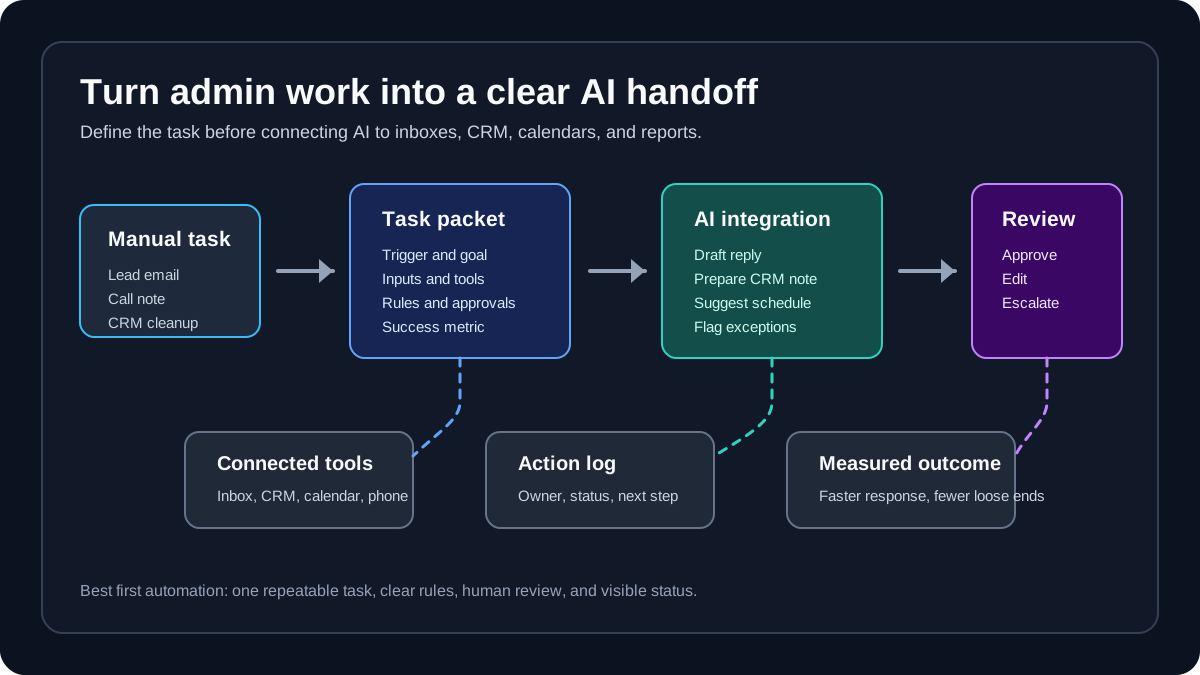
An AI task handoff packet is a simple operating brief for one workflow. It tells an AI system what work to do, what context to use, what tools it can access, what output to prepare, and when to stop for a person.
Think of it like a training note for a new operations assistant.
| Packet section | Plain-English question | Example for a service business |
|---|---|---|
| Trigger | What starts the task? | New website form, missed-call transcript, invoice email, weekly CRM report |
| Goal | What should be true when the task is done? | Lead assigned, reply drafted, booking options prepared, CRM note updated |
| Inputs | What information is needed? | Customer name, phone, job type, address, urgency, history, preferred time |
| Tools | Which systems can be used? | CRM, calendar, shared inbox, phone log, property management system, spreadsheet |
| Rules | What business policies matter? | No pricing promise without approval, emergency jobs routed first, insurance questions escalated |
| Output | What should AI produce? | Draft SMS, CRM update, task list, summary, manager report, exception queue |
| Human review | When should a person approve? | Refunds, medical advice, legal notices, angry customers, large invoices |
| Measurement | How will you know it worked? | Response time, booked appointments, open tasks, review rate, rework, missed handoffs |
This packet can later become a prompt, an automation spec, a CRM workflow, a dashboard requirement, or a custom software brief. It is intentionally simple because the first hard part is not code. It is operational clarity.
The best workflows to packet first
Start with work that is frequent, rules-based, visible, and expensive when delayed. Avoid starting with decisions that are rare, emotionally sensitive, or financially risky.
| Automate first | Wait or keep human-led |
|---|---|
| New lead intake from forms, calls, email, and chat | Negotiating a disputed contract |
| Appointment reminders and reschedule drafts | Medical, legal, or financial advice |
| CRM note cleanup after calls or messages | Firing a customer or employee |
| Weekly status reports from CRM and task tools | Approving refunds above a set amount |
| Invoice capture and missing-detail requests | Paying unfamiliar vendors without review |
| Maintenance request triage with emergency flags | Sending sensitive notices without manager approval |
For a non-technical founder, a good first question is: "Which task does the team already know how to do, but nobody has time to do consistently?"
That is usually the workflow to document first.
Before and after: a practical lead follow-up packet
Here is how a messy lead workflow changes when it is packaged clearly.
| Step | Before the packet | After the packet |
|---|---|---|
| Lead arrives | Form email lands in a shared inbox | Trigger creates a lead review item |
| Details | Staff read the message and copy fields manually | AI extracts name, phone, service type, location, urgency, and preferred time |
| Context | Staff check CRM only if they remember | AI checks for existing customer or prior inquiry |
| Response | Staff write a new reply each time | AI drafts a reply from approved templates and available appointment windows |
| CRM | Notes may be added later | AI prepares a CRM note and follow-up task |
| Approval | No clear rule for edge cases | Human review required for pricing exceptions, complaints, or unclear requests |
| Reporting | Owner asks, "What happened with that lead?" | Status shows source, owner, next step, and last contact |
This is where AI integrations matter. A useful workflow may need to connect the website form, CRM, calendar, shared inbox, phone system, and reporting dashboard. If the workflow needs agent behavior and controlled tool access, AI agent development can provide the operating layer. If those systems do not connect cleanly, custom software development can create the missing bridge.
The approval rules to define before launch
OpenAI's workspace agent documentation says write actions for apps and connectors are set to "Always ask" by default, and advises using write approvals carefully for workflows that can send, edit, post, or delete content (OpenAI Help Center). That is a useful principle for small and mid-sized service businesses too.
You do not need a complicated governance program to start. You need clear action rules.
| AI action | Low-risk mode | Approval required when |
|---|---|---|
| Summarize a call or email | AI creates a private summary | The summary will be sent to a customer |
| Draft a reply | AI prepares text for staff | The customer is angry, confused, or discussing money |
| Update CRM fields | AI prepares suggested values | The update changes deal stage, price, status, or owner |
| Create a calendar hold | AI suggests times | The booking commits staff, rooms, vehicles, or deposits |
| Send a reminder | AI sends from approved template | The message changes policy, price, or appointment terms |
| Route an urgent request | AI flags and assigns | The request affects safety, medical care, legal notices, or emergency dispatch |
NIST's AI Risk Management Framework organizes AI risk work around govern, map, measure, and manage functions, and emphasizes context, documentation, human oversight, and ongoing monitoring (NIST AI RMF Core). For a service business, that translates into a practical habit: document what the AI is allowed to do, test it on real examples, review early results, and keep improving the workflow after launch.
What technical terms mean in plain English
You may hear vendors use terms that make this sound more complex than it needs to be.
| Term | Plain-English meaning | Why it matters |
|---|---|---|
| Agent | AI that can take multiple steps toward a goal instead of only answering one question | Useful for admin workflows with several handoffs |
| Integration | A connection between tools, such as CRM, calendar, inbox, forms, or phone systems | Prevents staff from copying data by hand |
| API | A controlled way for one software system to talk to another | Helps AI update or retrieve information reliably |
| Human-in-the-loop | A person reviews or approves certain AI actions | Keeps sensitive decisions under human control |
| Trigger | The event that starts a workflow | Makes automation consistent instead of dependent on memory |
| Exception queue | A list of items AI could not safely finish | Lets staff focus on the cases that need judgment |
If a vendor cannot explain these terms in your workflow language, that is a warning sign. The point of automation is to make operations clearer, not to bury them under jargon.
A 30-day rollout plan
Do not try to automate every admin workflow at once. Pick one high-volume task and build confidence.
| Timeline | What to do | What to produce |
|---|---|---|
| Days 1-3 | Choose one workflow with clear business value | Workflow name, owner, trigger, and success metric |
| Days 4-7 | Collect 20-50 real examples | Sample messages, call notes, CRM records, and current replies |
| Days 8-12 | Write the task handoff packet | Inputs, rules, tools, output, approval rules, exception cases |
| Days 13-18 | Test AI drafts without sending automatically | Draft replies, summaries, CRM updates, and manager review notes |
| Days 19-24 | Connect the tools or build the missing interface | CRM/calendar/inbox integration or a simple custom dashboard |
| Days 25-30 | Launch with monitoring | Review queue, action log, weekly scorecard, improvement list |
The early version can be very manual. For example, staff may paste messages into a review queue before the integrations are finished. That is fine. It lets you confirm the business rules before building the deeper automation.
What to measure after launch
AI automation should make work easier to see, not harder to audit.
| Metric | What it tells you | Good question to ask |
|---|---|---|
| Time to first response | Whether leads and customers hear back faster | Are urgent inquiries being handled first? |
| Review rate | How often staff must approve or fix AI output | Are the rules too loose or too strict? |
| Rework rate | How often drafts need major edits | Does the packet need better examples or policies? |
| Missed handoffs | Whether work still gets stuck between tools | Which system is not connected yet? |
| Booking or completion rate | Whether the workflow supports revenue or operations | Did faster handling produce better outcomes? |
| Exception reasons | Why AI stops for human review | Can we add clearer rules without adding risk? |
Do not judge the workflow only by whether AI produced text. Judge it by whether the work moved faster, records got cleaner, customers waited less, and staff had fewer loose ends.
Where Zenovae helps
Zenovae helps founders and service-business operators turn unclear back-office work into practical AI automation.
That can include:
| Need | How Zenovae supports it |
|---|---|
| You know the pain but not the workflow | Map the task, identify triggers, define owners, and write the handoff packet |
| Your tools do not talk to each other | Connect CRM, calendar, phone, forms, inbox, property management software, and reporting tools |
| Your team needs review controls | Build approval queues, exception handling, action logs, and human-in-the-loop rules |
| Off-the-shelf tools are not enough | Build custom dashboards, portals, APIs, and internal workflow software |
| You want support after launch | Monitor performance, tune rules, control cost, and improve the automation over time |
The best automation review usually starts with one question: "Which manual workflow keeps coming back every week?"
Want to remove a manual workflow? Zenovae can map the task, connect the right tools, and show what an AI integration or custom software build would look like.
FAQ
What is the simplest AI workflow for a service business to start with?
The simplest workflow is usually one that turns incoming customer or lead messages into a reviewed next step. Examples include missed-call follow-up, new lead intake, appointment reminders, CRM note cleanup, and weekly operations reports.
Do I need custom software before using AI agents?
Not always. Some workflows can start inside tools your team already uses. Custom software becomes useful when the workflow needs a cleaner dashboard, a specific approval queue, deeper CRM or calendar logic, or integrations that off-the-shelf tools do not support.
Should AI send customer messages automatically?
Only after the workflow has been tested and the message type is low risk. Many service businesses should begin with AI drafting replies while staff approve anything involving pricing, complaints, medical or legal sensitivity, refunds, cancellations, or urgent dispatch.
What should be inside an AI task handoff packet?
Include the trigger, goal, inputs, tools, business rules, expected output, approval rules, exception cases, and success metrics. The packet should be clear enough for a new employee to understand the workflow.
Sources
- OpenAI: ChatGPT is now a partner for your most ambitious work
- OpenAI Help Center: ChatGPT Workspace Agents for Enterprise and Business
- Microsoft Support: Get started with Workflows in Microsoft 365 Copilot
- Microsoft Power Platform Blog: Making apps smarter with Copilot and app skills in Power Apps
- NIST AI RMF Core
Need Help with Your AI Project?
At Zenovae, we build production-ready AI systems that scale. From OpenClaw setup to custom integrations, Mission Control workflows, and full-stack delivery, we can help you ship faster and avoid costly mistakes.
Let's Talk