AI Workflow Loops for Service Businesses: Turn Lead Lists Into Follow-Up
AI workflow loops help service businesses turn lead lists, meeting notes, and appointment emails into reviewed follow-up without spreadsheet chasing.
Most service businesses do not lose money because nobody knows what to do next. They lose money because the next step sits in a spreadsheet, meeting note, shared inbox, or CRM view until a busy person has time to work through the list.
That is why AI workflow loops matter. A workflow loop is a repeatable automation that can move through a list of items, such as new leads, appointment requests, open estimates, or meeting action items, and prepare the next step for each one. The best version does not blindly send messages. It drafts, routes, updates, and asks for review where the decision affects a customer, schedule, invoice, or revenue opportunity.
Quick take: Recent updates from Google, Microsoft, and Salesforce show AI automation moving from one-off prompts into everyday workflows across email, calendars, spreadsheets, CRM, and legacy systems. For service businesses, the practical opportunity is to automate reviewed follow-up loops: turn every lead row, appointment email, meeting note, or open task into a clear next action before it gets stale.
| If you only read one section | Read this |
|---|---|
| You have leads or requests sitting in spreadsheets | What an AI workflow loop actually does |
| You use Gmail, Outlook, Calendar, Teams, Sheets, or CRM daily | What changed in 2026 |
| You want a safe first workflow | Back-office loops worth automating first |
| You are worried about mistakes | The control checklist before launch |
| You need an implementation path | A practical 30-day rollout plan |
What an AI workflow loop actually does
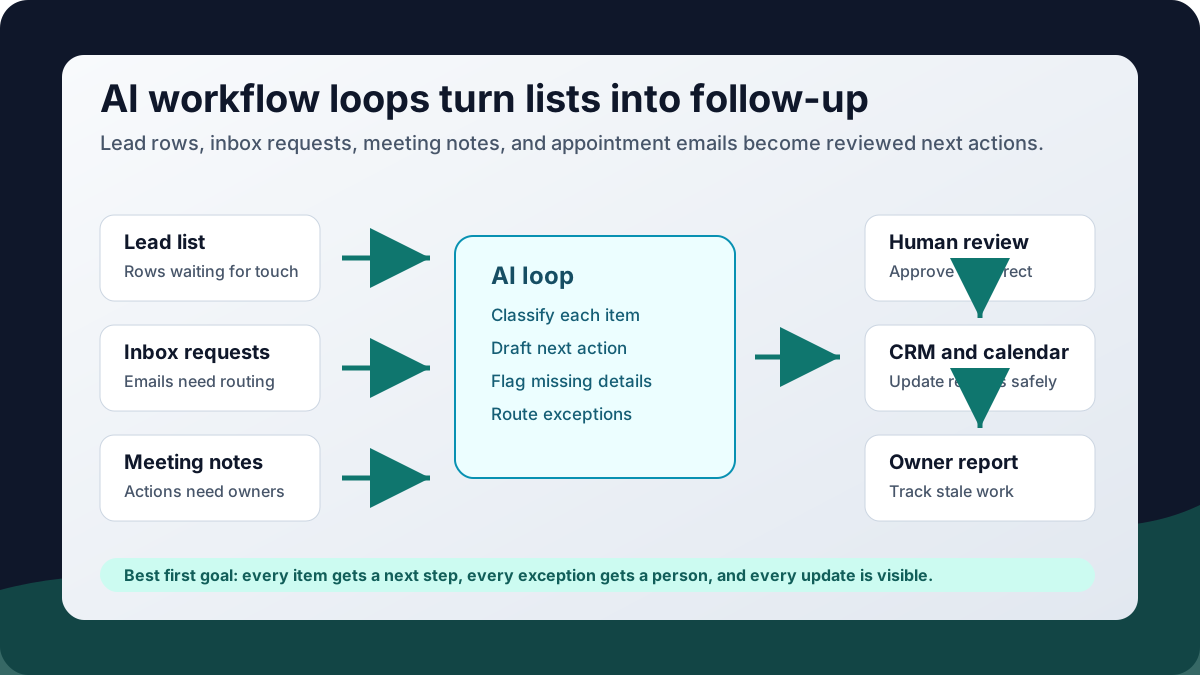
An AI workflow loop is a business process that repeats the same set of steps for every item in a list. In plain English: "For every new lead in this sheet, draft a follow-up, create a CRM note, assign an owner, and flag anything that needs a manager."
That sounds simple, but it fixes a common back-office gap. Many service businesses already have lists everywhere: missed-call logs, estimate follow-up sheets, intake forms, appointment requests, meeting action items, renewal lists, maintenance tickets, and open invoice reports. The list exists. The follow-up is where the process breaks.
The AI part helps with reading messy information, summarizing context, drafting a message, categorizing urgency, or spotting missing fields. The workflow part makes sure the work is routed consistently instead of depending on memory.
What changed in 2026
The trend is not one vendor. It is the shift from "ask AI a question" to "let AI help move work through the tools your team already uses."
Google's Workspace team announced on June 2, 2026 that Workspace Studio flows can now loop over a list of items. Google says the new "Repeat for each" step can loop over list output from Gemini or over Google Sheets rows, with examples such as creating tasks from meeting notes and drafting an email for each sales lead in a tracker.
Google also expanded Workspace Studio around meetings and calendars. In May 2026, Google said the Meet starter step can now run from meeting transcripts or Notes by Gemini, support up to 100 different meetings as triggers, and use a calendar "Block time" step for scenarios like appointment confirmation or training reminders (Google Workspace Updates).
Microsoft is moving in the same direction inside Microsoft 365. Its support documentation, last updated in April 2026, describes Workflows in Microsoft 365 Copilot as an agent that helps automate work across apps such as Outlook, SharePoint, Teams, and Planner using natural language. Microsoft says workflows can run on a schedule or in response to events, collect input in Teams, use Microsoft 365 data such as calendar or tasks, and be tested in a visual designer.
For larger CRM and operations teams, Salesforce announced Agentforce Operations on April 29, 2026, positioning it around back-office process coordination across fragmented systems. Salesforce says the product is designed to turn manual back-office processes into tasks that specialized agents can help complete, including verification, approvals, and process coordination.
The buyer takeaway is straightforward: AI automation is becoming more useful when it is connected to the list, inbox, calendar, CRM, and approval step. That is exactly where small service businesses feel the daily pain.
What this means for your business
If your team already keeps a lead tracker, dispatch board, appointment list, or weekly action log, you probably have a workflow-loop opportunity. The value is not "AI writes nicer emails." The value is that every item gets reviewed, assigned, and moved forward.
| Current workflow | AI-assisted workflow loop | Business outcome to watch |
|---|---|---|
| A lead list is checked whenever someone remembers | Each new lead row gets categorized, assigned, and prepared for follow-up | Faster response and fewer stale opportunities |
| Meeting notes turn into vague action items | Each action item becomes a task with owner, due date, and review status | Better accountability after sales or operations meetings |
| Appointment requests sit in email | Each request is extracted, checked for missing details, and queued for staff confirmation | Less scheduling friction and fewer dropped inquiries |
| Open estimates require manual chasing | Each estimate gets a next-touch draft based on age, value, and status | More consistent follow-up without awkward guesswork |
| Weekly reporting depends on manual updates | Each open item is summarized into a manager-ready status report | Clearer visibility without another staff meeting |
This is especially useful for businesses where the office team is handling multiple roles: front desk, customer follow-up, scheduling, billing, vendor coordination, and reporting. A workflow loop gives those tasks a queue instead of letting them scatter across messages and spreadsheets.
Back-office loops worth automating first
Start with repeatable, reviewed work. Do not start with the most sensitive decision in the business.
| Automate first | Keep human-led |
|---|---|
| Draft follow-up for each lead in a tracker | Final decision on discounts, refunds, or unusual terms |
| Create tasks from meeting notes | Performance conversations or sensitive staff matters |
| Extract appointment details from inbound emails | Medical, legal, or compliance-sensitive advice |
| Summarize open estimates by age and next action | Closing a high-value deal without owner review |
| Flag missing CRM fields after calls | Changing customer account status automatically |
| Prepare weekly owner reports from open tasks | Deciding which customer relationship needs personal attention |
For a dental office, the first loop might be "for every new patient inquiry, prepare a scheduling task and draft a response." For an HVAC company, it might be "for every unscheduled estimate older than two days, create a callback task." For a property manager, it might be "for every maintenance request, classify urgency, building, vendor category, and missing information."
The control checklist before launch
AI workflow loops should be boring before they are powerful. A safe loop has clear inputs, review points, logging, and ownership.
| Control | Why it matters | Plain-English test |
|---|---|---|
| Clear trigger | Prevents the workflow from running on the wrong data | "What exactly starts this loop?" |
| Approved data source | Keeps the AI away from stale or private information it should not use | "Which sheet, inbox, CRM view, or form is allowed?" |
| Human review point | Stops customer-facing or financial mistakes before they go out | "Who approves the message or update?" |
| Exception routing | Makes edge cases visible instead of hidden | "Where does the AI send confusing cases?" |
| Activity log | Helps staff understand what happened | "Can we see what it drafted, changed, skipped, or flagged?" |
| Owner and metric | Keeps automation tied to business results | "Who owns response time, completion rate, or stale-item count?" |
This matches the spirit of the NIST AI Risk Management Framework, which gives organizations a way to manage AI risks across governance, mapping, measurement, and ongoing management. For a service business, that does not need to become a compliance project. It can start as a practical rule: map the workflow, measure mistakes and outcomes, and keep a person responsible for managing changes after launch.
A practical 30-day rollout plan
Do not automate ten workflows at once. Pick one loop where the list is clear and the payoff is easy to see.
| Timeframe | What to do | Output |
|---|---|---|
| Days 1-3 | Choose one list-based workflow, such as stale leads, appointment requests, or meeting action items | A named workflow with one owner |
| Days 4-7 | Map the current steps, handoffs, tools, and review decisions | A before-and-after workflow map |
| Days 8-14 | Build a draft-only loop that reads the list and prepares next actions | Draft messages, tasks, CRM notes, or summaries |
| Days 15-21 | Add approvals, exception labels, and logging | Staff can review, correct, and track the loop |
| Days 22-30 | Run the workflow on live work with a small scope | Measured response time, completion rate, and error notes |
The first goal is not full autonomy. The first goal is a trusted queue: every item has a next step, every exception has a place to go, and your team can see what the automation did.
Where Zenovae helps
Zenovae helps founders and service-business operators turn messy back-office work into practical AI integrations and custom software. That can mean connecting an inbox to a CRM, turning appointment requests into reviewed scheduling tasks, creating a dashboard for stale leads, or building a custom internal tool when off-the-shelf automation does not fit the workflow.
The difference is support after launch. A workflow loop needs monitoring, staff feedback, prompt adjustments, permissions, and occasional changes when the business process changes. Zenovae can help map the workflow, connect the right tools, keep humans in control, and improve the automation over time.
Relevant service pages:
- AI Integration Services for connecting AI to CRM, calendar, inbox, phone systems, forms, and internal tools
- AI Agent Development for tool-using agents that prepare follow-up, route exceptions, and update systems with review
- Custom Software Development for dashboards, portals, internal tools, and workflow systems built around your process
- Free AI Audit for finding the highest-value manual workflow to remove first
Want to remove a manual workflow? Zenovae can map the task, connect the right tools, and show what an AI integration or custom software build would look like.
FAQ
What is an AI workflow loop?
An AI workflow loop is automation that repeats a set of steps for each item in a list. For example, it can review every lead in a spreadsheet, draft a follow-up, create a task, and flag missing information for a staff member.
Is this different from a chatbot?
Yes. A chatbot answers a question. A workflow loop moves work through a business process, such as lead follow-up, scheduling, CRM cleanup, meeting actions, or weekly reporting.
Should service businesses let AI send follow-up automatically?
Not at first. Start with draft-only or approval-based follow-up. Once the workflow is stable, you can decide which low-risk messages can be sent automatically and which still need human review.
What tools can an AI workflow loop connect to?
Common tools include Gmail, Outlook, Google Sheets, Microsoft Teams, calendars, CRMs, booking tools, phone systems, intake forms, and custom dashboards. The right setup depends on where the work starts and where the official record lives.
Sources
- Google Workspace Updates: Introducing the ability to loop over a list of items in Workspace Studio
- Google Workspace Updates: Improvements to the Meet starter step and Calendar time-blocking capabilities
- Microsoft Support: Get started with Workflows in Microsoft 365 Copilot
- Microsoft Copilot Blog: New and improved Copilot Studio updates, May 2026
- Salesforce: Salesforce Launches Agentforce Operations
- NIST AI Risk Management Framework
Need Help with Your AI Project?
At Zenovae, we build production-ready AI systems that scale. From OpenClaw setup to custom integrations, Mission Control workflows, and full-stack delivery, we can help you ship faster and avoid costly mistakes.
Let's Talk