Before AI Agents Touch Your CRM, Map the Back-Office Rules
AI agents can update business tools, not just answer questions. Learn how service businesses can prepare CRM, inbox, and scheduling workflows safely.
AI agents are no longer limited to drafting messages or summarizing documents. The practical shift for service businesses is that agents are getting closer to the systems where work actually happens: CRMs, calendars, inboxes, forms, phone systems, and internal portals.
That creates a real opportunity. A well-designed agent can prepare follow-up, update customer records, create callback queues, summarize jobs, and route admin work faster than a busy team can do it manually. It also creates a new risk: if the agent has access before the workflow has rules, it can update the wrong record, promise the wrong thing, or bury a task where nobody reviews it.
Quick take: Before an AI agent touches your CRM or back-office software, map what it may read, what it may draft, what it may update, and what still needs human approval. The best first projects are not fully autonomous. They are reviewed workflows that remove repetitive admin work while keeping staff in control.
| If you only read one section | Read this |
|---|---|
| You want the short answer | What changed |
| You manage customer operations | What this means for your business |
| You want a practical starting point | The back-office rules map |
| You are worried about mistakes | Risks to check before launch |
| You want a rollout plan | A practical 30-day implementation plan |
What changed
The important trend is that AI agents are becoming tool users, not just chat tools. OpenAI describes its Responses API as a way to build agents that can use tools such as web search, file search, code execution, and remote Model Context Protocol servers, which can connect agents to external systems (OpenAI). In plain English, a connector lets an AI agent work with another business tool instead of only replying in a chat box.
Microsoft has also been expanding Copilot Studio toward workflow automation. Its Copilot Studio update describes computer-using agents that can interact with websites and desktop applications when an API is not available, plus a workflow experience for building and managing automations (Microsoft).
Anthropic's Model Context Protocol is another sign of the same direction. MCP is an open protocol for connecting AI applications to tools and data sources, which matters because businesses rarely run on one clean system (Model Context Protocol).
For a founder or operator, the takeaway is simple: AI is moving from "write this email" toward "help complete this workflow." That is where back-office automation becomes valuable, but only if the rules are clear.
What this means for your business
Most service businesses do not lose time because staff are slow. They lose time because work is scattered. A lead arrives in a form, a missed call sits in voicemail, a customer replies by email, a technician notes something in a job system, and someone has to manually copy the right detail into the CRM.
An AI agent can help by gathering and preparing the work. It should not start by making every decision on its own.
| Back-office pain | What an AI agent can safely do first | What should stay human-led |
|---|---|---|
| Missed leads are not followed up | Draft replies, create a call queue, tag lead source, note urgency | Final pricing, discounts, or unusual promises |
| CRM records are incomplete | Suggest field updates from calls, forms, and emails | Overwriting conflicting customer records |
| Scheduling requires too many checks | Pull requested times, detect missing details, draft options | Confirming exceptions, double-booking, or urgent dispatch |
| Inbox triage eats the morning | Sort messages by topic, customer, urgency, and next step | Sensitive complaints, legal issues, or cancellation decisions |
| Reporting is manual | Prepare daily summaries from CRM and job data | Drawing conclusions without manager review |
| Staff ask the same policy questions | Answer from approved SOPs and link to the source | Creating new policy or changing terms |
This is why the first question should not be "Which AI tool should we buy?" The better question is "Which workflow can the agent prepare, route, or update without creating customer risk?"
Plain-English definitions
AI agent: Software that can use AI to plan steps and take actions through approved tools. In a service business, that might mean reading an intake form, checking a CRM record, drafting a customer reply, and creating a follow-up task.
Connector: A bridge between the AI agent and another system, such as a CRM, calendar, email inbox, phone platform, or property management tool.
Human-in-the-loop: A workflow where the agent prepares or recommends an action, but a person reviews and approves important steps before they happen.
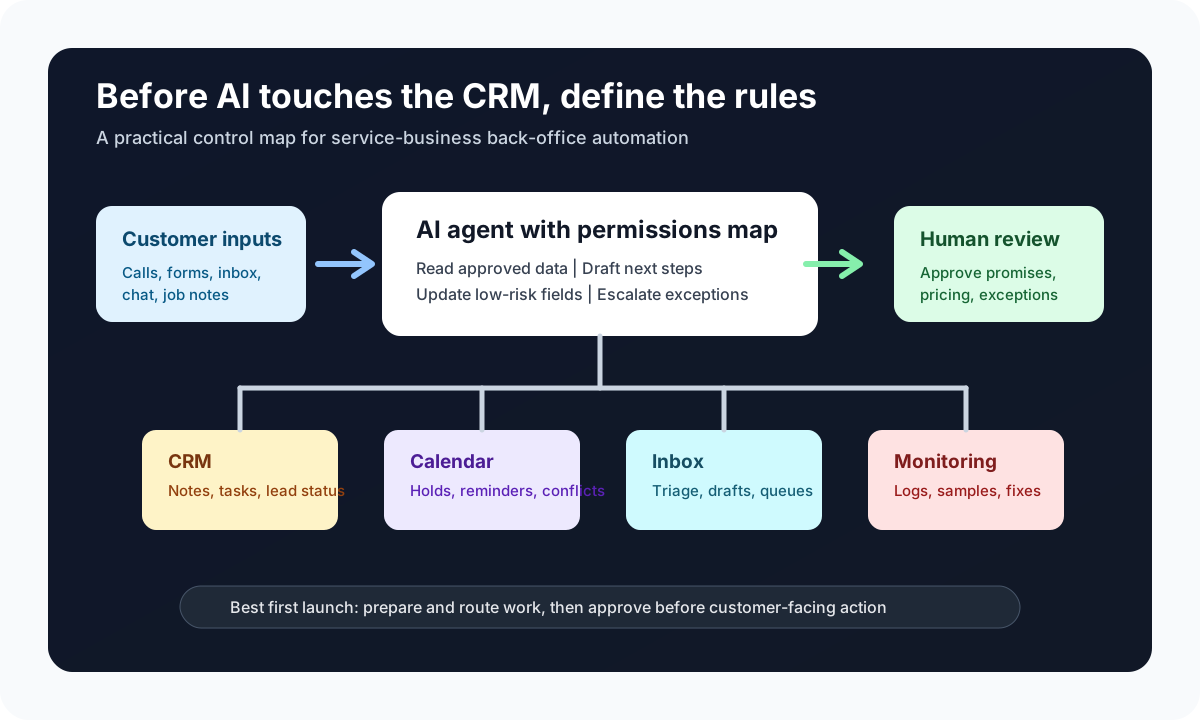
Permissions map: A simple operating document that says what the agent can read, draft, update, send, delete, or escalate.
The back-office rules map
Before connecting an agent to the CRM, build a rules map. This does not need to be a technical document. It needs to be clear enough that an operator, manager, and implementation partner agree on what the agent is allowed to do.
| Workflow area | Agent can read | Agent can prepare | Agent can update automatically | Requires approval |
|---|---|---|---|---|
| New lead intake | Form submission, caller ID, source, service requested | Lead summary, missing-info questions, first response draft | Lead status, source tag, callback task | Price quote, custom scope, urgent promises |
| Scheduling | Calendar availability, service area, requested time | Appointment options, confirmation draft | Reminder task, tentative slot hold if supported | Double-booking, emergency dispatch, cancellation fee |
| CRM notes | Call transcript, email thread, form details | Clean summary, next step, owner recommendation | Non-sensitive notes and task assignment | Merging records, changing deal value, closing opportunity |
| Inbox triage | Shared inbox, approved labels, customer history | Priority list, suggested response, escalation reason | Label, assign, or move to review queue | Sending sensitive replies or refund decisions |
| Reporting | CRM fields, call logs, appointment data | Daily summary, stuck-work list, no-response report | Internal report draft | Performance conclusions or customer-facing claims |
The goal is not to slow the project down. The goal is to prevent the agent from learning business rules through mistakes in front of customers.
Start with preparation, then move to action
The safest pattern is a staged rollout.
| Stage | What the agent does | Why it helps |
|---|---|---|
| Observe | Reads approved sources and summarizes what happened | Finds manual work without changing records |
| Prepare | Drafts replies, notes, tasks, and report summaries | Saves staff time while humans still review |
| Route | Assigns work to the right person or queue | Reduces forgotten handoffs |
| Update | Changes low-risk fields in CRM or scheduling tools | Removes repetitive data entry |
| Act with approval | Sends messages or confirms steps after human review | Speeds work without losing control |
For many service businesses, the first useful version is not a fully autonomous agent. It is an assistant that produces a clean review queue: "Here are the leads that need a callback, here is what they asked for, here is the suggested next step, and here is the CRM record that needs an update."
Risks to check before launch
NIST's AI Risk Management Framework organizes AI risk work around governance, mapping, measuring, and managing risks (NIST). That applies directly to back-office automation. You do not need a corporate risk department, but you do need a basic control plan.
The OWASP Top 10 for LLM Applications also highlights risks such as prompt injection and excessive agency (OWASP). In customer terms, prompt injection means someone tries to manipulate the AI through text it reads, and excessive agency means the AI is allowed to take too much action without enough limits.
| Risk | What it looks like in a service business | Practical mitigation |
|---|---|---|
| Wrong customer record | Agent updates the wrong lead or tenant file | Require record matching rules and show the record before approval |
| Over-promising | Agent confirms a price, appointment, or policy exception | Keep promises and exceptions human-approved |
| Bad source data | Old SOP or outdated pricing appears in the knowledge base | Assign one owner for approved documents and review dates |
| Hidden work | Agent creates tasks in a place staff do not check | Use one visible review queue with clear ownership |
| Too much access | Agent can read or change more systems than needed | Start with least-privilege access and expand only after review |
| No monitoring | Mistakes are found only after customers complain | Review samples, track escalations, and log actions |
A practical 30-day implementation plan
You do not need to automate the whole company at once. Pick one workflow where the handoff is painful, the outcome is measurable, and the risk can be controlled.
| Timing | Focus | Output |
|---|---|---|
| Days 1-5 | Map one workflow | Current process, systems involved, owner, failure points |
| Days 6-10 | Define permissions | Read, draft, update, send, escalate, and approval rules |
| Days 11-15 | Clean source data | Approved FAQs, policies, scripts, CRM fields, labels |
| Days 16-22 | Build the first integration | Agent prepares summaries, tasks, or CRM updates in a review queue |
| Days 23-30 | Test with real work | Sample review, staff feedback, error log, rollout decision |
Good first candidates include missed-call follow-up, appointment confirmation, lead intake cleanup, shared inbox triage, and daily manager reporting. These workflows are visible, repetitive, and usually easy to compare before and after.
Where Zenovae helps
Zenovae helps founders and service-business operators turn messy admin workflows into practical AI integrations and custom software. That usually means mapping the workflow first, choosing the right automation pattern, connecting the existing tools, and building the human review points that keep the business in control.
For example, Zenovae can connect an AI receptionist or follow-up workflow to your CRM and calendar, build a review dashboard for staff, automate routine updates, and monitor the system after launch. If the off-the-shelf tools do not fit the process, Zenovae can build custom internal software around the workflow instead of forcing your team into a generic template.
The point is not to replace your staff. The point is to remove the repetitive back-office work that keeps staff from answering customers, booking jobs, and resolving issues quickly.
FAQ
Should an AI agent update my CRM automatically?
Only for low-risk fields after the workflow has been tested. A good first step is to let the agent draft CRM updates and place them in a review queue. Automatic updates can come later for simple fields such as source tags, follow-up tasks, or non-sensitive notes.
What is the safest first AI integration for a service business?
Missed-call follow-up, lead intake cleanup, appointment reminder preparation, and inbox triage are usually safer starting points than pricing, refunds, dispatch exceptions, or customer complaints.
Do I need to replace my CRM to use AI agents?
Usually no. The better approach is to connect AI to the tools your team already uses, then build a workflow layer around the gaps. Replacement only makes sense when the current system cannot support the workflow at all.
How do I know whether a workflow is ready for AI?
A workflow is ready when the inputs are clear, the outcome is measurable, the data source is approved, and the human approval points are defined. If staff cannot agree on the rules, the AI agent will not fix the process.
The practical next step
Before buying another AI tool, choose one back-office workflow and write down the rules. What can the agent read? What can it draft? What can it update? What needs a person?
Want to remove a manual workflow? Zenovae can map the task, connect the right tools, and show what an AI integration or custom software build would look like.
Sources
Need Help with Your AI Project?
At Zenovae, we build production-ready AI systems that scale. From OpenClaw setup to custom integrations, Mission Control workflows, and full-stack delivery, we can help you ship faster and avoid costly mistakes.
Let's Talk