CRM AI Orchestration: How Service Businesses Can Fix Follow-Up Without Losing Control
CRM AI orchestration is turning customer records into active workflows. Learn how service businesses can automate follow-up safely.
Most service businesses do not lose leads because the team does not care. They lose them because the follow-up process lives across too many places: missed calls, contact forms, shared inboxes, calendars, CRM notes, spreadsheets, and staff memory.
That is why the current shift in CRM AI matters. Large platforms are moving from "store the customer record" toward AI systems that can route work, suggest next steps, and coordinate tasks across sales, service, and operations. For a local service business, the practical question is not whether to buy the biggest CRM. It is whether your lead and customer handoffs are clear enough for AI to help without creating confusion.
Quick take: CRM AI orchestration means using AI to coordinate the steps around a customer record: assign the lead, draft the follow-up, update the CRM, schedule the next task, and escalate exceptions. Service businesses should start with reviewed workflows, not fully autonomous decisions. The best first projects are lead follow-up, inbox triage, appointment reminders, quote chasing, customer status updates, and weekly reporting.
| If you only read one section | Read this |
|---|---|
| You lose leads after calls, forms, or estimates | What CRM AI orchestration means in plain English |
| Your team uses a CRM but still works from inboxes and spreadsheets | What this means for your business |
| You want a safe first workflow | Follow-up workflows worth automating first |
| You are worried about mistakes or customer trust | Risks to control before AI updates customer records |
| You need a rollout plan | A practical 30-day implementation plan |
What changed in CRM AI
In May 2026, Salesforce described its Summer '26 release as a move toward agentic enterprise workflows, including multi-agent orchestration, Slack-first workflows, real-time data activation, and AI-powered customer engagement. In plain English, the CRM is being positioned less like a database and more like a place where work gets coordinated.
ServiceNow announced new AI specialists for IT, CRM, employee service, security, and risk in May 2026. The company framed them as systems that work alongside humans to complete end-to-end processes, not just respond to isolated prompts.
Research and advisory firm ISG said in March 2026 that CRM has expanded beyond record-keeping and sales force automation into an AI-enhanced foundation for revenue operations, customer experience, and performance management. ISG also noted that agentic AI is moving CRM from passive records toward active orchestration of revenue and customer engagement processes.
This does not mean every service business should rush into a complex enterprise platform. It does mean the direction of travel is clear: customer systems are becoming action systems. The businesses that benefit first will be the ones with clean workflows, clear rules, and practical integration plans.
What CRM AI orchestration means in plain English
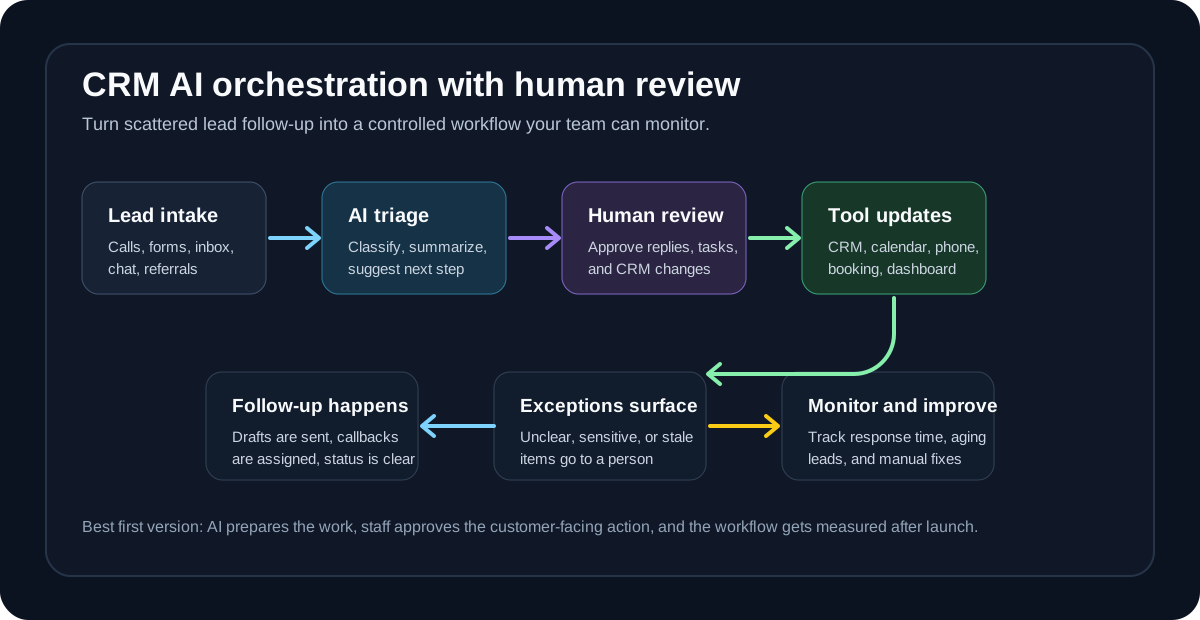
CRM AI orchestration means the AI helps coordinate work around a customer or lead record. It might notice a new form fill, check whether the person already exists in the CRM, classify the request, draft a response, create a follow-up task, and alert the right person.
An AI agent is software that can follow instructions and use approved tools. A chatbot might answer a question. An agent can help take the next step, such as drafting a reply or preparing a CRM update.
An AI integration connects that agent to the tools your team already uses: CRM, calendar, inbox, phone system, booking tool, form software, property management system, or reporting dashboard.
Human-in-the-loop automation means the AI prepares, routes, or drafts the work, but a person approves customer-facing or high-risk actions. This is the best starting point for service businesses because it saves time while keeping accountability with the team.
What this means for your business
The important change is not the AI label. The important change is that manual follow-up can become a controlled workflow instead of a memory test.
| Current follow-up problem | AI-assisted workflow | Business impact to watch |
|---|---|---|
| A form lead waits in the inbox until someone checks it | AI classifies the lead, drafts a reply, and creates a CRM task for review | Faster response and fewer untouched leads |
| A missed call creates a voicemail but no owner | AI summarizes the call, checks service area, and routes a callback task | Clearer ownership and less callback delay |
| Staff manually copy details from email into the CRM | AI extracts contact details, service need, urgency, and preferred time for approval | Cleaner records and less duplicate entry |
| Estimates go out but follow-up is inconsistent | AI drafts a polite follow-up and reminds the assigned person | More consistent quote chasing |
| Managers ask for pipeline or job-status updates | AI prepares a weekly summary from CRM notes and open tasks | Better visibility without a reporting scramble |
For a dental practice, this could mean new-patient inquiries are sorted by insurance question, scheduling request, and urgent concern before a coordinator reviews them. For an HVAC company, it could mean after-hours calls become prioritized callback tasks by emergency type and ZIP code. For a property manager, it could mean maintenance messages are routed by building, vendor category, and urgency. For a med spa, it could mean booking questions and clinical questions are separated before staff respond.
Why small businesses should care now
Small businesses are already using AI across daily work. The Small Business & Entrepreneurship Council reported in April 2026 that 82% of small business employers have invested in AI tools, and that the typical small business is using a median of five AI tools. The same article lists customer service, sales support, lead generation, scheduling, data entry, and workflow management among practical areas where small businesses are applying AI.
That "stack" approach is useful, but it creates a problem: five tools can mean five places where customer context gets scattered. If the CRM is not updated, the next person does not know what happened. If the inbox has one version of the conversation and the spreadsheet has another, customers feel the gap.
CRM AI orchestration is valuable when it reduces that fragmentation. The goal is not to make the CRM busier. The goal is to make the next right action clearer.
Follow-up workflows worth automating first
Start with workflows that are repetitive, high-volume, and easy for a person to review. Avoid beginning with sensitive judgment calls or irreversible customer decisions.
| Automate first | Keep human-led |
|---|---|
| Lead intake summaries from forms, calls, and emails | Deciding whether to accept complex, risky, or unusual jobs |
| First-response drafts for common inquiries | Final wording for sensitive complaints or medical questions |
| CRM field update suggestions | Changing account status, pricing, refunds, or contract terms |
| Callback task creation and assignment | Handling disputes or high-value exceptions |
| Appointment reminder drafts | Sending messages that require legal, clinical, or compliance review |
| Weekly open-lead and stale-opportunity reports | Strategic decisions about sales priority and staffing |
This is also where a custom software layer can help. Some businesses do not need a new CRM. They need a simple internal dashboard that shows unassigned leads, stale estimates, upcoming appointments, failed follow-ups, and AI-suggested next actions in one place.
Before-and-after workflow example
| Step | Manual workflow today | Reviewed AI workflow |
|---|---|---|
| 1. Inquiry arrives | Staff checks voicemail, email, form, or chat when time allows | AI watches approved channels and flags new inquiries |
| 2. Lead is understood | Staff reads the message and decides what it is | AI suggests category, urgency, location, and missing details |
| 3. CRM is updated | Someone copies details into the CRM later | AI prepares the CRM update for approval |
| 4. Follow-up happens | Staff writes a response from scratch | AI drafts a response using approved business rules |
| 5. Ownership is tracked | Owner may be unclear unless someone creates a task | AI creates a callback or follow-up task for the right person |
| 6. Manager sees status | Manager asks for updates manually | Dashboard or weekly report shows open items and aging leads |
The reviewed version is not about removing the office manager, dispatcher, receptionist, or coordinator. It is about giving them a cleaner queue and fewer places to check.
Risks to control before AI updates customer records
AI can create operational leverage, but customer records and follow-up workflows need guardrails. NIST's Generative AI Profile says organizations may need additional human review, tracking, documentation, and management oversight when using generative AI systems. That guidance is directly relevant when AI touches customer communication or operational records.
| Risk | Why it matters | Practical control |
|---|---|---|
| Wrong customer matched in the CRM | A follow-up could go to the wrong person | Require confidence checks and human approval before merge or update |
| Overconfident reply draft | Customer receives a promise staff did not approve | Keep outbound messages in review mode at first |
| Missing context from another tool | AI gives an incomplete answer | Connect approved sources and show source notes beside suggestions |
| Permission creep | AI can see or change more than it needs | Limit tool access by workflow and staff role |
| Silent workflow failure | Leads stop moving and nobody notices | Add logs, alerts, and weekly exception reviews |
| Unclear ownership | Staff assumes the AI handled something it only drafted | Assign every workflow step to a human owner |
The safest first version of a CRM AI workflow should show its work: what it saw, what it recommends, what field it wants to update, what message it drafted, and who approved the next step.
A practical 30-day implementation plan
| Timeframe | What to do | Output |
|---|---|---|
| Week 1 | Pick one workflow: missed-call follow-up, form leads, estimate chasing, or appointment reminders | A narrow use case with one owner |
| Week 2 | Map the current steps, systems, fields, approval points, and failure points | A simple workflow map and rule list |
| Week 3 | Build a reviewed AI workflow connected to the CRM, inbox, calendar, or phone system | Drafts, tasks, and CRM update suggestions |
| Week 4 | Run with human approval, measure misses, and adjust rules | A safer workflow ready for broader rollout |
Do not measure only whether the AI "works." Measure whether the workflow improved: fewer unassigned leads, faster first response, fewer stale estimates, cleaner CRM records, fewer manual status checks, and fewer customer handoff gaps.
Where Zenovae helps
Zenovae helps founders and service-business operators turn messy back-office workflows into practical AI integrations and custom software. That can include connecting an AI agent to your CRM, inbox, calendar, phone system, booking tool, property management software, or internal reporting dashboard.
For simple workflows, Zenovae can build reviewed AI follow-up automation: the agent drafts, classifies, routes, and prepares updates while your team approves customer-facing actions. For more complex operations, Zenovae can build a custom internal tool that gives managers one view of open leads, pending callbacks, stale estimates, no-show risks, and workflow exceptions.
The important part is support after launch. CRM AI orchestration should be monitored, tuned, and improved as real customer situations appear. Zenovae helps define the workflow, connect the tools, add human approval, monitor performance, and keep the system useful instead of letting automation become another unmanaged inbox.
Want to remove a manual workflow? Zenovae can map the task, connect the right tools, and show what an AI integration or custom software build would look like.
FAQ
Do service businesses need an enterprise CRM to use CRM AI orchestration?
No. Many service businesses can start by connecting the tools they already use, such as a CRM, inbox, phone system, calendar, forms, and spreadsheets. The first goal is a reviewed workflow, not a full platform replacement.
What should not be automated first?
Do not start with refunds, pricing exceptions, legal questions, clinical advice, account cancellations, or high-dollar decisions. Start with summaries, routing, task creation, draft responses, and CRM update suggestions that a person can approve.
How is CRM AI orchestration different from a chatbot?
A chatbot usually answers a question in one channel. CRM AI orchestration coordinates work across tools: it can prepare a CRM update, create a task, draft follow-up, route a callback, or summarize open items for a manager.
What is the safest first workflow?
Lead follow-up is often the safest first workflow when it is reviewed by staff. The AI can summarize the inquiry, draft a reply, suggest a CRM update, and create a callback task while a person approves the customer-facing action.
Sources
Need Help with Your AI Project?
At Zenovae, we build production-ready AI systems that scale. From OpenClaw setup to custom integrations, Mission Control workflows, and full-stack delivery, we can help you ship faster and avoid costly mistakes.
Let's Talk