CRM-Connected AI Agents: What Service Businesses Should Build Before Buying Another Chatbot
CRM-connected AI agents are becoming the practical path for service businesses that need calls, bookings, follow-up, and records to work together.
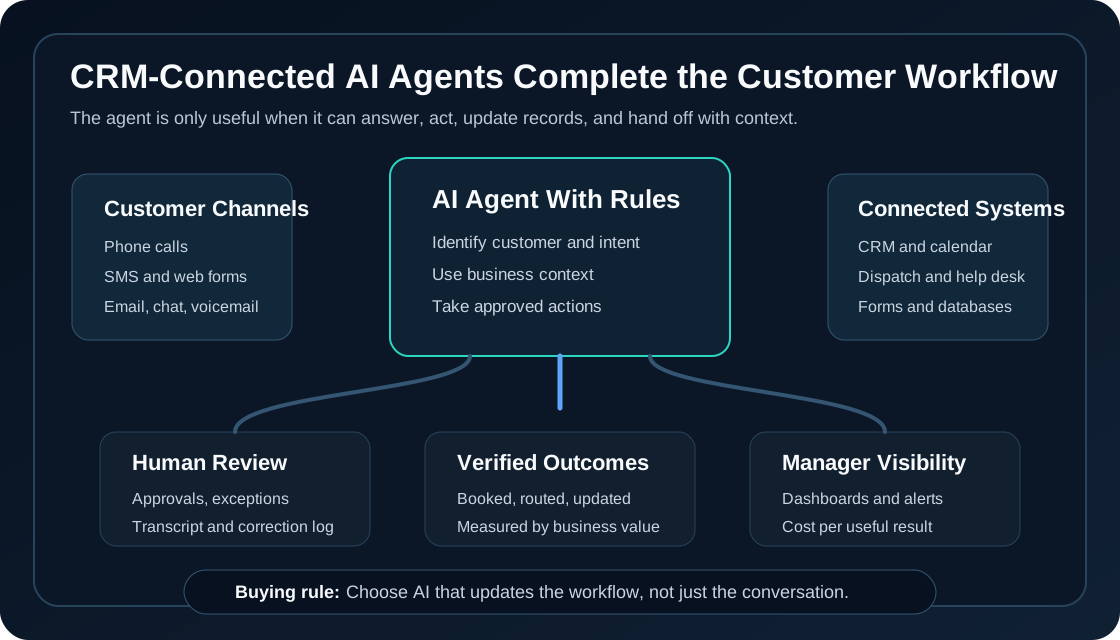
CRM-connected AI agents are AI systems that can answer customers, use business context, update records, book appointments, route urgent work, and hand off to staff inside the tools a business already runs. For service businesses, that matters more than a polished chatbot because the real work usually lives in phone systems, CRMs, calendars, forms, dispatch boards, property management software, and follow-up queues.
Quick take: The 2026 AI customer-operations trend is not "add another bot." It is connecting AI agents to the systems where customer work actually happens. Service businesses should start with one valuable workflow, connect only the systems needed to complete that workflow, and measure verified outcomes such as booked appointments, qualified leads, routed emergencies, completed work orders, and clean CRM notes.
| If you only read one section | Read this |
|---|---|
| You are deciding whether your chatbot is enough | Why standalone chatbots are becoming a dead end |
| You run calls, forms, SMS, and CRM together | What a CRM-connected AI agent should actually do |
| You want a practical rollout plan | A 30-day build plan for service businesses |
| You need buyer safeguards | Risks and watchouts |
What Changed in 2026
Major AI and customer-operations vendors are converging on the same idea: AI agents are most useful when they work across channels and systems, not when they sit in a separate chat window.
OpenAI's April 27, 2026 Choco customer story shows a production version of this shift. Choco's OrderAgent processes emails, SMS, images, documents, and other inputs into ERP-ready orders, while VoiceAgent handles natural phone ordering through OpenAI's Realtime API. OpenAI reported that Choco processes more than 8.8 million orders annually through these AI systems and reduced manual order entry by up to 50%. Source: OpenAI Choco customer story
Salesforce introduced Agentforce Contact Center on March 10, 2026, positioning it as a system that brings voice, digital channels, CRM data, and AI agents into one customer-service environment with AI-to-human handoffs and real-time visibility. Source: Salesforce Agentforce Contact Center
Freshworks announced Freddy AI Agent Studio in Freshservice on May 14, 2026, describing no-code AI agents, domain-specific service context, and connections to third-party tools through its MCP Gateway. Source: Freshworks AI Agent Studio
ServiceNow expanded AI Control Tower in May 2026 to discover, observe, govern, secure, and measure AI systems, agents, and workflows across different systems. That is an enterprise example, but the lesson applies to smaller operators too: once AI starts taking action, visibility and governance become part of the implementation, not an afterthought. Source: ServiceNow AI Control Tower expansion
Microsoft's Dynamics 365 Contact Center 2026 release wave 1 documentation also points in the same direction, describing a Copilot-first contact center with agentic intelligence that works with the CRM system a business already uses. Source: Microsoft Dynamics 365 Contact Center 2026 release wave 1
The buyer takeaway is simple: AI agents are moving closer to the operational record. A service business should judge AI by whether it can complete customer work inside the systems the team trusts.
Why Standalone Chatbots Are Becoming a Dead End
A standalone chatbot can answer questions. A CRM-connected AI agent can move the customer's request forward.
| Customer request | Standalone chatbot result | CRM-connected AI agent result |
|---|---|---|
| "Can I book a cleaning next Tuesday?" | Shares a scheduling link or asks staff to follow up | Checks availability, books the appointment, sends confirmation, and updates the CRM |
| "My AC stopped working tonight" | Gives generic troubleshooting advice | Flags emergency criteria, captures address, routes dispatch, and alerts the on-call team |
| "I want a quote for three rental units" | Collects contact information | Qualifies the lead, enriches the record, creates a follow-up task, and sends the right intake form |
| "Can I reschedule my dental appointment?" | Tells the patient to call | Checks allowed schedule windows and either reschedules or hands off with context |
| "Did you receive my maintenance request?" | Says someone will check | Looks up the request, gives status, and logs the conversation |
The difference is not cosmetic. It is the difference between deflecting a conversation and completing a business action.
For service businesses, customers do not care whether the AI sounds advanced. They care whether someone answers, remembers the details, gives a correct next step, and does not make them repeat everything when a human gets involved.
What a CRM-Connected AI Agent Should Actually Do
Start with a narrow job. The first agent should not be allowed to improvise across the entire business. It should complete a specific workflow with clear permissions, good context, and human review where needed.
| Capability | What it means in plain language | Service-business example |
|---|---|---|
| Customer identification | Match the person to an existing record or create a new one carefully | Recognize a tenant, patient, homeowner, or repeat lead |
| Context lookup | Pull the right facts before answering | Service area, appointment rules, maintenance status, pricing guidance, membership level |
| Action execution | Update the system of record | Create a CRM note, booking, task, work order, estimate request, or dispatch alert |
| Human handoff | Escalate with useful context | Send transcript, summary, urgency, customer details, and recommended next step |
| Audit trail | Let staff review what happened | See every AI answer, system action, correction, and owner |
| Measurement | Track useful outcomes, not AI activity | Booked jobs, qualified leads, corrected notes, reopened issues, cost per outcome |
This is where many AI projects fail. The AI demo answers one perfect question. The real business needs the AI to handle messy inputs, partial customer information, schedule conflicts, duplicate records, and exceptions.
What This Means for Service Businesses
Service businesses should think less about "Which AI tool has the best demo?" and more about "Which workflow loses money when humans are slow, unavailable, or forced to copy information between systems?"
| Business type | High-value first workflow | Systems the AI may need |
|---|---|---|
| Property management | After-hours maintenance triage and tenant status updates | Phone, SMS, property management software, maintenance queue, emergency routing |
| Dental practice | New patient calls, appointment requests, and no-show follow-up | Phone, calendar, patient intake forms, CRM, reminders |
| Med spa | Consultation booking and lead follow-up | Web forms, SMS, CRM, calendar, treatment menu, deposit rules |
| HVAC company | Emergency call intake and dispatch routing | Phone, dispatch board, CRM, technician schedule, service area rules |
| Plumbing business | After-hours urgent job qualification | Phone, SMS, CRM, dispatch, pricing rules, on-call escalation |
The best first workflow usually has three traits: high volume, clear business value, and repeatable rules. Missed-call recovery, speed-to-lead follow-up, booking requests, status checks, and emergency triage are stronger starting points than open-ended "answer every customer question" projects.
A Practical Integration Map
Before buying or building, map the minimum systems needed for one useful outcome.
| Workflow question | Example answer | Why it matters |
|---|---|---|
| What customer action starts the workflow? | Missed call, web form, SMS, email, voicemail, or chat | Defines where the agent listens |
| What does a successful outcome look like? | Appointment booked, lead qualified, work order created, issue routed | Prevents vague "AI handled it" reporting |
| What data does the AI need? | Customer record, schedule, policies, service area, previous notes | Reduces wrong answers and duplicate questions |
| What can the AI change? | CRM note, task, appointment, request status, reminder | Sets action permissions |
| What must stay human-led? | Pricing exceptions, medical advice, refunds, emergencies, complaints | Protects trust and reduces risk |
| How will staff review performance? | Daily transcript review, correction log, outcome dashboard | Makes improvement measurable |
If an AI agent cannot access the calendar, it should not promise appointment times. If it cannot see the CRM, it should not claim to know customer history. If it cannot update the system of record, staff will still end up doing the cleanup.
Risks and Watchouts
Connected AI agents are more valuable than standalone bots, but they also carry more responsibility. The solution is not to avoid integration. The solution is to integrate with constraints.
| Risk | What can go wrong | Practical safeguard |
|---|---|---|
| Bad customer matching | AI updates the wrong record | Require confirmation for phone, address, email, or account details before edits |
| Over-permissioned actions | AI changes bookings, pricing, or dispatch without review | Use role-based permissions and approval gates for sensitive actions |
| Weak knowledge base | AI gives outdated policy or service information | Assign an owner for FAQs, service areas, pricing rules, and escalation criteria |
| Invisible failure | Staff assumes the AI handled work correctly | Log every action, transcript, correction, and exception |
| Poor handoff | Customer repeats the same issue to a human | Include summary, intent, urgency, prior answers, and recommended next step |
| Tool sprawl | AI is bolted onto many apps without a clear owner | Start with one workflow and one source of truth |
For small and mid-sized service businesses, governance does not need to look like an enterprise control tower on day one. It does need to include owners, permissions, review queues, and a habit of measuring what the AI actually completed.
A 30-Day Build Plan for Service Businesses
Use the first month to prove one workflow, not to automate the entire front office.
| Timeline | Goal | What to do |
|---|---|---|
| Days 1-3 | Pick the workflow | Choose a revenue leak such as missed calls, slow follow-up, after-hours intake, or booking requests |
| Days 4-7 | Define the outcome | Write down what counts as qualified, booked, routed, completed, or escalated |
| Days 8-12 | Prepare context | Gather FAQs, service areas, pricing boundaries, schedule rules, emergency criteria, and escalation paths |
| Days 13-18 | Connect minimum systems | Integrate phone, SMS, CRM, calendar, forms, or dispatch only as needed for the first workflow |
| Days 19-23 | Test edge cases | Test duplicates, angry customers, missing details, after-hours requests, urgent issues, and policy exceptions |
| Days 24-30 | Launch with review | Review transcripts, staff corrections, outcomes, and customer complaints every day |
After 30 days, decide whether to expand based on evidence. Strong signals include more answered inquiries, faster follow-up, more complete records, fewer manual callbacks, and a low correction rate. Weak signals include generic summaries, staff cleanup, unclear attribution, and customers still repeating themselves.
Buyer Checklist
Ask these questions before buying a customer-operations AI platform, an AI receptionist, or a custom agent build.
| Question | Strong answer | Weak answer |
|---|---|---|
| Which system is the source of truth? | CRM, calendar, dispatch, help desk, or industry software is named clearly | "The AI stores the conversation" |
| What actions can the AI take? | Specific allowed actions with permissions | "It can automate anything" |
| How does human review work? | Approval rules, escalation paths, transcript review, correction tracking | "The model knows when to escalate" |
| How are outcomes measured? | Bookings, qualified leads, work orders, routed emergencies, correction rate | Messages, minutes, or conversations only |
| How is business knowledge maintained? | Owner, source documents, update cadence, test cases | One-time document upload |
| What happens when the AI is uncertain? | It asks for missing details or escalates | It guesses or gives a generic answer |
This checklist helps buyers compare a packaged tool, a custom Zenovae build, or a hybrid approach without getting distracted by demos.
Where Zenovae Helps
Zenovae helps service businesses build AI automation around real customer operations: calls, follow-up, scheduling, intake, routing, CRM updates, and staff review.
| Business need | How Zenovae can help |
|---|---|
| Answer and recover missed calls | Build AI receptionist workflows that qualify leads, route urgent requests, and book appointments |
| Connect AI to existing tools | Use AI integrations for CRM, phone systems, calendars, forms, dispatch, help desks, and property management software |
| Automate multi-step work | Build AI agent workflows with permissions, escalation rules, and human review |
| Create visibility for owners and managers | Build custom dashboards and internal tools for outcomes, corrections, and workflow performance |
| Decide what to automate first | Use the AI automation readiness checklist to choose a practical starting point |
The right first project is usually small and measurable: recover missed calls, improve speed-to-lead, triage after-hours requests, or make booking follow-up consistent. Once that workflow works, expansion becomes much easier to justify.
If your team is still relying on voicemail, manual callbacks, or disconnected CRM notes, Zenovae can map the workflow and show what a CRM-connected AI agent should do first. Book a free AI audit to identify the highest-value automation opportunity.
FAQ
What is a CRM-connected AI agent?
A CRM-connected AI agent is an AI system that can use customer records, business rules, and connected tools to answer customers and complete operational actions such as booking appointments, creating tasks, updating notes, routing requests, or escalating to staff.
Why is a CRM-connected AI agent better than a chatbot?
A chatbot usually answers questions in one channel. A CRM-connected AI agent can use business context, update the system of record, and hand off to staff with the conversation history and next step already prepared.
What should a service business connect first?
Start with the systems needed for one useful workflow. For many service businesses, that means phone or web forms, CRM, calendar, SMS, and one dispatch or task system.
How should businesses measure connected AI agents?
Measure verified outcomes such as booked appointments, qualified leads, routed emergencies, completed work orders, clean CRM notes, escalation rate, staff correction rate, and cost per useful outcome.
Sources
Need Help with Your AI Project?
At Zenovae, we build production-ready AI systems that scale. From OpenClaw setup to custom integrations, Mission Control workflows, and full-stack delivery, we can help you ship faster and avoid costly mistakes.
Let's Talk