Google Workspace Studio for Service Businesses: Turn SOPs Into AI Workflows
Google Workspace Studio brings AI agents into everyday work. Learn how service businesses can turn SOPs into safer back-office automation.
Most service businesses already run on informal SOPs: the office manager checks the inbox, copies a request into a spreadsheet, texts a technician, updates the CRM, and reminds the customer later. The process works until the day gets busy, a callback is missed, or a handoff depends on one person remembering every step.
Google Workspace Studio matters because it moves AI automation closer to the tools many teams already use: Gmail, Drive, Chat, Sheets, and Calendar. The opportunity is not "replace your staff with agents." The better opportunity is to turn repeatable back-office procedures into reviewed workflows that save time, reduce dropped tasks, and keep humans in control.
Quick take: Google announced Workspace Studio in December 2025 as a no-code place to design, manage, and share AI agents in Workspace. At Google Cloud Next 2026, Google also described Workspace "skills" that can turn standard operating procedures into reusable agentic automation. For service businesses, the practical next step is to document the workflows that already eat staff time, then automate the narrow parts that are repetitive, measurable, and safe to review.
| If you only read one section | Read this |
|---|---|
| You use Gmail, Sheets, Drive, or Chat for operations | What changed with Workspace Studio |
| Your team has messy SOPs or tribal knowledge | What this means for your business |
| You want examples before buying anything | Back-office workflows worth automating first |
| You are worried about control and mistakes | Risks to manage before agents touch live work |
| You need a rollout plan | A practical 30-day implementation plan |
What changed with Workspace Studio
Google announced the general availability of Google Workspace Studio on December 4, 2025. Google describes it as a place to design, manage, and share AI agents in Workspace, with agents that can automate everyday work from simple tasks to more complex workflows without coding.
The operational shift is important. Google says Workspace Studio can work inside familiar Workspace apps, including Gmail, Drive, and Chat, and can connect with tools such as Asana, Jira, Mailchimp, and Salesforce through prebuilt steps and actions. In plain English, that means the agent is not just answering a question. It can help read work, classify it, draft the next step, notify a person, and move information into another business tool.
At Google Cloud Next 2026, Google added a second piece to the story: Workspace skills. Google described skills as a way to convert standard operating procedures into agentic automation, using invoice review as an example: compare a new invoice against recent invoices in the inbox and flag discrepancies.
Google's own Workspace Studio training page also frames Studio as a way to set up and manage routine-task automations with no programming required. That does not remove the need for judgment. It does change who can participate in designing the workflow. The person who knows the front desk, billing, dispatch, or intake process can now be part of the build discussion from day one.
What this means for your business
For a service business, the biggest automation opportunities are usually not dramatic. They are the repeated handoffs that sit between customer communication and the system of record.
| Current pain | AI-assisted workflow | Business impact to watch |
|---|---|---|
| New inquiries sit in a shared inbox until someone has time to sort them | AI labels lead type, urgency, location, and next action for staff review | Faster response, fewer missed leads, clearer ownership |
| Staff manually copy appointment details from email into a spreadsheet or CRM | AI extracts requested service, preferred date, contact info, and notes before a human confirms | Less duplicate entry, cleaner records, fewer scheduling mistakes |
| Managers ask for weekly updates from multiple people | AI drafts a status summary from approved notes, open tasks, and recent messages | Less reporting chase, better operational visibility |
| Invoice review depends on memory | AI compares new invoices with recent related invoices and flags unusual changes | Fewer missed billing issues, faster approval routing |
| Customer follow-up is inconsistent after a call or estimate | AI drafts a follow-up, creates a task, and waits for staff approval before sending | Better customer experience, fewer stale opportunities |
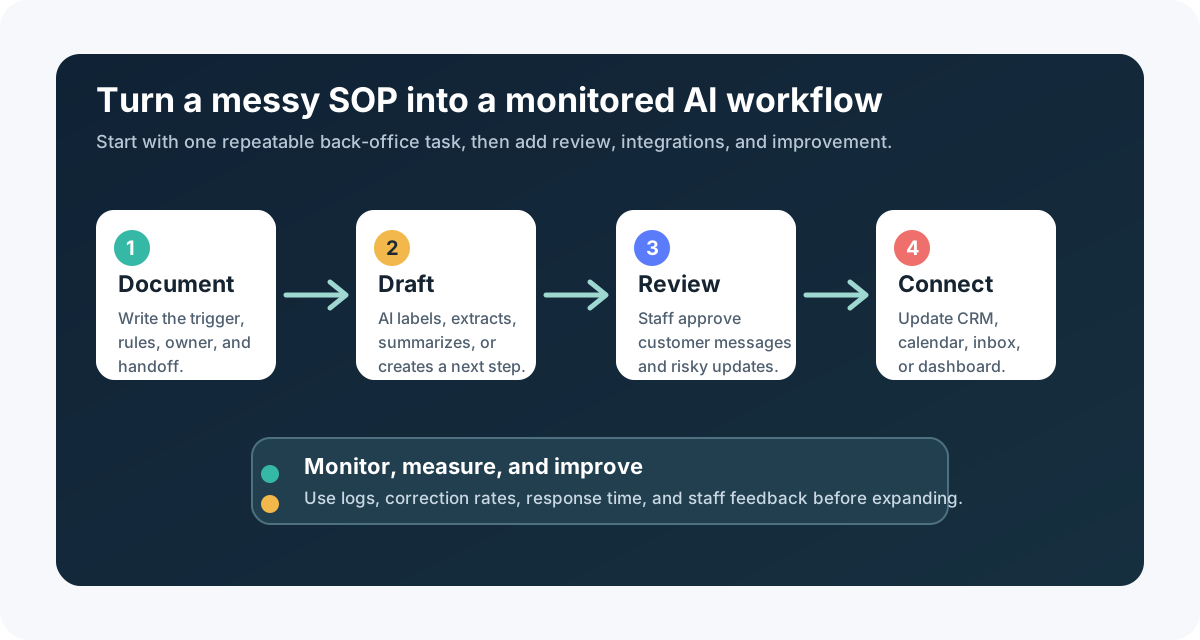
The key phrase is "waits for staff approval." Back-office AI should be useful before it is fully automatic. A receptionist, office manager, dispatcher, treatment coordinator, or property manager should be able to see what the agent thinks, correct it, and improve the workflow over time.
Plain-English definitions
An AI agent is software that can follow instructions, use tools, and take steps toward a task. A simple chatbot only replies. An agent can help classify a request, draft a message, update a system, or ask for approval.
An SOP is a standard operating procedure. It is the written version of how your team handles a repeatable process, such as "new lead comes in," "tenant reports maintenance," "patient asks to reschedule," or "technician sends job notes."
An AI integration connects the AI workflow to the tools your business already uses: CRM, calendar, phone system, inbox, spreadsheet, form, booking system, property management software, or internal dashboard.
Human-in-the-loop automation means the AI prepares or routes the work, but a person reviews sensitive, expensive, or customer-facing actions before they happen.
Back-office workflows worth automating first
Start where the task is frequent, structured, and low-risk when reviewed. Do not begin with the most sensitive decision in the business.
| Automate first | Keep human-led |
|---|---|
| Labeling and routing inbound emails | Final approval on refunds, discounts, or exceptions |
| Drafting callback notes from intake details | Deciding whether to accept a complex or risky job |
| Creating reviewed CRM update suggestions | Changing customer account status without review |
| Summarizing open tasks for a manager | Handling legal, medical, or compliance-sensitive advice |
| Comparing invoices or estimates for differences | Approving payment disputes or high-dollar purchases |
| Drafting appointment reminders and follow-ups | Sending sensitive messages without a staff check |
For a dental office, this might mean turning new-patient emails into reviewed scheduling tasks. For an HVAC company, it might mean triaging after-hours service requests by urgency and service area. For a med spa, it might mean separating booking questions from clinical questions so the right person responds. For a property manager, it might mean routing maintenance requests by building, urgency, and vendor category.
Before-and-after workflow example
Here is what a practical lead follow-up workflow can look like when it is built around review instead of blind automation.
| Step | Manual workflow today | AI-assisted workflow |
|---|---|---|
| 1. Inquiry arrives | Staff checks inbox when available | AI watches the approved inbox or form feed |
| 2. Details are understood | Staff reads the message and decides what it means | AI extracts name, service type, location, urgency, and requested time |
| 3. Work is assigned | Staff forwards the email or posts in chat | AI drafts the assignment and notifies the right queue |
| 4. Customer gets a response | Staff writes from scratch | AI drafts a response using approved language |
| 5. Record is updated | Staff copies notes into CRM or spreadsheet | AI prepares a CRM update for review or pushes approved fields |
| 6. Follow-up happens | Someone remembers to check later | AI creates a follow-up task or reminder |
The business result is not just "less typing." The result is a clearer operating rhythm: every inquiry gets classified, every next step has an owner, and the customer is less likely to wait because the team was stuck in admin work.
Risks to manage before agents touch live work
AI workflows fail when the business skips the operating rules. Google has already added administrative concepts around monitoring and control. Its Workspace Studio log events documentation says administrators can view user and agent activity, track flow activity, troubleshoot discrepancies, and stop a flow when needed.
That kind of visibility should be part of your rollout plan no matter which platform you use. NIST's AI Risk Management Framework is also a useful reference because it pushes organizations to manage AI risks intentionally instead of treating deployment as a one-time setup. The FTC's artificial intelligence enforcement page is another reminder for business buyers: avoid exaggerated AI claims, especially around performance, earnings, legal outcomes, or customer-impacting decisions.
| Risk | Why it matters | Practical mitigation |
|---|---|---|
| Wrong classification | A lead, patient, tenant, or urgent job may go to the wrong queue | Start with labels and drafts, then measure corrections before automating more |
| Bad data access | The workflow may read files or inboxes it does not need | Limit permissions to the minimum tools and folders required |
| Unapproved customer messages | AI may send a message that sounds confident but is incomplete | Require approval for customer-facing responses at launch |
| Duplicate updates | CRM, spreadsheet, and calendar records can drift | Pick one system of record and define update rules |
| No audit trail | Staff cannot explain what happened when something goes wrong | Use logs, named owners, and weekly review of exceptions |
| Overpromising savings | Buyers may expect magic instead of workflow improvement | Measure time saved, response speed, error reduction, and completion rate |
A practical 30-day implementation plan
You do not need to automate the whole company at once. A smaller rollout is easier to measure and easier for staff to trust.
| Timeline | What to do | Output |
|---|---|---|
| Week 1 | Pick one workflow with high volume and clear rules, such as lead intake, appointment reminders, invoice review, or inbox triage | One-page workflow map with owner, trigger, systems, and approval points |
| Week 2 | Gather examples: real emails, forms, notes, statuses, and edge cases with sensitive details removed where appropriate | Test set of normal cases, urgent cases, and "do not automate" cases |
| Week 3 | Build the first reviewed workflow and connect only the required tools | Drafts, labels, task suggestions, or reviewed CRM updates |
| Week 4 | Measure accuracy, staff corrections, completion time, and customer response impact | Go/no-go decision for deeper integration or broader rollout |
The best first project is usually boring in a good way. If the workflow already happens 20, 50, or 100 times a week, even a partial automation can create visible relief without forcing a risky rebuild.
Where Zenovae helps
Zenovae helps founders and service-business operators turn messy back-office work into practical AI automation. That includes mapping the workflow, choosing what should stay human-led, connecting AI to existing tools, and building custom software where off-the-shelf automation is not enough.
For example, Zenovae can help connect an AI workflow to your CRM, calendar, phone system, forms, inbox, internal dashboard, or property management software. If your process needs more than a no-code flow can handle, Zenovae can build the custom portal, approval screen, reporting layer, or integration logic around it.
The goal is not to add another tool for staff to babysit. The goal is to remove repetitive admin work while keeping the team accountable for customer experience, revenue, and risk.
Useful starting points:
- AI integration services for connecting AI to the tools your team already uses.
- AI agent development for tool-using workflows with approval gates and monitoring.
- Custom software development when your back-office process needs a tailored dashboard or internal app.
- AI automation readiness checklist to decide what should be automated first.
FAQ
Is Google Workspace Studio enough for a service business?
It may be enough for simple internal workflows that stay inside Google Workspace or connect through supported actions. If the workflow needs deeper CRM logic, phone-system data, custom dashboards, reporting, or strict approval rules, a custom AI integration or internal software layer may be a better fit.
Should AI update my CRM automatically?
Not at first. Start with AI-drafted CRM updates that staff can approve. Once the workflow is consistently accurate and the fields are low-risk, you can automate specific updates with clear rules and logs.
What workflow should a service business automate first?
Good first candidates include inbox triage, lead follow-up drafts, appointment reminders, missed-call summaries, weekly reporting, invoice review, and CRM cleanup suggestions. Avoid starting with high-stakes customer decisions, payments, medical advice, legal language, or complex exceptions.
How do I keep staff from building risky automations on their own?
Create a simple intake and approval process. Require every automation to name the workflow owner, data sources, customer impact, approval points, and rollback plan. Review logs and exceptions weekly during the first month.
What to do next
Pick one workflow your team repeats every week and write down the trigger, the decision rules, the handoff, and the system that should be updated. Then ask three questions: could AI classify or draft this safely, where should a person approve it, and what record should prove the work happened?
Want to remove a manual workflow? Zenovae can map the task, connect the right tools, and show what an AI integration or custom software build would look like. Start with a free AI audit or contact Zenovae to review the workflow your team wants off its plate.
Sources
- Google Workspace: Introducing Google Workspace Studio
- Google Workspace: 10 more announcements from Google Workspace at Cloud Next 2026
- Google Workspace Learning Center: Workspace Studio training and help
- Google Workspace Help: Workspace Studio log events
- NIST AI Risk Management Framework
- Federal Trade Commission: Artificial Intelligence
Need Help with Your AI Project?
At Zenovae, we build production-ready AI systems that scale. From OpenClaw setup to custom integrations, Mission Control workflows, and full-stack delivery, we can help you ship faster and avoid costly mistakes.
Let's Talk