HighLevel Appointment Triggers: Recover No-Shows Without Overbuilding
When HighLevel appointment triggers are enough for no-show recovery, and when service businesses need a custom AI integration.
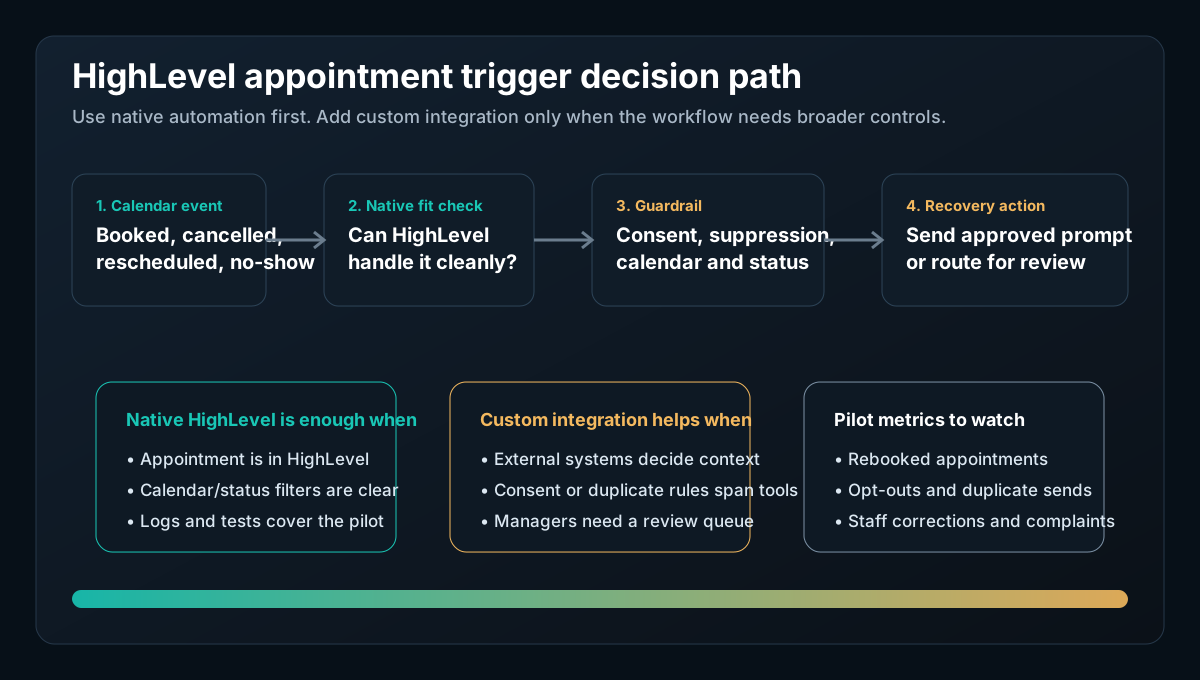
HighLevel appointment triggers can be enough for a service business that wants a simple AI follow-up when someone books, cancels, reschedules, confirms, or misses an appointment. The native path is strongest when the workflow stays inside HighLevel: one or two calendars, known appointment statuses, approved SMS or email language, test runs, and logs your team can review.
Custom integration becomes worth discussing when the no-show or cancellation workflow has to coordinate more than HighLevel can cleanly own by itself: an external CRM, a dispatch board, a practice management system, a property management platform, consent records, staff approval, reporting, and duplicate protection.
HighLevel's current documentation says Managed Agents appointment triggers can start AI responses from calendar events, including bookings, confirmations, cancellations, and no-shows. It lists two trigger sources: Customer Booked Appointment and Appointment Status Changed, with filters for calendars and statuses (HighLevel Managed Agents Appointment Triggers).
Quick take: Do not build custom software just to duplicate HighLevel's native appointment triggers. Use the native trigger first when it can send the right message, respect the right calendar/status filter, and give staff usable logs. Build a custom AI integration only when the workflow needs cross-system checks, consent-aware routing, review queues, or reporting that HighLevel alone does not provide.
| If you only read one section | Read this |
|---|---|
| You need the buyer answer | The direct answer |
| You need the native-vs-custom boundary | Native HighLevel vs custom AI integration |
| You need the workflow artifact | A safe no-show recovery workflow |
| You need rollout controls | Pilot checklist before launch |
The direct answer
Yes, HighLevel appointment triggers can handle many no-show and cancellation recovery workflows without custom development. If the customer booked through a HighLevel calendar, the relevant status is available, the outreach can stay inside approved HighLevel messaging, and the team can monitor results in HighLevel, start there.
That native path is especially reasonable for appointment-heavy service businesses such as med spas, dental practices, HVAC companies, plumbing businesses, property managers, and local professional services. A cancelled consultation, missed estimate, missed showing, or missed service appointment is a clear operational moment: the system knows the appointment status changed, the team wants fast follow-up, and the message can often be templated.
The catch is that "appointment trigger" does not automatically mean "safe autonomous recovery campaign." HighLevel's documentation says an appointment-status trigger can be left unfiltered, in which case the Managed Agent runs on every status change for selected calendars, including confirmed, cancelled, showed, and no-show statuses. For most service businesses, that is too broad for a first launch. The safer first release is one high-value calendar and one or two statuses, such as No Show and Cancelled.
Native HighLevel vs custom AI integration
HighLevel's native feature deserves the first look. The appointment trigger documentation says Managed Agents can run when a customer books an appointment or when an appointment status changes, and that triggers can be scoped to specific calendars and statuses. It also says appointment-triggered runs appear in the activity feed with appointment metadata so teams can see which calendar and status started the agent (HighLevel Managed Agents Appointment Triggers).
HighLevel also documents testing and lifecycle controls around Agent Studio. Its Agent Studio overview says existing flow agents can be updated visually, tested, controlled through versioning, and promoted from staging to production. It also says new agent creation has moved toward SuperAgents while existing flow-based agents can continue to be managed in Agent Studio (HighLevel Agent Studio overview).
| Option | Use it when | Do not overbuild when |
|---|---|---|
| HighLevel native appointment trigger | The appointment is in a HighLevel calendar, the status is reliable, and the follow-up can stay inside HighLevel | You only need a confirmation, reschedule prompt, post-no-show message, internal notification, or tag |
| HighLevel workflow or Managed Agent logic | The business can define the calendar, status, message, owner, and stop condition clearly | The team can test the agent in HighLevel and review activity feed or Agent Logs |
| Custom AI integration | The workflow needs external records, custom approval screens, duplicate protection, consent reconciliation, or cross-system reporting | A native HighLevel flow already gives staff the exact queue, message, and measurement they need |
| Custom web app or dashboard | Managers need a purpose-built control surface for multiple locations, calendars, service lines, and exception queues | HighLevel's existing views are enough for the operating team |
This is an AI integrations decision because the core question is whether HighLevel should remain the workflow system, or whether HighLevel needs to be connected to other business software and review controls.
For example, a med spa might use native HighLevel triggers for missed consultation follow-up. A dental practice might need a stricter handoff if the message touches clinical questions, insurance, or protected patient workflows. An HVAC company may need custom logic if a no-show estimate affects dispatch capacity, technician routing, or a separate field-service platform. The same trigger can be simple in one business and risky in another.
A safe no-show recovery workflow
A good first workflow is not "AI chases everyone forever." It is a short, observable recovery loop.
| Step | Native HighLevel can often handle | Add custom integration when |
|---|---|---|
| 1. Trigger | Appointment status becomes No Show or Cancelled on a selected HighLevel calendar | The source appointment lives outside HighLevel or must be reconciled across systems |
| 2. Filter | Calendar and appointment status limit when the agent starts | The business needs service line, location, customer tier, consent state, or open-job checks |
| 3. Message | AI drafts or sends an approved reschedule prompt | Staff must approve language before sending, or the message depends on external customer history |
| 4. Stop condition | HighLevel workflow settings and contact state prevent obvious over-messaging | Reply handling, duplicate suppression, or multi-channel suppression must span multiple tools |
| 5. Review | Activity feed and Agent Logs show what ran and why | Managers need a custom queue with evidence, source links, status, and correction reasons |
| 6. Measurement | HighLevel reporting is enough for the initial pilot | Leadership needs cross-system metrics such as recovered revenue, show rate by calendar, or staff review time |
HighLevel's Agent Logs documentation says Agent Logs provide a centralized view for supported AI agent activity, including conversation context, execution timelines, and granular step detail. That matters because a no-show workflow should be inspectable: staff need to know which appointment caused the run, what the agent did, and where a message or tool step failed (HighLevel Agent Logs).
Messaging guardrails matter more than clever prompts
No-show recovery usually involves SMS, email, or both. That makes the operating rules just as important as the AI prompt.
HighLevel's SMS deliverability guidance says HighLevel monitors delivery, error, and opt-out rates, and recommends stopping workflows or campaigns to contacts who have not explicitly opted in when a violation email occurs. It also recommends opt-out language and sender identification in the first SMS to a new contact (HighLevel SMS deliverability best practices).
HighLevel's A2P opt-in guidance says U.S. A2P 10DLC registration is a carrier requirement for application-to-person SMS traffic, and its opt-in form guidance separates marketing and non-marketing consent. It also says a phone field and SMS consent choice should be separate decisions, and consent checkboxes should not be preselected (HighLevel A2P opt-in compliance).
Email follow-up has its own boundary. The FTC's CAN-SPAM business guide says commercial email must avoid misleading header information and deceptive subject lines, include a valid postal address, explain how recipients can opt out, honor opt-out requests promptly, and that businesses cannot contract away responsibility for email marketing compliance (FTC CAN-SPAM compliance guide).
This article is not legal advice. The practical takeaway is narrower: do not let an AI appointment agent invent who can be contacted, why they can be contacted, or what opt-out rules apply. The workflow should read from approved consent and suppression sources, use approved message templates, and route uncertain cases to a human.
When native HighLevel is enough
Use HighLevel's native appointment triggers first when all of these are true:
| Question | Native-friendly answer |
|---|---|
| Where is the appointment? | It is already on a HighLevel calendar. |
| What starts the workflow? | A specific status such as No Show or Cancelled. |
| Who receives the message? | Contacts with the right consent and no suppression conflict. |
| What does the message say? | A pre-approved reschedule or confirmation prompt. |
| Who owns exceptions? | A named front desk, sales, dispatcher, or manager queue. |
| How is it tested? | Test calendar, test contact, activity feed, and logs. |
| How is success measured? | Rebooked appointments, responses, opt-outs, staff corrections, and no duplicate sends. |
That is enough for many service businesses. A med spa AI workflow might send a missed-consultation reschedule prompt. An HVAC AI receptionist workflow might notify the office when an estimate appointment is missed. A dental AI automation workflow might keep the first release to reminder and reschedule coordination, while staff handle sensitive questions.
When custom work is justified
Custom work is justified when the native trigger is useful but the operating system around it is missing.
| Custom need | Why it matters |
|---|---|
| External system check | The appointment status in HighLevel must be reconciled with a CRM, field-service system, EHR, PMS, dispatch board, or property system |
| Consent reconciliation | SMS or email permission lives outside HighLevel, or the business needs a stronger suppression check |
| Review queue | Staff need to approve the exact message before it leaves the business |
| Duplicate protection | The business has multiple automations that might respond to the same cancellation or no-show |
| Multi-location reporting | Managers need one view across calendars, locations, staff owners, and service lines |
| Exception policy | VIP customers, urgent jobs, clinical questions, deposits, cancellation fees, or safety-sensitive requests require human judgment |
This is where AI agent development and custom software can help, but only after the native path has been honestly assessed. If all you need is a HighLevel calendar status trigger plus a short approved SMS, native is probably the right first answer. If the team needs a governed queue, external context, and manager-ready metrics, a custom layer can be the cleaner long-term system.
The NIST AI Risk Management Framework is useful framing here because it treats AI risk management as a lifecycle process with govern, map, measure, and manage functions. For an appointment recovery workflow, that translates into documenting who owns the workflow, what the AI is allowed to do, how the team tests it, and how production outcomes are reviewed over time (NIST AI RMF Core).
Pilot checklist before launch
Use this checklist before turning on appointment-triggered AI follow-up for real contacts.
| Gate | Pass condition |
|---|---|
| Workflow scope | One calendar, one service line, and one or two statuses are selected. |
| Native review | HighLevel appointment triggers, workflow settings, activity feed, and Agent Logs have been reviewed before scoping custom work. |
| Message review | SMS and email copy use approved language, clear sender identity, and the right opt-out path. |
| Consent source | Marketing and non-marketing consent are checked before outreach. |
| Duplicate prevention | Existing reminders, campaigns, and manual follow-up are checked so contacts do not receive conflicting messages. |
| Human owner | A named person or role owns exceptions, replies, angry customers, VIPs, and sensitive questions. |
| Test run | A test calendar and test contact validate the trigger, message, status filter, and logs. |
| Metrics | The pilot tracks responses, recovered appointments, opt-outs, duplicate sends, staff corrections, and customer complaints. |
HighLevel's own appointment-trigger article recommends testing appointment events before going live, optionally using a test calendar and test contact, and monitoring initial runs to confirm the intended calendars and statuses are starting the agent. That is the right posture for a first release: small enough to see, easy enough to stop, and measured against real appointment outcomes.
Where Zenovae helps
Zenovae can help a service business decide whether HighLevel's native appointment triggers are enough or whether the workflow needs a controlled integration layer.
| Buyer need | Zenovae fit |
|---|---|
| Native HighLevel setup review | Map the appointment status, calendar, message, consent, and owner before launch |
| Cross-system integration | Connect HighLevel with CRM, dispatch, property, practice, phone, or reporting systems through AI integrations |
| Agent workflow design | Build bounded agent logic with approvals, logs, and fallback rules through AI agent development |
| Manager dashboard | Create a custom queue or reporting layer through custom software development |
| Build-vs-no-code decision | Compare native automation, no-code tools, and deeper integration using the AI integrations vs Zapier automation guide |
If your team already uses HighLevel but still loses revenue to missed consultations, cancelled estimates, no-show appointments, or messy follow-up, start by mapping the native workflow. Then decide whether the gap is configuration, message quality, consent handling, staff ownership, or integration depth.
Want to know where appointment automation would recover the most revenue in your business? Book a free AI audit.
Sources
Need Help with Your AI Project?
At Zenovae, we build production-ready AI systems that scale. From OpenClaw setup to custom integrations, Mission Control workflows, and full-stack delivery, we can help you ship faster and avoid costly mistakes.
Let's Talk