Meta Business Agent on WhatsApp: What Service Businesses Should Automate First
Meta Business Agent brings AI replies to WhatsApp. Learn what service businesses should automate first, what to connect, and what to keep human-led.
Meta Business Agent makes AI customer messaging more accessible for small and midsize businesses. For service businesses, the opportunity is not simply "turn on a chatbot." The real opportunity is to recover missed inquiries, qualify leads, book appointments, and hand off sensitive cases before customers drift to a competitor.
The practical question is what to automate first. A plumbing company, dental office, med spa, HVAC company, or property manager needs more than generic answers in a messaging app. The AI needs business rules, service-area logic, calendar context, CRM updates, opt-out handling, and a clear path to a human.
Quick take: Meta Business Agent is a useful signal that WhatsApp AI agents are moving into everyday customer operations. Start with low-risk, high-intent workflows: FAQs, lead qualification, appointment requests, missed-message recovery, and staff handoffs. Do not let a channel-native agent make unsupported promises about pricing, emergency priority, clinical issues, lease terms, refunds, or technician availability without business-system context.
| If you only read one section | Read this |
|---|---|
| You want the buyer takeaway | Answer first: what changed for service businesses |
| You are deciding what to automate | Best first workflows for WhatsApp AI agents |
| You are worried about cost and policy | Pricing, consent, and channel rules |
| You need a rollout plan | A 30/60/90-day rollout plan |
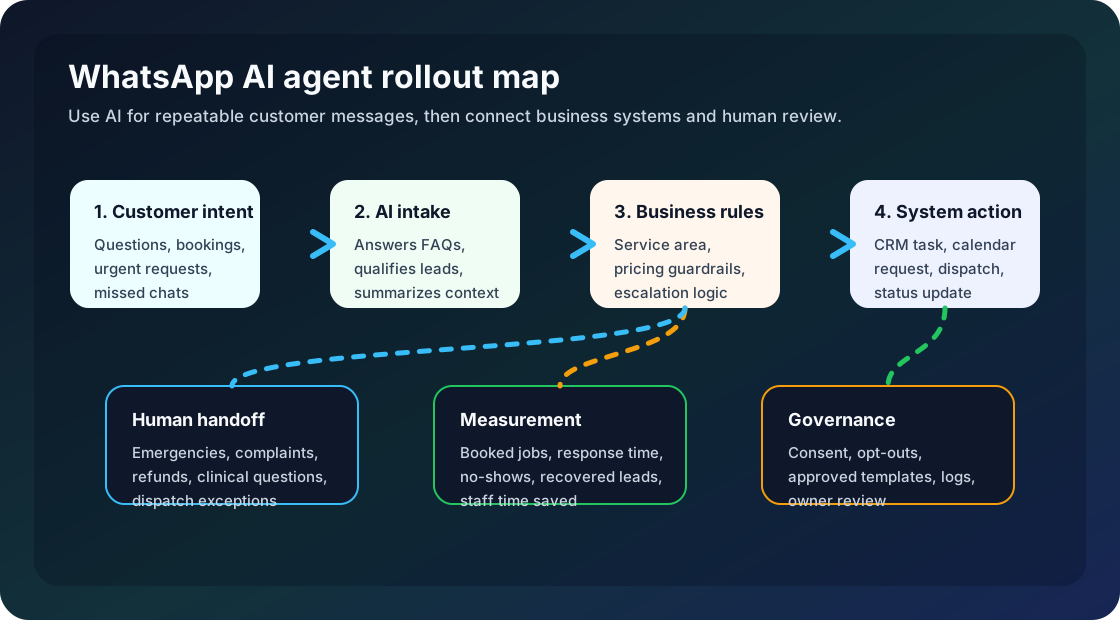
Answer first: what changed for service businesses
On June 3, 2026, Meta announced Meta Business Agent and said it is expanding the agent globally to businesses of all sizes across WhatsApp, Messenger, and Instagram. Meta says the agent can answer business-specific questions, recommend products from a catalog, book appointments, qualify incoming leads, let a team member step in, and close sales (Meta Newsroom).
WhatsApp's own product page frames the agent as a native WhatsApp setup where a business can set up the agent in the WhatsApp Business app, let it learn from past chats, and add a website or catalog to improve responses (WhatsApp Business).
For service businesses, that means customer messaging is becoming an AI front door. A homeowner may ask for emergency HVAC help in WhatsApp. A tenant may ask about a maintenance request. A med spa prospect may ask about available appointment times. A dental patient may ask whether the practice accepts new patients.
The risk is that many real service workflows do not live inside WhatsApp. They live in the CRM, calendar, phone system, dispatch board, property management software, payment tool, and staff judgment. The agent is valuable when it becomes part of that operating system.
Why this matters now
Meta says more than one million businesses are already using a Meta Business Agent on WhatsApp and Messenger, and that there are more than one billion active business threads across WhatsApp, Messenger, and Instagram each day (Meta Newsroom). Those are Meta-provided numbers, but they still point to the buyer reality: messaging is no longer a side channel.
The European Commission's June 2026 interim-measures decision also shows how strategically important WhatsApp has become for AI assistants. The Commission ordered Meta to restore free access to WhatsApp for rival general-purpose AI assistants during an ongoing antitrust investigation, saying the case concerns access to a key channel in the AI assistant market (European Commission).
That does not mean a local service business needs to follow European competition law closely. It does mean WhatsApp is becoming a contested distribution channel for AI-powered customer conversations. Buyers should expect more AI options inside messaging, not fewer.
What Meta Business Agent can handle well
Meta Business Agent is a good fit for simple, repeatable customer conversations where the answer is known, the next step is predictable, and the risk is low.
| Customer need | Good AI role | What the business should provide |
|---|---|---|
| "Are you open today?" | Answer hours and holiday exceptions | Accurate hours, emergency rules, closure dates |
| "Do you serve my area?" | Check ZIP code or neighborhood fit | Service-area list and escalation rules |
| "Can I book an appointment?" | Offer available next steps | Calendar or booking integration, staff rules |
| "What services do you offer?" | Explain packages or service categories | Approved service descriptions and exclusions |
| "I need help after hours" | Capture urgency and route | Emergency triage script and dispatch handoff |
| "Can someone call me?" | Collect details and create a task | CRM/contact capture and owner assignment |
The best early use cases are not glamorous. They are the conversations your staff answers every day.
Best first workflows for WhatsApp AI agents
1. Lead qualification and routing
For HVAC, plumbing, dental, med spa, and property management businesses, a WhatsApp AI agent can collect the basics: name, location, service needed, urgency, preferred time, and whether the customer is new or existing.
The workflow should route emergency, medical, billing, lease, and angry-customer situations to a person. The AI can gather context, but the decision belongs to the business.
2. Appointment requests and reminders
Meta says Business Agent can book appointments and qualify incoming leads (Meta Newsroom). That is useful only if availability is current. If the calendar is not connected, the safer first version is "request an appointment" rather than "confirm an appointment."
For service businesses, appointment automation should include confirmation messages, rescheduling rules, staff notifications, and no-show tracking.
3. Missed-message recovery
Many businesses already lose revenue in chat, not just phone calls. A customer asks a question after hours, waits, then contacts another provider.
A WhatsApp AI agent can respond immediately, capture intent, and place the customer into a follow-up queue. This is especially useful for inbound messages that already show customer interest.
4. FAQ and policy answers
The agent can answer routine questions about hours, pricing ranges, service areas, insurance, deposits, preparation instructions, maintenance request steps, and cancellation policies.
The key is freshness. If policies live in a document nobody updates, the AI will repeat outdated information. A better setup uses a small managed knowledge base with owner review.
5. Staff-facing summaries
Meta says the agent can provide morning briefings and insights on missed overnight chats (Meta Newsroom). For local operators, this may be one of the most practical features. The value is not only replying faster; it is helping staff start the day with a prioritized queue.
What to keep human-led
| Automate first | Keep human-led or approval-led |
|---|---|
| Basic qualification and intake | Emergency dispatch decisions when safety is unclear |
| Appointment requests and reminders | Medical, legal, financial, or lease interpretation |
| Service-area checks | Refunds, discounts, and complaint resolution |
| FAQ answers from approved policies | Promises about exact arrival time without dispatch data |
| Chat summaries and CRM tasks | Sensitive customer relationships and escalations |
An AI agent should not become the most confident employee in the business when it has the least context. Use the agent to reduce repetitive work, then escalate the moments where judgment matters.
Pricing, consent, and channel rules
WhatsApp Business Platform pricing matters if your business uses the API or sends messages at scale. WhatsApp says platform messages are charged on a per-message basis when delivered, based on the recipient and message category. The four categories are marketing, utility, authentication, and service (WhatsApp Business Platform Pricing).
WhatsApp also says service messages are used for incoming customer inquiries and that a user message opens a 24-hour customer service window where businesses can respond with service messages at no charge (WhatsApp Business Platform Pricing). The same pricing page says messages from click-to-WhatsApp ads or a Facebook Page call-to-action button can create a 72-hour period where messages are not charged.
Policy matters too. WhatsApp's Business Messaging Policy says businesses must maintain accurate business profile information, must not impersonate another business, are responsible for notices and consents, and may only send non-template replies within the 24-hour customer service window unless using approved message templates (WhatsApp Business Messaging Policy).
| Area | What to verify before launch | Why it matters |
|---|---|---|
| Message category | Marketing, utility, authentication, or service | Category affects cost and allowed use |
| Customer consent | How the customer opted in and how opt-out works | Prevents trust and compliance problems |
| 24-hour window | Whether the customer recently messaged first | Determines whether free-form replies are allowed |
| Templates | Which outbound messages are approved | Reduces delays and policy rejections |
| Identity | Business name, profile, website, phone, and support contact | Avoids customer confusion and impersonation risk |
| Logs | Transcript, trigger, action, owner, and handoff result | Lets managers audit performance and fix failures |
This is not legal advice. It is an operational checklist. Messaging automation should be governed like a customer-facing employee.
Build versus buy: where the default agent stops
For a small business with a simple catalog and basic questions, Meta Business Agent may be enough to start. For a service business with multiple locations, field staff, intake forms, CRM stages, recurring customers, warranties, emergency rules, and custom follow-up, the default agent is usually only one layer.
| Need | Channel-native agent may cover | Custom integration often needed |
|---|---|---|
| Answer common questions | Yes, if content is accurate | Knowledge base governance and review workflow |
| Capture lead details | Often yes | CRM field mapping, deduping, owner assignment |
| Book or request appointments | Basic cases | Calendar rules, buffers, staff capacity, deposits |
| Route urgent issues | Basic handoff | Dispatch logic, after-hours escalation, SLA tracking |
| Measure ROI | Basic insights | Revenue attribution, no-show rate, recovered leads |
| Manage multiple channels | WhatsApp plus Meta channels | Phone, SMS, web forms, email, CRM, dashboards |
The buying decision should be based on workflow complexity, not AI hype. If the customer journey already crosses phone, SMS, web forms, CRM, and scheduling, plan the integration layer before expanding automation.
A 30/60/90-day rollout plan
| Timeline | Focus | What to do | Success signal |
|---|---|---|---|
| Days 1-30 | Map customer conversations | Export common WhatsApp questions, missed chats, booking requests, and escalation cases | Clear shortlist of 2-3 automations |
| Days 31-60 | Launch controlled intake | Enable AI answers for FAQs and lead qualification; route exceptions to staff | Faster response without customer confusion |
| Days 61-90 | Connect business systems | Add CRM tasks, calendar requests, staff summaries, consent logs, and performance reporting | More booked conversations and fewer manual follow-ups |
Do not start by automating every conversation. Start where intent is clear and the next step is easy to verify.
What this means for service-business buyers
Meta Business Agent will make AI messaging feel normal for customers. That helps service businesses because buyers will be more willing to ask questions, book, and follow up in chat. It also raises the bar: slow responses and inconsistent answers will feel worse when competitors can reply instantly.
The winning businesses will not be the ones that turn on the most AI features. They will be the ones that connect AI to the actual operating workflow: who owns the lead, when the appointment is available, which service area applies, what the customer was promised, and when a human should step in.
If you run a service business, the first question is not "Should we use Meta Business Agent?" The better question is: "Which customer conversation leaks the most revenue or staff time, and what context would an AI need to handle it safely?"
Where Zenovae helps
Zenovae helps service businesses build the workflow around the AI agent. That can include WhatsApp and Meta-channel messaging, but also phone, SMS, web forms, CRM, calendar, dispatch, property management software, and reporting.
Typical first projects include:
- AI receptionist and WhatsApp intake for missed inquiries and after-hours leads.
- CRM-connected lead qualification with staff handoff rules.
- Appointment request automation with calendar checks and no-show reminders.
- RAG knowledge systems for accurate answers from your policies, FAQs, and service documents.
- Monitoring dashboards that show transcripts, outcomes, escalations, and cost.
If your team is still relying on manual callbacks, scattered inboxes, or staff memory to keep customer conversations moving, Zenovae can map the workflow and show what to automate first. Start with a free AI audit or review our AI integration services.
FAQ
What is Meta Business Agent on WhatsApp?
Meta Business Agent is an AI agent for business messaging that Meta says can answer business-specific questions, recommend products, book appointments, qualify leads, and let a team member step in when needed.
Should a service business use Meta Business Agent?
It can be useful for high-volume, repeatable customer conversations. Service businesses should start with FAQs, lead qualification, appointment requests, missed-message recovery, and human handoffs before automating complex decisions.
Is WhatsApp AI enough for service-business automation?
Usually not by itself. The agent needs accurate business context from calendars, CRMs, phone systems, work orders, service rules, and staff escalation paths to handle real customer operations reliably.
What should stay human-led?
Emergency judgment, medical or legal questions, refunds, complaints, discounts, lease issues, exact dispatch promises, and any conversation where the customer relationship could be damaged by a generic answer.
Sources
- Meta Newsroom: Be There for Every Customer With Meta Business Agent
- WhatsApp Business: Meta Business Agent on WhatsApp
- WhatsApp Business: Conversations 2026 introduction
- WhatsApp Business Platform Pricing
- WhatsApp Business Messaging Policy
- European Commission: interim measures on Meta and WhatsApp access for AI assistants
Need Help with Your AI Project?
At Zenovae, we build production-ready AI systems that scale. From OpenClaw setup to custom integrations, Mission Control workflows, and full-stack delivery, we can help you ship faster and avoid costly mistakes.
Let's Talk