Microsoft 365 AI Coworkers: What Service Businesses Should Automate First
Microsoft 365 AI coworkers are moving into daily work. Learn what service businesses should automate first and how to control cost and risk.
Microsoft 365 AI coworkers are moving from chat help into long-running work: reading files, using business context, calling tools, and returning finished outputs. For service businesses, the opportunity is not a futuristic robot employee. It is a practical way to reduce admin drag around email, scheduling, customer follow-up, quoting, reporting, and handoffs.
The risk is just as practical. If an AI coworker can touch your inbox, calendar, files, CRM, or customer records, it needs clean rules. A dental office, HVAC company, plumbing business, med spa, or property manager should not start by giving an agent every workflow. Start where the work is repetitive, documented, and easy to verify.
Quick take: On June 16, 2026, Microsoft announced worldwide general availability of Copilot Cowork for Microsoft 365 Copilot customers. It is designed for complex, long-running, multi-tool tasks, with usage-based billing and admin controls. Service businesses should use this shift as a planning signal: map the work that lives in email, calendars, files, and CRM before buying or building an AI coworker.
| If you only read one section | Read this |
|---|---|
| You want the buyer takeaway | Answer first: what changed |
| You run a service team | What this means for service businesses |
| You need a first project | What to automate first |
| You are worried about risk | Risks and watchouts |
| You need an action plan | A practical 30/60/90-day rollout |
Answer first: what changed
Microsoft announced on June 16, 2026 that Copilot Cowork is generally available worldwide for Microsoft 365 Copilot customers. Microsoft describes Cowork as an agentic system for complex, long-running, multi-tool tasks that returns a completed result rather than only a draft or recommendation (Microsoft).
Two details matter for business buyers. First, Copilot Cowork is grounded in Microsoft 365 context through Work IQ, which includes email, calendar, meetings, chats, files, people, collaboration patterns, and line-of-business systems (Microsoft). Second, Cowork uses usage-based billing. Microsoft says tasks are priced from model use, context retrieval, tool calls, and runtime, with PayGo priced at $0.01 per Copilot Credit (Microsoft).
This is part of a broader shift. OpenAI's workspace agents are built around reusable team workflows, controlled tool access, approvals for sensitive actions, analytics, and admin visibility (OpenAI). Salesforce also reported in May 2026 that AI service-agent adoption among customer service organizations rose from 39% in 2025 to 66% in 2026, based on a double-anonymous survey of 3,075 service professionals conducted from March 9 to April 4, 2026 (Salesforce).
For service businesses, the point is simple: AI agents are moving into the daily systems where work already happens. The winning use cases will be the ones with clear business rules, clean data, and visible handoffs.
What this means for service businesses
Most service teams already run on a messy mix of inboxes, calendars, spreadsheets, call notes, forms, CRM records, booking tools, and staff memory. That makes daily work slow, but it also creates an opening for AI automation.
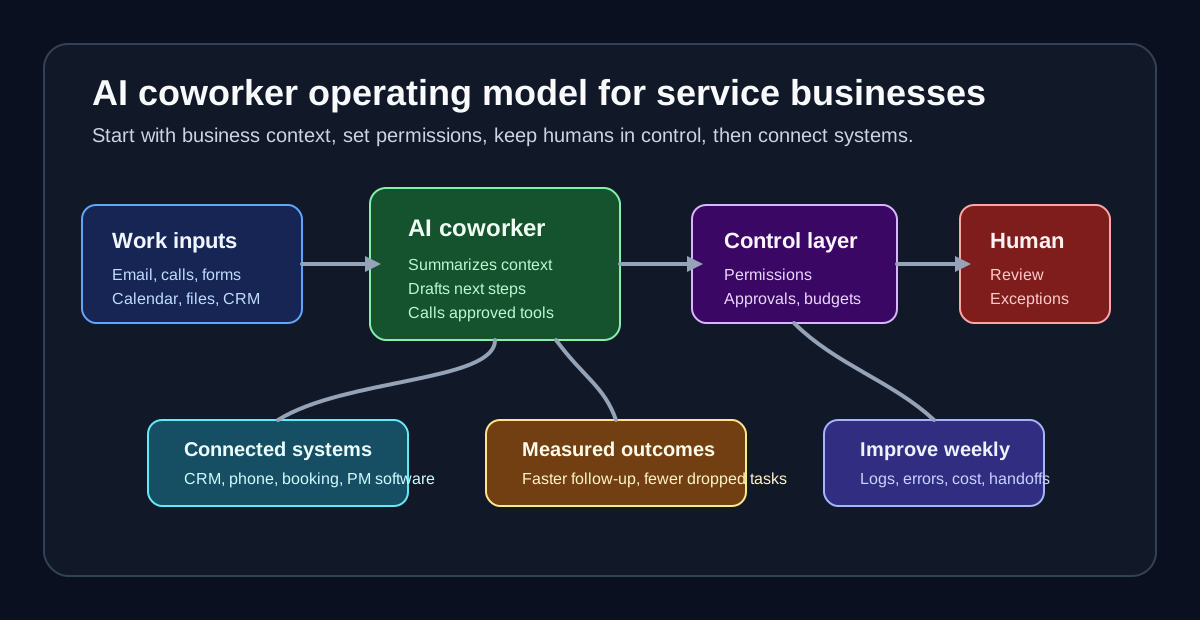
An AI coworker is useful when it can coordinate the boring middle of the workflow: summarize a request, check context, prepare the next step, update the record, and ask for approval when needed.
| Business situation | AI coworker opportunity | Human control point |
|---|---|---|
| New inquiry lands in email or form | Extract need, service area, urgency, and contact details | Staff approves quote, dispatch, or exception |
| Customer asks for appointment changes | Check calendar rules and draft reschedule options | Staff approves high-value or edge cases |
| Owner needs weekly pipeline visibility | Summarize open leads, stale follow-ups, and booked jobs | Manager reviews before decisions |
| Property tenant reports an issue | Classify maintenance priority and prepare vendor handoff | Human handles safety, lease, or legal questions |
| Dental or med spa patient asks policy questions | Answer from approved FAQ and route sensitive questions | Staff handles clinical or billing complexity |
| HVAC or plumbing emergency comes in after hours | Capture details and escalate based on rules | Dispatcher handles unclear safety calls |
The business value comes from fewer dropped tasks, faster follow-up, better internal visibility, and less repetitive admin work. The agent is not replacing judgment. It is reducing the amount of manual coordination required before judgment happens.
What to automate first
Start with workflows that are high-volume, low-risk, and easy to measure. Do not start with the most sensitive decision in the business.
| Automate first | Why it is a good first workflow | Measure this |
|---|---|---|
| Lead intake summaries | Repetitive, easy to review, directly tied to revenue | Time to first response, booked appointments |
| Follow-up task creation | Prevents leads from going cold | Stale lead count, follow-up completion rate |
| Appointment reminders and confirmations | Clear rules and high admin volume | No-show rate, reschedule rate |
| Internal weekly reports | Uses existing records and avoids customer-facing risk | Manager time saved, missed follow-ups found |
| FAQ drafts from approved policies | Good for customer experience when answers are stable | Deflection rate, escalation quality |
| CRM cleanup suggestions | Improves the data the agent needs later | Duplicate records, missing fields |
Avoid automating complex judgment first. Pricing exceptions, refunds, clinical advice, lease interpretation, emergency prioritization, and angry-customer negotiation should remain human-led until the business has strong guardrails and review history.
The operating model matters more than the tool
Microsoft's Work IQ announcement is important because it names the real issue: agents need business context, not just raw data. Work IQ is described as a layer that builds a semantic understanding of work from Microsoft 365 content and business systems, then exposes that context to agents through APIs (Microsoft).
Service businesses need the same idea, even if they are not ready for Microsoft enterprise tooling. Before selecting a platform, answer these questions:
| Question | Why it matters |
|---|---|
| Where is the source of truth for customers, leads, jobs, and appointments? | The agent cannot coordinate work if records disagree. |
| Which actions can the agent take without approval? | Clear permission boundaries prevent costly mistakes. |
| Which actions require a human checkpoint? | Sensitive work needs review before customer impact. |
| How will staff see what the agent did? | Auditability builds trust and helps training. |
| How will failed or uncertain tasks be routed? | Unclear handoffs create the same old admin burden. |
| How will cost be monitored? | Usage-based agents need budget rules before volume ramps. |
This is where many buyers under-scope the project. They buy the agent interface, then discover the real work is knowledge cleanup, integration, permission design, and monitoring.
Risks and watchouts
AI coworkers become risky when they are allowed to operate inside messy processes without supervision. The controls should be part of the launch plan, not a later patch.
| Risk | Why it matters | Practical mitigation |
|---|---|---|
| Wrong business context | The agent may rely on stale policies, duplicate records, or old instructions | Create an approved knowledge base and review unanswered questions weekly |
| Silent task failure | Staff may assume work happened when it did not | Require completion logs, alerts, and failed-task queues |
| Over-automation | Customers may need judgment, empathy, or exception handling | Keep sensitive workflows approval-led |
| Cost drift | Long-running tasks can consume more usage than expected | Set budgets, alerts, task tiers, and weekly cost reviews |
| Weak permissions | Agents may access more data or tools than needed | Use role-based access and least-privilege tool permissions |
| Poor staff adoption | Staff may ignore an agent they do not trust | Start with internal drafts, summaries, and reports before direct customer actions |
Microsoft says Copilot Cowork includes admin controls such as enablement decisions, user access, spending limits, usage alerts, and reporting by tenant, group, user, and feature (Microsoft). That is a useful checklist for any service business, even when using a different platform.
A practical 30/60/90-day rollout
| Timeline | What to do | Output |
|---|---|---|
| First 30 days | Map high-volume admin workflows, identify source-of-truth systems, collect approved FAQs and policies | Automation shortlist and risk map |
| Days 31-60 | Build one internal workflow such as lead summaries, weekly pipeline reports, or appointment follow-up drafts | Staff-reviewed pilot with measured time savings |
| Days 61-90 | Connect the pilot to CRM, calendar, phone, or booking tools with approval gates | Production workflow with monitoring and escalation |
The goal is not to prove that an AI coworker can do everything. The goal is to prove that it can do one repetitive workflow reliably enough to expand.
Where Zenovae helps
Zenovae helps service businesses turn AI coworker ideas into practical operating workflows. That usually means starting before the model: mapping missed-call, follow-up, scheduling, CRM, and reporting processes; cleaning the business knowledge the agent needs; and deciding which steps should be automatic, approval-led, or human-only.
For a property manager, that may mean tenant maintenance triage, leasing follow-up, and owner reporting. For a dental practice or med spa, it may mean lead intake, appointment reminders, and front-desk FAQ automation. For HVAC and plumbing companies, it may mean after-hours call handling, emergency routing, and CRM follow-up.
Zenovae can build and integrate AI receptionists, AI follow-up automation, RAG knowledge systems, CRM-connected AI agents, dashboards, and monitoring around the workflows you already use. The point is not to replace your business systems. It is to make them work together with clear rules and human control.
Want to know where AI would recover the most revenue in your business? Book a free AI audit, or see how Zenovae approaches AI integrations and AI agent development.
FAQ
What is an AI coworker for a service business?
An AI coworker is an AI agent that can use business context and connected tools to complete parts of daily work, such as summarizing leads, drafting follow-ups, preparing reports, updating records, or routing customer requests. It should operate with clear permissions and human approval for sensitive actions.
Should a small service business use Microsoft Copilot Cowork?
It depends on the business stack. Companies already standardized on Microsoft 365 Copilot may evaluate it for internal workflows. Other service businesses may get faster results from a custom AI receptionist, CRM-connected follow-up workflow, or industry-specific automation. The decision should start with the workflow and source-of-truth systems.
What should not be automated first?
Do not start with emergency judgment, clinical advice, legal interpretation, pricing exceptions, refunds, or angry-customer negotiation. Start with intake, summaries, reminders, internal reporting, and follow-up drafts where staff can review outcomes easily.
Sources
Need Help with Your AI Project?
At Zenovae, we build production-ready AI systems that scale. From OpenClaw setup to custom integrations, Mission Control workflows, and full-stack delivery, we can help you ship faster and avoid costly mistakes.
Let's Talk