Microsoft Service Agent Is GA: Prepare the Back Office Before AI Updates Cases
Microsoft Service Agent is now generally available. Learn how service businesses should prepare inbox, CRM, case, and handoff workflows before AI takes action.
Customer service work is rarely stuck because the team does not care. It gets stuck because the answer, customer history, next step, and owner are spread across email, chat, CRM notes, case records, calendars, and staff memory.
That is why the latest service-agent announcements matter for founders and operators. AI is moving closer to the place where customer work actually happens: Outlook, Teams, CRM, support queues, and knowledge bases. The practical question is no longer "Can AI summarize a case?" It is "Is our workflow ready for AI to help update, route, and follow through without creating a mess?"
Quick take: Microsoft made Service Agent in Microsoft 365 Copilot generally available on June 30, 2026, with case context, knowledge discovery, service actions, coaching signals, admin controls, and workflows across Dynamics 365, Teams, and Outlook. Service businesses should treat this as a signal to prepare their own back-office service workflows: clean handoffs, define update rules, connect the right tools, and keep humans in control for sensitive customer decisions.
| If you only read one section | Read this |
|---|---|
| Your team loses time switching between inbox, chat, and CRM | What changed |
| You worry AI will update the wrong record | The back-office readiness checklist |
| You want a practical first workflow | A safe first workflow for service businesses |
| You need a rollout path | A 30-day implementation plan |
| You want help connecting tools | Where Zenovae helps |
What changed
On June 30, 2026, Microsoft announced that Service Agent in Microsoft 365 Copilot is generally available. Microsoft describes it as a unified customer service experience that brings Dynamics 365 Customer Service context and Microsoft 365 grounding into Copilot, so service teams can review case context, find trusted answers, draft communications, create notes, update cases, and take action across the service workflow (Microsoft Dynamics 365 Blog).
This matters because the tool is not only answering questions. Microsoft says the general availability release includes service actions and follow-through, quality and operations support, admin controls, extensibility, and in-chat experiences such as grids, forms, cards, charts, and file work. Microsoft also states that the integrated experience depends on Dynamics 365 Customer Service and Microsoft 365 Copilot licensing, which is important for buyers to verify directly before planning around it.
The March 2026 preview announcement explains the operating problem clearly: service professionals often juggle CRM systems, knowledge bases, email, chat, and reports, and Service Agent is designed to bring workflows, insights, and actions into the Copilot surface employees already use (Microsoft Dynamics 365 Blog).
Microsoft is also moving the same direction in broader automation. Its May 2026 Copilot Studio update says computer-using agents are generally available, workflows can combine API actions, approvals, business logic, and adaptive UI interactions, and agent nodes can be added into workflows when simple if-then logic is not enough (Microsoft Copilot Blog).
OpenAI is pointing in a similar direction. On July 9, 2026, OpenAI introduced ChatGPT Work as an agent that can gather information across apps and workflows, create finished materials, and stay with complex projects for hours by breaking work into smaller steps (OpenAI). In ChatGPT Enterprise and Edu release notes, OpenAI also says workspace agents can own workflows across tools and includes admin visibility and safeguards for app actions (OpenAI Help Center).
Plain-English version: major platforms are building AI that can work across business systems, not just chat. That creates real opportunity, but only if the underlying workflow is ready.
Why this matters for service businesses
Most small and mid-sized service businesses do not have a single clean "customer service system." They have a practical mix of tools that grew over time.
A property manager may have tenant emails in Outlook, maintenance details in property management software, vendor messages in text threads, and owner notes in a spreadsheet. A dental office may have phone calls, insurance questions, patient scheduling, treatment-plan follow-up, and CRM records in separate places. An HVAC or plumbing company may have dispatch notes, job photos, missed calls, estimate follow-up, and warranty issues across multiple systems.
The service-agent trend is relevant because it targets the exact friction that hurts these businesses: context switching and incomplete follow-through.
| Daily service problem | What happens today | What an AI-assisted workflow can improve |
|---|---|---|
| Customer asks for an update by email | Staff search CRM, job notes, and chat history manually | AI drafts the current status with source links for review |
| A case needs a next step | Owner is unclear or buried in notes | AI flags missing owner, due date, and next action |
| A customer calls twice | Prior context is hard to find quickly | AI summarizes account, recent conversations, and open issues |
| A staff member resolves an issue | CRM or case record is updated late or not at all | AI prepares notes and suggested updates for approval |
| A sensitive request arrives | It looks like normal admin work until someone reads it carefully | AI routes exceptions to a human instead of auto-handling them |
The benefit is not "AI instead of staff." The benefit is fewer dropped handoffs, faster answers, cleaner records, and better visibility for managers.
What a service agent means in plain English
A service agent is an AI-assisted workflow that helps a team understand customer context, find trusted information, draft a response, recommend the next step, and sometimes update business records.
That definition matters because "agent" can sound abstract. For a service-business operator, it should be judged by practical questions:
- Does it reduce the time staff spend searching across tools?
- Does it help customers get accurate updates faster?
- Does it keep CRM, case, and job records cleaner?
- Does it route risky issues to the right person?
- Does it show what it used, what it changed, and where a human approved it?
If the answer is no, the business does not need more AI. It needs a better workflow map.
The back-office readiness checklist
Before letting AI update customer records or draft messages, prepare the back office. This is where many automation projects succeed or fail.
| Readiness area | Buyer question | Good first standard |
|---|---|---|
| Source systems | Where does the truth live for customer, job, appointment, and case data? | Name the approved systems and avoid relying on staff memory |
| Update rules | Which fields can AI suggest or update? | Start with draft-only notes, owners, due dates, and status suggestions |
| Escalation rules | Which situations always need a human? | Refunds, complaints, health details, legal issues, angry customers, high-value accounts |
| Permissions | Who can see what customer information? | Match AI access to existing staff permissions |
| Knowledge base | Which answers should AI rely on? | Use current FAQs, policies, scripts, SOPs, and service rules |
| Review workflow | Who approves customer-facing messages and record changes? | Assign a named reviewer and backup |
| Audit trail | Can managers see what the AI read, drafted, skipped, and changed? | Log source links, draft versions, approvals, and exceptions |
| Monitoring | How will you catch quality problems after launch? | Review samples weekly and track corrections |
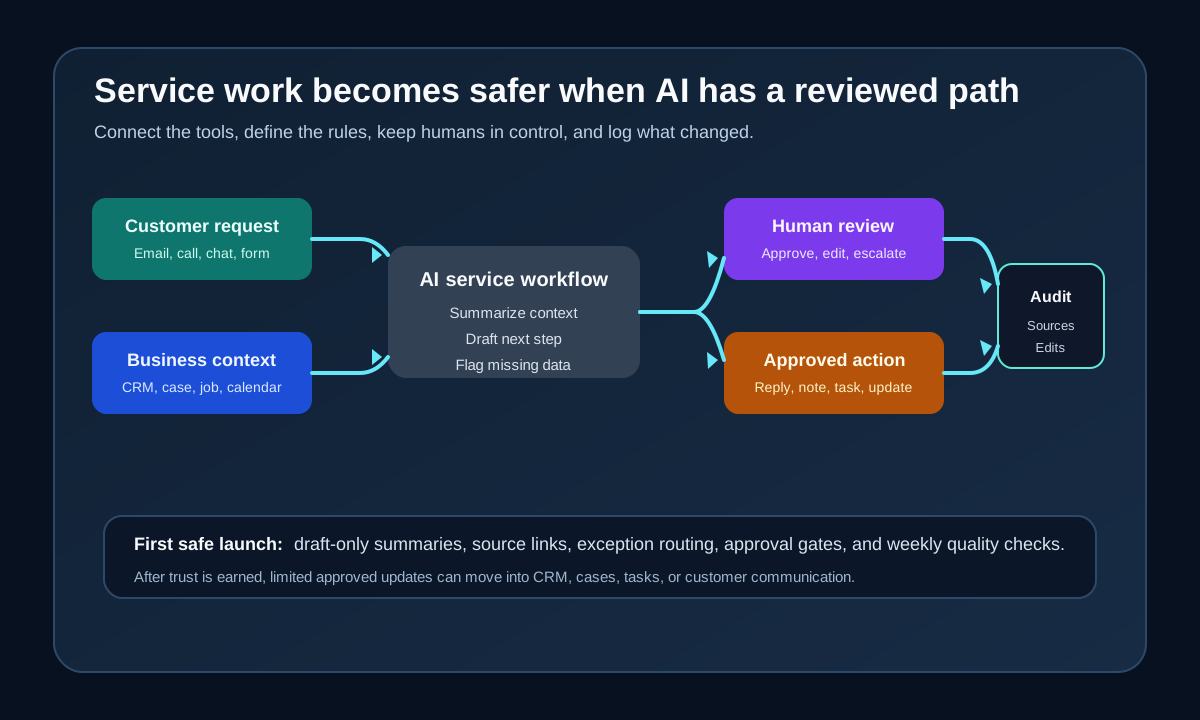
The safest pattern is to start with AI that drafts and recommends, then move to limited updates after the team trusts the workflow.
A safe first workflow for service businesses
Do not begin with "AI handles all customer service." Begin with one workflow that already costs time and creates missed follow-up.
For many service businesses, a good first project is a customer update workflow.
| Step | What the workflow does | Human control |
|---|---|---|
| 1. Intake | Reads a labeled email, form, phone note, or CRM case | Only approved inboxes and queues are connected |
| 2. Context check | Pulls customer record, recent notes, appointment or job status, and open tasks | AI cannot invent missing facts |
| 3. Draft | Creates a short internal summary and suggested customer reply | Staff edits before sending |
| 4. Exception routing | Flags urgent, sensitive, angry, or expensive issues | Human owner makes the decision |
| 5. Record update | Prepares a CRM or case note with source references | Draft-only at first, then approved updates later |
| 6. Follow-up task | Suggests next owner and due date | Manager approves the task rule |
| 7. Review log | Stores what happened for later review | Weekly quality checks improve the workflow |
This workflow helps with a common customer-experience leak: the customer asks "Any update?" and the staff member spends 10 minutes checking systems before replying. AI can reduce the search burden, but the person still owns judgment and tone.
What this means for your business
If you are a founder, practice manager, office manager, or operator, the service-agent trend should change how you think about automation.
The old question was: "Which chatbot should we add?"
The better question is: "Which customer workflow is slow because information is scattered?"
That shift leads to better projects. Instead of buying another standalone AI widget, you can identify the exact handoff that costs time or revenue:
| Business symptom | Likely workflow issue | Better automation angle |
|---|---|---|
| Customers ask for the same update twice | Case or job status is not easy to find | AI-assisted status summary with human review |
| Leads go cold after the first call | CRM next steps are missing or stale | Follow-up workflow tied to phone notes and CRM |
| Managers cannot see service backlog clearly | Cases, tasks, and inboxes are separate | Daily exception report with owner and due date |
| Staff copy notes between tools | Systems are not integrated | AI integration that drafts notes and pushes approved updates |
| Customers get inconsistent answers | Policies live in PDFs, chats, and staff memory | Knowledge system grounded in approved documents |
This is especially useful for businesses that depend on speed-to-response: property management, dental, med spas, HVAC, plumbing, home services, and other appointment-based teams.
Risks to manage before AI touches customer work
AI service workflows can help a lot, but they should not be treated as magic. They need operating rules.
NIST's AI Risk Management Framework describes AI risk work around govern, map, measure, and manage, with ongoing actions across the system lifecycle (NIST AI Resource Center). For a service business, that translates into a simple habit: define the workflow, test it, review it, and improve it continuously.
| Risk | Why it matters | Practical mitigation |
|---|---|---|
| Wrong context | AI may summarize an outdated record or miss a newer note | Show source links and require review before customer replies |
| Permission creep | AI may access more information than a staff role should see | Match access to existing roles and tools |
| Bad handoff | AI may treat a sensitive issue as routine | Define escalation words, account types, and issue categories |
| Over-automation | Customers may need empathy, not just a fast answer | Keep human review for complaints, refunds, health, legal, or high-value cases |
| Silent errors | A wrong note or status update may affect future work | Log updates and review samples weekly |
| Tool mismatch | A platform may not fit your CRM, phone system, or field software | Validate integration paths before rollout |
The important idea is not to avoid automation. It is to launch with visibility and control.
A 30-day implementation plan
Use a small rollout before expanding.
| Timeframe | Action | Output |
|---|---|---|
| Days 1-3 | Pick one service workflow, such as customer update requests or stale case follow-up | One narrow use case with a named owner |
| Days 4-7 | Map the current tools, fields, decisions, and handoffs | Before-and-after workflow map |
| Days 8-12 | Define source systems, allowed actions, and escalation rules | Readiness checklist and human-review policy |
| Days 13-18 | Build a draft-only workflow that summarizes context and suggests next steps | Internal AI assistant workflow |
| Days 19-24 | Connect review, approval, and logging | Manager-ready process with audit trail |
| Days 25-30 | Run with a small queue and measure corrections | Launch notes, quality review, and expansion plan |
Good measures are simple: time to find context, number of stale cases, follow-up speed, staff edits required, missing-data flags, and customer issues escalated correctly.
Where Zenovae helps
Zenovae helps founders and service-business operators turn these ideas into practical AI integrations, workflow automation, and custom internal software.
That can mean connecting AI to your CRM, calendar, inbox, phone system, forms, scheduling tools, property management software, or internal dashboards. It can also mean building a lightweight review screen where staff can approve AI-drafted case notes, customer replies, follow-up tasks, and exception routing.
Zenovae's role is not to push a one-size-fits-all platform. The useful work is mapping the workflow, finding the highest-value handoff, connecting the right tools, and supporting the system after launch.
Zenovae can help with:
- Mapping customer-service handoffs across inbox, CRM, phone, calendar, and support tools.
- Building AI workflows that draft summaries, next steps, and customer replies for review.
- Creating safe approval gates before AI updates CRM or case records.
- Connecting existing tools instead of forcing a full platform replacement.
- Building custom dashboards or internal software when off-the-shelf tools do not fit.
- Monitoring quality, cost, and workflow performance after launch.
Want to remove a manual workflow? Zenovae can map the task, connect the right tools, and show what an AI integration or custom software build would look like.
FAQ
Is Microsoft Service Agent only for companies using Dynamics 365?
Microsoft says the generally available Service Agent experience uses Dynamics 365 Customer Service for case data, knowledge, and service workflows, and Microsoft 365 Copilot for the integrated Copilot experience. Businesses should verify licensing and fit with Microsoft directly before planning around it.
What if my service business does not use Microsoft tools?
The trend still matters. AI service workflows are moving toward the same pattern across platforms: connect to existing tools, gather context, draft next actions, and route approvals. A business using Google Workspace, a field-service platform, a CRM, or a custom system can still apply the same workflow-readiness checklist.
Should AI update customer records automatically?
Not at first. Start with draft-only notes and suggested updates. After the workflow is accurate, reviewed, and logged, consider limited approved updates for low-risk fields such as owner, next-step date, or internal status notes.
What is the best first workflow to automate?
Choose a workflow with frequent volume, clear rules, and low risk. Good first options include customer update requests, stale lead follow-up, unconfirmed appointments, open estimate follow-up, and internal case summaries.
Sources
- Microsoft Dynamics 365 Blog: Service Agent reaches general availability in Microsoft 365 Copilot
- Microsoft Dynamics 365 Blog: Introducing Service Agent in Microsoft 365 Copilot
- Microsoft Copilot Blog: Computer-using agents, workflows, and real-time voice experiences
- OpenAI: ChatGPT is now a partner for your most ambitious work
- OpenAI Help Center: ChatGPT Enterprise and Edu release notes
- NIST AI Resource Center: AI RMF Core
Need Help with Your AI Project?
At Zenovae, we build production-ready AI systems that scale. From OpenClaw setup to custom integrations, Mission Control workflows, and full-stack delivery, we can help you ship faster and avoid costly mistakes.
Let's Talk