OpenAI DevDay 2026: What Shipped and How Builders Can Use It
OpenAI DevDay 2026 shipped persistent agents, Codex Cloud, GPT-6.1 Sol, computer use, and shared workspaces. Here is what builders should try first.
OpenAI DevDay 2026 was not only a model launch. OpenAI announced more than 20 major updates across ChatGPT, Codex, models, APIs, plugins, and shared workspaces. The confirmed product changes point toward persistent agents that can keep working, coding environments that can run in the cloud, and APIs that can act inside software; the strategic conclusion is Zenovae analysis, not an OpenAI promise.
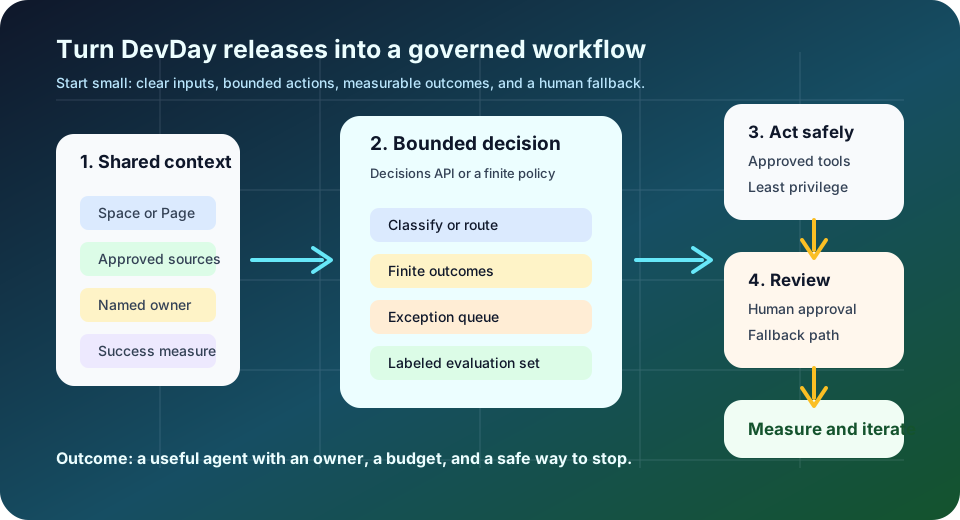
For builders, the practical question is not “Which announcement should I try?” It is “Which bounded workflow can I make measurably better with the least new risk?” This guide separates what OpenAI announced from what developers, founders, CTOs, product leaders, and operators should do next.
Quick take: Start with one workflow that has a clear trigger, a measurable outcome, limited permissions, and a human fallback. Use GPT-6.1 Sol when the task is complex but cost still matters; use Codex Cloud for repeatable engineering work; use Decisions API for finite routing; and use computer-use agents only where an API or structured integration is not practical.
| If you only read one section | Read this |
|---|---|
| You lead software engineering | Codex Cloud, the refreshed CLI, and Code Review |
| You are choosing a model | Who should use GPT-6.1 Sol and when is Ultrafast worth it? |
| You are automating operations | Which release should builders try first? |
| You are worried about limits or parity | Are OpenAI’s usage limits fair? |
What changed at OpenAI DevDay 2026?
Confirmed: OpenAI shipped a broader working surface
OpenAI’s official DevDay 2026 recap says the event included more than 20 major announcements. It describes a move toward agents that can take on ongoing responsibilities, ChatGPT as a shared surface for people and agents, and a more open ecosystem for developers to launch native experiences.
The shift matters because a normal chat session is usually request-and-response work. The new direction is closer to an operating layer:
| Earlier mental model | DevDay 2026 direction | What a builder should control |
|---|---|---|
| A person asks a question | An agent owns an ongoing responsibility | Scope, schedule, stop conditions, and escalation |
| A prompt produces an answer | A workspace accumulates context and artifacts | Permissions, retention, source links, and review |
| An API returns text or structured data | An API can route, call tools, or operate software | Allowed actions, logs, retries, and rollback |
| A developer builds an isolated integration | Plugins and shared surfaces make tools discoverable | Identity, consent, data boundaries, and support |
Analysis: the valuable unit is now the workflow
The strongest implication is not that every team needs an autonomous agent. It is that the unit of design is moving from the prompt to the workflow. A useful workflow has an input, a policy, a tool boundary, an output, and an owner. Without those pieces, a persistent agent simply turns an unclear process into a continuously running unclear process.
For a service business, the pattern could be a new lead entering a CRM, an AI system extracting the request, a routing decision selecting the right queue, an approval step for sensitive replies, and a human receiving the exception. For a product team, it might be a repository issue becoming a Codex task, a cloud environment running tests, a code review summarizing the diff, and a maintainer approving the merge.
What are Dots, ChatGPT Space, and Pages useful for?
OpenAI introduced several shared work surfaces. Dots are described as always-on agents for ongoing responsibilities. ChatGPT Space is a shared home where teammates, ChatGPT, and a dot can build on shared knowledge. Pages are collaborative documents where people and agents can write, research, create charts, generate images, and collect feedback.
These features are most useful when a team has work that is continuous but still reviewable:
- A weekly operating update that gathers approved data, highlights changes, and asks an owner to verify exceptions.
- A product-research space where source links, decisions, open questions, and drafts stay together instead of being scattered across chats.
- A project page where an agent turns meeting notes into actions, while the project owner decides what becomes a commitment.
- An internal knowledge space that answers questions from approved documents and links back to the source.
The warning is equally important: shared context is not the same as shared authorization. Before connecting a workspace, define who can read which sources, who can invite an agent, whether a page can contain customer or employee data, and which actions require a person. Keep high-impact decisions—medical, legal, financial, employment, safety, refunds, access changes, and production deployments—human-led or explicitly approved.
Who should use GPT-6.1 Sol and when is Ultrafast worth it?
GPT-6.1 Sol is the middle path between maximum intelligence and minimum cost
OpenAI describes GPT-6.1 Sol as a major upgrade to GPT-6 Sol with strong performance on agentic coding, computer use, and professional work. It says the model delivers near-Astra intelligence at one-fifth of Astra’s standard input and output token prices, and that it is available to API, Plus, Pro, Business, Enterprise, and Edu users. Those are the claims OpenAI has published; exact pricing, access, tools, and limits can vary by product and model version.
The OpenAI model-selection guide positions GPT-6.1 Sol for complex work where teams need to manage time and cost. That makes it a sensible first candidate for:
- Multi-step engineering tasks that need code changes, tests, and a reviewable explanation.
- Structured research that combines sources and produces a deliverable someone will revise.
- Agent workflows that need more judgment than simple triage but do not justify the highest-cost model on every run.
- Computer-use tasks where visual reasoning and reliable recovery matter, but the business can still constrain the actions.
The right test is not “Is Sol smart enough?” It is “Does Sol meet the acceptance criteria at the lowest setting that works?” Run a representative task set, measure successful completion, human rework, latency, and usage, then compare against another model with the same inputs and tools.
Ultrafast is for waiting time, not a substitute for workflow design
OpenAI describes Ultrafast as a premium speed tier. The DevDay recap claims up to 8× faster token generation in Codex, up to 6× in the API, and 300 tokens per second for the Codex claim. It says GPT-6 Astra Ultrafast is available in the API and in ChatGPT Work and Codex on Pro 500 and Enterprise plans, while GPT-6.1 Sol Ultrafast is coming soon.
Ultrafast is worth considering when a person is actively blocked on a result, a voice-driven workflow needs a faster interaction loop, or a coding team is steering several short tasks in real time. It is less compelling for overnight analysis, batch classification, or a workflow whose real bottleneck is approvals, missing data, flaky integrations, or unclear requirements. Speed can reduce waiting; it cannot fix an undefined process.
What do Codex Cloud and the refreshed Codex workflow change?
OpenAI says Codex in the cloud can run from a computer, a phone, or any device, with reusable development environments that provide a shared setup and approved settings and permissions. The Codex help documentation adds that cloud tasks run on OpenAI-managed computers, can be continued from desktop, web, or mobile, and can continue while a local computer is asleep.
That creates a more practical engineering loop:
- A developer writes down the task, acceptance criteria, repository, and constraints.
- Codex starts in a reusable environment with the right dependencies and network rules.
- The task runs in the background while the developer handles other work.
- A worktree keeps the change isolated from unrelated work.
- Code Review summarizes the change, surfaces possible issues, and prepares a human review before a GitHub pull request or GitLab merge request is shared.
The refreshed CLI adds voice control, a /agents view for delegating and tracking tasks, prompt editing, session resumption, worktrees, and a cleaner terminal experience. These features are useful when the team treats Codex as an engineering system with artifacts and checkpoints, not as a replacement for ownership.
Codex Security Cloud extends the pattern to security work. OpenAI says it can scan GitHub repositories on demand or on a schedule, investigate findings, remove duplicates, and prepare cloud fixes while the laptop is closed. Use that as an investigation and prioritization layer. Keep repository scope, secrets, network access, patch application, and production changes behind explicit permissions and review.
The operational rule is simple: a cloud task should have a named repository, a named owner, a bounded instruction, an allowed tool set, and a way to stop or revert. A reusable environment is valuable precisely because its permissions and dependencies should be reviewed once, then reused deliberately.
What are the Decisions API, Agents API with computer use, and Bedrock Managed Agents for?
Decisions API: bounded classification and routing
The Decisions API is designed for real-time decisions over a finite set of predefined answers. Developers provide context using text or images and receive an answer that can classify content, route a request, or choose an agent’s next action. OpenAI announced it in limited preview with a broader release planned in the coming days.
That is a different job from an open-ended agent. A routing decision might be:
urgent_maintenance,routine_maintenance, ormissing_information;sales,support,billing, orhuman_review;safe_to_draft,needs_approval, orblocked.
Use a finite decision surface when you can name the allowed outcomes and measure accuracy against labeled examples. Keep the actual write, refund, customer promise, or access change in a separate tool step with its own authorization.
Agents API with computer use: useful where software has no clean interface
OpenAI says the Agents API now supports computer use and brings multi-agent capabilities, tool search, tool calling, and context compaction into applications. Computer use means the agent can interact with software through its visible interface—clicking, typing, navigating, or reading a screen.
Computer use is appropriate when:
- the workflow is repetitive and the existing system has no reliable API;
- the screen and target actions are stable enough to test;
- a sandbox or low-privilege account is available;
- a human can review before an irreversible action;
- the team has screenshots, traces, retries, and a fallback for UI changes.
It is a poor first choice for high-impact actions, unstable interfaces, secrets, or workflows that can be made safer with a structured API. The more authority an agent has, the more important it is to separate observation, recommendation, approval, and execution.
Bedrock Managed Agents: an AWS-native option if your controls require it
OpenAI says it worked with Amazon on Bedrock Managed Agents to add customization that runs natively in AWS and integrates with AWS resources. For teams already governed around AWS, that may reduce the distance between an agent workflow and existing identity, networking, logging, and data controls. It does not remove the need to define permissions, data residency expectations, model behavior, evaluation, and human escalation.
How do plugins, MCP events, Slack, Teams, Meetings, and Marketplace fit together?
The common theme is distribution: AI work can happen where people already collaborate.
- Plugin extensions let developers create interactive panels in ChatGPT, give a plugin a sidebar home, and add viewers for supported file types.
- Plugin Creator and improved discovery aim to make building, submitting, and finding plugins easier. OpenAI says users choose which plugins to use and approve the access each receives.
- MCP events let plugin automations react to events in a connected app. Because OpenAI describes this as support for a proposed MCP Events specification, treat it as an integration capability that still needs careful event filtering, deduplication, and retry behavior.
- Sites with plugins can give teammates a shared app with each person’s connected data and permissions on eligible plans.
- ChatGPT in Slack and Microsoft Teams lets people mention ChatGPT in a channel, thread, or direct message. The agent can use admin-connected tools or a person’s own tools with that person’s permissions.
- Meetings can create notes, summaries, and action items in ChatGPT Space. Keep consent, participant expectations, retention, and access rules clear before recording real meetings.
- Marketplace gives eligible enterprise customers a way to express interest in partner software using part of an existing OpenAI commitment. That is a procurement path, not proof that every partner is right for a workflow.
Connected tools also create a cost and governance boundary. OpenAI says eligible usage through participating tools can count toward plan limits, and its help documentation says shared allowances or credits can span Codex, ChatGPT Work, ChatGPT for Excel, and Workspace Agents when those features are available on a plan. A team should know which identity is being used, which permission is active, which plan allowance is consumed, and who owns the resulting data.
Which release should builders try first?
Start with the narrowest capability that can produce a measurable result. Do not begin with “autonomous company.” Begin with one queue, one repository, one decision surface, or one recurring deliverable.
| Use case | Best first experiment | Success criteria | Keep human-led |
|---|---|---|---|
| Software engineering | Codex Cloud environment plus Code Review | Faster cycle time without higher escaped-defect or rework rates | Merge approval, production deploys, secrets, dependency changes |
| Operations and routing | Decisions API with a finite label set | Routing accuracy, time to queue, exception rate | Policy changes, edge cases, customer commitments |
| Customer support | A bounded agent that drafts or routes from approved knowledge | First-response time, resolution quality, escalation accuracy | Refunds, complaints, safety issues, sensitive personal data |
| Security | Scheduled repository scan and reviewed fix proposals | True-positive rate, duplicate reduction, time to triage | Patch application, incident declaration, production access |
| Internal knowledge work | ChatGPT Space or Pages over approved sources | Faster retrieval with source-linked answers and fewer repeated questions | Final decisions, confidential data sharing, policy interpretation |
For any of these, define the owner, baseline, target, allowed actions, human fallback, and stop condition before turning it on. A successful pilot is not merely an impressive transcript. It is a workflow that keeps working when inputs are incomplete, a tool is unavailable, or the model is uncertain.
Are OpenAI’s usage limits fair?
The short answer is that limits do not need to be unlimited, but they do need to be predictable and transparent.
There are two different commercial ideas to keep separate:
- Subscription allowances and credits. A ChatGPT plan may include an allowance for eligible features. When supported, purchased credits can extend usage after included limits are reached. OpenAI’s credits documentation says included usage is used first, then supported usage draws from the credit balance.
- API token pricing. API usage is a metered developer service. Its cost is tied to the model and tokens processed, plus the tools or features used. The API changelog is the right place to watch model, endpoint, and capability changes, while the model catalog and current pricing should be checked before budgeting a production system.
OpenAI’s Codex guidance says shared usage depends on the model, where the task runs, task complexity, context, reasoning, speed, and tools. A long-running task can use substantially more than a short request. That is a reasonable explanation for variation, but it is not yet the same as a good operating dashboard.
Zenovae opinion: users should see, in plain language:
- remaining allowance or credits;
- reset time and the control that caused the limit;
- model and reasoning impact;
- tool, context, and speed impact;
- an estimate of credit or token-equivalent consumption;
- what happens when a long-running task reaches a limit;
- whether the plan, model routing, or availability changed.
Long-running tasks should fail gracefully with a resumable state, a clear partial result, and a human-readable explanation. A plan can have limits. It should not make a team guess whether a failed task consumed half an allowance, switched models, or needs a new subscription.
Should API and Codex subscriptions deliver the same performance?
Not necessarily. They do need a comparable and explainable capability baseline.
It would be a mistake to state as fact that the API or Codex is objectively better from the model name alone. The same named model can behave differently because of system prompts, harnesses, context assembly, available tools, retries, routing, permissions, background execution, and reasoning settings. Codex is an application and workflow environment; an API call is a programmable surface that a team assembles differently.
The user concern is still reasonable. If two products advertise the same model family, builders should be able to understand why the result, latency, or usage differs. OpenAI’s model-selection guidance itself says availability, tools, reasoning settings, and usage limits differ by product and model version, and recommends comparing models on the same task rather than assuming the answer.
Zenovae opinion: OpenAI should publish a parity matrix covering:
- model snapshot and system behavior;
- reasoning level and default settings;
- tool access and sandbox permissions;
- context assembly and compaction policy;
- median and tail latency;
- successful task completion on a shared evaluation set;
- retry and fallback behavior;
- usage cost or allowance consumption.
API and Codex do not need identical pricing or limits. They serve different products and cost structures. But the advertised model capability should have a comparable baseline, with material differences explained in terms a buyer can measure.
Where Zenovae helps
DevDay 2026 makes it easier to start an agent workflow. It does not decide which workflow deserves automation, where permissions should stop, how success should be measured, or what happens when the model is wrong.
Zenovae helps technical teams turn that gap into a production plan: a bounded Production Agent Build, an Agent Reliability Audit, the right AI integrations, or an Embedded AI Engineer working inside the team’s real stack. The deliverable should be a working path with tools, approvals, evaluation, traces, and an owner—not a demo that no one can operate.
Want to know where AI would create the most leverage in your workflow? Book a free AI audit.
Conclusion: what should builders do after DevDay 2026?
OpenAI DevDay 2026 shipped a broad platform direction: persistent agents, shared AI workspaces, cloud-based coding, bounded decisions, computer-use agents, plugins, events, and more flexible ways to spend plan usage. The opportunity is real, but the correct starting point is still operational.
Pick one workflow with a clear owner. Define the inputs, outcome, permissions, review gates, cost budget, and fallback. Test it against real examples, compare the result with a human baseline, and expand only when the numbers and the operating model hold up.
That is how builders get the value of the new agent stack without handing an unclear process unlimited authority.
Sources
Need Help with Your AI Project?
At Zenovae, we build production-ready AI systems that scale. From OpenClaw setup to custom integrations, Mission Control workflows, and full-stack delivery, we can help you ship faster and avoid costly mistakes.
Let's Talk