Prebuilt AI Customer Support Agents: What Service Businesses Should Prepare First
Prebuilt AI customer support agents are getting easier to launch. Learn what service businesses should prepare before turning one on.
Prebuilt AI customer support agents are making it easier for businesses to turn on automated help. That does not mean a service business should let an agent answer customers, schedule appointments, or update records before the operating details are ready.
For property managers, dental offices, med spas, HVAC companies, plumbing businesses, and other local service teams, the risk is not that AI cannot respond. The risk is that the agent responds without the right service rules, calendar logic, CRM context, escalation path, or review process.
Quick take: Salesforce announced Agentforce Help Agent on June 25, 2026 as a prebuilt service agent that can answer customer questions from knowledge content and be activated quickly. Adobe's 2026 AI and Digital Trends research says 78% of organizations expect agentic AI to directly handle customer support interactions within 18 months. The buyer takeaway is simple: prebuilt agents reduce setup friction, but service businesses still need a readiness layer before customer-facing automation goes live.
| If you only read one section | Read this |
|---|---|
| You want the short answer | Answer first: what changed |
| You are comparing tools | What prebuilt really means |
| You manage calls, booking, or support | What service businesses should prepare |
| You need a launch plan | A practical 30/60/90-day rollout |
| You are worried about mistakes | Risks and guardrails |
Answer first: what changed
On June 25, 2026, Salesforce announced Agentforce Help Agent, a prebuilt service agent designed to answer questions from knowledge content, work across channels such as voice, web, portal, and messaging, and transfer conversations to human support when needed (Salesforce). Salesforce framed the product as a faster way to deploy AI support, with Agentforce Help Agent and Agentforce Customer Service Portal generally available in July 2026.
That matters because major platforms are packaging AI agents as business-ready support layers. The setup is getting easier, but the workflow responsibility still belongs to the business.
Adobe's 2026 AI and Digital Trends customer engagement research shows why buyers are paying attention. Adobe reported that 78% of organizations expect agentic AI to directly handle customer support interactions within the next 18 months, and that just 39% have a shared customer data platform able to support a large-scale agentic AI rollout (Adobe). That gap between ambition and operational readiness is the practical issue for service-business owners.
OpenAI's June 25, 2026 economic research also points in the same direction: AI is moving from simple task assistance toward agentic workflows that can use tools, run for minutes or hours, and complete delegated work (OpenAI). For service-business buyers, the conclusion is not "wait." It is "prepare the workflow before the agent touches the customer."
What prebuilt really means
Prebuilt means the vendor has packaged common support capabilities, not that your business rules are already encoded. A prebuilt agent may know how to search knowledge content, draft an answer, route a conversation, or hand off to a human. It does not automatically know your emergency rules, refund policy, appointment constraints, service radius, pricing exceptions, lease language, clinical boundaries, or staff preferences.
| Prebuilt capability | What the business still has to define |
|---|---|
| Answers questions from knowledge content | Which articles, policies, FAQs, and service pages are approved and current |
| Hands off to a human | Which issues require escalation, who owns them, and how fast they must respond |
| Uses a customer support interface | Whether phone, SMS, web forms, email, chat, and CRM records share the same context |
| Summarizes or classifies requests | Which categories matter for dispatch, booking, revenue tracking, and reporting |
| Launches quickly | What launch group, review period, fallback path, and success metrics prove it is working |
This is why a prebuilt AI customer support agent should be treated like a new front-office process, not a toggle.
What service businesses should prepare
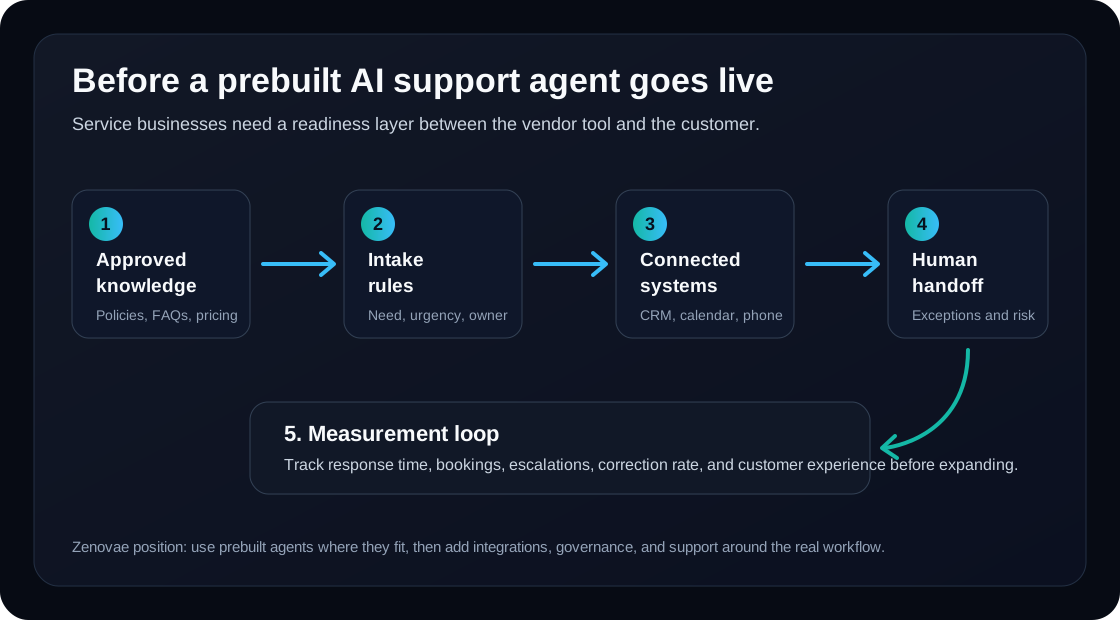
Service businesses should prepare five layers before turning on a customer-facing agent: approved knowledge, clean intake rules, system access, handoff paths, and measurement. Without those layers, even a strong agent can create staff cleanup.
| Preparation layer | Why it matters | Practical example |
|---|---|---|
| Approved knowledge | The agent needs source material it is allowed to trust | Service menu, pricing ranges, cancellation rules, maintenance policy, treatment prep instructions |
| Intake rules | The agent must know what information to collect before routing | Name, phone, address, urgency, preferred time, service need, photos, insurance or account status |
| System access | The agent needs controlled connections to act usefully | CRM, calendar, phone system, ticketing, property management software, booking platform |
| Human handoff | The agent needs clear stop signs | Angry customer, safety risk, medical question, legal issue, large refund, high-value commercial account |
| Measurement | The owner needs proof the workflow improved | Response time, bookings, recovered calls, escalation rate, correction rate, customer satisfaction |
The best first use case is usually not "answer every support question." It is a narrow workflow where the business already has rules and a measurable leak.
Where to start by business type
The right first workflow depends on where revenue or customer trust leaks today. For most service businesses, the first project should be frequent, structured, and easy for a human to review.
| Business type | Good first AI support workflow | Keep human-led |
|---|---|---|
| Property management | Maintenance intake, showing follow-up, rent-policy FAQs from approved documents | Lease disputes, fair housing concerns, eviction-sensitive issues, expensive repairs |
| Dental practice | New-patient questions, appointment requests, reminders, routing billing questions | Clinical advice, diagnosis, treatment suitability, insurance exceptions |
| Med spa | Consultation qualification, treatment-prep FAQs, abandoned booking follow-up | Medical suitability, adverse reactions, complaints, pricing exceptions |
| HVAC company | After-hours call capture, emergency triage, seasonal tune-up booking | Safety-critical dispatch decisions, warranty disputes, high-value replacement promises |
| Plumbing business | Leak and clog intake, routine job scheduling, emergency routing | Gas, safety, commercial account exceptions, disputed invoices |
| Multi-location service company | Shared FAQ answers, call summaries, ticket classification | Brand-sensitive complaints, refunds, VIP accounts, legal questions |
This structure keeps AI focused on recoverable revenue and staff time while protecting decisions that require judgment.
The readiness checklist
Before launching a prebuilt AI customer support agent, a service business should be able to answer these questions without guessing.
| Readiness question | Yes means | If no, fix this first |
|---|---|---|
| Do we have one approved source of truth? | The agent can cite current policies and FAQs | Consolidate scattered docs, web copy, scripts, and staff notes |
| Are intake fields defined? | The agent knows what to collect before routing | Create forms for lead type, urgency, location, service need, and next step |
| Are escalation rules written down? | The agent knows when to stop | Write rules for safety, legal, medical, refund, angry-customer, and VIP cases |
| Are systems connected safely? | The agent can create useful work without broad permissions | Start with read access or draft-only actions before live updates |
| Can staff review early outputs? | Mistakes become training data instead of customer damage | Create a daily review queue for first 30 days |
| Are success metrics defined? | The owner can decide whether to expand | Track bookings, response time, recovered calls, escalations, and correction rate |
This checklist is also useful when comparing vendors. Ask the vendor or implementation partner how each item will be handled in your business, not just whether the agent can answer a demo question.
A practical 30/60/90-day rollout
The safest rollout starts narrow, measures quickly, and expands only after the agent has proven it can work with real customer context.
| Timeline | Focus | What to ship |
|---|---|---|
| Days 1-30 | Readiness and pilot | Approved knowledge base, escalation rules, one channel, staff review queue, baseline metrics |
| Days 31-60 | Integration and workflow | CRM or booking drafts, call or chat summaries, follow-up tasks, exception reports |
| Days 61-90 | Expansion and optimization | Additional channels, tighter automation rules, reporting dashboard, cost and quality review |
Do not begin with fully autonomous refunds, clinical answers, legal policy interpretation, or emergency dispatch. Start with intake, routing, reminders, answer drafts, and follow-up where humans can supervise the early period.
Risks and guardrails
Prebuilt agents can create value quickly, but the same speed can expose weak operations. The biggest risk is not a dramatic AI failure. It is a quiet workflow failure: a lead is not followed up, a customer repeats their story, a staff member trusts a bad summary, or the CRM fills with messy records.
| Risk | Why it hurts | Guardrail |
|---|---|---|
| Outdated knowledge | The agent gives old pricing, policy, or availability | Assign an owner for monthly knowledge review |
| Over-automation | The agent handles sensitive issues that should escalate | Use explicit "must hand off" rules |
| Bad system permissions | AI updates records before the workflow is proven | Use draft mode, approval queues, and restricted fields first |
| Channel fragmentation | Phone, SMS, chat, and web forms create duplicate records | Connect channels to a single customer record or task queue |
| No correction loop | Staff fix mistakes manually without improving the process | Track corrections and update prompts, policies, or integrations weekly |
The goal is not to slow AI down. The goal is to keep customer-facing automation narrow enough that it can be trusted, measured, and improved.
Where Zenovae helps
Zenovae helps service businesses turn AI customer support agents into practical operations systems. That usually means mapping the current call, booking, support, and follow-up workflow before choosing what the agent should own.
For a service business, Zenovae can help with:
- Building the approved knowledge base and retrieval layer the agent should use.
- Connecting AI to phone systems, CRM, calendars, forms, booking tools, and internal dashboards.
- Designing human handoff rules for emergencies, sensitive questions, complaints, and exceptions.
- Creating review queues, reporting, and monitoring so owners can measure response speed, bookings, correction rates, and escalation quality.
- Building custom AI receptionists, follow-up automation, and workflow agents when a prebuilt product is not enough.
If your team is evaluating a prebuilt AI customer support agent, the strongest first question is not "Can it answer?" It is "What workflow are we ready to trust it with?"
Want to know where AI would recover the most revenue in your business? Book a free AI audit, or review Zenovae's AI integration services and AI agent development to see what a practical rollout can include.
FAQ
Are prebuilt AI customer support agents safe for small service businesses?
They can be safe when the workflow is narrow, source material is approved, system permissions are limited, and staff review early outputs. They are risky when launched across every customer channel without rules, handoff paths, or measurement.
What should a service business automate first?
Start with frequent, structured workflows such as missed-call recovery, appointment requests, maintenance intake, routine FAQs, call summaries, follow-up tasks, and reminder messages. Keep clinical, legal, safety, refund, and complaint decisions human-led until the process is proven.
Do prebuilt agents replace an implementation partner?
No. Prebuilt agents reduce the amount of software setup, but they do not automatically define your knowledge base, CRM rules, escalation logic, calendar constraints, reporting, or staff adoption process. Those are implementation decisions.
Sources
Need Help with Your AI Project?
At Zenovae, we build production-ready AI systems that scale. From OpenClaw setup to custom integrations, Mission Control workflows, and full-stack delivery, we can help you ship faster and avoid costly mistakes.
Let's Talk