ServiceTitan Scheduling Pro Webhooks: Recover Abandoned Bookings Safely
How HVAC and plumbing teams can use ServiceTitan Scheduling Pro webhooks for abandoned-booking follow-up without risky AI writes.
ServiceTitan Scheduling Pro webhooks can help an HVAC, plumbing, or residential service team react when a customer starts booking online but does not finish. The safe first implementation is not "let AI book every abandoned lead." It is a controlled follow-up workflow: capture the webhook, check whether ServiceTitan's native recovery tools already cover the situation, draft a compliant callback or email, and require staff review before the workflow creates or changes an operational record.
ServiceTitan's current Scheduling Pro webhook documentation says two webhook events are available: Session Completed (Job/Booking Creation) and Qualified Abandoned Session, where the customer has provided enough contact details, such as phone or email, to follow up, but leaves before completing the booking. The same page says the feature is in Private Preview for specific accounts and is subject to change (ServiceTitan Scheduling Pro webhooks).
Quick take: Use ServiceTitan's native lead recovery and Zapier options first when they fit. Build a custom AI integration only when the abandoned-booking workflow needs cross-system context, consent-aware messaging, staff approval, retry handling, and audit logs that the native path does not provide.
| If you only read one section | Read this |
|---|---|
| You need the buyer answer | The direct answer |
| You need the build-vs-native boundary | Native ServiceTitan and Zapier vs custom AI integration |
| You need the safe workflow | A controlled abandoned-booking workflow |
| You need a vendor checklist | Questions to answer before building |
The direct answer
Yes, a service business can use ServiceTitan Scheduling Pro webhooks as the trigger for abandoned-booking follow-up, but the first release should be narrow. Treat the webhook as a signal that someone may need follow-up, not as proof that the system should automatically send a sales message, book a job, or change dispatch capacity.
For many teams, ServiceTitan's native Contact Center Pro and Scheduling Pro recovery tools may be enough. ServiceTitan describes Abandoned Call Recovery as a connected workflow across Contact Center Pro, Titan Intelligence, and Voice Agent, with CSR queues for Abandoned Calls and Second Chance Leads. It also says Voice Agent can handle routine inbound calls and book qualifying jobs, while CSRs work prioritized follow-up queues (ServiceTitan Abandoned Call Recovery).
Custom work becomes worth discussing when the buyer question is more specific: "Can abandoned online-booking sessions become a reviewed AI follow-up queue that also checks CRM context, marketing source, service area, booking rules, and approved messaging before anyone contacts the lead?"
That is an AI integrations problem because it connects ServiceTitan, AI drafting, messaging rules, staff review, and possibly a CRM, phone system, email tool, or reporting dashboard. It is not a reason to duplicate a native ServiceTitan workflow that already solves the operational need.
Native ServiceTitan and Zapier vs custom AI integration
Start with the native and no-code options. ServiceTitan's Zapier documentation says the ServiceTitan-Zapier integration can connect ServiceTitan data to third-party applications for no-code automation and can use ServiceTitan API services to create a task, job note, attachment, or book a job. The same documentation says the Zapier feature is in open beta, requires a Client ID and Secret Key, and is not officially supported by ServiceTitan beyond API-related issues (ServiceTitan Zapier integration).
Zapier's own ServiceTitan help page adds practical constraints: ServiceTitan API access is tied to certain ServiceTitan package/service agreements, setup requires administrator permissions, and ServiceTitan supports API-related issues while users contact Zapier for Zap setup support. Zapier also lists API rate limits and content storage restrictions for the ServiceTitan app (Zapier ServiceTitan help).
| Option | Use it when | Do not overbuild when |
|---|---|---|
| ServiceTitan native recovery | Abandoned calls, second-chance leads, Voice Agent, CSR queues, and reporting already match the workflow | Staff can work the queue inside ServiceTitan without missing context |
| ServiceTitan Scheduling Pro webhooks | A completed or qualified abandoned online booking should notify another system in near real time | The follow-up is a simple internal alert or one-step handoff |
| Zapier | A standard trigger-action workflow is enough and the business accepts the beta/support boundaries | The action is low-risk and can live within Zapier's platform constraints |
| Custom AI integration | The workflow needs AI classification, approved language, multi-system context, staff review, idempotent processing, and audit logs | The custom build would merely recreate a working native ServiceTitan feature |
The important boundary is operational, not fashionable. If a native queue tells CSRs exactly who to call, why they should call, and how to close the loop, use it. If the abandoned session must be enriched, prioritized, drafted, reviewed, and measured across systems, custom integration may be justified.
What the webhook should and should not do
The Scheduling Pro webhook should start the workflow. It should not be the workflow.
| Webhook signal | Reasonable first action | Keep constrained |
|---|---|---|
| Session Completed | Confirm the internal job or booking record is visible to the right team | Do not create duplicate follow-up if ServiceTitan already created the booking |
| Qualified Abandoned Session | Create a reviewed follow-up item with source, timestamp, contact fields, and known service interest | Do not assume consent, urgency, eligibility, or technician availability |
| Missing or conflicting data | Route to a human owner with the exact missing fields | Do not let AI invent missing contact details or service context |
| Repeat visitor or existing customer | Ask ServiceTitan or the CRM for approved context if access is permitted | Do not expose more customer history than the reviewer needs |
| High-value or urgent language | Escalate to the defined CSR or dispatcher process | Do not let AI make safety, pricing, or dispatch promises |
ServiceTitan's developer portal overview says API calls require a Client ID and Secret Key, an application key, a Partner ID, OAuth token exchange, and the access token plus application key for resource API calls. It also notes the access token has a 15-minute lifetime and should be cached and reused during that lifetime (ServiceTitan API overview). Those are engineering details, but they affect the buyer's real risk: credentials, tokens, scopes, retries, and ownership cannot be an afterthought.
A controlled abandoned-booking workflow
A practical first build for HVAC or plumbing looks like this:
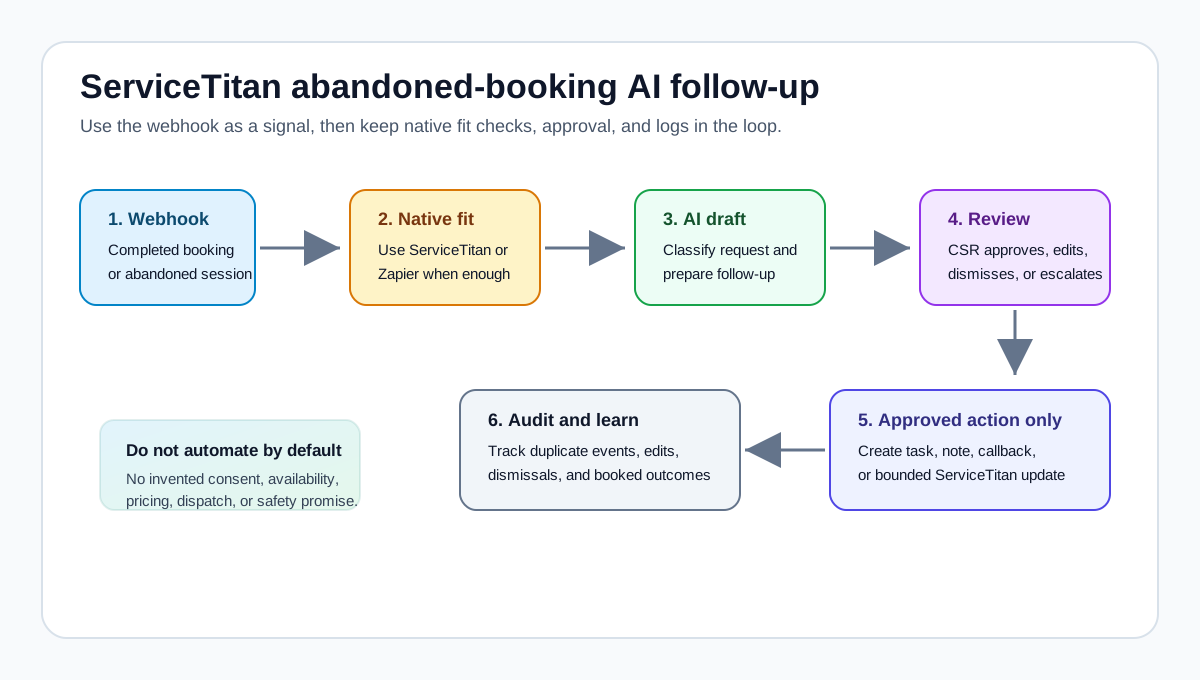
- Scheduling Pro sends a completed or qualified abandoned-session webhook to a dedicated endpoint.
- The integration verifies the source, stores the event ID, and prevents duplicate processing.
- The workflow checks whether a booking or open recovery item already exists.
- AI classifies the request using only the webhook data and approved business context.
- The system drafts a short callback script, email, or internal task for staff review.
- A CSR approves, edits, dismisses, or escalates the follow-up.
- Only the approved action creates a task, note, or other allowed update through ServiceTitan or the chosen handoff tool.
- The result is logged for review: source, reviewer, action, timestamp, outcome, and reason for dismissal if applicable.
That design keeps the buyer out of the awkward middle: faster than manual inbox chasing, but not a black box that contacts customers and changes records without review.
It also gives the operator an evidence loop. Useful first-month measures include number of qualified abandoned sessions, reviewer edits, dismissed items, duplicate events blocked, time to first human review, and number of follow-ups that led to an actual booking. Do not claim revenue recovered until the team can trace a follow-up to a real customer outcome.
Messaging and consent boundaries
Abandoned booking follow-up often touches email or SMS, so the workflow should separate facts from recommendations. Fact: ServiceTitan says TCR brand registration is a setup gate for business text messaging on 10DLC numbers and that downstream messaging features cannot send SMS or MMS until brand and campaign approval are complete. It also says verification typically takes 7-10 business days (ServiceTitan TCR registration).
Fact: the FTC's CAN-SPAM business guide says commercial email must use accurate header information and subject lines, include a valid physical postal address, provide a clear opt-out path, and honor opt-out requests within 10 business days (FTC CAN-SPAM guide).
Recommendation: treat AI follow-up drafts as messages that need business-approved templates, opt-out handling, channel rules, and legal review for the jurisdictions where the business operates. This article is not legal advice. It is a workflow design boundary: do not let an AI integration decide that an abandoned booking form gives permission for every future marketing or sales message.
Questions to answer before building
Before buying or building a ServiceTitan abandoned-booking AI integration, ask:
| Question | Why it matters |
|---|---|
| Is Scheduling Pro webhook access enabled for this account? | The webhook feature is in Private Preview for specific accounts, so availability must be verified directly. |
| Which event starts the workflow? | Completed booking and qualified abandoned session need different handling. |
| What native ServiceTitan queue already exists? | If Contact Center Pro or ServiceTitan Max already covers recovery, custom work should not replace it without a gap. |
| Which ServiceTitan scopes and credentials are required? | API access, application keys, OAuth tokens, and secrets must be scoped and protected. |
| What can AI draft but not send? | Customer-facing language can create operational, trust, and compliance risk. |
| Who reviews exceptions? | The queue needs an accountable owner, not just an automation log. |
| How are duplicates handled? | Webhook-driven systems should avoid repeated tasks, repeated messages, and duplicate bookings. |
| What proves the pilot worked? | Track reviewed items, corrections, dismissed leads, booked outcomes, and follow-up speed before expanding. |
NIST's AI Risk Management Framework is voluntary, but it is useful here because it frames AI risk management as something organizations should incorporate into design, development, use, and evaluation of AI systems (NIST AI RMF). For buyers, that means defining ownership, testing, monitoring, and human oversight before the integration starts contacting leads.
Where Zenovae helps
Zenovae helps service businesses decide whether a native feature, Zapier-style automation, or custom integration is the right fit. For this workflow, that can mean mapping the ServiceTitan event, confirming native coverage, designing the review queue, connecting approved messaging tools, and building the smallest integration that makes abandoned-booking follow-up visible and measurable.
Use the AI integrations service page for the core fit, compare the simpler path with AI integrations vs Zapier automation, and score the workflow with the AI automation readiness checklist. If the workflow expands into call handling, the HVAC AI receptionist page is the closer vertical fit; if it needs a tailored operations tool, custom software development may be the next step.
Want to know whether ServiceTitan abandoned-booking follow-up is worth automating first? Book a free AI audit.
Sources
Need Help with Your AI Project?
At Zenovae, we build production-ready AI systems that scale. From OpenClaw setup to custom integrations, Mission Control workflows, and full-stack delivery, we can help you ship faster and avoid costly mistakes.
Let's Talk