Slack AI Teammates for Service Businesses: What to Automate Before Staff Ask
Slack AI teammates are moving into daily operations. Learn what service businesses should automate first, connect carefully, and keep human-led.
AI is moving into the place where staff already coordinate work: team chat. For service businesses, that matters because many customer problems are not solved in one system. A missed call becomes a staff message, a scheduling check, a CRM note, a customer text, and sometimes a handoff to a manager or technician.
Anthropic announced Claude Tag on June 23, 2026 as a Slack-based way for teams to tag Claude into selected channels, give it access to approved tools and data, and delegate tasks from the same conversation where staff are already working (Anthropic). Slack also describes AI agents and assistants as tools that can use Slack context plus connected enterprise data sources to help teams automate work and take action (Slack).
Quick take: Slack AI teammates are not just another chat window. They are a sign that AI agents are becoming shared operational coworkers inside the communication layer of the business. Service businesses should start with structured customer operations tasks, connect only the systems needed, and require human approval before AI makes expensive, sensitive, or irreversible commitments.
| If you only read one section | Read this |
|---|---|
| You want the short answer | Answer first: what changed |
| You run a service business | Why this matters for customer operations |
| You want examples | Workflows worth automating first |
| You are worried about risk | Guardrails before access |
| You want a rollout plan | A practical 30/60/90-day plan |
Answer first: what changed
The practical change is that AI agents are moving from private assistant tabs into shared work channels. Anthropic says Claude Tag can join selected Slack channels, remember relevant context from channels it is in, and plan tasks for future completion when a user tags it (Anthropic). That makes the agent visible to a team instead of hidden inside one person's account.
Slack's own AI agent materials point in the same direction: AI assistants, Agentforce, enterprise search, and third-party assistants can live inside Slack, with admin and security controls around how apps are published and what data they use (Slack). Salesforce has also positioned Slack as a place where Agentforce can help employees find answers, complete tasks, and use permissioned context from company data (Salesforce).
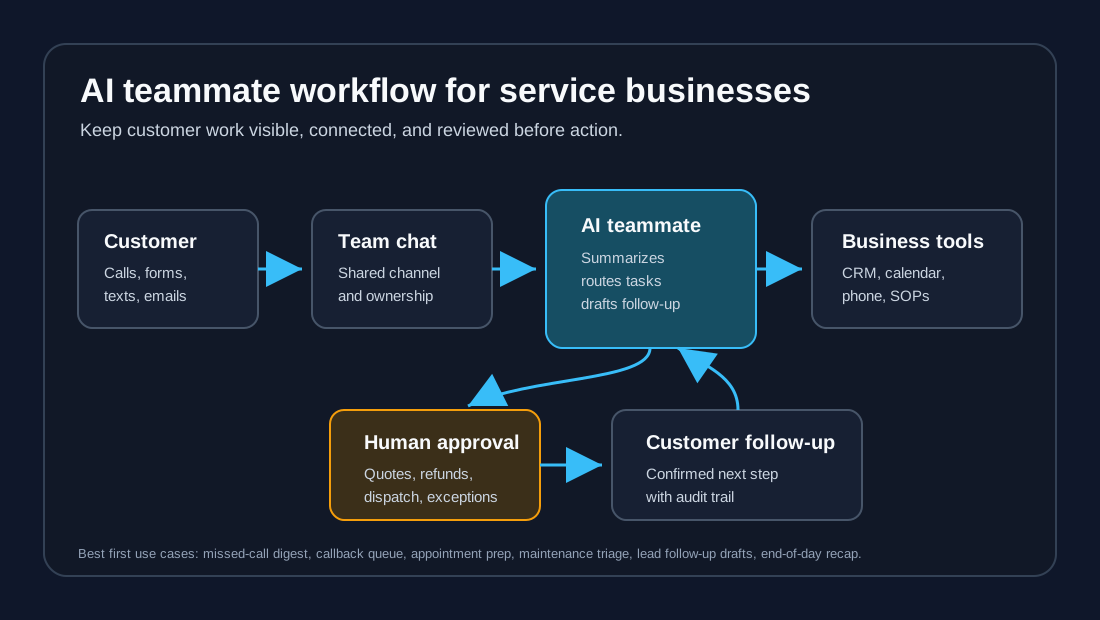
For a service business, this does not mean "put an AI in every channel." It means the team can eventually ask one shared agent to summarize the day, identify unassigned customer requests, draft follow-up, prepare callback lists, and route issues to the right person. The value comes from connecting customer work across phones, calendars, CRMs, forms, and staff conversations.
Why this matters for customer operations
Service businesses often have good people working through messy handoffs. The problem is not that staff do not care. The problem is that customer operations are fragmented.
| Common operating gap | What staff do today | Where a shared AI teammate can help |
|---|---|---|
| Missed calls after hours | Listen to voicemails, copy notes, decide who calls back | Summarize missed calls, classify urgency, create a callback queue |
| Scheduling friction | Ask in chat, check calendar, message the customer, update CRM | Pull availability, draft options, flag conflicts for approval |
| Maintenance or service triage | Read forms, ask follow-up questions, notify field staff | Extract issue type, location, photos, urgency, and next action |
| Lead follow-up | Search inboxes and texts for stale opportunities | Surface unresponded leads and draft compliant follow-up |
| Staff questions | Ask a manager for policy, pricing, or availability | Answer from approved SOPs and link to the source document |
| Customer complaints | Manually reconstruct what happened across systems | Build a timeline from call notes, CRM records, and channel updates |
This is why the "teammate" framing matters. A private AI assistant can help one employee write faster. A shared, governed AI teammate can help the whole operation notice what is stuck.
The adoption lesson: workflows beat experiments
The broader AI market is pushing in the same direction. McKinsey's 2026 AI trust analysis argues that trust supports sustained adoption and integration into core workflows, while also helping organizations manage a changing risk landscape (McKinsey). McKinsey's April 2026 article on agentic AI at scale also emphasizes high-impact workflows, strong data foundations, and operating model changes instead of scattered pilots (McKinsey).
Deloitte's 2026 State of AI in the Enterprise report is based on research with more than 3,000 director to C-suite leaders involved in AI initiatives (Deloitte). Deloitte's AI enterprise research frames the same business issue: companies are trying to move AI from experimentation into scaled operating value (Deloitte).
The buyer takeaway is simple: do not buy a Slack AI teammate because it is interesting. Buy or build one around a workflow that already costs revenue, time, or customer trust.
Workflows worth automating first
Start where the AI can gather, summarize, route, and prepare work without taking over high-risk decisions.
| Automate first | Why it is a good first workflow | Keep human-led |
|---|---|---|
| Daily missed-call digest | Easy to measure, high revenue impact, clear owner | Deciding pricing exceptions or refund commitments |
| Callback queue from voicemail and forms | Turns scattered requests into assigned work | Sensitive complaints or legal-sensitive disputes |
| Appointment request prep | AI can collect details and suggest times | Final booking when rules are unclear or calendar conflicts exist |
| Lead follow-up drafts | AI can draft fast, consistent responses | Sending aggressive outreach without consent rules |
| Maintenance triage summary | AI can extract address, issue, urgency, photos, and tenant details | Emergency dispatch decisions without confirmation |
| End-of-day operations recap | Helps managers spot unassigned tasks and bottlenecks | Performance decisions about staff or vendors |
For a dental practice, the first workflow might be "show tomorrow's unconfirmed appointments and draft reminders." For an HVAC company, it might be "summarize after-hours emergency calls and identify jobs that need dispatch confirmation." For a property manager, it might be "turn tenant maintenance messages into a reviewed priority queue."
Guardrails before access
The risk is not that an AI teammate writes a bad paragraph. The risk is that it gets too much access too early, acts on incomplete context, or makes a promise the business cannot keep.
NIST's AI Risk Management Framework gives a useful structure for this because it organizes AI risk work around governing, mapping, measuring, and managing AI systems (NIST). In service-business language, that means define who owns the AI, where it is used, how performance is measured, and how the team intervenes.
| Guardrail | What it means in a service business | Example rule |
|---|---|---|
| Channel scope | AI only joins channels where the workflow is defined | Allow #callbacks and #maintenance-triage; block private HR or finance channels |
| Tool permissions | Give the AI read or draft access before write access | Read CRM records and draft notes, but require approval before updating stages |
| Source control | Answers come from approved policies and SOPs | Link to the cancellation policy before drafting a customer response |
| Human approval | Sensitive or expensive actions require review | Staff approves quotes, refunds, emergency dispatch, medical-adjacent advice, and legal-sensitive replies |
| Audit trail | Every AI action has a visible record | Log prompt, source, suggested action, approver, and final outcome |
| Cost control | Usage limits prevent surprise bills | Set workspace, channel, or workflow budget caps before broad rollout |
The safest early design is "AI prepares, humans approve." Expand autonomy only after the workflow produces consistent results and the team understands failure patterns.
What this means for service-business buyers
If you are evaluating Slack-native AI tools, do not start with vendor features. Start with your front-office operating map.
| Buyer question | Good answer |
|---|---|
| Which customer moments create the most staff coordination? | Missed calls, booking requests, maintenance intake, complaints, no-show follow-up, or estimate requests |
| Where does work get stuck today? | Unassigned messages, slow callbacks, duplicate CRM updates, unclear ownership, or missing context |
| What data does the AI need? | Call summaries, CRM records, calendars, service rules, pricing guardrails, SOPs, and consent rules |
| What should the AI never do alone? | Quote exceptions, refund decisions, emergency promises, clinical advice, legal-sensitive messages, or firing vendors |
| What outcome will we measure? | Faster callback time, fewer unassigned requests, lower no-shows, cleaner CRM records, or reduced manager interruptions |
The right first project is usually smaller than buyers expect. A well-designed missed-call and callback workflow can teach the team more than a broad "AI teammate for everything" pilot.
A practical 30/60/90-day plan
| Timeline | What to do | What good looks like |
|---|---|---|
| First 30 days | Pick one channel and one customer workflow. Define owners, source documents, escalation rules, and success metrics. | Staff knows what the AI can prepare, what it cannot do, and who approves actions. |
| Days 31-60 | Connect the minimum systems: phone summaries, CRM lookup, calendar availability, or maintenance forms. Keep write actions behind approval. | The AI creates useful drafts and queues without making irreversible changes. |
| Days 61-90 | Review every exception, tune prompts and policies, add dashboards, then expand to one adjacent workflow. | The business can show faster response, cleaner handoffs, and fewer unassigned customer requests. |
Avoid the common mistake of connecting everything before the workflow is clear. More data does not fix unclear ownership.
Where Zenovae helps
Zenovae helps service businesses turn AI agents from interesting demos into controlled customer operations workflows. That usually means mapping missed calls, intake, follow-up, scheduling, CRM updates, and staff handoffs before choosing the agent interface.
| Zenovae workstream | Outcome for the business |
|---|---|
| Workflow mapping | Identify the customer moments where work gets lost or delayed |
| AI receptionist and follow-up design | Capture calls, qualify requests, draft callbacks, and reduce manual chasing |
| AI integrations | Connect AI to phone systems, CRMs, calendars, forms, ticketing, and team chat |
| RAG knowledge systems | Give AI approved policies, service rules, FAQs, and source-linked answers |
| Monitoring and support | Track quality, cost, escalations, staff edits, and customer outcomes |
If your team already runs customer work through Slack or another team chat tool, Zenovae can help define which workflows are ready for AI assistance and which should stay human-led.
FAQ
What is a Slack AI teammate?
A Slack AI teammate is an AI agent or assistant that operates inside Slack channels or conversations, using approved context and connected tools to answer questions, prepare work, summarize activity, or help route tasks.
Is this different from a chatbot?
Yes. A chatbot usually answers one user's question. A shared AI teammate can participate in a team workflow, use channel context, remember relevant information where permitted, and prepare follow-up actions for staff review.
Should service businesses connect AI to their CRM right away?
Usually not with full write access. Start with read-only lookup or draft updates, then require human approval before the AI changes customer records, appointment status, prices, or pipeline stages.
What should a service business automate first?
Start with frequent, structured, measurable workflows: missed-call summaries, callback queues, appointment request prep, maintenance triage, lead follow-up drafts, or end-of-day operations recaps.
What to do next
If your team uses Slack, Teams, or another chat tool to coordinate customer work, ask where staff keep asking the same questions or chasing the same updates. That is often where an AI teammate can help first.
Zenovae can map your missed-call, follow-up, scheduling, and customer operations workflow and show what to automate first, what to connect, and where human approval should stay in place. Start with a free AI audit or contact Zenovae to review your current workflow.
Sources
- Anthropic: Introducing Claude Tag
- Slack: AI Agents with Agentforce and agentic AI
- Slack: Agentforce for employees in Slack
- McKinsey: State of AI trust in 2026
- McKinsey: Building the foundations for agentic AI at scale
- Deloitte: 2026 State of AI in the Enterprise press release
- Deloitte: The State of AI in the Enterprise
- NIST AI Risk Management Framework
Need Help with Your AI Project?
At Zenovae, we build production-ready AI systems that scale. From OpenClaw setup to custom integrations, Mission Control workflows, and full-stack delivery, we can help you ship faster and avoid costly mistakes.
Let's Talk