Typeform AI Lead Intake: When to Build a Custom Web App
Use Typeform AI for simple lead intake, but build a custom web app when service teams need queues, approvals, and cross-system visibility.
Typeform AI lead intake can be enough for a service business when the job is simple: ask better questions, score or segment the lead, notify the team, and push a completed form response into the next tool. A custom web app starts to make sense when the business needs a staff-facing queue, duplicate checks, role-based approvals, service-area logic, CRM history, appointment context, and reporting in one place.
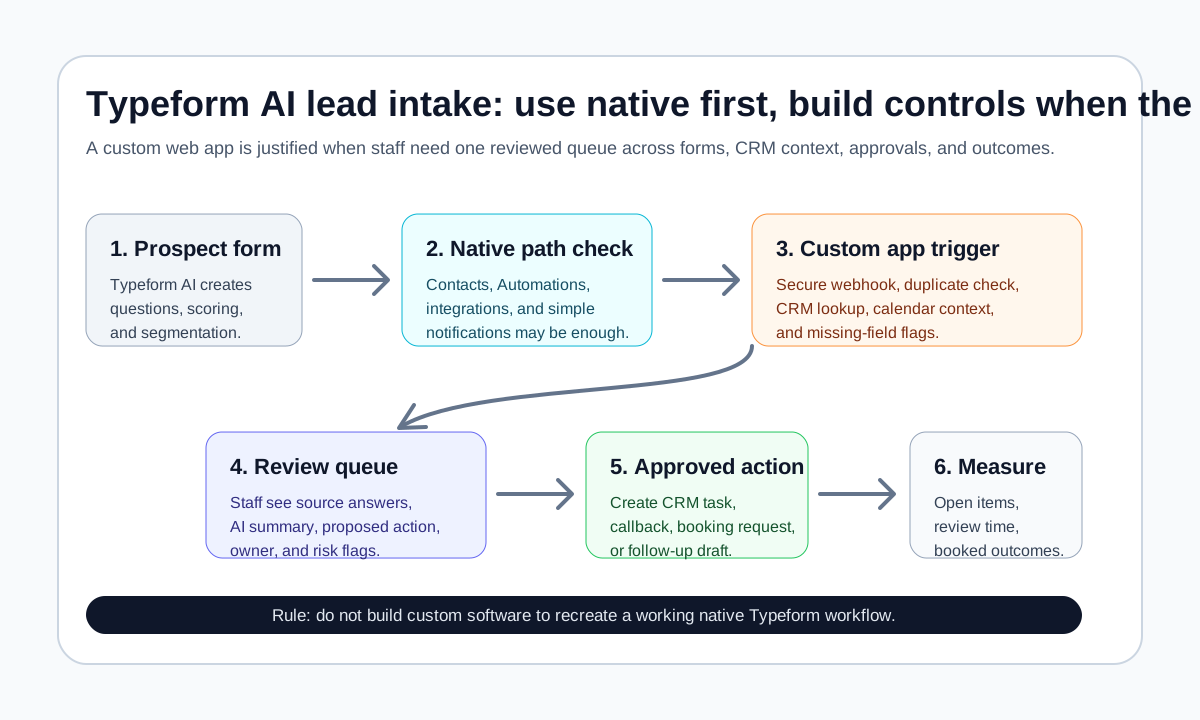
The direct answer: use Typeform's native AI, Contacts, Automations, integrations, and webhooks first when they fit the workflow. Build a custom intake web app only when the form is no longer the workflow. If staff still have to reconcile spreadsheets, inboxes, CRM records, booking calendars, and customer promises after every submission, the missing piece is usually a controlled application surface, not a prettier form.
Quick take: Typeform can handle a lot of lead intake without custom software. Its current docs describe AI-assisted form creation, lead qualification forms, Contacts and Automations, MCP Connectors, webhooks, the Responses API, and security controls. A custom web app is justified when the business needs one reviewed operating queue around Typeform responses, CRM context, booking rules, human approvals, and measurable follow-up.
| If you only read one section | Read this |
|---|---|
| You need the buyer answer | The direct answer for service businesses |
| You want to avoid overbuilding | Native Typeform vs custom web application |
| You need a practical workflow | A controlled intake web app workflow |
| You need a launch artifact | The build-or-use-Typeform checklist |
The direct answer for service businesses
For a dental office, med spa, HVAC company, property manager, plumbing company, or other service business, Typeform AI lead intake is a strong first option when the intake path is mostly linear. A prospect fills out a form, answers qualification questions, gets routed by score or segment, and the team receives a clean notification.
Typeform's current Help Center says Typeform AI can create and edit forms, manage questions and branching rules, preview suggested changes, restore previous versions, work with Contacts and Automations, upload files, and use connected apps as context (Typeform AI Help Center). Typeform also documents a lead qualification AI solution that generates tailored questions, an ideal customer profile, scores, and segments for leads (Typeform lead qualification with AI).
That native path is enough when the business can answer "yes" to these questions:
| Question | If yes, stay native first |
|---|---|
| Is one completed form response the main unit of work? | Typeform can capture the response and hand it to the next tool. |
| Are routing rules simple? | Scores, segments, integrations, and notifications may cover the handoff. |
| Does one team own review? | A Slack, email, CRM, or contact automation can be sufficient. |
| Is the follow-up low-risk? | A native message or task can work when it does not make promises about price, availability, health, lease terms, or emergency priority. |
| Can the team measure success elsewhere? | A CRM or existing dashboard may already track booked appointments and closed work. |
Build a custom web application when the answer changes. If the form starts one workflow, the CRM holds another version of the customer, the calendar controls availability, staff need to approve AI-drafted replies, and managers need to see what happened, the business probably needs a lightweight intake portal or operations dashboard around Typeform.
Native Typeform vs custom web application
Start with Typeform's native and no-code options. This is the boring advice, which is often the useful advice.
Typeform's Contacts and Automations documentation says Contacts organize form-submitted customer data, while Automations can send personalized email communication and Slack messages based on collected information, contact updates, list changes, form submissions, and schedules. It also notes plan and add-on availability details for Contacts and Automations (Typeform Contacts and Automations).
Typeform also documents MCP Connectors that let Typeform AI use context from apps such as Notion, Slack, Shopify Storefront, Stripe, and Canva while creating or updating forms and workflows. Typeform currently says MCP Connectors are available on all plans, with non-Enterprise plans receiving them as a complimentary add-on subject to its service terms (Typeform MCP Connectors). Because plan access and connected apps can change, verify the current account before promising a workflow.
| Option | Best fit | Watch the boundary |
|---|---|---|
| Typeform AI form creation | The team needs better intake questions, branching, and lead qualification quickly | It creates a better front door, but not necessarily a full staff workflow. |
| Typeform Contacts and Automations | Leads can be segmented and followed up inside Typeform or simple connected tools | Confirm consent, sender setup, owner, and where the official customer record lives. |
| Classic integrations or no-code handoffs | A completed response should create a CRM lead, Slack alert, email, or simple task | Simple handoffs break down when staff need context from several systems. |
| Typeform webhooks or Responses API | A developer-owned system needs response data reliably | The receiving app must handle security, retries, duplicates, and delayed availability. |
| Custom intake web app | Staff need one queue for review, approvals, CRM context, booking rules, outcomes, and logs | Do not build it just to recreate a form, contact list, or native automation that already works. |
That last row is the commercial fit. A custom web app should earn its place by giving staff a better control surface. It should not be custom software theater.
What Typeform webhooks can and cannot solve
Typeform's Webhooks API can send every new submission to a URL or compatible web application when a response is submitted. The documentation says the webhook receiver should return a 2XX response, new webhook URLs must use HTTPS, payload signing is supported, timeouts and retry behavior apply, and Typeform can disable failing webhooks after repeated failed delivery (Typeform Webhooks API).
Typeform's secure webhooks documentation explains why signature verification matters: a public webhook endpoint can be called by anyone, so the app should use a shared secret and verify the Typeform-Signature header before processing the payload (Typeform secure webhooks).
Those details are not just developer trivia. They shape the buyer decision.
| Webhook reality | Operational implication |
|---|---|
| The webhook says a form response happened | It does not prove a lead should be contacted, booked, or marked qualified. |
| Delivery can fail or retry | The receiving app needs idempotency and visible error handling. |
| Payloads should be verified | Staff should not trust a queue fed by an unsigned or unverified endpoint. |
| A 2XX response matters | The app should acknowledge quickly and process slower AI or CRM work separately. |
| Responses still live in Typeform | Decide which system is the source of truth before building reports. |
Typeform's Responses API is useful when the business needs to retrieve historical submissions or query responses programmatically. Its documentation notes that the API retrieves submissions in JSON and that very recent submissions may not be included for up to about 30 minutes, while webhooks and third-party integrations push responses when submitted (Typeform Responses API).
That means the first custom build should usually separate two jobs: webhook-driven intake for near-real-time review, and API-based reconciliation for audits, backfills, and reporting.
A controlled intake web app workflow
A practical custom web app around Typeform AI lead intake can be small. It does not need to replace Typeform. It can sit beside it and make the handoff usable.
- A prospect completes a Typeform lead intake form.
- Typeform sends the response to a secure webhook endpoint.
- The app verifies the Typeform signature and records the event.
- The app checks for duplicate leads, existing customer records, service area, and appointment context if the business has approved those integrations.
- AI can summarize the request, label missing fields, and draft the next staff action.
- Staff review the item in a queue with the original Typeform answers, AI summary, source links, proposed next step, and risk flags.
- Approved actions create a CRM task, booking request, callback queue item, or follow-up draft.
- The app logs reviewer, decision, timestamp, final status, and outcome.
| Service workflow | Native Typeform may be enough | Custom web app may be justified |
|---|---|---|
| Dental new-patient inquiry | The form qualifies basic need and sends a scheduling link | Staff need insurance notes, clinical handoff flags, privacy rules, and scheduler review. |
| Med spa consultation request | The form segments treatment interest and sends a confirmation email | Staff need risk flags, treatment-specific intake status, consent checks, and review before advice-like replies. |
| HVAC replacement estimate | The form captures equipment age, location, urgency, and budget range | Staff need service-area checks, duplicate customer history, technician capacity, and estimate follow-up visibility. |
| Property-management maintenance request | The form captures unit, issue, and preferred contact | Staff need emergency triage, tenant history, vendor routing, and approval before work-order creation. |
| Plumbing emergency inquiry | The form captures issue type and contact details | Staff need urgent escalation, service-zone rules, after-hours ownership, and call-back audit logs. |
This supports custom software development if the business needs a broader internal system. It supports AI integrations if the main job is connecting Typeform, CRM, calendar, phone, and reporting tools. But the primary buyer question here is the web app decision: whether staff need a browser-based control layer around lead intake.
Security, privacy, and AI boundaries
Typeform's AI FAQ says Typeform uses AI features across form creation, lead qualification, Smart Insights, custom flows, and related tools. It also says some AI features use OpenAI or Anthropic, customer data is not used to train models, and data handling varies by feature (Typeform AI FAQ). Typeform's security documentation describes controls such as SOC 2 Type II, ISO certifications, GDPR-related processing, AWS hosting, encryption in transit and at rest, access controls, and shared responsibility (Typeform security).
Recommendation: treat these as vendor due-diligence inputs, not blanket approval for every workflow. A dental practice, med spa, property manager, or home-service company still needs to decide what information belongs in a form, who can see it, what AI may summarize, and what must stay human-led.
NIST's AI Risk Management Framework is voluntary and use-case agnostic, but it is useful because it frames AI risk management as part of design, development, use, and evaluation, not a final checklist after launch (NIST AI RMF). For this workflow, that means defining the AI's task, reviewing outputs, monitoring errors, and keeping humans accountable for sensitive follow-up.
If automated email follow-up is part of the workflow, separate transactional messages from marketing messages. The FTC's CAN-SPAM business guide says commercial email must avoid misleading header information and subject lines, include a valid physical postal address, provide a clear opt-out path, and honor opt-out requests within 10 business days (FTC CAN-SPAM guide). This article is workflow guidance, not legal advice; get legal review for the states, channels, industries, and message types your business uses.
The build-or-use-Typeform checklist
Use this checklist before scoping a custom intake portal:
| Decision question | Use Typeform native first | Build a custom web app |
|---|---|---|
| What starts the workflow? | One completed Typeform response | Multiple sources: Typeform, phone, SMS, inbox, CRM, and calendar |
| Who owns the next action? | One person or one team gets notified | Several roles need routing, reassignment, and visibility |
| What context is needed? | The form answers are enough | Staff need CRM history, booking availability, customer status, or duplicate detection |
| What can AI do? | Suggest questions, score leads, summarize or segment simple responses | Draft actions but require approval before customer-facing or system-of-record changes |
| What does staff need to see? | A form response, email, Slack message, or CRM lead | A reviewed queue with status, owner, proposed action, source data, and outcome |
| What proves it worked? | More complete forms and faster notifications | Faster response, fewer stale leads, cleaner handoffs, fewer duplicates, and booked outcomes |
| What breaks the workflow? | A missed notification or poorly written form | Duplicate records, unsafe AI replies, lost webhooks, hidden errors, or no audit trail |
The simplest useful pilot is a review queue. Do not start with every integration. Start with one Typeform, one service line, one team owner, one approved follow-up path, and one dashboard showing open items, reviewer decisions, and outcome status.
Where Zenovae helps
Zenovae helps service businesses decide whether Typeform is enough, whether a no-code handoff is enough, or whether a custom web app should sit around the workflow. The work can include mapping the lead intake path, designing the review queue, connecting CRM and calendar context, adding secure webhooks, and giving staff a browser-based surface for approvals, outcomes, and reporting.
Start with the web application development page if your team needs a control layer, the AI integrations page if the main gap is system connection, and the AI automation readiness checklist if you want to score the workflow before building. For the simpler-path comparison, see AI integrations vs Zapier automation.
Want to know whether your Typeform lead intake should stay native or become a custom web app? Book a free AI audit.
Sources
Need Help with Your AI Project?
At Zenovae, we build production-ready AI systems that scale. From OpenClaw setup to custom integrations, Mission Control workflows, and full-stack delivery, we can help you ship faster and avoid costly mistakes.
Let's Talk