Usage-Based AI Automation: Budget Before Agents Run Your Back Office
Usage-based AI automation can help service businesses move faster, but owners need task budgets, review rules, and workflow visibility first.
AI automation is moving from simple chat responses into work that can run across email, calendars, CRM records, customer portals, spreadsheets, and internal tools. For service businesses, that is useful. It also means the cost and risk of automation are no longer tied only to a monthly software subscription.
The new buying question is not "Can AI do this task?" It is "How often should this task run, what systems can it touch, who reviews the result, and what should it cost when volume changes?"
Quick take: Usage-based AI automation can be a good fit for lead follow-up, scheduling support, inbox triage, customer-service resolution, CRM cleanup, and reporting. Before you let agents run back-office work, define task budgets, approval points, success metrics, and visibility dashboards. Otherwise, a helpful workflow can become an expensive black box.
| If you only read one section | Read this |
|---|---|
| You are evaluating AI agents for admin work | Start with the task budget, not the tool |
| You already use Microsoft 365 or Salesforce | What changed in the market |
| You worry about surprise costs | How to keep usage-based automation under control |
| You need a practical rollout path | A 30-day implementation plan |
What changed in the market
Recent platform announcements show where business automation is heading.
Microsoft announced that Copilot Cowork is generally available worldwide and described it as a system for complex, long-running, multi-tool tasks. Microsoft also said Cowork is usage-billed through Copilot Credits, with task cost influenced by model use, context retrieval, tool calls, and runtime. Its cost controls include spending limits, usage alerts, and reporting by tenant, group, and user (Microsoft 365 Blog, June 16, 2026).
Earlier in June, Microsoft announced Work IQ APIs for agents that need business context from Microsoft 365 data and apps. In plain English: agents are being designed to understand work across email, calendars, meetings, chats, files, people, and business systems, not just answer isolated questions (Microsoft 365 Blog, June 2, 2026).
Salesforce is also pushing AI deeper into service and back-office work. Salesforce announced Agentforce Operations as generally available, positioning it for processes that span systems, unstructured information, business rules, human review, and audit trails (Salesforce, 2026). Salesforce also announced Agentforce Help Agent and pay-per-resolution pricing, where organizations pay when the agent autonomously resolves an issue from start to finish, with no charge in specified human-escalation or negative-feedback cases (Salesforce, 2026).
The pattern is clear: AI tools are being packaged around completed work, not just seats, chats, or messages.
What usage-based AI automation means in plain English
Usage-based AI automation means the bill is connected to what the AI does. Depending on the vendor, that may include completed resolutions, tool calls, time spent running a task, documents reviewed, business context retrieved, or credits consumed.
For a service business, that can be fairer than buying a large platform up front. It can also be harder to forecast if nobody maps the workflow before launch.
| Pricing or cost driver | Plain-English meaning | Service-business example |
|---|---|---|
| Resolution | The AI completed a customer issue end to end | A portal agent answers a billing question and closes the case |
| Tool call | The AI used another system | Checking CRM status, calendar availability, or a work-order record |
| Runtime | The task ran for a period of time | Reviewing a long inbox thread and preparing next actions |
| Context retrieval | The AI pulled business information | Looking up policies, files, notes, or prior customer history |
| Human review | A person approved or corrected the output | Office manager approves a refund reply or job reschedule |
This is why operators should treat AI automation like a workflow budget, not just a software subscription.
Start with the task budget, not the tool
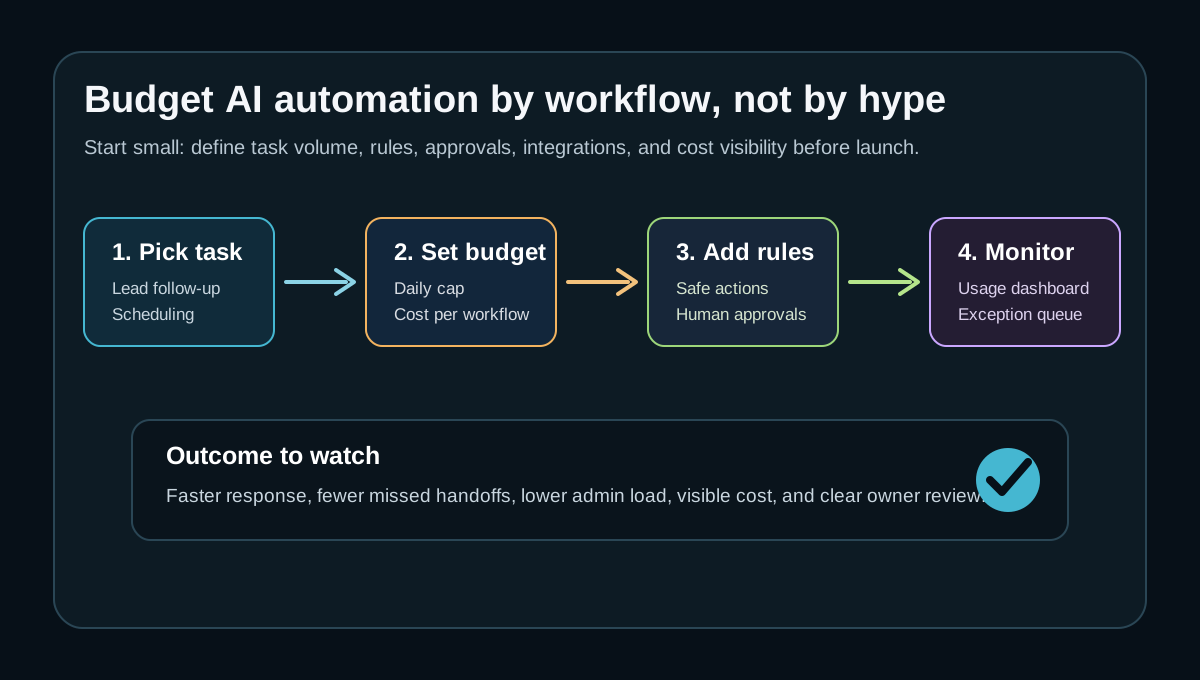
The best first step is to pick a narrow, frequent workflow and estimate its volume.
Do not begin with "We need an AI agent." Begin with a sentence like:
"Every weekday, our team receives 40 appointment-change emails. Staff spend time reading each message, checking the calendar, updating the CRM, replying to the customer, and flagging exceptions for a manager."
That sentence gives you the budget inputs: volume, systems touched, business rules, exception rate, and expected value.
| Workflow | Good first budget question | Watchout |
|---|---|---|
| Lead follow-up | How many new inquiries arrive per day, and how fast do we respond now? | Do not let AI promise availability that sales cannot support |
| Scheduling | How many booking or reschedule requests need calendar checks? | Keep conflict rules and cancellation policies explicit |
| Inbox triage | How many emails can be labeled, routed, or drafted safely? | Sensitive complaints should go to a person |
| CRM updates | Which fields can AI suggest, and which fields require approval? | Bad CRM data can damage future automation |
| Weekly reporting | Which metrics are pulled manually from CRM, calendar, phone, and task tools? | Reports need source links and owner review |
The goal is not to automate everything. The goal is to find the work where speed, consistency, and fewer handoffs create clear business value.
What this means for your business
For a dental office, usage-based automation might start with missed-call summaries, new-patient callback queues, insurance follow-up drafts, and appointment reminders. The value is not "AI." The value is fewer lost appointments and less desk congestion.
For an HVAC or plumbing company, the right workflow might be after-hours lead intake, emergency routing, estimate follow-up, or job-status notifications. The budget should separate urgent revenue workflows from low-value admin chatter.
For a property manager, the first target might be maintenance triage, leasing follow-up, renewal reminders, or owner reporting. Human review matters when the request touches safety, legal notices, tenant disputes, or vendor spend.
For a med spa, usage-based automation may help with consultation requests, treatment reminders, post-visit follow-up, and lead reactivation. The workflow should protect brand tone, consent rules, and staff escalation.
Before-and-after workflow example
Here is what a controlled AI workflow can look like for a service business that gets too many manual scheduling and follow-up requests.
| Step | Manual workflow today | AI-assisted workflow with controls |
|---|---|---|
| Intake | Staff reads every email, voicemail, and form submission | AI labels request type and urgency |
| Lookup | Staff checks CRM, calendar, prior notes, and policies | AI retrieves relevant customer context and available slots |
| Draft | Staff writes the response from scratch | AI drafts a reply using approved rules and tone |
| Review | Manager only sees problems after a complaint | Human approval is required for refunds, disputes, or unusual changes |
| Update | Staff manually updates CRM and task lists | AI proposes CRM updates and logs every action |
| Monitor | Owner asks for status in meetings | Dashboard shows volume, pending approvals, exceptions, and cost |
This is where AI integrations matter. The agent needs safe connections to the tools the business already uses. Replacing every system is rarely the first move.
How to keep usage-based automation under control
The cost-control work should happen before launch.
| Control | Why it matters | Practical rule |
|---|---|---|
| Task scope | Prevents the AI from wandering into expensive or risky work | Define exactly what the workflow may and may not do |
| Volume cap | Avoids surprise usage during busy periods | Set daily or weekly task limits at first |
| Approval gate | Keeps people in control for sensitive actions | Require review for refunds, cancellations, discounts, disputes, and high-dollar jobs |
| Exception queue | Prevents silent failure | Anything uncertain goes to a named owner |
| Cost dashboard | Makes usage visible | Track cost by workflow, location, user, and outcome |
| Outcome metric | Connects spend to business value | Measure booked appointments, faster callbacks, fewer stale leads, or hours saved |
The National Institute of Standards and Technology describes AI risk management around govern, map, measure, and manage functions. That language may sound formal, but the business version is simple: know who owns the workflow, map where it operates, measure whether it works, and manage issues after launch (NIST AI Risk Management Framework).
A 30-day implementation plan
You do not need a six-month transformation project to start. You do need a bounded workflow, a review loop, and enough visibility to improve after launch.
| Timeline | Work to complete | Output |
|---|---|---|
| Week 1 | Pick one workflow and count real volume | Task budget, current process map, owner list |
| Week 2 | Define rules, exceptions, and human approvals | Approval checklist and safe-action list |
| Week 3 | Connect tools and test with real examples | CRM, inbox, calendar, phone, or form integration plan |
| Week 4 | Launch with caps and review results | Dashboard for tasks run, cost, exceptions, and outcomes |
Keep the first launch small enough to inspect. If the workflow saves time and improves customer response, expand it. If the exception rate is high, fix the process before adding more automations.
Where Zenovae helps
Zenovae helps founders and service-business operators turn messy back-office work into practical AI automation. That includes mapping the workflow, connecting existing tools, building custom software when off-the-shelf tools do not fit, and adding support after launch.
Typical projects include AI receptionists, AI follow-up automation, CRM and calendar integrations, inbox triage, reporting dashboards, human-in-the-loop approval queues, and custom internal tools.
The point is not to make your business depend on a black-box agent. The point is to create a clear workflow where the AI handles repetitive work, staff handle judgment calls, and owners can see what is happening.
Want to remove a manual workflow? Zenovae can map the task, connect the right tools, and show what an AI integration or custom software build would look like.
FAQ
Is usage-based AI automation better than a monthly subscription?
It depends on the workflow. Usage-based pricing can be attractive when value is tied to completed tasks or seasonal volume. A flat subscription may be easier to budget when usage is predictable. Many businesses need both: a base platform plus controlled task-level automation.
What should a service business automate first?
Start with frequent, rules-based work that causes missed revenue or slow customer response. Good candidates include lead follow-up, appointment reminders, rescheduling requests, inbox triage, CRM cleanup, and weekly operations reporting.
What should stay human-led?
Keep humans involved for customer complaints, refunds, discounts, legal or compliance issues, medical or safety-sensitive questions, vendor disputes, and high-dollar decisions. AI can draft, summarize, route, and prepare context, but a person should own the final judgment.
How do you know if AI automation is working?
Track business outcomes, not only task volume. Useful metrics include response time, booked appointments, stale leads revived, admin hours reduced, exceptions caught, customer escalations, and cost per successful workflow.
Sources
- Microsoft 365 Blog: Copilot Cowork is now generally available
- Microsoft 365 Blog: Announcing the new Work IQ APIs
- Salesforce: Agentforce Operations announcement
- Salesforce: Agentforce Help Agent announcement
- Salesforce: AI service agents improve customer satisfaction
- NIST AI Risk Management Framework Core
Need Help with Your AI Project?
At Zenovae, we build production-ready AI systems that scale. From OpenClaw setup to custom integrations, Mission Control workflows, and full-stack delivery, we can help you ship faster and avoid costly mistakes.
Let's Talk