Voice-Controlled AI Workflows: Start Back-Office Tasks Without More Admin
Voice-controlled AI workflows can help service businesses start follow-up, reporting, and admin tasks while keeping review rules clear.
Owners and operators often know what needs to happen before they have time to open the right app. A lead needs a callback. A job needs a follow-up note. A manager wants a weekly report. A customer issue needs to be routed before the day gets away from the team.
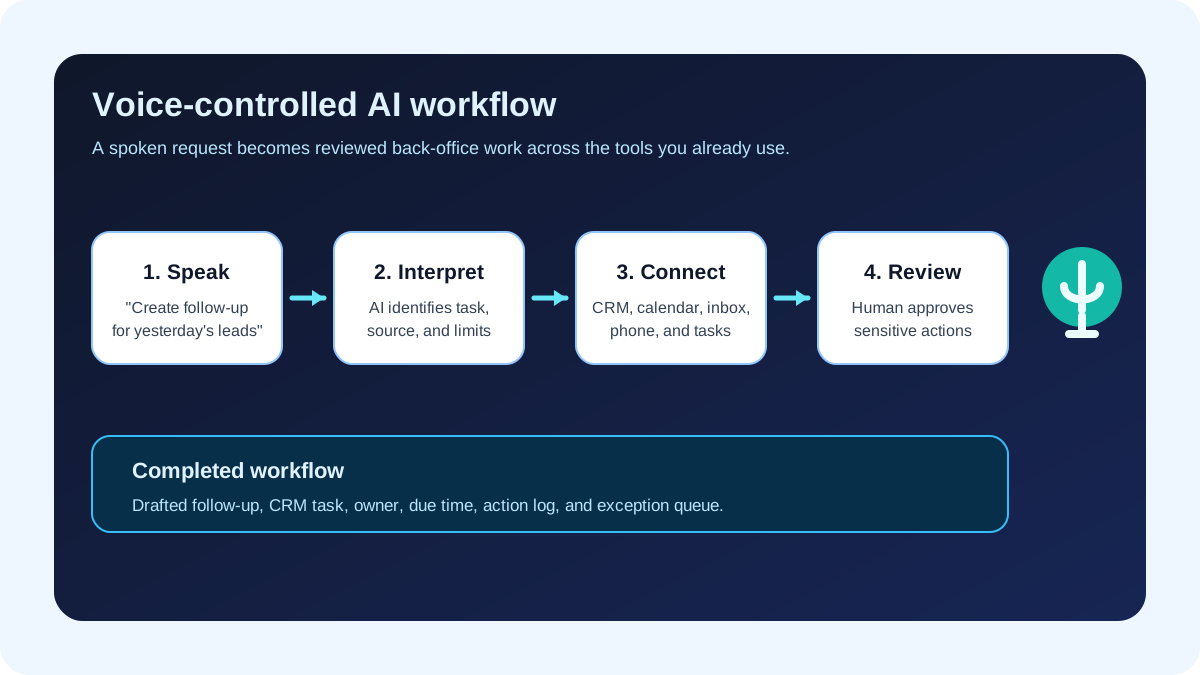
Voice-controlled AI workflows make that handoff easier: the owner can say what needs to happen, and AI can start a reviewed task across the right tools. The business value is not the voice interface by itself. The value is turning spoken instructions into assigned work, CRM updates, calendar actions, reports, and review queues without adding another layer of admin.
Quick take: OpenAI's ChatGPT Business release notes on July 23, 2026 introduced ChatGPT Voice in Work and Codex on desktop, including the ability to start tasks, check progress, ask questions about agents, and coordinate multiple agents by voice. For service businesses, the practical takeaway is clear: voice can become a faster way to trigger back-office workflows, but only if the business has clean task definitions, connected tools, approval rules, cost visibility, and human review.
| If you only read one section | Read this |
|---|---|
| You want the business takeaway | What changed with voice-controlled AI workflows |
| You need plain-English definitions | The plain-English terms owners should know |
| You are choosing what to automate | The best first voice-to-workflow use cases |
| You worry about mistakes | What should stay human-reviewed |
| You want a rollout plan | A 30-day implementation plan |
What changed with voice-controlled AI workflows
OpenAI's ChatGPT Business release notes for July 23, 2026 say ChatGPT Voice is available to Business workspaces in Chat and in Work/Codex on desktop. The Work and Codex voice experience is described as a way to start tasks, check progress, ask questions about agents, and coordinate multiple agents through one conversation.
That matters because AI work tools are moving from "ask a question, get an answer" toward "delegate a repeatable task and monitor progress." In the same release-note page, OpenAI describes ChatGPT Work as an agent for longer tasks that can research, work across connected apps and files, create deliverables, and run scheduled tasks.
OpenAI also launched a ChatGPT for small business program on July 21, 2026, focused on helping entrepreneurs use ChatGPT in day-to-day work. Microsoft has been moving in a similar direction with Workflows in Microsoft 365 Copilot, which Microsoft describes as using natural language to automate work across Microsoft 365 services such as Outlook, Teams, SharePoint, Planner, and approvals.
Plain-English version: owners are getting closer to telling AI, in normal speech, "turn this into a task, report, follow-up, or handoff." The hard part is still operational. The AI needs to know which system to use, what it is allowed to change, who approves exceptions, and how the team can see what happened.
Why this matters for service businesses
Service businesses run on fast, practical handoffs. A property manager hears about a maintenance issue and needs it assigned. A dental office gets a cancellation and needs a waitlist message. A med spa owner wants yesterday's lead summary. An HVAC dispatcher needs urgent calls separated from routine requests. A plumbing company needs estimate follow-up before the customer chooses someone else.
Voice can reduce friction because many of those instructions happen while the operator is already busy: between appointments, after a call, during a site visit, or at the end of the day.
| Business moment | Manual workflow today | Voice-controlled AI workflow |
|---|---|---|
| Owner finishes a sales call | Opens CRM later, writes notes from memory, creates follow-up task | Says the next step; AI drafts notes, creates a task, and queues a follow-up for review |
| Manager checks morning messages | Scans inbox, missed calls, and calendar manually | Asks for a lead and issue summary; AI prepares a reviewed briefing |
| Dispatcher hears an urgent request | Copies details into a job board or chat | Dictates the request; AI classifies urgency and routes the task |
| Practice manager wants no-show visibility | Pulls data from calendar and notes | Asks for a report; AI prepares a summary from connected systems |
| Team lead needs progress updates | Interrupts staff in chat | Asks the workflow status; AI reports open items, owners, and blockers |
The point is not to make staff talk to computers all day. The point is to remove the extra steps between knowing what should happen and getting the work into the right queue.
The plain-English terms owners should know
You do not need a technical vocabulary to buy or deploy this well.
| Term | Plain-English meaning | Why it matters |
|---|---|---|
| Voice-controlled AI workflow | A workflow where spoken instructions start or manage an AI-assisted task | Helps owners and staff move work forward without opening every app manually |
| AI agent | Software that can follow a goal, use tools, and complete steps | It may update systems, not just write text |
| AI integration | A connection between AI and business tools such as CRM, calendar, inbox, phone system, or task board | Without integrations, staff still copy and paste the work manually |
| Approval gate | A checkpoint where a person must review before the action happens | Keeps sensitive or high-value decisions under human control |
| Action log | A record of what AI did, where it got information, and who approved the result | Helps managers troubleshoot mistakes and improve the workflow |
| Cost limit | A budget or usage rule for AI tasks | Prevents open-ended agent work from becoming hard to manage |
The best first voice-to-workflow use cases
Start with spoken requests that are frequent, easy to verify, and connected to a clear business outcome.
| Use case | Spoken request example | AI prepares | Human keeps control over |
|---|---|---|---|
| Lead follow-up | "Follow up with the three new HVAC estimate leads from yesterday." | Lead list, draft messages, CRM tasks, owner assignments | Pricing, discounts, unusual job scope |
| Scheduling cleanup | "Find today's cancellations and notify the waitlist." | Open slots, eligible waitlist contacts, draft texts or emails | Final send rules and sensitive customer notes |
| Inbox triage | "Summarize urgent customer messages from this morning." | Categorized inbox summary, recommended owners, due times | Angry customers, refunds, legal or medical details |
| CRM updates after calls | "Add a note that Maria wants a Friday appointment and needs financing info." | CRM note draft, follow-up task, reminder | Record merge decisions and customer-facing promises |
| Weekly reporting | "Prepare Friday's operations summary." | Report from CRM, calendar, inbox, phone, and task data | Final interpretation and business decisions |
| Vendor/admin routing | "Send the new roof repair invoice to approval." | Invoice summary, vendor record, approval task | Payment approval and exception handling |
The safest first version often keeps AI in "prepare and route" mode. It drafts, summarizes, classifies, and creates review items. After the workflow proves reliable, some routine actions can move to automatic completion with limits.
Before and after: voice as the trigger, not the whole system
Voice should be the front door to a workflow, not the only control.
| Step | Weak version | Stronger version |
|---|---|---|
| Spoken request | "Handle my follow-ups" | "Create reviewed follow-up drafts for new leads from yesterday" |
| Context | AI only uses the words spoken | AI checks approved CRM, calendar, inbox, and task data |
| Action | AI sends messages immediately | AI drafts messages and routes exceptions for approval |
| Visibility | Owner trusts that it happened | Workflow shows status, owner, source, action, and review history |
| Improvement | Mistakes are fixed one at a time | Review logs identify repeated gaps in rules or data |
This is where custom software and AI integrations matter. Many service businesses already have the data, but it lives across a phone system, website forms, CRM, calendar, spreadsheet, or industry-specific platform. A useful workflow connects those systems so a spoken instruction can become structured work.
What should stay human-reviewed
Microsoft's guidance on deciding when to use Copilot or an agent makes a buyer-friendly point: delegating work to AI does not transfer accountability. The person or business still needs to review, validate, and approve the work where accuracy, tone, or impact matters.
NIST's AI Risk Management Framework frames AI risk management as work that spans design, deployment, use, and evaluation. For a service business, that becomes a practical checklist.
| Risk | Why it matters | Safer operating rule |
|---|---|---|
| Vague spoken request | AI may choose the wrong task or source | Require a specific workflow name, date range, and output |
| Wrong customer record | CRM mistakes create follow-up confusion | Match on approved identifiers and route uncertain matches to review |
| Sensitive customer issue | Medical, billing, legal, or angry-customer situations need care | AI summarizes and escalates; staff handles the response |
| Unauthorized action | A spoken request should not bypass permissions | Use role-based access, approval gates, and action logs |
| Cost creep | Long-running agent tasks can consume paid usage | Set task budgets, dashboards, and stop rules |
| Staff overtrust | Teams may stop checking important details | Keep review queues visible and sample completed work regularly |
What this means for your business
Voice-controlled AI workflows are most useful when they remove small delays that happen many times per week.
If you run a service business, ask where staff repeatedly say, "I need to remember to do that later." Those moments are good candidates:
- After a sales call, turn the next step into a CRM task.
- After a missed call, turn the transcript into a callback queue.
- After a cancellation, turn the open slot into waitlist outreach.
- After a field update, turn the note into a customer status message.
- At the end of the week, turn scattered activity into a report.
The implementation question is not, "Can AI understand speech?" The better question is, "When someone says this out loud, what system should be updated, what evidence should be used, who reviews it, and how do we know it happened?"
A 30-day implementation plan
| Timeline | Business goal | What to build |
|---|---|---|
| Days 1-5 | Choose one voice-triggered workflow | Pick one repeatable request such as lead follow-up, call-note updates, or weekly reporting |
| Days 6-10 | Define the handoff | List the source systems, allowed fields, approval rules, and final output |
| Days 11-18 | Connect the tools | Integrate AI with the CRM, calendar, inbox, phone notes, task board, or reporting source |
| Days 19-24 | Test with real examples | Run recent requests, compare AI output to staff decisions, and tighten instructions |
| Days 25-30 | Launch with limits | Start with draft-only or review-first actions, then monitor usage, errors, and cycle time |
The first workflow should be narrow enough that everyone can tell whether it worked. A voice-triggered workflow that reliably creates reviewed follow-up tasks is more valuable than a broad assistant that creates cleanup work.
Where Zenovae helps
Zenovae helps founders and service-business operators turn messy back-office work into practical AI integrations, workflow automation, and custom software.
For voice-controlled AI workflows, that can include:
- Mapping the spoken request into a real operational workflow.
- Connecting AI to existing tools such as CRMs, calendars, inboxes, phone systems, forms, dashboards, and task boards.
- Building custom review queues or internal tools when off-the-shelf software does not match the business.
- Adding human-in-the-loop approval for sensitive customer replies, billing, scheduling exceptions, urgent jobs, and high-value leads.
- Monitoring performance, cost, and workflow drift after launch.
Want to remove a manual workflow? Zenovae can map the task, connect the right tools, and show what an AI integration or custom software build would look like.
FAQ: voice-controlled AI workflows for service businesses
What is a voice-controlled AI workflow?
A voice-controlled AI workflow is a process where a spoken instruction starts or manages an AI-assisted task, such as preparing follow-up, updating a CRM record, routing an inbox item, or generating a report.
Is voice control the same as automation?
No. Voice is the input method. Automation is the system that turns the request into structured work across tools, rules, approvals, and records.
Should AI send customer messages from a voice command?
Not at first for most service businesses. Start with AI-drafted messages that staff review. Automate routine sends only after the rules, logs, and exceptions are proven.
What tools should a voice workflow connect to?
Most service businesses need connections to a CRM, calendar, inbox, phone or call-note system, forms, task board, and sometimes industry-specific software such as property management, scheduling, or accounting tools.
What should owners measure after launch?
Track open tasks, response time, stale leads, reviewed draft changes, incorrect record matches, escalations, staff time saved, and AI usage cost. These measures show whether the workflow is improving operations instead of just adding another tool.
Sources
Need Help with Your AI Project?
At Zenovae, we build production-ready AI systems that scale. From OpenClaw setup to custom integrations, Mission Control workflows, and full-stack delivery, we can help you ship faster and avoid costly mistakes.
Let's Talk