Jobber AI Receptionist Integration: A Safe After-Hours Intake Blueprint
A practical blueprint for connecting an AI receptionist to Jobber with reviewable intake, limited permissions, signed webhooks, and human-led dispatch.
An AI receptionist can make after-hours intake easier for a home-service business, but it should not become an unsupervised dispatcher. The safer first goal is narrow: collect the caller's details, turn the conversation into a structured draft, and put the next Jobber action in front of the right person for review.
Jobber's current developer documentation supports building integrations around its GraphQL API, OAuth-based account access, scopes, and webhooks. That does not mean every Jobber account, API version, or integration has the same permitted actions. Confirm the current schema, authorized scopes, and account workflow before building anything that writes to a system of record.
Quick take: Start with a controlled after-hours intake loop, not autonomous dispatch. Let an AI receptionist collect the right details, send a reviewable draft to staff, and perform a Jobber write only after the business's approved rules are satisfied. Keep technician assignment, emergency judgment, price promises, and availability commitments human-led.
| If you only read one section | Read this |
|---|---|
| You need the practical boundary | Start with intake, not dispatch |
| You need to understand Jobber access | Use the smallest practical permission set |
| You need a safe integration flow | Bind review to the exact proposed action |
| You need a launch checklist | Pilot before you expand |
The direct answer: yes, but begin with a reviewable handoff
For a plumbing, HVAC, electrical, cleaning, or other home-service business, an after-hours caller often needs a response before the office opens. An AI receptionist can gather a name, callback number, service address, problem summary, urgency indicators, and a preferred callback window. That can make the next morning's work clearer without letting software make promises the business cannot keep.
The initial integration should produce a structured intake record and review queue, not a fully autonomous schedule. A staff member should still decide whether the request is in service territory, whether the situation needs immediate escalation, which technician is appropriate, what timing is available, and what the customer can be promised.
That distinction matters because Jobber's API exposes business records and is controlled by account-specific authorization. Jobber describes its API as GraphQL over HTTPS, requiring an OAuth access token, an active API version header, and the scopes configured for the app (Jobber Developer Center). A capability visible in an API schema is not automatically a permission your integration should request or use.
Jobber's native Receptionist vs a custom integration
Jobber already offers a native Receptionist that can handle calls and texts, take requests, schedule jobs, create follow-up tasks, and route selected inquiries to staff. Its current configuration also includes conversation logs and review states inside Jobber (Jobber Receptionist, Receptionist in the Jobber app).
Use the native product first when its call handling, review, scheduling, and request flow fit the business without workarounds. A custom integration is justified only when the operation needs Jobber coordinated with other systems, a non-standard approval path, a separate control surface, or business rules that the native configuration cannot support cleanly.
Do not commission a custom build merely to recreate a capable native feature. The practical decision is whether the workflow has a real gap, not whether custom software sounds more sophisticated.
Start with intake, not dispatch
The first version should make staff better informed, not remove the person accountable for operational decisions.
| Stage | Useful first-release behavior | Keep human-led |
|---|---|---|
| After-hours call | Capture contact details, service type, address, issue summary, and callback preference | Determine whether the customer has a true emergency or should receive safety instructions |
| Intake normalization | Turn the call into a structured draft with clearly marked unknowns | Decide whether ambiguous information is sufficient to open or change a record |
| Jobber handoff | Present the proposed action, target account, and field values for review | Approve a record creation or change when it affects operations |
| Dispatch and scheduling | Surface relevant context to the dispatcher | Assign a technician, commit to an arrival window, change a visit, or override dispatch rules |
| Customer communication | Draft a neutral acknowledgement for review | Promise price, availability, safety outcomes, service eligibility, or a completion time |
The goal is not to make the agent look maximally autonomous. The goal is to make the handoff reliable, visible, and easy to audit. That is consistent with the NIST AI Risk Management Framework's focus on documenting context, risk tolerance, human oversight, and the tasks an AI system is expected to support (NIST AI RMF Core).
Use the smallest practical permission set
Jobber says a company admin explicitly authorizes an app to access its account, and that access is limited to the scopes granted during authorization (Jobber App Authorization). Treat that approval screen as a design constraint, not an inconvenience.
Before asking for a write-capable scope, answer four questions:
- What is the exact business outcome for the first release?
- Which record, if any, must the integration read or propose changing?
- Can a reviewed draft, task, or internal queue solve the problem before a write is required?
- Who owns approval when the data is incomplete, duplicated, urgent, or outside normal hours?
| Permission decision | Better first move | Why |
|---|---|---|
| Read existing customer or request context | Request only the minimum documented read access needed for the staff workflow | The reviewer can see whether the caller already has an open request or history |
| Create or change a Jobber record | Put the exact proposed fields into a review queue first | A person can catch a wrong address, duplicate customer, unclear service type, or incomplete request |
| Send a message outside the business | Draft the acknowledgement and apply the business's approved messaging rules | Outbound language can create a commitment even when the summary is accurate |
| Assign a technician or change a visit | Keep the action human-led | It depends on capacity, skills, route, availability, and current operating rules |
| Handle an emergency or safety-sensitive request | Escalate to the business's defined human process | An AI receptionist should not replace safety triage, professional judgment, or emergency services |
Jobber's documentation also notes that access tokens expire and that refresh tokens, app secrets, and disconnects must be handled correctly. A Jobber admin can disconnect an app, invalidating access and refresh tokens, so the integration must stop using the connection and mark it inactive rather than silently continuing (Jobber App Authorization).
Bind review to the exact proposed action
"Human in the loop" is too vague if the person reviewing cannot see what will actually happen. A reliable review screen or queue should show:
- the source call and the structured intake fields;
- the proposed Jobber action, not just a summary of it;
- the target account and record, if known;
- the fields that would be added or changed;
- any missing, conflicting, or low-confidence information;
- the policy or business rule that allowed the action to be proposed;
- the reviewer, decision time, and resulting status.
This is more than good process. OWASP's current AI Agent Security Cheat Sheet advises independently validating scope, privilege, and approval state before an agent executes a high-impact action. It recommends binding approval to the exact action details and failing closed if approval validation, policy lookup, or audit logging fails (OWASP AI Agent Security Cheat Sheet).
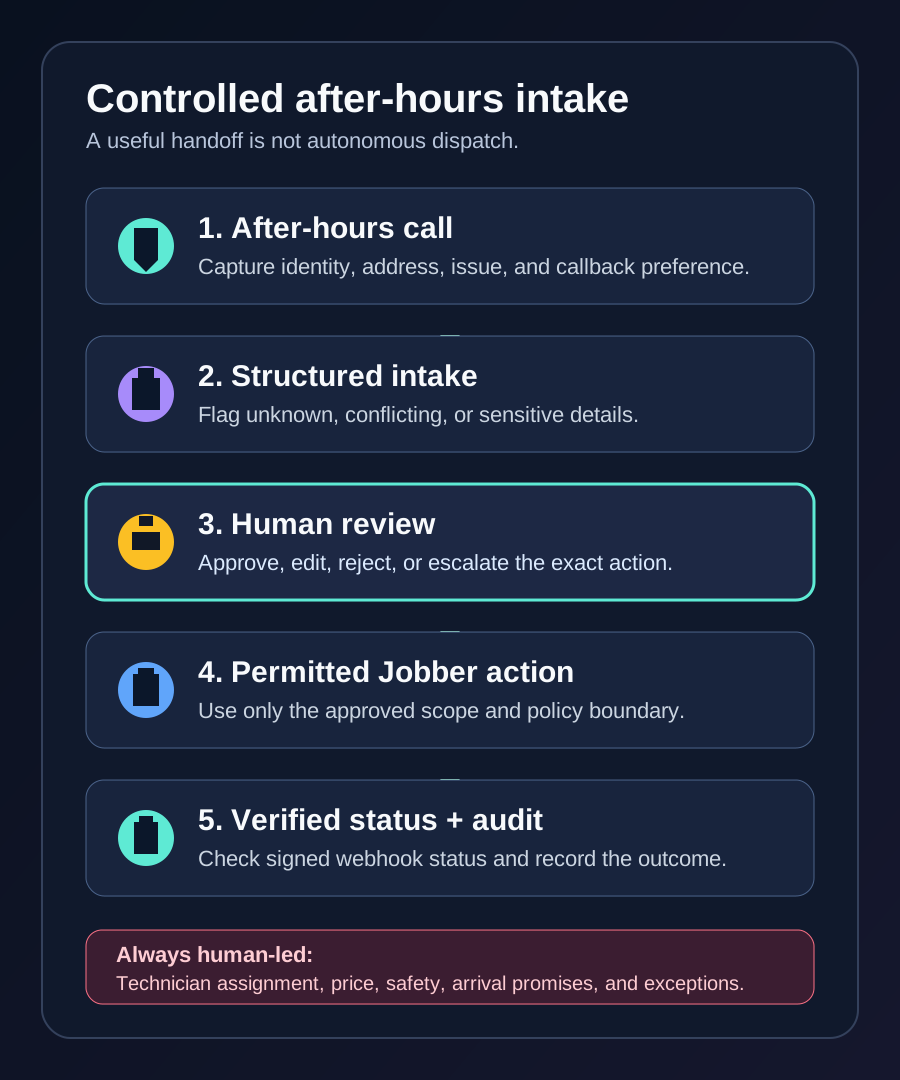
A practical sequence looks like this:
- The phone or voice layer passes the call transcript and caller details to the intake service.
- The intake service extracts structured fields and labels unknown, conflicting, or sensitive details.
- The policy layer classifies the proposed next step as read-only, review-required, or human-led.
- Staff see the proposed Jobber action and either approve, edit, reject, or escalate it.
- Only an approved action uses the permitted Jobber scope.
- The system records the decision, result, and any error or retry outcome for follow-up.
This design lets a business begin with the operational value of faster, clearer intake without pretending the agent has the authority or context to run the dispatch board.
Treat webhooks as production controls, not a shortcut
After a Jobber action or relevant account event, webhooks can help an integration keep the review queue and operational state in sync. They also introduce a few non-negotiable engineering details.
Jobber's webhook documentation says integrations should verify the supplied HMAC signature, respond quickly, and handle at-least-once delivery. The same event can arrive more than once, and multiple events can be triggered close together for the same object. The docs explicitly recommend duplicate handling or idempotent processing (Jobber webhooks).
| Webhook reality | Design response |
|---|---|
| A webhook payload is not proof that any request should be trusted | Verify Jobber's signature before processing the event |
| The same event may be delivered more than once | Record an event key and make downstream actions idempotent |
| The payload identifies an event and item, not every business detail | Retrieve only the approved context needed to update the internal workflow |
| A slow receiver can create operational problems | Acknowledge quickly and process the business workflow asynchronously |
| An app can be disconnected | Remove or deactivate stored access promptly and surface the disconnected state to staff |
Do not design a loop where a webhook triggers an agent, the agent makes an irreversible change, and the same event can silently repeat it. The execution service should enforce the approved policy independently of the model's suggested action.
Pilot before you expand
An AI receptionist integration should earn broader authority through evidence from a narrow workflow. NIST's framework describes testing, monitoring, documented roles, and defined human-AI oversight as part of managing AI risk; it does not offer a universal checklist that guarantees a system is safe (NIST AI RMF Core).
A sensible pilot can be small:
| Pilot phase | Scope | Evidence to review |
|---|---|---|
| 1. Intake-only rehearsal | Run historical or test calls through the structured intake format without a Jobber write | Missing fields, incorrect categorization, unclear escalation cues, staff edits |
| 2. Reviewed handoff | Let staff approve or reject drafts before any permitted action | Approval rate, rejection reasons, duplicate records, reviewer feedback |
| 3. Bounded production action | Allow one approved, reversible, documented action type | Audit logs, webhook behavior, retry behavior, error handling, customer-impact exceptions |
| 4. Expansion decision | Review the evidence with the operations owner | Whether a new action is justified, and what additional controls it needs |
This is not a promise that a pilot will produce a particular metric. It is a way to decide whether the workflow is accurate enough, constrained enough, and understood enough for the next level of automation.
Questions to ask an integration partner
Before approving a Jobber-connected AI receptionist project, ask:
- Which Jobber API version and scopes will the integration request, and why?
- Which actions are read-only, which require staff approval, and which are never automated?
- What exact information does a reviewer see before a Jobber record is created or changed?
- How are duplicate events, failed retries, and disconnected apps handled?
- How is the Jobber webhook signature verified?
- Where are tokens and customer data stored, and who can access them?
- How can the business pause the integration, inspect an audit trail, or reverse an approved workflow?
- What test cases cover incomplete caller details, duplicate customers, out-of-area requests, and urgent-sounding but ambiguous issues?
If a provider cannot answer these in operational language, they are selling a demo instead of an accountable integration.
What this means for HVAC and other home-service teams
The most useful first implementation is usually the one that makes the next staff decision easier. For an HVAC or plumbing team, that may be an after-hours intake draft with a clear callback owner—not an autonomous promise about dispatch or arrival.
That same controlled design can connect to broader AI integrations, support an HVAC AI receptionist, and later feed a more tailored AI agent development project. If your team already has a CRM-connected workflow in mind, see our guide to CRM-connected AI agents and the customer-agent runbook for adjacent operating guidance.
Where Zenovae helps
Zenovae designs custom software, AI integrations, and controlled AI agents around the systems a service business already uses. We can help map the call, review, Jobber, CRM, calendar, and dispatch handoffs before asking software to take an action.
Want to see which after-hours handoff is worth automating first? Book a free AI audit.
Sources
Need Help with Your AI Project?
At Zenovae, we build production-ready AI systems that scale. From OpenClaw setup to custom integrations, Mission Control workflows, and full-stack delivery, we can help you ship faster and avoid costly mistakes.
Let's Talk